
🎙 METT Episode #26 – Featuring Katie Wardrobe

Technology trainer and speaker, Katie Wardrobe, joins the show to talk about producing technology training and resources for music teachers. (And way more)

Topics include:

  • Katie’s exceptional website: Midnight Music
  • Free vs. paid software
  • Teaching facing / student facing software
  • M1 and Intel Macs
  • Tools Katie uses to make content
  • Canva
  • File Management on iPad
  • Podcasting
  • Managing big projects
  • Our recent favorite tech tips, albums, and apps

Show Notes:

Katie’s Home Screen

Robby’s Homescreen

App of the Week:
Robby – CalZones
Katie – DaVinci Resolve

Album of the Week:
Robby – Tye Tribbett Apple Music Essentials Playlist
Katie – The Arcadian Wild | Cory Wong & Metropole Orkest

Where to Find Us:
Robby – Twitter | Blog | Book
Katie – Twitter | Website

Please don’t forget to rate the show and share it with others!

Subscribe to Music Ed Tech Talk:

Subscribe to the Blog

Subscribe to the Podcast in…
Apple Podcasts | Overcast | Castro | Spotify | RSS
🎙 METT Episode #15 – Double the Burns, Double the Fun!… with Amy Burns

Elementary music educator, Amy Burns, joins the show! We talk about Seesaw, using tech in the elementary general music classroom, and her new book: Using Technology with Elementary Music Approaches!!!

Show Notes:

Stuff Amy is doing:

App of the Week:
Robby – SoundSource by Rogue Amoeba
Amy – Tripple Feature! – Timestamp Camera | MixCam app | Focos

Album of the Week:
Robby – Clear Line | Jacob Garchik
Amy – In the Heights | Lin-Manuel Miranda

Where to Find Us:
Robby – Twitter | Blog | Book
Amy – Twitter | Website

Please don’t forget to rate the show and share it with others!

Subscribe to Music Ed Tech Talk:

Subscribe to the Blog

Subscribe to the Podcast in…
Apple Podcasts | Overcast | Castro | Spotify | RSS

🔗 Using Jamboard in the Music Classroom

UPDATE: Listen to Theresa’s appearance on my podcast and subscribe below…

Listen on Apple PodcastsListen on SpotifyRSS FeedTheresa Hoover Ducassoux is a band director in Virginia doing awesome work ensuring that her students are engaged and empowered in her band classes, online and in person. She is especially savvy with a lot of the web-based tech tools that are popular in education right now.

Her post, which I have linked and quoted below, explains some ways you might use Google’s Jamboard app in the music classroom to engage students.

Getting Started with Google Jamboard – Off the Beaten Path:

Jamboard is one of the newer and lesser-known G Suite tools, but it’s one that I love and am excited to use this school year! Jamboard is a collaborative whiteboard that be accessed by an app or web browser. The simplicity of the tool makes it great for education. Jamboard is a great way to have all students in your class share their voices.

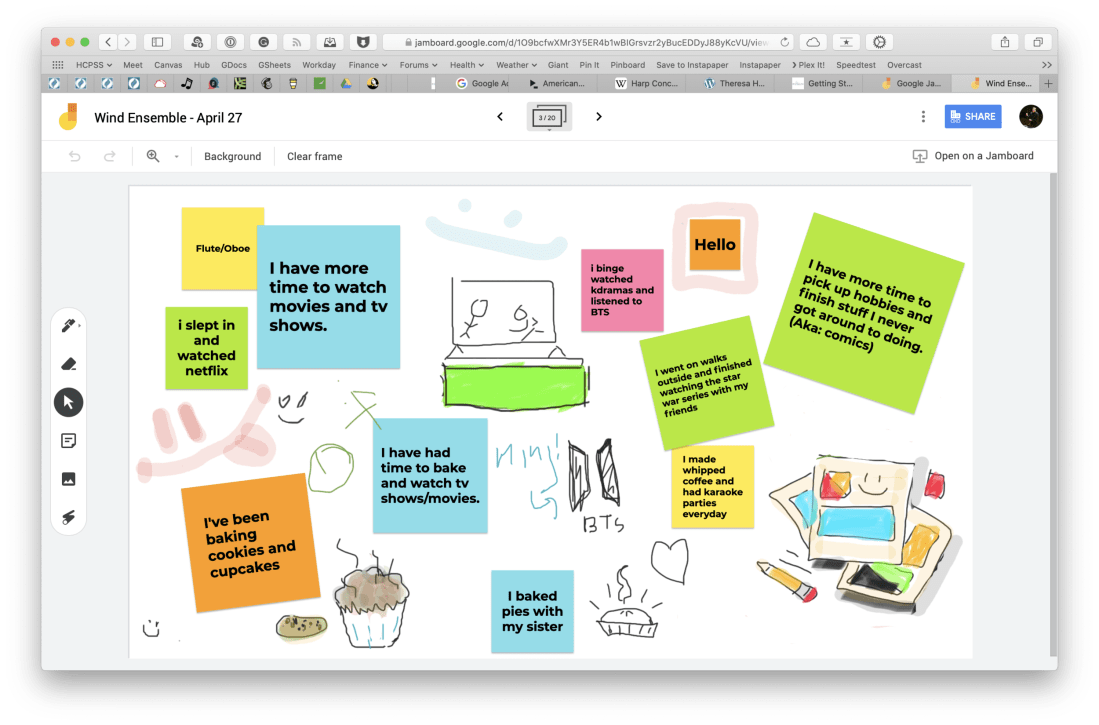
Jamboard is indeed excellent. I used it for a number of things last spring. One way we used it was to communicate and share what we had been up to in our free time when school started online.

<div class="
      image-block-outer-wrapper
      layout-caption-below
      design-layout-inline
      combination-animation-none
      individual-animation-none
      individual-text-animation-none
    ">


    <figure class="
          sqs-block-image-figure
          intrinsic
        " style="max-width:2500px">


      <div class="image-block-wrapper">
        <div class="sqs-image-shape-container-element


          has-aspect-ratio
        " style="position: relative;padding-bottom:65.95999908447266%;overflow: hidden">


            <img src="https://images.squarespace-cdn.com/content/v1/5595df9ce4b0ce9ff9ecd1a8/1596727567417-F9EYY0NWKQGJQAMN4WLR/CleanShot+2020-08-06+at+11.18.02%402x.png" alt="CleanShot 2020-08-06 at 11.18.02@2x.png" width="2500" height="1649" style="display:block;object-fit: cover;width: 100%;height: 100%;object-position: 50% 50%" loading="lazy">

        </div>
      </div>


      <figcaption class="image-caption-wrapper">
        <div class="image-caption"><p class="">I used this Jamboard our first day of online learning to ask students how they had been spending their extra time at home. Each section of the band had a page of the digital whiteboard to edit.</p></div>
      </figcaption>


    </figure>


</div>

Another way we used it was as an adjudication tool for providing ourselves feedback on our virtual ensemble video progress. You can see a brief snippet of that process in the middle of my How to Make a Virtual Band video, below.

<div class="sqs-video-wrapper" data-provider-name="YouTube" data-html="
“>

Go and check out Theresa’s post, and all of her fine work at Off The Beaten Path Music. Spoiler: She is my podcast guest this week. Jamboard is just one of the many awesome tools and online teaching strategies we talk about. I learned a ton from her. That episode should be published tomorrow. Stay tuned!