Teaching Intonation with Tonal Energy – OMEA 2022 (5:15 pm, Room 21)
This blog post, podcast episode, and presentation were prepared for the Ohio Music Educators Association Professional Development Conference 2022.
This blog post exists to serve as both session notes for conference attendees, show notes for listeners of the podcast episode, and any teacher who wishes to develop intonation in their performing ensemble.
Session Outline and Links to Resources Mentioned in the Session
Teaching Intonation
Philosophy
Prioritize these…
Tone
Intonation
Balance/Blend
Melodic Accuracy
Rhythmic Accuracy
Expression/Phrasing
Technique/Articulation
Sound Over Sight
If we are asking students to use their ears, then why are we having them use their eyes?
Natural Learning – think about how children learn to speak. Through modeling from parental figures, constant repetition, and encountering these repetitions in various contexts.
Electronic tuners can only tune intervals of unisons and octaves accurately.
We are used to hearing the piano in its slightly “out-of-tune” tempered state.
Interval Adjustment
Pure intervals have varying degrees of adjustment from tempered intonation to make them in tune.
Scale Degree | Adjustment
1 | 0
2 | +3.9
3 | -13.7
4 | -2.0
5 | +2.0
6 | -15.6
7 | -11.7
8 | 0
We must teach our students to HEAR when something is out of tune by listening for beats. But how?
Resonant intonation is the result of two other important features: superior tone and balance.
Good tone comes first.
Learning balance is difficult in a room by yourself.
Use of an electric drone helps.
Turn the drone up to a level that equals the student.
Song based learning that utilizes lots of simple melodies in standard keys teaches students to understand basic consonance and dissonance.
Lots of repetition!!!
Patients!
Reinforce that one success does not mean that everything will be in tune from here on out.
Don’t strive for a perfect intonation system. Resist teaching students the theory of intervals and focus on them hearing consonance and dissonance through listening to the relationships of intervals.
Once you know what a 5th sounds like, you can tune it anywhere.
Avoid technical talk unless something is absolutely in a students way.
Daniel Kohut – Musical Performance: Learning Theory and Pedagogy
Superior Concept
Relaxed Concentration
Focused Awareness
Reasons teachers give up on teaching intonation this way…
Fear of other areas of musical performance failing – wrong notes, rhythm, poor technique, inability to execute musically. The solution to this – pick easier music!!!
Abstract nature of these skills make them less concrete to student minds and harder to teach.
This is a long road. It takes time. But! – the end reward is ultimately better because students own their critical listening skills and now make musical adjustments themselves, even to features in the music that are not tone and intonation related. Each year will have an upswing towards the end. Independent musicianship is the result.
Features of Tonal Energy
Overview of each feature and setting – Live Demo
Strategies
Everything with drone
All music taught around tonal centers
Students tune down to the tonic most immediately beneath where the majority of their part sits
Students write tonal centers in their method books and concert music
Analyze mode – Students practice scale patterns and songs in this sequence…
Visual and aural feedback
Aural feedback only
No drone at all
Practice Guide
You can balance to the drone
Tell students to match the volume of the drone at various levels.
Play along melodies with students on a keyboard or on the display
A midi keyboard like the Xkey can play certain key areas in tune perfectly and can automatically tune chords to just intonation. Combined with an iPad, this is like owning a Yamaha Harmony Director.
In rehearsal: Have students buzz along and find their place in the chord
The post below first appeared on the Noteflight blog on November 11th, 2021. You can read it there by clicking here or continue on below.
Two important parts of teaching include:
Sequencing learning so that students how to go from point A to point B.
Doing it in a way that they understand how new skills fit into broader musical contexts.
As a band director who also teaches general music, I have always been confident in my ability to connect these dots in performing ensembles, and less so in general music classes. This year, I am determined to rectify that using new technologies in combination with traditional instruments.
Historically, my school district’s general music curriculum has been categorized into four “strands:”
Drumming
Piano performance
Guitar performance
Technology
Last year, we began using Noteflight and Soundtrap to engage students with virtual music making. This year, we returned to in-person instruction and replaced our guitars with ukuleles, making chord strumming (and therefore an understanding of harmonic accompaniment) accessible earlier on in the learning sequence.
Moving into this year, I knew it was important that I leverage new technology in combination with traditional instrumental performance skills to create bigger musical connections.
My General Music II class, made up of 8th graders, is currently working on an assignment that leverages composition, recording, producing, ukulele performance, and harmonic understanding.
We start in Noteflight by composing an eight measure melody in C major. This is their first notation project of the year so directions and restrictions are fairly loose. Students are limited to certain rhythmic durations that I have taught them on drums but are otherwise free to experiment with their melody.
A blank eight measure Noteflight score is set as a template and linked to an assignment in my district’s Learning Management System, Canvas. Once students launch Noteflight as an external tool, they are taken immediately to the score depicted above, where they can begin editing, and submit their work in one click. In an LMS like Canvas, I am able to see the final submission in the Noteflight web app itself, where I can easily see the student’s work, demonstrate alterations for them, and provide other feedback directly.
After writing the melody, I had them write a chord progression in the key of C using our most familiar chords on the ukulele (C, F, G, Am). Pressing the letter K quickly allows for chord entry above the current selection.
Exporting the melody to Soundtrap is as easy as one click. Go to the Score Menu–>Export and then select “Open In Soundtrap.” The notes of the melody will be brought in as a MIDI track.
From here, students can…
Change the sound of the melody using a different software instrument.
Record themselves strumming the ukulele part into an audio track.
Edit the ukulele with effects if wanted.
Add supplemental bass and drum parts from the loop library.
In no time, they have written their own melody, recorded their own accompaniment, and used pre-existing samples to create the effect of an entire band playing their music.
I modeled a final project for my students in class. See a video below of the demo I showed.
Once we have moved on to some piano reading and performing, I plan to teach the students the notes of the chords as they relate to their melody. We can then iterate on this project, by composing melodies that make appropriate use of chord tones. We will even be able to use our understanding of the keyboard layout to input notes into Noteflight through the piano itself, via MIDI cables which conect our classroom pianos to our Chromebooks.
Once we have studied more forms and musical styles, am confident that we can be writing and performing out own songs.
I’m getting ukuleles for my general music classes this year so I thought it would be natural to have past guest Chris Russell on the podcast. He is a technology expert and maker of many online ukulele resources, amongst his many other skills.
I learned a lot talking to him. The conversation was packed with resources for teachers looking to better their ukulele skills so be sure to scroll down and check out all of the resources he mentions on the show, which I have provided links for.
Episode Description
Robby is getting ukeleles to teach general music this year. Chris Russel (tech and ukelele specialist) joins the show to talk about how to get the best use out of them. We also talk about the state of tech in music ed.
Full Topics:
Ukelele pedagogy
Where to find ukelele resources online
How to integrate ukelele and technology
The state of technology in music education
Apple’s App-centric and native approach to education vs. Google’s web-centric approach
Our favorite apps, albums, and tech tips of the week
The tools and process Chris uses to make ukelele play-along videos on his iPad (in the post-show for Patreon subscribers)
*The following post first appeared on the NAfME Blog on April 19th, 2021.
Over the past year of remote and hybrid instruction, teachers have reimagined the tools, assignments, and methods that best engage their students. The need to engage my band students from a distance has challenged me to depend on cloud-based tools that still foster the development of their performance skills. The features of these cloud tools allow me to engage students in new ways by introducing interactive projects, collaboration with peers, and automated grading.
The ideas below will be featured in my presentation at the NAfME Eastern Division Conference this weekend. Register here to join me and the many exceptional presenters who will be sharing their ideas.
What is Cloud Software
Cloud software is a buzzword in the technology industry that is used to describe apps that run in a web browser. Examples of cloud-based music software include BandLab, Soundtrap, Noteflight, MusicFirst, and Flat for Education, to name a few. Because these offerings are web-based, they can run on nearly any computer with a web browser, as long as you have an internet connection. For this reason, they are more widely accessible to all students and can be integrated into an LMS (learning management software) like Canvas, Blackboard, and Google Classroom.
Here are some practical ideas for assignments in a performing ensemble using cloud software.
Noteflight
Noteflight is a music notation tool that runs on the web. In recent years, Noteflight has expanded to offer Noteflight Learn, which allows teachers to take Noteflight content and assign it to students in their class, much like an LMS. In the past year, Noteflight has added a feature called SoundCheck which can take these assigned Noteflight scores, and assess student performance for note/rhythm/pitch accuracy.
Students can play these scores, practice to them at any speed, and loop tricky sections. When they are done recording themselves, Noteflight provides an accuracy score and a line beneath the notes which indicates pitch and note inaccuracies by the counter and color of the line.
You can make any Noteflight score into a Soundcheck-enabled assignment. If the score is linked to an assignment in your LMS, the student score will automatically go into your grade book. Because computers are not perfect, I prefer to go back and listen to my students who don’t receive good scores on assignments, to make sure I agree with the automatic grade.
Generally, is better at assessing note accuracy than pitch, so I tend to use SoundCheck as a first step to ensuring students are prepared for their music. Finer qualities in the music like tone and articulation are best left to video assessments with more comprehensive rubrics.
Getting Existing Music Into Soundcheck
If you have music that outside of Noteflight that you want to turn into an assessment, some apps can help. I use an app called Sheet Music Scanner on my iPad to take pictures of paper sheet music and turn them into XML files. XML is a file format that can pass notation projects from one notation editor to another. Once the XML version is saved to my device, I can import it into Noteflight and then assign it to my students.
Notation editors like Sibelius and Dorico can export to XML. If you have already created a score in a professional editor, it is easy to turn into an assignment.
Flipgrid
If your LMS does not have a video recording feature built-in, you might want to check out Flipgrid. My LMS has a video feature, and I still use Flipgrid because it makes video recording whimsical and fun. The Flipgrid interface puts an active circle around your face when you have submitted a recent video (like an Instagram story). Students can add filters, emoji, text, and other effects to their final videos. Students can watch each other’s videos, and leave video responses. It is like a mini social network for your class, with lots of control over the privacy settings.
Flipgrid also integrates into LMS software, so you can use it as an alternative to the basic video recorder if you wish.
Soundtrap
Soundtrap is a web-based DAW (digital audio workstation). I have heard it described as “if Google Docs and GarageBand had a baby.” This is because it looks and functions like GarageBand, but runs on the web. Like Google’s apps, it is also collaborative. This means that you can have two or more students editing the same project at the same time while discussing their progress in a chat.
Soundtrap is great for producing beats, songwriting, and all of the things you would expect to do with access to limitless software instruments, samples, and pre-made loops. But what I use it for in the band room is to teach chamber music.
If I have a flute trio, for example, I can provide the music to my students and then invite them all to a Soundtrap project. Each student can create their audio track and record their part to the metronome. They can all be doing this simultaneously. Once they click save, they can play it back and hear what they sound like alongside one another in a somewhat real-time experience.
A fun alternative to this is to give a small ensemble piece to a single student and have them overdub themselves playing each part. This can help them to better understand how the varying parts fit together and complement one another. In cases like this, I have reached out to the local high school and asked for student volunteers to play all of the parts to a metronome. I then take all of the high schooler’s recordings and add them as tracks in a Soundtrap template so that my students can toggle each part on and off for reference while they are recording.
You can see an example of this around the 20-minute mark in the video below.
Conclusion
These cloud-based assignments empower all students to participate in engaged music-making, alone and in groups. Nailing down the accuracy with a metronome will do wonders for their sense of timing and internal pulse. With recording assignments in Noteflight and Soundtrap, my students will do numerous takes until they get it just right! I cannot speak highly enough of these tools, and I certainly plan to use the assignment ideas above even when we return to a fully in-person learning environment.
If a video of this process is more your speed, you can watch how some of it works below. I also have a podcast version of this post available here.
I have been meaning to write about “what I have been doing for online learning” since the fall.
This has proven difficult for many reasons, mostly that there is a lot I have been doing and it is all interconnected.
Generally, my planning and technology use has fallen into two categories.
Tech that supports synchronous classes (via Zoom/Google Meet/etc.)
Tech that supports the asynchronous work (via LMS, cloud-based and student-facing software, etc.)
Fortunately, I was invited to present at two music conferences this year, MMEA and TMEA, and each of my accepted sessions has serendipitously aligned with each of those areas.
This presentation in the video above is an overview of the asynchronous part. In other words, how I am keeping my virtual instruction focused on playing instruments solo, through student-facing tools like Noteflight, Soundtrap, Flipgrid, and a handful of iOS utility apps.
These strategies were developed while I was teaching virtually but they can just as easily be used in a hybrid or in-person teaching model. I would argue that they are just as valuable in either of those environments.
This presentation was first given at TMEA on Saturday, February 14th, 2021.
Today I am excited to announce that my podcast, Robby Burns + Friends, is getting a long overdue re-brand. I am renaming the show Music Ed Tech Talk. It will continue to follow the candid guest/host conversation style and will focus on music, education, technology, and other mutual interests.
Given my investment in the fields of music and education, and my intense interest in technology, most episodes of Robby Burns + Friends were already centered on these topics. I felt it was time to rebrand the show to better indicate to new listeners what they should expect when they press play.
That being said, I see this show, in combination with my blog, to be my digital megaphone, so don’t be surprised to hear me venture into the unknown. This is not a show about music technology education. It is a show about music, education, and technology. Three separate interests, sometimes discussed in isolation, sometimes in combination, and sometimes not at all. What I am saying is — don’t be surprised to hear occasional digressions on Star Wars and pickling.
I am hosting this show in the same place so you should expect to keep getting episodes in your feed if you were subscribed to Robby Burns + Friends. If not, please let me know. I am keeping the first three seasons of RB+F in the Apple Podcasts Directory under the new title because I feel that they are, spiritually speaking, the same show. I will be tightening up the format a little bit, and am planning to speak with new and exciting guests.
That about sums it up. Ushering in this new season of Music Ed Tech Talk is my very first guest ever, Jon Tippens. You can listen to the new episode and read the show notes here or click play right below.
I am thrilled to be presenting at TMEA again this year. Both of my sessions, “Digital Organization Tips for Music Teachers” and “Working with Digital Scores” will be taking place on February 17th, at 8 am and 11 am, respectively.
As someone with a love of great user interface design, and someone who interacts with audio output on a regular basis, these designs are downright hilarious.
If you ask me, Chris Russell’s Technology in Music Education blog is one of the places on the web to read about music technology in education. Chris is a big time proponent and writer on using iPads in music ed. He is also a great hold out when it comes to resisting new tech and pushing his current technology to its near death. As a reckless early adopter I admire him for this.
Chris just updated his iPad to the large 12.9 pro model. This device was updated recently alongside an all new 10.5 inch sized pro model. I hear that the 120Hz refresh rate on the screen of both these new models is out of this world. Needless to say, now that Chris is using an iPad Pro, I am curious to see what he will write about it in the coming months.
His early thoughts are in keeping with this theme, basically stating that the iPad Pro is a monster piece of hardware desperately waiting for the productivity features of iOS 11 this fall.
I have been putting off the purchase of a new iPad for some time–and it was time to upgrade.
That iPad arrived on Tuesday, and I have been using the iPad Pro in my daily life for the past three days. I have been reading a lot about the iPad Pro models on all of the technology news outlets. The general consensus is that the iPad Pro is wonderful, but it costs a lot. This sounds like typical Apple to me. That said, my 2008 MacBook (which I am still using) was pretty expensive ($1500 if memory serves), but it is still working for me nearly 9 years later.
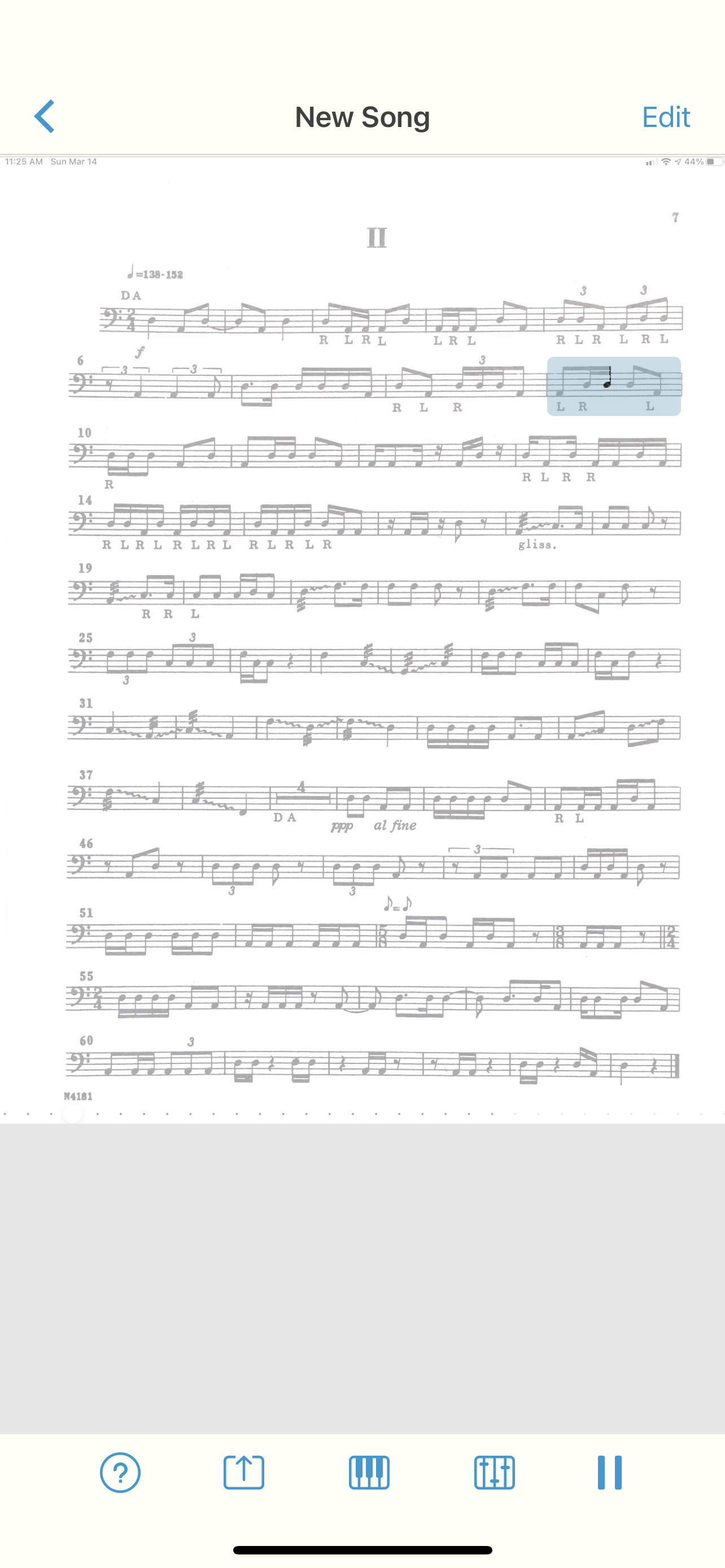
I have been integrating the iPad Pro into my life, and for the most part, what I have to say is this: it is a big iPad that does what iPads do. I am able to do some more split screen activities as the size better allows for it, and it is wonderful for reading music.






 Music Ed Tech Talk
You must be logged in to post a comment.