➡️ Develop Performance Skills With Cloud Software

*The following post first appeared on the NAfME Blog on April 19th, 2021.

Over the past year of remote and hybrid instruction, teachers have reimagined the tools, assignments, and methods that best engage their students. The need to engage my band students from a distance has challenged me to depend on cloud-based tools that still foster the development of their performance skills. The features of these cloud tools allow me to engage students in new ways by introducing interactive projects, collaboration with peers, and automated grading.

The ideas below will be featured in my presentation at the NAfME Eastern Division Conference this weekend. Register here to join me and the many exceptional presenters who will be sharing their ideas.
What is Cloud Software

Cloud software is a buzzword in the technology industry that is used to describe apps that run in a web browser. Examples of cloud-based music software include BandLab, Soundtrap, Noteflight, MusicFirst, and Flat for Education, to name a few. Because these offerings are web-based, they can run on nearly any computer with a web browser, as long as you have an internet connection. For this reason, they are more widely accessible to all students and can be integrated into an LMS (learning management software) like Canvas, Blackboard, and Google Classroom.

Here are some practical ideas for assignments in a performing ensemble using cloud software.

Noteflight

Noteflight is a music notation tool that runs on the web. In recent years, Noteflight has expanded to offer Noteflight Learn, which allows teachers to take Noteflight content and assign it to students in their class, much like an LMS. In the past year, Noteflight has added a feature called SoundCheck which can take these assigned Noteflight scores, and assess student performance for note/rhythm/pitch accuracy.

The line beneath the staff represents the pitch and note accuracy of the performance.

Students can play these scores, practice to them at any speed, and loop tricky sections. When they are done recording themselves, Noteflight provides an accuracy score and a line beneath the notes which indicates pitch and note inaccuracies by the counter and color of the line.

Changing the tempo in SoundCheck

You can make any Noteflight score into a Soundcheck-enabled assignment. If the score is linked to an assignment in your LMS, the student score will automatically go into your grade book. Because computers are not perfect, I prefer to go back and listen to my students who don’t receive good scores on assignments, to make sure I agree with the automatic grade.

Generally, is better at assessing note accuracy than pitch, so I tend to use SoundCheck as a first step to ensuring students are prepared for their music. Finer qualities in the music like tone and articulation are best left to video assessments with more comprehensive rubrics.

Getting Existing Music Into Soundcheck

If you have music that outside of Noteflight that you want to turn into an assessment, some apps can help. I use an app called Sheet Music Scanner on my iPad to take pictures of paper sheet music and turn them into XML files. XML is a file format that can pass notation projects from one notation editor to another. Once the XML version is saved to my device, I can import it into Noteflight and then assign it to my students.

Notation editors like Sibelius and Dorico can export to XML. If you have already created a score in a professional editor, it is easy to turn into an assignment.
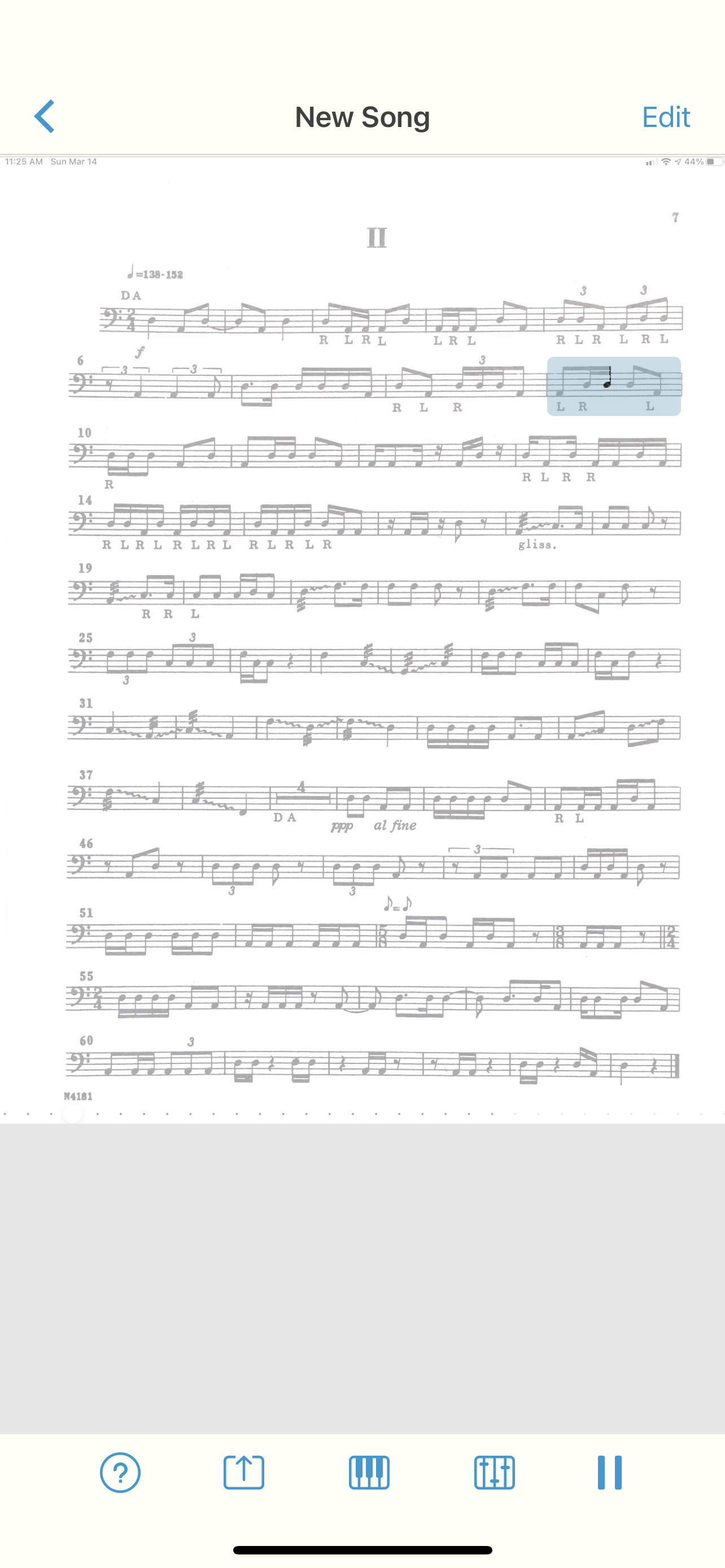
Sheet Music Scanner can take sheet music and turn it into an XML or audio file.

Sheet Music Scanner files can be played back, tempo adjusted, and exported to a variety of useful file formats.

Flipgrid

If your LMS does not have a video recording feature built-in, you might want to check out Flipgrid. My LMS has a video feature, and I still use Flipgrid because it makes video recording whimsical and fun. The Flipgrid interface puts an active circle around your face when you have submitted a recent video (like an Instagram story). Students can add filters, emoji, text, and other effects to their final videos. Students can watch each other’s videos, and leave video responses. It is like a mini social network for your class, with lots of control over the privacy settings.

Flipgrid also integrates into LMS software, so you can use it as an alternative to the basic video recorder if you wish.

Flipgrid videos can feature engaging effects, emoji, and filters. Student submissions appear with a colorful ring around their face like an Instagram story.

Soundtrap

Soundtrap is a web-based DAW (digital audio workstation). I have heard it described as “if Google Docs and GarageBand had a baby.” This is because it looks and functions like GarageBand, but runs on the web. Like Google’s apps, it is also collaborative. This means that you can have two or more students editing the same project at the same time while discussing their progress in a chat.

Soundtrap is great for producing beats, songwriting, and all of the things you would expect to do with access to limitless software instruments, samples, and pre-made loops. But what I use it for in the band room is to teach chamber music.

If I have a flute trio, for example, I can provide the music to my students and then invite them all to a Soundtrap project. Each student can create their audio track and record their part to the metronome. They can all be doing this simultaneously. Once they click save, they can play it back and hear what they sound like alongside one another in a somewhat real-time experience.

This template provides students with a play-along track, and a separate track for each part. The pre-recorded tracks were performed by a high schooler to model notes/rhythms/tone for my students. The reference tracks can be independently toggled on and off. Before saving, my students toggle everything off except their own performances.

A fun alternative to this is to give a small ensemble piece to a single student and have them overdub themselves playing each part. This can help them to better understand how the varying parts fit together and complement one another. In cases like this, I have reached out to the local high school and asked for student volunteers to play all of the parts to a metronome. I then take all of the high schooler’s recordings and add them as tracks in a Soundtrap template so that my students can toggle each part on and off for reference while they are recording.

You can see an example of this around the 20-minute mark in the video below.

Conclusion

These cloud-based assignments empower all students to participate in engaged music-making, alone and in groups. Nailing down the accuracy with a metronome will do wonders for their sense of timing and internal pulse. With recording assignments in Noteflight and Soundtrap, my students will do numerous takes until they get it just right! I cannot speak highly enough of these tools, and I certainly plan to use the assignment ideas above even when we return to a fully in-person learning environment.

If a video of this process is more your speed, you can watch how some of it works below. I also have a podcast version of this post available here.
🎬 Creating a Song Remix Project for Your Music Class using Soundtrap and Neural Mix Pro

UPDATE: I talk about this project on the latest episode of my podcast, as well as two other Soundtrap project ideas. Listen and subscribe below.

<div class="sqs-video-wrapper" data-provider-name="YouTube" data-html="

“>

Last week I mused on Twitter about the subject of teaching harmony to middle school students.

In the opening Tweet of that thread, I shared a project idea for my middle school General Music II class and provided a sample of student work. Be sure to read the whole thread for more context.

Here is a brief description of how I set that up.

If I don’t have the track, I use Downie or ViDL to download it from YouTube as an mp3.

For the vocal track, I am using Neural Mix Pro, which allows you to import any song and separate the voice, drums, and other accompaniment parts separately from one another. The results aren’t perfect, but they are beyond acceptable for a project like this.

<div class="
      image-block-outer-wrapper
      layout-caption-below
      design-layout-inline
      combination-animation-none
      individual-animation-none
      individual-text-animation-none
    ">


    <figure class="
          sqs-block-image-figure
          intrinsic
        " style="max-width:1220px">


      <div class="image-block-wrapper">
        <div class="sqs-image-shape-container-element


          has-aspect-ratio
        " style="position: relative;padding-bottom:73.11475372314453%;overflow: hidden">


            <img src="https://images.squarespace-cdn.com/content/v1/5595df9ce4b0ce9ff9ecd1a8/1618764806230-JHZ0NUQDTYRN4SWQPU3R/CleanShot+2021-04-18+at+12.39.13.png" alt="Neural Mix Pro." width="1220" height="892" style="display:block;object-fit: cover;width: 100%;height: 100%;object-position: 50% 50%" loading="lazy">

        </div>
      </div>


      <figcaption class="image-caption-wrapper">
        <div class="image-caption"><p class="">Neural Mix Pro.</p></div>
      </figcaption>


    </figure>


</div>

Once I turn down the drums/accompaniment, I export the resulting sound as a new file on my computer. On export, Neural Mix will tell you the key and BPM of the exported track. If the song is something awkward like 83.6 BPM, you can tell it to export at something sane like, 84 BPM and Neural Mix will adjust the final file accordingly.

Neural Mix isn’t cheap. It’s 50 dollars. But it does the job quickly and reliably while offering the user good control over the results. If you do not have access to something like this, there are tons of places you can find isolated vocal stems, like for example, the reddit community r/IsolatedVocals

In Soundtrap, I set the project up using my district’s LMS, Canvas. If you are using an LMS, you should be able to create an assignment and have it link out to Soundtrap as an “external tool.” If you can do this, you can create a template in Soundtrap that will already be set up for your students when they click the link.

<div class="
      image-block-outer-wrapper
      layout-caption-below
      design-layout-inline
      combination-animation-none
      individual-animation-none
      individual-text-animation-none
    ">


    <figure class="
          sqs-block-image-figure
          intrinsic
        " style="max-width:1868px">


      <div class="image-block-wrapper">
        <div class="sqs-image-shape-container-element


          has-aspect-ratio
        " style="position: relative;padding-bottom:73.44754028320312%;overflow: hidden">


            <img src="https://images.squarespace-cdn.com/content/v1/5595df9ce4b0ce9ff9ecd1a8/1618764958285-ZLK3HGLWQKNIBNINL84S/CleanShot+2021-04-18+at+12.44.39%402x.png" alt="CleanShot 2021-04-18 at 12.44.39@2x.png" width="1868" height="1372" style="display:block;object-fit: cover;width: 100%;height: 100%;object-position: 50% 50%" loading="lazy">

        </div>
      </div>


    </figure>


</div>

When I set up this template, I set the project’s key and tempo to match that of my exported file from Neural Mix. I drag the vocal-only track I exported from Neural Mix from my desktop into Soundtrap and it automatically makes a new audio track for me. Once the vocal track is imported, I have to slide it around left and right until the first measure of the song lands precisely on beat one. If the vocal part has an introduction or pickup note, you will need to consider that and make sure to tell your students that the loop accompaniment starts on a different measure than one.

<div class="
      image-block-outer-wrapper
      layout-caption-below
      design-layout-inline
      combination-animation-none
      individual-animation-none
      individual-text-animation-none
    ">


    <figure class="
          sqs-block-image-figure
          intrinsic
        " style="max-width:1552px">


      <div class="image-block-wrapper">
        <div class="sqs-image-shape-container-element


          has-aspect-ratio
        " style="position: relative;padding-bottom:63.595359802246094%;overflow: hidden">


            <img src="https://images.squarespace-cdn.com/content/v1/5595df9ce4b0ce9ff9ecd1a8/1618764920479-LAYLVV0VVIEQJ821EH29/CleanShot+2021-04-18+at+12.42.21%402x.png" alt="Set your project key and tempo to match the song." width="1552" height="987" style="display:block;object-fit: cover;width: 100%;height: 100%;object-position: 50% 50%" loading="lazy">

        </div>
      </div>


      <figcaption class="image-caption-wrapper">
        <div class="image-caption"><p class="">Set your project key and tempo to match the song.</p></div>
      </figcaption>


    </figure>


</div>

Once this is set up correctly, save the results. When choosing Soundtrap as the external tool for your LMS assignment, a mini Soundtrap shows up within your LMS (or at least it does in Canvas), and you can navigate to your pre-made template. Having the tempo and key preset for them ensures that the loops all sound mostly decent. It is still possible to wreak chaos, but it is enough structure that some of the loops will end up sounding pleasant.

There is a video at the top of this post covering everything I just explained. Hope it helps.