Bob Habersat over at Shed the Music created a super useful tool for generating a CSV file in the exact format Soundtrap requires for uploading students in bulk.
If you’ve done this before, you know it’s a hassle. I’m all for anything that makes the process even a little easier.
I will be presenting a session at the NJMEA Conference this week titled Practical Projects for Your Elective Course. In preparation for this presentation, I have reissued an older episode of my podcast with similar content to make it quickly accessible in the feed for attendees of the session.
This post contains the episode and resources related to the presentation.
The podcast episode opens with my first impressions of the Apple Vision Pro which I got to try out last week.
Enjoy!
Listen to the podcast episode and subscribe below!
This is the first year that I have had consistent access to a cloud-based DAW and notation editor with all of my students. The result of this experience has been dozens of new Soundtrap project ideas. I plan to do an episode and post about how I am using these tools for composition projects in the band classroom later this year.
In the episode above, and in this post, I give an overview of three of my most successful Soundtrap projects this year. These projects can be done in any digital audio workstation, including Bandlab, GarageBand, Logic, Ableton Live, etc.
Listen to the episode for a more thorough explanation of each idea.
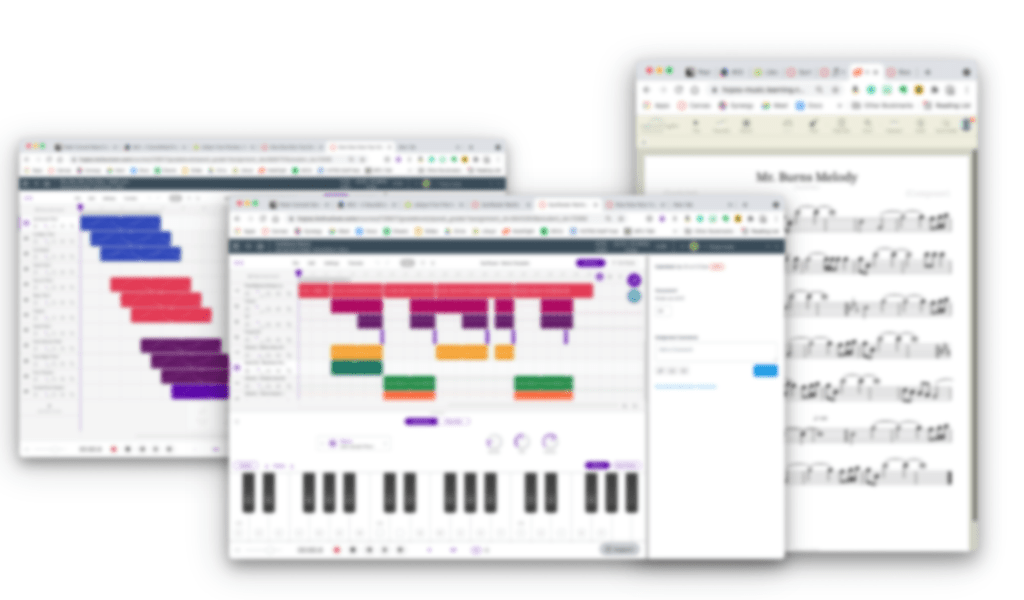
C Melody and Loop Audition
<div class="
      image-block-outer-wrapper
      layout-caption-below
      design-layout-inline
      combination-animation-none
      individual-animation-none
      individual-text-animation-none
    ">


    <figure class="
          sqs-block-image-figure
          intrinsic
        " style="max-width:544px">


      <div class="image-block-wrapper">
        <div class="sqs-image-shape-container-element


          has-aspect-ratio
        " style="position: relative;padding-bottom:110.7784423828125%;overflow: hidden">


            <img src="https://images.squarespace-cdn.com/content/v1/5595df9ce4b0ce9ff9ecd1a8/1622399213019-7WQQF3CV9DF9WDNEE1YH/Melody+Loop+222.png" alt="Melody writing in Noteflight and producing in Soundtrap go hand in hand. Because of Noteflight’s many export options, you have many ways to get your melody out of Noteflight and into your Soundtrap project." width="544" height="708" style="display:block;object-fit: cover;width: 100%;height: 100%;object-position: 50% 50%" loading="lazy">

        </div>
      </div>


      <figcaption class="image-caption-wrapper">
        <div class="image-caption"><p class="">Melody writing in Noteflight and producing in Soundtrap go hand in hand. Because of Noteflight’s many export options, you have many ways to get your melody out of Noteflight and into your Soundtrap project.</p></div>
      </figcaption>


    </figure>


</div>
After giving students some time to experience the user interface of Soundtrap, I have them write a short, 8 measure long, melody in the key of C using Noteflight.
Next, I have them export this melody as a MIDI file and then import it into a track in Soundtrap. Next, I have them add three more tracks and create an accompaniment for their melody using at least one of the three loop types.
Bass
Percussion
Harmonic (guitar, synth, piano, etc.)
Here is a recent submission of this project one of my students made. This assignment was submitted later in the semester when we had expanded the project into composing two alternating melodies which became the basis of a song-form in Soundtrap. By alternating between both melodies (and varying the loop accompaniment) the student made a song that follows the form: Verse—Chorus—Verse—Chorus—Bridge—Chorus. This particular student chose to improvise the blues scale over the bridge.
Row Your Boat Multi-Track
This idea was taken from the amazing Middle School Music Technology class content in MusicFirst. I recommend checking out their subscription options if you like this idea. MusicFirst combines the activity with curated YouTube and Spotify playlists that give students an idea about early recording studio practices for multi-track recording before music was produced digitally.
I am giving an overview of this project with permission from MusicFirst. Full Disclosure:MusicFirst is a past sponsor of the Music Ed Tech Talk blog and podcast.
To start, the student performs the song Row Row Row Your Boat into a software instrument track in Soundtrap. After it is recorded, they quantize it to the nearest 1/8th or 1/16th note so that it is rhythmically accurate.
Next, they duplicate this track two times. Using the piano roll to edit the MIDI content of each loop, students select all notes and drag them higher to create harmony. I have them move the second track a third higher and the next track a fifth higher so that they get a nice three-part voicing.
<div class="
      image-block-outer-wrapper
      layout-caption-below
      design-layout-inline
      combination-animation-none
      individual-animation-none
      individual-text-animation-none
    ">


    <figure class="
          sqs-block-image-figure
          intrinsic
        " style="max-width:700px">


      <div class="image-block-wrapper">
        <div class="sqs-image-shape-container-element


          has-aspect-ratio
        " style="position: relative;padding-bottom:66.14286041259766%;overflow: hidden">


            <img src="https://images.squarespace-cdn.com/content/v1/5595df9ce4b0ce9ff9ecd1a8/1622399067329-O1K4RMOQZ392YR5BO5H5/RowRow222.png" alt="After multi-tracking the melody of Row Row Row Your Boat, this student moved the starting point of each region to create a round." width="700" height="510" style="display:block;object-fit: cover;width: 100%;height: 100%;object-position: 50% 50%" loading="lazy">

        </div>
      </div>


      <figcaption class="image-caption-wrapper">
        <div class="image-caption"><p class="">After multi-tracking the melody of Row Row Row Your Boat, this student moved the starting point of each region to create a round.</p></div>
      </figcaption>


    </figure>


</div>
Next, I have them move any notes that land on black keys as a result down to the nearest white key so that every note of each voice is in the key of C.
Next, I have them duplicate these three tracks and transpose them up an octave. Next, I have them take the lowest voice and transpose it down three octaves to add some bass. You can have students make the final result as dense as you like.
Optionally, students can experiment with using different instrument sounds and adding groove-based loop accompaniment.
Here are three recent examples of my student’s submissions:
All-Star Remix
In this assignment, I take a popular song that students choose and separate the voice from the instrumental accompaniment. Then I add it to an audio track in a Soundtrap template and match the tempo and key of the Soundtrap project to the vocal track.
This way, students can drag and drop loops and have them match the pitch and tempo content of the vocals.
I have a post with more details about this project here.
Spotify is selling music-creation tool Soundtrap back to its founders to become a standalone business again, five and a half years after acquiring it.
Originally a startup from Spotify’s homeland Sweden, Soundtrap built its service as a cloud-based tool for recording and collaborating on music. Aimed at grassroots musicians and schools, it was bought by Spotify in November 2017.
Soundtrap has now been sold back to its original founders, Per Emanuelsson and Björn Melinder, for an undisclosed amount.
I was intrigued back when Spotify purchased Soundtrap and podcast publishing tool Anchor. The idea of putting both the audio creation tools and consumption tools into the hands of the general user seemed like it could result in some synergistic results long term. I guess Spotify isn’t interested in that. I am not really sure what Spotify is interested in. Their vision for the experience of using their app seems to be all over the place lately. And I don’t understand what the app offers that other music streaming services don’t, other than perhaps their superior music discovery algorithm.
Light the Music empowers educators to ignite student creativity and collaboration. Using a digital audio workstation, students learn about the fundamentals of music while creating their own music that is authentic, relevant, and meaningful to them.
Light the Music provides a curriculum aligned with the creating strand of the National Core Arts Standards. As students are introduced to the technology tools, they create an artist’s profile to guide their work throughout the curriculum. Students then learn about the elements that make up a piece of music; rhythm, chords, bass, and melody. They learn concepts by recreating and remixing, then use that knowledge to create something new. In each lesson, students share their work with classmates to give and receive feedback that is kind, specific, honest, and helpful.
The Light the Music curriculum comprises 8 units and 26 lessons, containing tutorial videos, templates, resources, and slides to make teaching easy. In each lesson, students learn, practice, and apply new skills. The curriculum offers a scaffolded structure for teachers to sequence lessons, yet contains enough flexibility for students to get support or dive deeper when desired. Students will work towards creating their own piece of music and a video to go along with it. At the conclusion of the 8 units, students share their work in a final showcase.
Light the Music is ideal for students in sixth through twelfth grade general **music, music technology, music appreciation, or any other music courses where student creativity is a goal. Additional stand-alone lesson plans for teachers looking for a one-time project are also available. If you’d like to learn more, check out www.lightthemusic.com.
The post below first appeared on the Noteflight blog on November 11th, 2021. You can read it there by clicking here or continue on below.
Two important parts of teaching include:
Sequencing learning so that students how to go from point A to point B.
Doing it in a way that they understand how new skills fit into broader musical contexts.
As a band director who also teaches general music, I have always been confident in my ability to connect these dots in performing ensembles, and less so in general music classes. This year, I am determined to rectify that using new technologies in combination with traditional instruments.
Historically, my school district’s general music curriculum has been categorized into four “strands:”
Drumming
Piano performance
Guitar performance
Technology
Last year, we began using Noteflight and Soundtrap to engage students with virtual music making. This year, we returned to in-person instruction and replaced our guitars with ukuleles, making chord strumming (and therefore an understanding of harmonic accompaniment) accessible earlier on in the learning sequence.
Moving into this year, I knew it was important that I leverage new technology in combination with traditional instrumental performance skills to create bigger musical connections.
My General Music II class, made up of 8th graders, is currently working on an assignment that leverages composition, recording, producing, ukulele performance, and harmonic understanding.
We start in Noteflight by composing an eight measure melody in C major. This is their first notation project of the year so directions and restrictions are fairly loose. Students are limited to certain rhythmic durations that I have taught them on drums but are otherwise free to experiment with their melody.
A blank eight measure Noteflight score is set as a template and linked to an assignment in my district’s Learning Management System, Canvas. Once students launch Noteflight as an external tool, they are taken immediately to the score depicted above, where they can begin editing, and submit their work in one click. In an LMS like Canvas, I am able to see the final submission in the Noteflight web app itself, where I can easily see the student’s work, demonstrate alterations for them, and provide other feedback directly.
After writing the melody, I had them write a chord progression in the key of C using our most familiar chords on the ukulele (C, F, G, Am). Pressing the letter K quickly allows for chord entry above the current selection.
Exporting the melody to Soundtrap is as easy as one click. Go to the Score Menu–>Export and then select “Open In Soundtrap.” The notes of the melody will be brought in as a MIDI track.
From here, students can…
Change the sound of the melody using a different software instrument.
Record themselves strumming the ukulele part into an audio track.
Edit the ukulele with effects if wanted.
Add supplemental bass and drum parts from the loop library.
In no time, they have written their own melody, recorded their own accompaniment, and used pre-existing samples to create the effect of an entire band playing their music.
I modeled a final project for my students in class. See a video below of the demo I showed.
Once we have moved on to some piano reading and performing, I plan to teach the students the notes of the chords as they relate to their melody. We can then iterate on this project, by composing melodies that make appropriate use of chord tones. We will even be able to use our understanding of the keyboard layout to input notes into Noteflight through the piano itself, via MIDI cables which conect our classroom pianos to our Chromebooks.
Once we have studied more forms and musical styles, am confident that we can be writing and performing out own songs.
I am presenting at the Howard County Public School System Music Professional Development on August 23, 2021.
These are the notes for that session…
Related Blog Posts
“What Do We Keep?” – This presentation is an loosely adapted from a post I wrote for the NAfME blog titled “Take, Leave, Transform! What Do We Keep from Last School Year”, which was based on a presentation I gave at the Music Ed Tech Conference this past summer. Check it out for more resources and ideas, and most importantly, links to the software mentioned in today’s session.
“What Do We Keep?”” Session Notes – If you want just the links and resources from the blog post above, click here.
Getting Your Students to Compose – Click here to read more about implementing Putting the E in Ensemble and to listen to my interview with Alex Shapiro.
“Develop Performance Skills Remotely” – TMEA Presentation Notes – Some of the videos in today’s presentation were taken from my TMEA presentation this past year. Click here to watch the entire thing and receive the session notes.
Making Just Intonation Play-Alongs with Tonal Energy Tuner – Click here to read my blog post about making play-along tracks using the TE Tuner app.
Related Podcast Episodes
These three podcast episodes also address the subject of using Soundtrap creatively in the performing arts contexts.
What Do We Keep? (Podcast version of the above NAfME post)
Interview with Alex Shapiro about her “Putting the E in Ensemble” Curriculum
3 Soundtrap Projects Your Students Will Love (more Soundtrap ideas for in and outside of the performing arts classroom)
Related YouTube Videos
Develop Performance Skills Remotely with Cloud Software – YouTube
I am pleased to be a guest on the MusicFirst podcast, Profiles in Teaching with Technology, this week.
I had a great conversation with Dr. Jim Frankle. We talked about my journey into music ed, catching an interest in technology, tips for teachers who are apprehensive about tech, what my school’s music program looks like (normally and during the past year). and my favorite uses for technology in the classroom.
Check it out below and subscribe wherever you listen to podcasts.
This is the first year that I have had consistent access to a cloud-based DAW and notation editor with all of my students. The result of this experience has been dozens of new Soundtrap project ideas. I plan to do an episode and post about how I am using these tools for composition projects in the band classroom later this year.
In the episode above, and in this post, I give an overview of three of my most successful Soundtrap projects this year. These projects can be done in any digital audio workstation, including Bandlab, GarageBand, Logic, Ableton Live, etc.
Listen to the episode for a more thorough explanation of each idea.
C Melody and Loop Audition
<div class="
      image-block-outer-wrapper
      layout-caption-below
      design-layout-inline
      combination-animation-none
      individual-animation-none
      individual-text-animation-none
    ">


    <figure class="
          sqs-block-image-figure
          intrinsic
        " style="max-width:544px">


      <div class="image-block-wrapper">
        <div class="sqs-image-shape-container-element


          has-aspect-ratio
        " style="position: relative;padding-bottom:110.7784423828125%;overflow: hidden">


            <img src="https://images.squarespace-cdn.com/content/v1/5595df9ce4b0ce9ff9ecd1a8/1622399213019-7WQQF3CV9DF9WDNEE1YH/Melody+Loop+222.png" alt="Melody writing in Noteflight and producing in Soundtrap go hand in hand. Because of Noteflight’s many export options, you have many ways to get your melody out of Noteflight and into your Soundtrap project." width="544" height="708" style="display:block;object-fit: cover;width: 100%;height: 100%;object-position: 50% 50%" loading="lazy">

        </div>
      </div>


      <figcaption class="image-caption-wrapper">
        <div class="image-caption"><p class="">Melody writing in Noteflight and producing in Soundtrap go hand in hand. Because of Noteflight’s many export options, you have many ways to get your melody out of Noteflight and into your Soundtrap project.</p></div>
      </figcaption>


    </figure>


</div>
After giving students some time to experience the user interface of Soundtrap, I have them write a short, 8 measure long, melody in the key of C using Noteflight.
Next, I have them export this melody as a MIDI file and then import it into a track in Soundtrap. Next, I have them add three more tracks and create an accompaniment for their melody using at least one of the three loop types.
Bass
Percussion
Harmonic (guitar, synth, piano, etc.)
Here is a recent submission of this project one of my students made. This assignment was submitted later in the semester when we had expanded the project into composing two alternating melodies which became the basis of a song-form in Soundtrap. By alternating between both melodies (and varying the loop accompaniment) the student made a song that follows the form: Verse—Chorus—Verse—Chorus—Bridge—Chorus. This particular student chose to improvise the blues scale over the bridge.
Row Your Boat Multi-Track
This idea was taken from the amazing Middle School Music Technology class content in MusicFirst. I recommend checking out their subscription options if you like this idea. MusicFirst combines the activity with curated YouTube and Spotify playlists that give students an idea about early recording studio practices for multi-track recording before music was produced digitally.
I am giving an overview of this project with permission from MusicFirst. Full Disclosure:MusicFirst is a past sponsor of the Music Ed Tech Talk blog and podcast.
To start, the student performs the song Row Row Row Your Boat into a software instrument track in Soundtrap. After it is recorded, they quantize it to the nearest 1/8th or 1/16th note so that it is rhythmically accurate.
Next, they duplicate this track two times. Using the piano roll to edit the MIDI content of each loop, students select all notes and drag them higher to create harmony. I have them move the second track a third higher and the next track a fifth higher so that they get a nice three-part voicing.
<div class="
      image-block-outer-wrapper
      layout-caption-below
      design-layout-inline
      combination-animation-none
      individual-animation-none
      individual-text-animation-none
    ">


    <figure class="
          sqs-block-image-figure
          intrinsic
        " style="max-width:700px">


      <div class="image-block-wrapper">
        <div class="sqs-image-shape-container-element


          has-aspect-ratio
        " style="position: relative;padding-bottom:66.14286041259766%;overflow: hidden">


            <img src="https://images.squarespace-cdn.com/content/v1/5595df9ce4b0ce9ff9ecd1a8/1622399067329-O1K4RMOQZ392YR5BO5H5/RowRow222.png" alt="After multi-tracking the melody of Row Row Row Your Boat, this student moved the starting point of each region to create a round." width="700" height="510" style="display:block;object-fit: cover;width: 100%;height: 100%;object-position: 50% 50%" loading="lazy">

        </div>
      </div>


      <figcaption class="image-caption-wrapper">
        <div class="image-caption"><p class="">After multi-tracking the melody of Row Row Row Your Boat, this student moved the starting point of each region to create a round.</p></div>
      </figcaption>


    </figure>


</div>
Next, I have them move any notes that land on black keys as a result down to the nearest white key so that every note of each voice is in the key of C.
Next, I have them duplicate these three tracks and transpose them up an octave. Next, I have them take the lowest voice and transpose it down three octaves to add some bass. You can have students make the final result as dense as you like.
Optionally, students can experiment with using different instrument sounds and adding groove-based loop accompaniment.
Here are three recent examples of my student’s submissions:
All-Star Remix
In this assignment, I take a popular song that students choose and separate the voice from the instrumental accompaniment. Then I add it to an audio track in a Soundtrap template and match the tempo and key of the Soundtrap project to the vocal track.
This way, students can drag and drop loops and have them match the pitch and tempo content of the vocals.
I have a post with more details about this project here.
It seems plausible that some people subscribe to this blog and do not follow me on Twitter, so allow me to expand this recent Tweet thread into a lazy blog post.
🧵🪡🎶👇 Thread: a few things I am doing in my band teaching this year, that I previously didn’t have the time or resources to organize, but COVID forced my hand. (I will definitely be doing each of these every school year from now on)…
Thread: a few things I am doing in my band teaching this year, that I previously didn’t have the time or resources to organize, but COVID forced my hand. (I will definitely be doing each of these every school year from now on)…
<div class="
      image-block-outer-wrapper
      layout-caption-below
      design-layout-inline
      combination-animation-none
      individual-animation-none
      individual-text-animation-none
    ">


    <figure class="
          sqs-block-image-figure
          intrinsic
        " style="max-width:918px">


      <div class="image-block-wrapper">
        <div class="sqs-image-shape-container-element


          has-aspect-ratio
        " style="position: relative;padding-bottom:148.58387756347656%;overflow: hidden">


            <img src="https://images.squarespace-cdn.com/content/v1/5595df9ce4b0ce9ff9ecd1a8/1620928178100-EDH2P31OY42XLM8SB7E4/CleanShot+2021-05-07+at+09.06.00%402x.png" alt="A chart designed by my colleague Ben Denne. By thinking critically about music that will challenge, but not overwhelm them, students pick their select their own, grade appropriate, solo music." width="918" height="1364" style="display:block;object-fit: cover;width: 100%;height: 100%;object-position: 50% 50%" loading="lazy">

        </div>
      </div>


      <figcaption class="image-caption-wrapper">
        <div class="image-caption"><p class="">A chart designed by my colleague Ben Denne. By thinking critically about music that will challenge, but not overwhelm them, students pick their select their own, grade appropriate, solo music.</p></div>
      </figcaption>


    </figure>


</div>
Solo prep: by asking colleagues for rep ideas across all instruments, I created a resource in my LMS that guides students through a process of selecting appropriate solo rep for our district Festival and then registering for it. Student enrollment is up over 300 percent this year.
Composition: students LOVE writing short themes and ostinato patterns in Noteflight After recording their comps, they will make unique band arrangements out of each other’s recordings in Soundtrap by dragging them on top of one another and splicing/editing them, like loops. Inspiration for this idea and supporting materials provided by Alex Shapiro and can be found here.
Recording: having my students record video performances is not new. But having them record in a DAW, with respect to measure number, beat placement, and a metronome has been huge for our understanding of rhythm and form. Also it requires them to practice way more.
And then there are 100 new things I can do in my general music class simply by having access to a notation editor and DAW. I don’t have enough time to detail them now but here is one example:
As much fun as I have grinding in Final Cut Pro, I do NOT see virtual band videos becoming a thing beyond this school year. It was fun while it lasted. Here’s last year’s WW Quintet:





 Music Ed Tech Talk
You must be logged in to post a comment.