How I Manage My Private Teaching Studio

The latest episode of Music Ed Tech Talk is an overview of how I manage my private teaching studio and the tools that assist me.

Subscribe to the Blog…

RSS | Email Newsletter

Subscribe to the Podcast in…

Apple Podcasts | Overcast | Castro | Spotify | RSS

Support Music Ed Tech Talk

Become a Patron!

Buy me a coffee

Thanks to my sponsors this month, Scale Exercise Play-Along Tracks.

Show Notes:

App of the Week: Timery** | Toggl

Music of the Week: Beyoncé – Renaissance

Where to Find Me:

Please don’t forget to rate the show and share it with others!

Always Start from the Beginning: Developing Tone Quality, Intonation, Concert Repertoire, and Classroom Management through Unison Playing in Performing Ensembles

This post first appeared on the NAfME Blog on December 7, 2021. You can read it there by clicking here.


Always Start from the Beginning

Every year I teach band, I start from the beginning. I find that if I rebuild the ensemble, focusing on fundamentals, it is impossible to fail.

This is especially true after many programs have lost over a year of in-person instruction. Even if students’ skills have been sustained or improved, they are likely returning to the classroom with less handle on things that they can only learn in a group: intonation, balance, blend, and even basic rehearsal expectations.

They will have to relearn how to listen outside their comfortable bubble of one.

Image.jpeg

Caption: A mixer at the front of the room allows me to pump my voice, computer, and phone through a stereo and mix them to taste.

I want to describe some of the teaching strategies that have been most helpful this fall (and long since before COVID) while also sharing some technological tips I have taken from virtual learning into this year. I will explain how I am implementing them in my beginning band class to ensure that they develop great ears, strong ensemble sound, musicianship, and all while preparing concert music.

Developing the Ear

All excellent music-making starts with the ear. In Musical Performance: Learning Theory and Pedagogy, Daniel Kohut claims that students need a “superior concept” of the sound they wish to make. I believe this is much easier to achieve while playing in unison. Young musicians often learn this way by nature of beginning method books focusing on familiar, unison melodies, which elementary school teachers teach in instrument-specific sectionals. But when students first join a large ensemble, they can lose their independent sense of tone, intonation, and balance if too many separate voices start happening in their concert literature too soon.

IMG_9265.png

Caption: The Tonal Energy Tuner app is only a few dollars, and it play justly in-tune polyphonic drones and a metronome simultaneously.

My Concert Band class has 50 6th and 7th-grade students. Many of these students are first-year players. This year, most of them had only experienced a half year of in-person band before walking into my classroom.

I decided to keep them playing in unison for as long as I could keep them interested. I wanted to emphasize tone quality, intonation, balance, and bend, while somehow managing the classroom and preparing them for a December concert. And I wanted to keep things fun. Was it possible to do all of this? Yes!

CleanShot 2021-10-30 at 09.50.14.png

Caption: Dorico’s popovers, like this one for dynamics, allow you to enter notation naturally and quickly. Adding solfege with the Lyrics popover was equally easy.

Transforming Concert Literature into Unison Melodies

I started by ensuring that I centered instruction around accessible melodic material from the method book rather than technical exercises and drills. Additionally, I took the pieces I was planning for our winter concert and wrote out every person’s part for every instrument using Dorico. Dorico’s keyboard shortcuts and flow-based composing make it easy to design supplemental resources as quickly as you can think.

Image.jpeg

Caption: Last school year, my team purchased some equipment to support hybrid teaching. This year, we have repurposed that gear to integrate audio technology into traditional rehearsals seamlessly.

The guides are organized by rehearsal marking. For example, Part 1 has everyone in the band playing the bass line of measures 1-8. By playing each part of the music sequentially, students get more practice sight-reading while learning who in the band plays which notes. By playing in unison, they leverage their strength in numbers to develop firmer and more stable tone quality while learning to hear what an ensemble blend should sound like for the first time.

CleanShot 2021-10-30 at 09.49.23.png

Caption: This is what an individual part looks like in Dorico once completed. Instead of isolating sections of the band during rehearsal, I can have everyone playing at all times. For example, if I want to work with the tuba part in measure one, I can tell the entire band to play “Part 1. Lower Voice” and keep everyone engaged.

I write solfege into these practice guides and alternate between the students singing and playing. In a year without any COVID concerns, I would also encourage the brass to buzz these melodies on mouthpieces to develop their inner ear and flexibility.

Play-Along Resources Help Model Tone, Intonation, and Tempo

There is always a drone prominently playing through our sound system using the Tonal Energy Tuner app. The polyphonic drones can model justly in-tune intervals. Students can subtly adjust their pitch by making the “beats” that result between two out-of-tune pitches slow down and eventually dissolve.

CleanShot 2021-10-30 at 09.39.39.png

Caption: One of the easiest and most engaging ways to encourage metronome practice is to play along to the Drummer Tracks in GarageBand. There are numerous styles, beats, and editing tools at your disposal. Beats are way more fun to play with and provide more musical feeling than a metronome.

I have created play-along tracks that combine trap beats with tuning drones. I like to pump them through the speakers during warm-ups and throughout rehearsal. You can make these too using the free GarageBand app on iOS.

Sometimes, I will have Tonal Energy coming through my phone and the beats coming through my Mac. This allows me to mix the drone and the metronome independently, as they are plugged into two separate channels of my mixer.

Speaking Calmly, Being Everywhere

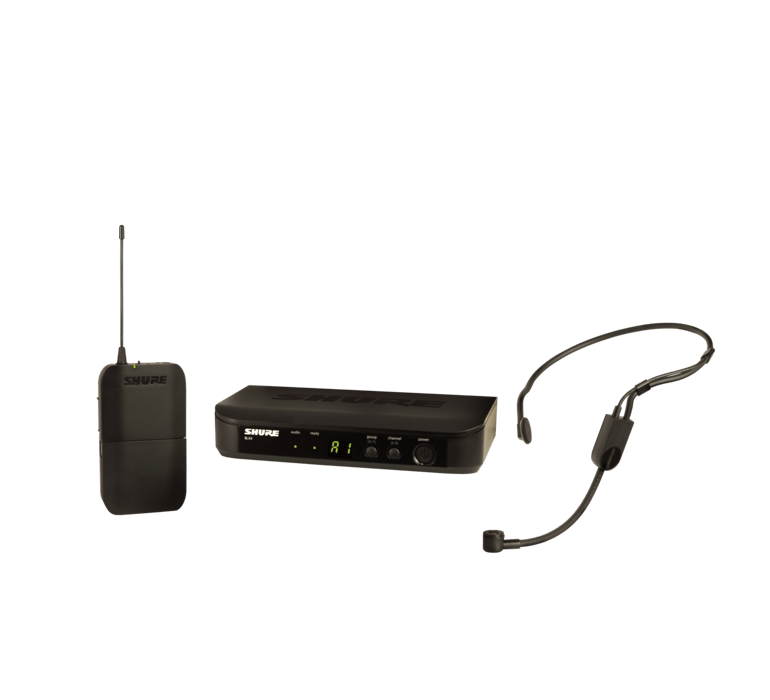
A Shure wireless microphone goes into a third channel of the mixer, allowing me to speak in a comfortable room voice and be heard over the sound of loud drones, beats, and a full band of 50-65 students playing.
73b42005bdaf925216f74de6ebf33333.png

Caption: This Shure wireless headset microphone has been a game-changer this year. I don’t ever have to raise my voice to be understood. I can speak comfortably and be heard over the sound of a pumping drone and 60 students playing.

This technique works wonders for classroom management. Flowing from one part of our daily agenda to the next is nearly seamless because of how easy it is to keep everyone playing most of the rehearsal. With these persistent play-alongs underlying most of the rehearsal, my role could be described less like a traditional director and more like a spin instructor.

This might sound ridiculous at first, but it is true. A spin instructor curates music, keeps the beat moving you forward and paces instruction, all while making you sweat. This is precisely how I want my role to feel in the band room. I like to think of myself as a “coach” who directs students towards the goal while they work for it, rather than a “director” who beats the music into them.

Image.jpeg

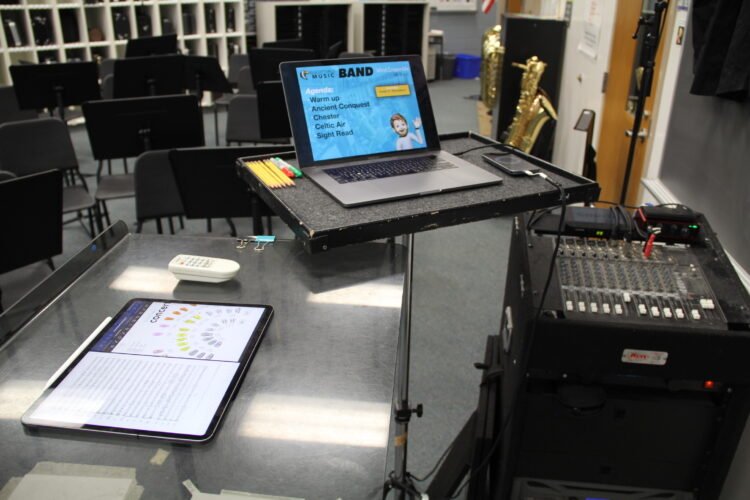
Caption: My colleague, Ben Denne, teaches from our “command station” at the front of the room.

The wireless mic allows me to step off the podium and be heard from anywhere in the room. While the band is playing, I can be high-fiving students, sizing a student for concert attire, helping percussionists find their place, encouraging good trombone posture, or any other need. I can be everywhere and still keep the flow of rehearsal moving even when I’m off the podium.

CleanShot 2021-10-30 at 12.32.29.png

Caption: Farrago is a useful app for queuing play-along material in a soundboard-style audio launcher. I keep my scale tracks organized and color-coded by key and rhythmic patterns to find them more easily.

Taking the Slow Road Gets Maximum Results

Once it is time to hand out concert music, I’m delighted to hear students say things like, “wait, we know this!.” By this point, they can sing every part, play every part, and can now split into three or four unique voices because they are more confident in their melody from having practiced it with the strength of 60 musicians in unison.

Image.png

Caption: AnyTune is another excellent app that can change the speed and pitch of a play-along track independently.

The results are clear. I have never had a more engaging, fun, and tightly managed beginning band experience. Students are developing fundamentals at a pace consistent, if not better, than a typical year, and we are stronger for it.

Ukulele Resources, Pedagogy, and Curriculum

I’m getting ukuleles for my general music classes this year so I thought it would be natural to have past guest Chris Russell on the podcast. He is a technology expert and maker of many online ukulele resources, amongst his many other skills.

I learned a lot talking to him. The conversation was packed with resources for teachers looking to better their ukulele skills so be sure to scroll down and check out all of the resources he mentions on the show, which I have provided links for.

Episode Description

Robby is getting ukeleles to teach general music this year. Chris Russel (tech and ukelele specialist) joins the show to talk about how to get the best use out of them. We also talk about the state of tech in music ed.

Full Topics:

  • Ukelele pedagogy
  • Where to find ukelele resources online
  • How to integrate ukelele and technology
  • The state of technology in music education
  • Apple’s App-centric and native approach to education vs. Google’s web-centric approach
  • Our favorite apps, albums, and tech tips of the week
  • The tools and process Chris uses to make ukelele play-along videos on his iPad (in the post-show for Patreon subscribers)

Subscribe to the Blog…
RSS | Email Newsletter

Subscribe to the Podcast in…
Apple Podcasts | Overcast | Castro | Spotify | RSS

Support Music Ed Tech Talk

Become a Patron!

.bmc-button img{height: 34px !important;width: 35px !important;margin-bottom: 1px !important;box-shadow: none !important;border: none !important;vertical-align: middle !important;}.bmc-button{padding: 7px 15px 7px 10px !important;line-height: 35px !important;height:51px !important;text-decoration: none !important;display:inline-flex !important;color:#ffffff !important;background-color:#000000 !important;border-radius: 5px !important;border: 1px solid transparent !important;padding: 7px 15px 7px 10px !important;font-size: 20px !important;letter-spacing:0.6px !important;box-shadow: 0px 1px 2px rgba(190, 190, 190, 0.5) !important;-webkit-box-shadow: 0px 1px 2px 2px rgba(190, 190, 190, 0.5) !important;margin: 0 auto !important;font-family:'Arial', cursive !important;-webkit-box-sizing: border-box !important;box-sizing: border-box !important;}.bmc-button:hover, .bmc-button:active, .bmc-button:focus {-webkit-box-shadow: 0px 1px 2px 2px rgba(190, 190, 190, 0.5) !important;text-decoration: none !important;box-shadow: 0px 1px 2px 2px rgba(190, 190, 190, 0.5) !important;opacity: 0.85 !important;color:#ffffff !important;}Buy me a coffeeBuy me a coffee

Show Notes:

App of the Week:
Robby – Carrot Weather
Chris – PDF Expert / TikTok / Vegas Bowling Apple Watch App

Album of the Week:
Robby – Squint – Julian Lage
Chris – Safe Haven – Ruth B / The Show – Lenka

Where to Find Us:
Robby – Twitter | Blog | Book
Chris – Twitter | Websites – Techinmusiced.com / Ukestuff.info

Please don’t forget to rate the show and share it with others!

Introducing My “Scale Exercise Play-Along Tracks With Trap Beats” – Available Now on My New Online Store!

I am announcing a new section of this website. A STORE! Starting today, I will be selling digital products and services I have created for musicians and music teachers. Check it out here!

First up is a collection of Scale Exercise Play-Along Tracks with Trap Beats underneath them.

You bet there’s a promotional video.

<div class="sqs-video-wrapper" data-provider-name="YouTube" data-html="
“>

Here is the product description from the sale page:

This collection contains over 70 major scale play-along tracks for your ensemble.

Each track includes a tuning drone playing the tonic with a scale overtop in just intonation so that you can reinforce flawless intonation, tone production, and blend amongst your students. Every exercise includes a count-off and a trap beat underneath to engage your students while reinforcing slower playing and subdividing!

The audio-only version of this package includes mp3 files of the following recordings in all twelve major keys, at 70bpm.

  • Whole note scale

  • Half note scale

  • Quarter note scale

  • Eighth note scale

  • Scale Exercise in Thirds

  • Mini-Scale with Arpeggio

Also included:

  • Remington at three different speeds! Perfect for playing underneath many of the exercises that come from popular band methods.

The premium version of this product includes the audio tracks above in addition to the Logic Pro and GarageBand stems so you can edit every element of the tracks, including speed, pitch, and instrumentation.

These are perfect for running through your Zoom/Google Meet/Virtual Classroom to keep kids playing as much as possible.

I have been using tracks like these with my band students for years now and they LOVE them. The trap beat resonates with them. Its popularity in hip hop music aside, there is something compelling about them, musically. The backbeat on three, combined with the busy hi-hat activity, helps kids subdivide slower tempos and keeps them motivated to practice stuff like long tones and scales. The strong 808 baseline asserts the beat while adding fun syncopation.

It was essential to me that the drones were in just intonation because I teach my students to hear and adjust to the beats that result when unison pitches and diatonic intervals are in/out of tune. The Yamaha Harmony Director was definitely the tool for the job. Here’s a really brief blog post I shared earlier this month about the process if you want to take a stab at making something like this.

You can alternatively do this process using the (excellent) Tonal Energy Tuner App, a MIDI keyboard, and GarageBand on iOS. I wrote about that here. I prefer the Tonal Energy experience, but the Yamaha’s hardware keys made it easier to “perform” the drones and allowed me to create in Logic Pro, which I am more proficient in.

The original concept for this was very ambitious initially, and I simplified the vision a ton to help myself “ship it.” I have seen music teachers asking for something like this on social media a lot lately, and it seemed like time to do the work. I am happy with how they turned out and I hope to create more of these down the road in varying style, tempo, and exercise patterns.

A few notes:

  1. Due to file upload limitations on Squarespace, buying the stems directs you to download a text file instead of the audio files. The text file contains a link to a third-party hosting source. A little inelegant, I know, but setting up a Squarespace store was otherwise the most comfortable choice.
  2. These are incredibly effective for engaging synchronous ensemble rehearsals. No, we still can’t play at once, but running rehearsal tracks through your Google Meet or Zoom call while students are muted is a great way to keep them playing. These tracks are slow enough that I have had success having groups of 3-6 unmute while playing along, and it is not total chaos. Between these, my Solfege Bingo tracks, and The Breathing Gym DVD, we can be synchronously active for more than 80 percent of each class. I get the audio to route directly through to the call using Loopback.
  3. Many of these tracks, particularly the scale exercise in thirds, mini-scale, and Remington tracks, pair perfectly with a multitude of examples in the Foundation for Superior Performance band method books series. I did not title them as such because the book and my project are in no way connected. I bring it up here because I know those exercises are ubiquitous in band rehearsals, and it’s for this reason, many directors have their students purchase those books.
  4. I made the arrangements of these tracks simple to keep the appeal as wide-reaching and flexible as possible. My hope is that people who really want to change the style, edit the beat, change the speed, or any other kind of alternation, will buy the version that comes with the GarageBand and Logic stems. Tip: If you want to use software instruments to create your own accompaniment, and want them to be justly in tune with my tracks, Logic Pro has support for tuning systems. That means that if you mute my trap beat and add your own samba tracks, you can have the instruments play in the key area you select instead of their usual equal tempered tuning.