6 Music Podcasts I Love

This is a followup to my post about my favorite tech podcasts from a few weeks ago.

There are a handful of music shows that are in my regular rotation. They span the topics of performance, conducting, theory, musicology, and pedagogy

Sticky Notes: The Classical Music Podcast

Great show for people who want to learn more about classical music, regardless of experience level with it.

Sound Expertise

Will Robin has conversations with scholars about music. This show goes deep, but I find it really approachable no matter how much experience you have with the weekly topic.

The Third Story

Leo Sidran hosts long-form interviews with musicians from various backgrounds. I particularly enjoyed the interviews with Cory Henry, Becca Stevens Louis Cole.

He really gets the guests to open up and reveal their humanity, intimate accounts of their life experiences, and creative journey.

The Brass Junkies

This is one of the few instrumental music education shows that doesn’t feel like the air has been sucked from the room when I listen.

This show features candid, personal, conversations with brass musicians from all over, about their professional journey and pedagogy.

Everything Band Podcast

Mark J. Connor does an excellent job interviewing band teachers, performers, and composers of music for winds and percussion.

UpBeat

This is an awesome podcast about conducting, with great industry advise and interviews with conductors from all over.

I may be a little biased because I went to school with one of the hosts, John Devlin.

The show is great and the parody ads are hilarious.

6 Tech Podcasts I Listen to Every Week

I am often asked where I go to learn about technology.

The truth is that most of it comes through a few blogs and podcasts. I don’t listen to many podcasts that deal specifically with integrating technology into the music classroom, though there are a few good ones. (Aside from my own, I recommend Katie Wardrobe’s show Music Tech Teacher and MusicFirst’s Profiles in Music Teaching with Technology.)

I don’t listen to prescriptive “how-to” shows. I focus more on industry analysis, details of hardware and software features, and extended discussion. My favorite shows are conversational in tone rather than the hyper-produced style of the modern-day shows that NPR has popularized.

I find this style of show to be far more listenable and engaging while giving me a deeper and underlying understanding of the technology I use. This way, I am more empowered to adapt the technology I have to my unique professional challenges and lifestyle.

Here are my six favorites…

Upgrade

Probably my most listened show. Heavily focused on Apple technologies, news, and the streaming media landscape. The show is deeply informative but also has some produced elements like theme music and segments, which keep each episode moving at an engaging pace.

Here is a recent episode where the hosts review the new M1 iMacs and M1 iPad:

The Vergecast

The Verge is a great website for learning about all things in consumer tech. Their podcast is the most produced on this list, but the camaraderie between speakers allows for the ideas to present as looser and more raw than they do in written articles.

I have been considering an electric vehicle lately and enjoyed this episode about recent EUVs:

Mac Power Users

This show delivers tips for making the most of your computing devices each week. It includes pro tips, app recommendations, and interviews with professionals spanning many industries. Listening to MPU is one of the inspirations for my book, as it focuses on not just the tools, but how to implement them creatively.

If you are looking for a place to start, check out Music Ed Tech Talk frequent guest, David MacDonald, on this episode of Mac Power Users:

The Talk Show

John Gruber’s The Talk Show is one of the shows that made me love podcasting. Though episodes are inconsistent in length, scope, and irregularly released, Gruber and his guests always have engaging discussion. So much so that I don’t mind rants about sports, politics, and other “off-topic” diversions. This show is in some respects a prototype for the kinds of discussions I like to have on my podcast. Personal, detailed, and analytical.

Accidental Tech Podcast

Also very Apple-focused, but with more perspective on software development and adjacent technologies. This show is lengthy and more unstructured but also very deep. The three hosts are in software development and sometimes talk about topics that are just on the outside of my wheelhouse, but I am still able to follow along. The perspective of these hosts has strongly influenced the kind of quality and detail I expect from my technology.

This episode is a fan favorite, and gives you an insight into the kind of detail the hosts cover, and also their relationship:

Dithering

This is a paid show. For me, it is worth the $5 a month because it includes John Gruber from The Talk Show with one of my favorite of his reoccurring guests, Ben Thompson, who is a brilliant technology analyst. Two 15-minute episodes are released each week. The tight format keeps the discussion fast and rich.

Here is a clip:

🎬 Creating a Song Remix Project for Your Music Class using Soundtrap and Neural Mix Pro

UPDATE: I talk about this project on the latest episode of my podcast, as well as two other Soundtrap project ideas. Listen and subscribe below.

<div class="sqs-video-wrapper" data-provider-name="YouTube" data-html="

“>

Last week I mused on Twitter about the subject of teaching harmony to middle school students.

In the opening Tweet of that thread, I shared a project idea for my middle school General Music II class and provided a sample of student work. Be sure to read the whole thread for more context.

Here is a brief description of how I set that up.

If I don’t have the track, I use Downie or ViDL to download it from YouTube as an mp3.

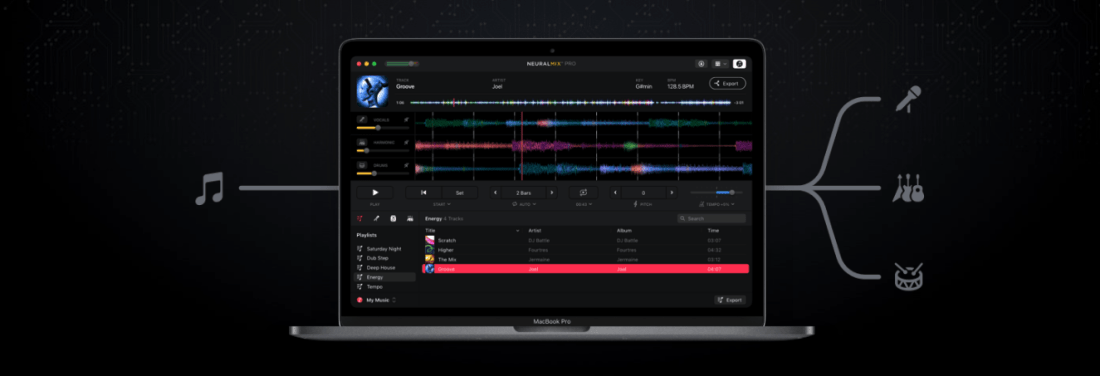
For the vocal track, I am using Neural Mix Pro, which allows you to import any song and separate the voice, drums, and other accompaniment parts separately from one another. The results aren’t perfect, but they are beyond acceptable for a project like this.

<div class="
      image-block-outer-wrapper
      layout-caption-below
      design-layout-inline
      combination-animation-none
      individual-animation-none
      individual-text-animation-none
    ">


    <figure class="
          sqs-block-image-figure
          intrinsic
        " style="max-width:1220px">


      <div class="image-block-wrapper">
        <div class="sqs-image-shape-container-element


          has-aspect-ratio
        " style="position: relative;padding-bottom:73.11475372314453%;overflow: hidden">


            <img src="https://images.squarespace-cdn.com/content/v1/5595df9ce4b0ce9ff9ecd1a8/1618764806230-JHZ0NUQDTYRN4SWQPU3R/CleanShot+2021-04-18+at+12.39.13.png" alt="Neural Mix Pro." width="1220" height="892" style="display:block;object-fit: cover;width: 100%;height: 100%;object-position: 50% 50%" loading="lazy">

        </div>
      </div>


      <figcaption class="image-caption-wrapper">
        <div class="image-caption"><p class="">Neural Mix Pro.</p></div>
      </figcaption>


    </figure>


</div>

Once I turn down the drums/accompaniment, I export the resulting sound as a new file on my computer. On export, Neural Mix will tell you the key and BPM of the exported track. If the song is something awkward like 83.6 BPM, you can tell it to export at something sane like, 84 BPM and Neural Mix will adjust the final file accordingly.

Neural Mix isn’t cheap. It’s 50 dollars. But it does the job quickly and reliably while offering the user good control over the results. If you do not have access to something like this, there are tons of places you can find isolated vocal stems, like for example, the reddit community r/IsolatedVocals

In Soundtrap, I set the project up using my district’s LMS, Canvas. If you are using an LMS, you should be able to create an assignment and have it link out to Soundtrap as an “external tool.” If you can do this, you can create a template in Soundtrap that will already be set up for your students when they click the link.

<div class="
      image-block-outer-wrapper
      layout-caption-below
      design-layout-inline
      combination-animation-none
      individual-animation-none
      individual-text-animation-none
    ">


    <figure class="
          sqs-block-image-figure
          intrinsic
        " style="max-width:1868px">


      <div class="image-block-wrapper">
        <div class="sqs-image-shape-container-element


          has-aspect-ratio
        " style="position: relative;padding-bottom:73.44754028320312%;overflow: hidden">


            <img src="https://images.squarespace-cdn.com/content/v1/5595df9ce4b0ce9ff9ecd1a8/1618764958285-ZLK3HGLWQKNIBNINL84S/CleanShot+2021-04-18+at+12.44.39%402x.png" alt="CleanShot 2021-04-18 at 12.44.39@2x.png" width="1868" height="1372" style="display:block;object-fit: cover;width: 100%;height: 100%;object-position: 50% 50%" loading="lazy">

        </div>
      </div>


    </figure>


</div>

When I set up this template, I set the project’s key and tempo to match that of my exported file from Neural Mix. I drag the vocal-only track I exported from Neural Mix from my desktop into Soundtrap and it automatically makes a new audio track for me. Once the vocal track is imported, I have to slide it around left and right until the first measure of the song lands precisely on beat one. If the vocal part has an introduction or pickup note, you will need to consider that and make sure to tell your students that the loop accompaniment starts on a different measure than one.

<div class="
      image-block-outer-wrapper
      layout-caption-below
      design-layout-inline
      combination-animation-none
      individual-animation-none
      individual-text-animation-none
    ">


    <figure class="
          sqs-block-image-figure
          intrinsic
        " style="max-width:1552px">


      <div class="image-block-wrapper">
        <div class="sqs-image-shape-container-element


          has-aspect-ratio
        " style="position: relative;padding-bottom:63.595359802246094%;overflow: hidden">


            <img src="https://images.squarespace-cdn.com/content/v1/5595df9ce4b0ce9ff9ecd1a8/1618764920479-LAYLVV0VVIEQJ821EH29/CleanShot+2021-04-18+at+12.42.21%402x.png" alt="Set your project key and tempo to match the song." width="1552" height="987" style="display:block;object-fit: cover;width: 100%;height: 100%;object-position: 50% 50%" loading="lazy">

        </div>
      </div>


      <figcaption class="image-caption-wrapper">
        <div class="image-caption"><p class="">Set your project key and tempo to match the song.</p></div>
      </figcaption>


    </figure>


</div>

Once this is set up correctly, save the results. When choosing Soundtrap as the external tool for your LMS assignment, a mini Soundtrap shows up within your LMS (or at least it does in Canvas), and you can navigate to your pre-made template. Having the tempo and key preset for them ensures that the loops all sound mostly decent. It is still possible to wreak chaos, but it is enough structure that some of the loops will end up sounding pleasant.

There is a video at the top of this post covering everything I just explained. Hope it helps.