Yesterday, I posted my top 10 blog posts written in 2021. Today, I thought I would share the most popular podcast episodes I published.
Note: everyone uses different podcast players, so I have linked to the show notes/blog posts that accompany many of these episodes. A few of them will require you to scroll down for the playback controls. Or, of course, you could subscribe to the show! (Don’t forget to leave me that sweet 5 star review if you are on Apple Podcasts, it really does help!)
As you can imagine, running a blog and podcast isn’t free. Costs of tools and hosting fees are monthly investments, not to mention the countless hours it takes to edit, publish, find guests, and other logistics.
<div class="
      image-block-outer-wrapper
      layout-caption-below
      design-layout-inline
      combination-animation-none
      individual-animation-none
      individual-text-animation-none
    ">


    <figure class="
          sqs-block-image-figure
          intrinsic
        " style="max-width:1178px">


      <div class="image-block-wrapper">
        <div class="sqs-image-shape-container-element


          has-aspect-ratio
        " style="position: relative;padding-bottom:67.6646728515625%;overflow: hidden">


            <img src="https://images.squarespace-cdn.com/content/v1/5595df9ce4b0ce9ff9ecd1a8/1624024034004-AFXNJ9UU5IPKHSP684NU/IMG_7259+2.PNG" alt="Backstage Access patrons get access to an early-access podcast feed with bonus discussion. Ooooooh…. look at that pretty alternate artwork." width="1178" height="797" style="display:block;object-fit: cover;width: 100%;height: 100%;object-position: 50% 50%" loading="lazy">

        </div>
      </div>


      <figcaption class="image-caption-wrapper">
        <div class="image-caption"><p class="">Backstage Access patrons get access to an early-access podcast feed with bonus discussion. Ooooooh…. look at that pretty alternate artwork.</p></div>
      </figcaption>


    </figure>


</div>
As public school teaching and private teaching are already far greater responsibilities in my life, this site has remained largely a hobby project to share the tools and strategies that help me manage my actual job, which is performing and teaching.
This past year, COVID forced me to be home more often and I felt a great need to share more of my experience with technology during a year where people needed it. I bumped up my average publishing to two episodes a month and a few blog posts.
I’d like to maintain that pace into the future and continue to produce deep, high quality content, that helps both teachers who are new to technology and those who are looking for more out of it.
All supporters get a video update once a month which is kind of like an extended version of the Tech Tip/Apps/Albums of the week segments of my podcast. All supporters also get invited to the Music Ed Tech Talk Discord community. All you need is a Discord account and then you can join other patrons and guests to talk about tech, music, pedagogy, lesson ideas, hardware, tech support, and more.
There has already been some lively discussion there. I hope you will join in on the fun!
<div class="
      image-block-outer-wrapper
      layout-caption-below
      design-layout-inline
      combination-animation-none
      individual-animation-none
      individual-text-animation-none
    ">


    <figure class="
          sqs-block-image-figure
          intrinsic
        " style="max-width:1392px">


      <div class="image-block-wrapper">
        <div class="sqs-image-shape-container-element


          has-aspect-ratio
        " style="position: relative;padding-bottom:59.77175521850586%;overflow: hidden">


            <img src="https://images.squarespace-cdn.com/content/v1/5595df9ce4b0ce9ff9ecd1a8/1624024002019-XC54HT9OGZL5ANMODGSM/Screen+Shot+2021-06-17+at+8.00.39+PM.png" alt="The Music Ed Tech Talk Discord community is a place you can talk with me and others about all things music, teching, technology, and more." width="1392" height="832" style="display:block;object-fit: cover;width: 100%;height: 100%;object-position: 50% 50%" loading="lazy">

        </div>
      </div>


      <figcaption class="image-caption-wrapper">
        <div class="image-caption"><p class="">The Music Ed Tech Talk Discord community is a place you can talk with me and others about all things music, teching, technology, and more.</p></div>
      </figcaption>


    </figure>


</div>
Robby explains the software, hardware, and teaching strategies he uses to run engaging and effective music rehearsals in a remote or hybrid environment.
This information was presented earlier this month at the Maryland Music Educators Association conference. The notes and links below are from the session notes of that presentation.
Learn the strategies and technologies to run engaging synchronous rehearsals. Engage students visually and speed up your flow using Open Broadcasting Software. Pump the sound video/music/play-along tracks directly through Zoom or Google Meet for a lag-free experience. Explore play along with resources, student reflection with Google Docs, effective camera/mic practices, and have students working collaboratively in synchronous chamber ensembles with Soundtrap! Software discussed includes: Keynote, Google Slides, Loopback, Soundsource, Farrago, AnyTune, Soundtrap, Smartmusic!
Tip! – In order to zoom in on your screen on a Mac while presenting, you can do the following: Go to System Preferences—>Accessibility—>Zoom and check on “Use scroll gesture with moifier keys to zoom.” I set up my modifier key as Control so that when I hold Control and scroll up, my screen zooms in.
Shawna Longo joins the show to talk about our hybrid teaching gear, social emotional learning, cloud-based music tools, and our favorite apps/albums/tech tips of the week.
Tech Tips of the Week: Robby – Command+K (or Control+K) will create a hyperlink Shawna – Mute All for Google Meet | Use AirPod mic as input in Google Meet
Technology trainer and speaker, Katie Wardrobe, joins the show to talk about producing technology training and resources for music teachers. (And way more)
Are you coming to my TMEA session, Develop Performance Skills Remotely with Cloud Software today? It starts at 3 pm! Here are the session notes which include links to all of the software mentioned in the presentation.
UPDATE: Listen to Theresa’s appearance on my podcast and subscribe below…
Listen on Apple PodcastsListen on SpotifyRSS FeedTheresa Hoover Ducassoux is a band director in Virginia doing awesome work ensuring that her students are engaged and empowered in her band classes, online and in person. She is especially savvy with a lot of the web-based tech tools that are popular in education right now.
Her post, which I have linked and quoted below, explains some ways you might use Google’s Jamboard app in the music classroom to engage students.
Jamboard is one of the newer and lesser-known G Suite tools, but it’s one that I love and am excited to use this school year! Jamboard is a collaborative whiteboard that be accessed by an app or web browser. The simplicity of the tool makes it great for education. Jamboard is a great way to have all students in your class share their voices.
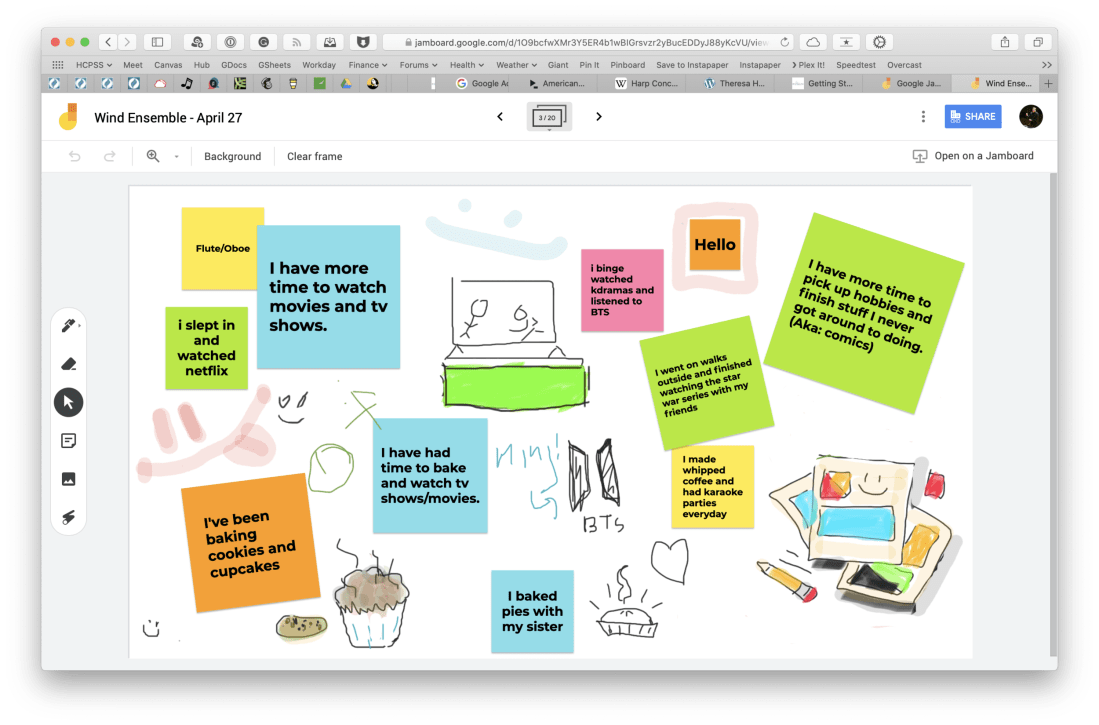
Jamboard is indeed excellent. I used it for a number of things last spring. One way we used it was to communicate and share what we had been up to in our free time when school started online.
<div class="
      image-block-outer-wrapper
      layout-caption-below
      design-layout-inline
      combination-animation-none
      individual-animation-none
      individual-text-animation-none
    ">


    <figure class="
          sqs-block-image-figure
          intrinsic
        " style="max-width:2500px">


      <div class="image-block-wrapper">
        <div class="sqs-image-shape-container-element


          has-aspect-ratio
        " style="position: relative;padding-bottom:65.95999908447266%;overflow: hidden">


            <img src="https://images.squarespace-cdn.com/content/v1/5595df9ce4b0ce9ff9ecd1a8/1596727567417-F9EYY0NWKQGJQAMN4WLR/CleanShot+2020-08-06+at+11.18.02%402x.png" alt="CleanShot 2020-08-06 at 11.18.02@2x.png" width="2500" height="1649" style="display:block;object-fit: cover;width: 100%;height: 100%;object-position: 50% 50%" loading="lazy">

        </div>
      </div>


      <figcaption class="image-caption-wrapper">
        <div class="image-caption"><p class="">I used this Jamboard our first day of online learning to ask students how they had been spending their extra time at home. Each section of the band had a page of the digital whiteboard to edit.</p></div>
      </figcaption>


    </figure>


</div>
Another way we used it was as an adjudication tool for providing ourselves feedback on our virtual ensemble video progress. You can see a brief snippet of that process in the middle of my How to Make a Virtual Band video, below.
Go and check out Theresa’s post, and all of her fine work at Off The Beaten Path Music. Spoiler: She is my podcast guest this week. Jamboard is just one of the many awesome tools and online teaching strategies we talk about. I learned a ton from her. That episode should be published tomorrow. Stay tuned!









 Music Ed Tech Talk
You must be logged in to post a comment.