Introducing Apple Invites, a new app that brings people together – Apple

New app from Apple. I like the fun design, but I wish it leaned more toward the streamlined scheduling approach of Calendly rather than the invitation-style feel of Evite.

Introducing Apple Invites, a new app that brings people together – Apple:

Apple today introduced Apple Invites, a new app for iPhone that helps users create custom invitations to gather friends and family for any occasion. With Apple Invites, users can create and easily share invitations, RSVP, contribute to Shared Albums, and engage with Apple Music playlists. Starting today, users can download Apple Invites from the App Store, or access it on the web through icloud.com/invites. iCloud+ subscribers can create invitations, and anyone can RSVP, regardless of whether they have an Apple Account or Apple device.

Keep reading here…CleanShot 2025-02-04 at 14.52.16@2x.

Apple in 2024: The Six Colors report card

CleanShot 2025-02-04 at 14.48.06@2x.

As someone who uses and thinks about Apple computers quite a lot, this read from Six Colors is always interesting.

Apple in 2024: The Six Colors report card – Six Colors:

It’s time for our annual look back on Apple’s performance during the past year, as seen through the eyes of writers, editors, developers, podcasters, and other people who spend an awful lot of time thinking about Apple. The whole idea here is to get a broad sense of sentiment—the “vibe in the room”—regarding the past year. (And by looking at previous survey results, we can even see how that sentiment has drifted over the course of an entire decade.)

This is the tenth year that I’ve presented this survey to my hand-selected group. They were prompted with 14 different Apple-related subjects, and asked to rate them on a scale from 1 (worst) to 5 (best) and optionally provide text commentary per category.
Keep reading here…

If you ask me, here’s how I’d rate Apple right now:

  • Mac: B – Mac hardware is better than ever, but macOS is cluttered with intrusive privacy popups. I’ve never found the operating system more distracting or off-putting.

  • iPhone: B – Battery life on my iPhone 16 Pro Max isn’t as good as my last phone, but I’m loving the new camera button for quick shots of my kid.

  • iPad: C – The latest iPads are great refinements of the 2018 iPad Pro design, but the software remains ok at lots of things, and not a great computer. Just put macOS on it.

  • Wearables: C – AirPods 4 and the new health features in AirPods Pro 2 are highlights, but the Vision Pro is a miss. It’s the first new Apple product category I haven’t felt tempted to buy… ever?

  • Watch: C – I love the Apple Watch, but OS updates and widgets feel half-considered. I never know whether I’ll see my watch face or the widget screen when I glance at my wrist. The Siri watch face and developer API seem abandoned, and Apple needs to figure out how to bring back the blood oxygen sensor in the U.S. before I consider upgrading.

  • Home: E – No meaningful updates. The Apple Home ecosystem remains unreliable, and the smart home industry still feels as chaotic as it did in 2019.

  • Apple TV: D – It’s odd to rate this so low because it’s still the best streaming box by very far, but Apple rarely updates the OS or expands its potential. There’s so much more I’d love them to do.

  • Services: C – Apple TV+ is decent, the news and game subscriptions are forgettable, and iCloud is passable but still not rock-solid.

  • Hardware Reliability: A – If there’s one thing Apple still nails, it’s hardware reliability.

  • Developer Relationship: E – Watching Apple handle EU regulations this past year has made it clear: their business practices hurt developers and users alike. It appears that any real improvement will require regulation.

  • World Impact: E – Given how much Apple prioritizes profit over progress in personal computing, it’s hard not to see them as more of a force for harm than good these days.

Holiday Gift Guide 2023, with David MacDonald

Robby and David discuss their current computing devices, favorite gift ideas, and lament the use of Microsoft Teams.  

Subscribe to the Blog…

RSS | Email Newsletter

Subscribe to the Podcast in…

Apple Podcasts | Overcast | Castro | Spotify | RSS

Support Music Ed Tech Talk

Become a Patron!

Buy me a coffee

Thanks to my sponsors this month, Scale Exercise Play-Along Tracks.

Show Notes:

Books

Grading for Growth

Critique is Creative

unGrading

On Music Theory

Software/Services

Audio Hijack

1Password

Things

Farrago

Affinity Apps – Designer / Photo / Publisher

Musio

Chat GPT Plus

Gadgets

Anker 3-in-1 Cube with MagSafe

Anker PowerCore MagGo

Material Dock

AirTags

Hidrate smart water bottle and Ember smart mugs

Games

Hori Split Pad Pro

Super Mario Bros Wonder

Elden Ring

Baldur’s Gate 3

Dave the Diver

Steam Deck

Pens, Notebooks, Misc.

Mark One

Mark Two

Mark Three

SideKick Notepad

Studio Neat Pen Tray

LightDims

App of the Week:

Robby – Narwal 2

David – Sports Alerts / Fotmob

Music of the Week:

Robby – Braxton Cook: Somewhere In Between

David – Darcy James Argue: Dynamic Maximum Tension

Tech Tip of the Week:

Robby – Use things as they are designed to be used

David – LightDims  

Where to Find Us:

Robby – Blog | Book

David – Website

Please don’t forget to rate the show and share it with others!

New Software Coming from Apple

Tim Chaten, host of the iPad Pros podcast, joins the show to talk about Apple’s announcements at their WWDC Keynote this month.

Subscribe to the Blog…
RSS | Email Newsletter

Subscribe to the Podcast in…
Apple Podcasts | Overcast | Castro | Spotify | RSS

Support Music Ed Tech Talk

Become a Patron!

.bmc-button img{height: 34px !important;width: 35px !important;margin-bottom: 1px !important;box-shadow: none !important;border: none !important;vertical-align: middle !important;}.bmc-button{padding: 7px 15px 7px 10px !important;line-height: 35px !important;height:51px !important;text-decoration: none !important;display:inline-flex !important;color:#ffffff !important;background-color:#000000 !important;border-radius: 5px !important;border: 1px solid transparent !important;padding: 7px 15px 7px 10px !important;font-size: 20px !important;letter-spacing:0.6px !important;box-shadow: 0px 1px 2px rgba(190, 190, 190, 0.5) !important;-webkit-box-shadow: 0px 1px 2px 2px rgba(190, 190, 190, 0.5) !important;margin: 0 auto !important;font-family:'Arial', cursive !important;-webkit-box-sizing: border-box !important;box-sizing: border-box !important;}.bmc-button:hover, .bmc-button:active, .bmc-button:focus {-webkit-box-shadow: 0px 1px 2px 2px rgba(190, 190, 190, 0.5) !important;text-decoration: none !important;box-shadow: 0px 1px 2px 2px rgba(190, 190, 190, 0.5) !important;opacity: 0.85 !important;color:#ffffff !important;}Buy me a coffeeBuy me a coffee

Thanks to my sponsors this month, Scale Exercise Play-Along Tracks.

Show Notes:

Where to Find Us:
Robby – Twitter | Blog | Book
Tim Chaten – Twitter | Website

Please don’t forget to rate the show and share it with others!

What’s on my desk?

This post now features a complimentary podcast episode. Listen and subscribe!

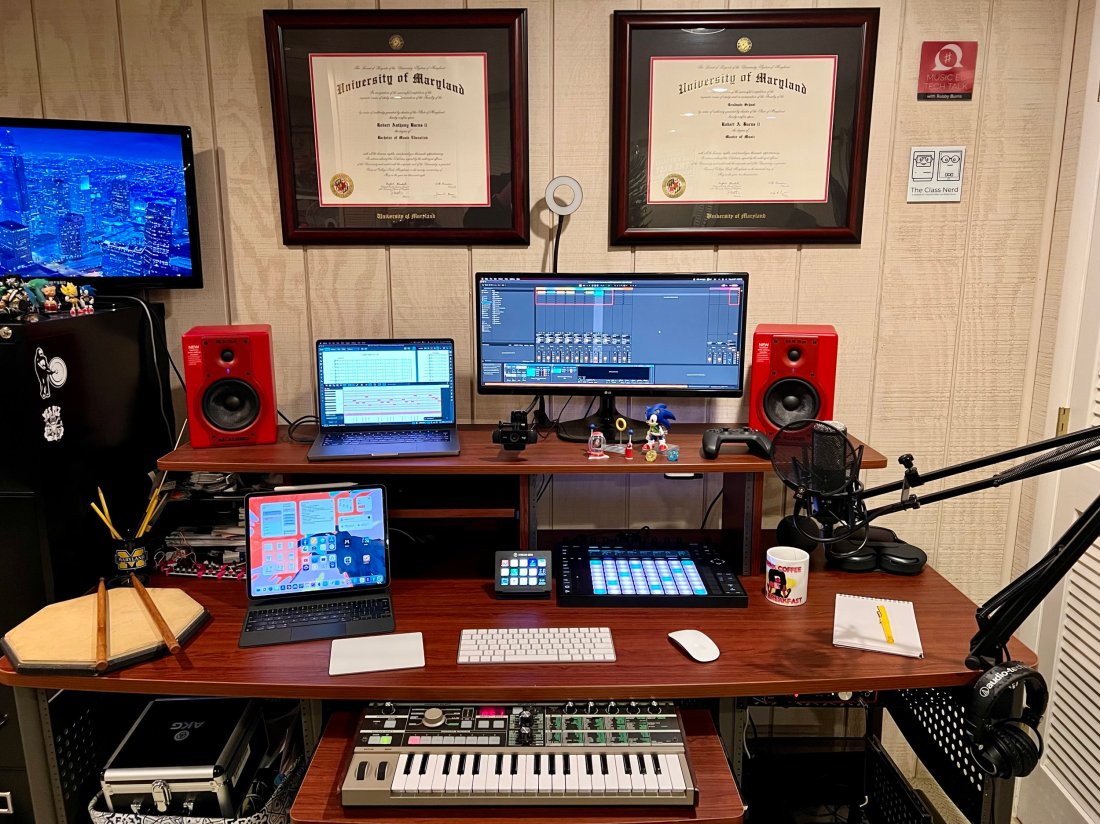
Earlier this year, I wrote a guest post for the Club MacStories newsletter showing off all the technology on my desk. With permission from the editors, I am cross-posting that below.

Image.jpeg

This desk is in my home music studio in Maryland. I run a private percussion teaching studio out of this space and produce my blog/podcast Music Ed Tech Talk.

Image.jpeg

My 14″ MacBook Pro is the core of my computing life. It goes with me everywhere, from this desk to my day job as a middle school band director. I teach out of four different classrooms. USB-C hubs at all of my desks allow me to have distinctive hardware setups specific to each room while maintaining continuity through the consistency of my macOS settings and apps.

My secondary monitor is an LG Ultra Wide. I don’t love it. I originally got it as a cheap way to interact with my Mac mini (dominantly used to serve up Plex content and run a Homebridge server.) I have phased out the Mac mini and hope to one day replace this monitor with something nicer now that it is used with the MacBook.

Image.jpeg

When my school district moved to virtual learning last year, I wanted to upgrade my webcam. The Logitech C920 was one of the most popular options I was coming across, and it hasn’t let me down yet. I have a snake arm from Amazon (link) that allows me to easily adjust the angle of the camera and the ring light behind it. The arm can bend the camera down to face the surface of my desk and show what my hands are doing during virtual classes, presentations, and live streams.

Image.jpeg

These M-Audio BX5a monitors were on sale ten years ago, presumably because red is a less popular color than black. I actually kind of like having an accent color. They sound balanced enough to reference the diverse musical projects I edit. They produce enough output for my students to jam along to recordings on drum set.

Because the studio monitors are my primary sound output, the HomePod mini is used mainly for controlling Siri. I often ask it to turn on the baseboard heaters (with the Mysa HomeKit thermostat), the lights, and a red light outside the door to let my family know if I’m recording.

Image.jpeg

The Focusrite Scarlet 6i6 is my current audio interface. It has just enough ins and outs to plug my MIDI and audio input devices into my computer while outputting sound to the studio monitors. I don’t currently do any fancy recording down here beyond my podcast and student audition tapes (which only require stereo recording).

Image.jpeg

The AKG P420 is my favorite mic for generalized recording in its price range. It’s a resonant and balanced condenser microphone. I honestly think it compares to some microphones up to double the price. I use it primarily for virtual class, presentations, podcasting, and in a pair to record student audition tapes in stereo.

My Audio Technica headphones are pretty old and junky (I couldn’t even find a link to this model online), but their long life speaks to the quality of AT’s gear. I sometimes plug my AirPods Max into the Scarlet if I am already wearing them.

Image.jpeg

My Lamy Safari Fountain Pen and Rhodia notebook are my entry point into the world of better-than-average writing tools, and I am open to learning more!

Image.jpeg

I love the feel and simplicity of Apple’s Magic Keyboard, Trackpad, and Mouse. It took some time to learn to use the trackpad on the left. Still, it gives me a powerful workflow where I can quickly make refined edits in audio software by zooming in and out of the project with my left hand while precisely manipulating content with the mouse.

iVBORw0KGgoAAAANSUhEUgAAC50AAAjwCAYAAAAKgq9xAAAACXBIWXMAAAsTAAALEwEAmpwYAAAM 2.png

I love my 12.9″ iPad Pro! Sometimes I use it as a laptop at home and work. In my studio, I usually rip off the tablet and read full-sized sheet music on it using the forScore app. I also depend on the Tonal Energy Tuner, which is the most powerful app of its kind on the App Store and does not currently have a Mac version.

Image.jpeg

My Ableton Push 2 works primarily as a control surface for Ableton Live. It is a new addition, and I am overwhelmed by its potential. Ableton Live is a very advanced application, and the Push allows you to control almost all of its features with tactile, performable knobs and buttons. It makes the software feel like an instrument. You can use it to record note input, manage the tempo, trigger loops, edit samples, and more!

CleanShot 2022-01-27 at 17.32.32.png

I play with music production for fun, but I also use the Push as a supercharged metronome when teaching private students. It allows me to get my eyes off the computer screen and focus more on the teaching because all the buttons can manipulate the app even when it isn’t in the foreground.

Image.jpeg

I use a Stream Deck for all the same reasons MacStories readers might find it useful- live streaming, Shortcuts, and other automation. I also use it to navigate the deep menus and feature sets of Dorico, a music notation application.

CleanShot 2022-01-27 at 17.51.41.png

Notation Central has pre-built Stream Deck profiles for major music notation apps available on their website (link).

Image.jpeg

The MicroKorg is a fun little synth that can be highly programmed to produce absolutely otherworldly audio. I also use it for MIDI note entry in digital audio workstations and music notation apps.

Image.jpeg

My electronic reference piano is a Korg Concert C-150, which I also use for MIDI note input. It’s an electric upright piano from the 80s with the legs chopped off. A high school was going to throw it away in the early 2000s before I asked if I could have it instead. I like it because it has a flat surface for putting stuff on (like other keyboards).

On top of the Korg is a Roland Octopad SPD-30. This is a great electronic drum sampler. It has an excellent library of its sounds and can trigger note input in music software using my most comfortable input method (drum sticks).

Next to the Octopad is my Yamaha Harmony Director. It’s a keyboard that plays sustained tuning drones and can easily switch between different tuning systems. The drones can be played through speakers, or in my case, be used to create play-along practice material for students (link).

Apple TV. I wish I could say I use this for something other than playing Sonic the Hedgehog while my kid naps.

Instruments! The desk is a fun command station, but it’s really only the hub of my digital productivity and creativity. The real bread and butter of my professional life are the instruments I play and teach. Depicted here are my vibraphone, marimba, timpani, drum sets, snare drum, wind instruments, and other fun!

Image.jpeg

Image.jpeg

Image.jpeg

Image.jpeg

Image.jpeg

Image.jpeg

PlayScore, with Anthony Wilkes

Anthony Wilkes joins the show to talk about PlayScore 2, a sheet music scanning app. Anthony is the CEO of PlayScore, and in the conversation we talked all about what it can do, the challenges of developing music scanning software, and practical uses for teachers and students.

Patreon supporters receive bonus conversation about machine learning, the future of score scanning software, and automation.

Subscribe to the Blog…
RSS | Email Newsletter

Subscribe to the Podcast in…
Apple Podcasts | Overcast | Castro | Spotify | RSS

Support Music Ed Tech Talk

Become a Patron!

.bmc-button img{height: 34px !important;width: 35px !important;margin-bottom: 1px !important;box-shadow: none !important;border: none !important;vertical-align: middle !important;}.bmc-button{padding: 7px 15px 7px 10px !important;line-height: 35px !important;height:51px !important;text-decoration: none !important;display:inline-flex !important;color:#ffffff !important;background-color:#000000 !important;border-radius: 5px !important;border: 1px solid transparent !important;padding: 7px 15px 7px 10px !important;font-size: 20px !important;letter-spacing:0.6px !important;box-shadow: 0px 1px 2px rgba(190, 190, 190, 0.5) !important;-webkit-box-shadow: 0px 1px 2px 2px rgba(190, 190, 190, 0.5) !important;margin: 0 auto !important;font-family:'Arial', cursive !important;-webkit-box-sizing: border-box !important;box-sizing: border-box !important;}.bmc-button:hover, .bmc-button:active, .bmc-button:focus {-webkit-box-shadow: 0px 1px 2px 2px rgba(190, 190, 190, 0.5) !important;text-decoration: none !important;box-shadow: 0px 1px 2px 2px rgba(190, 190, 190, 0.5) !important;opacity: 0.85 !important;color:#ffffff !important;}Buy me a coffeeBuy me a coffee

Thanks to my sponsors this month, Scale Exercise Play Alongs.

Show Notes:

App of the Week:
Robby – Audio Hijack 4
Anthony – Dorico

Music of the Week:
Robby – Listen to This – Audio Guide
Anthony – On BBC’s first ever live broadcast of Beatrice Harrison, featuring cellist Clare Deniz

Tech Tip of the Week:
Robby – Universal Control
Anthony – iPad multitasking

Where to Find Us:
Robby – Twitter | Blog | Book
Anthony – Twitter | Website

Please don’t forget to rate the show and share it with others!

#43 – iOS 15 and macOS Monterey, with Paul Shimmons

Paul Shimmons returns to the show to talk about the features in Apple’s new operating system updates, and how we plan to use them.

Patreon subscribers get a bootleg version of the recording, without the ads, and including bonus conversation about notation apps on iPad.

Subscribe to the Blog…

RSS | Email Newsletter

Subscribe to the Podcast in…

Apple Podcasts | Overcast | Castro | Spotify | RSS

Support Music Ed Tech Talk

Become a Patron!

Buy me a coffee

Show Notes:

Tuesday, 26 Oct 2021 14:10:49.jpeg

App of the Week

Paul – Ultimate Drill Book

Robby – Sofa

Music of the Week

Paul – Powerhouse – White Heart

Robby – Cory Henry – Best of Me

Where to Find Us:

Robby – Twitter | Blog | Book

Paul – Twitter | Website

Please don’t forget to rate the show and share it with others!

Yesterday’s iPhone Event

I’ve already been getting texts from colleagues asking about yesterday’s iPhone event so I thought I would put some thoughts down here.

I get why this event has everyone’s curiosity levels at 100 every year. Everyone needs a phone. And they want to know which one will be their next. The truth is, iPhones are at a point where they are going to continue to slowly iterate year over year. Major changes are rare.

Every year Apple makes better iPhones than the previous year. In the case of this year, the most notable improvements are to the camera. If you have been holding on to your phone for 2-3 years, this will be a worthy upgrade.

There are four options: iPhone 13, iPhone 13 mini, iPhone 13 Pro, iPhone Pro Max.

Respectively, those could be explained as New Phone (Medium), New Phone (Small), Better New Phone (Medium), Better New Phone (Big).

I can’t tell you which phone to buy but chances are the New Phone is probably good enough for your needs, and what it will really come down to is size and how ready you are to upgrade. The camera is always better on the Pro models, and I have a toddler, so I am getting that model. While some years there is a better camera in the largest sized model, this is not the case this year, so iPhone Pro 13 (non-Max) it is for me. My wife will be getting a mini, which is a really lovely phone if you can stomach the low battery life.

The most attractive thing announced yesterday was probably the new iPad mini that has the new design of the iPad Pros (with flat edges and support for the second-generation Apple Pencil). If you have room for an iPad mini in your life, there is no question, you should get it. This device looks really slick. I am still riding out my iPad Pro 12.9 inch from 2018 and plan to do so for a while, though I am curious about going to the 11-inch pro model sometime down the road. I realize I might miss the larger size for sheet music reading, but I was doing it before there was ever a 12.9-inch size, and I really miss the feeling of holding the smaller size for things like reading and watching video content on the couch. The 12.9 has very much a laptop feeling in my experience. Owning a 12.9 and a mini is tempting but it seems cumbersome to charge and keep up with two iPadOS devices.

There is also a new Apple Watch and it looks like the most boring update ever unless you have a 2+-year-old Apple Watch in which case it will be a really strong update.

I also may consider the new MagSafe wallet attachment that has Find My app integration considering I just lost my wallet at school over as recently as this past weekend.

Creating Rehearsal Automations and Workflows with iPadOS 15

Apple’s forthcoming fall operating system updates became available in a public beta on Wednesday. I like to stay up to date on what I will do with my computers each fall and these new updates feature a ton of productivity boosts. Naturally, I chose to dive in.

For now, I have installed just the iOS 15 beta on my iPad. It is a low-stakes device for me, and I am most dependent on it for using forScore in rehearsal and concerts (the official releases will have shipped by my next concerts). I have also read that these betas are relatively stable, but anything is possible, so if you do this (which I don’t recommend), make sure you backup your data!

There are a few productivity features I immediately began experimenting with.

Widgets on the Home Screen

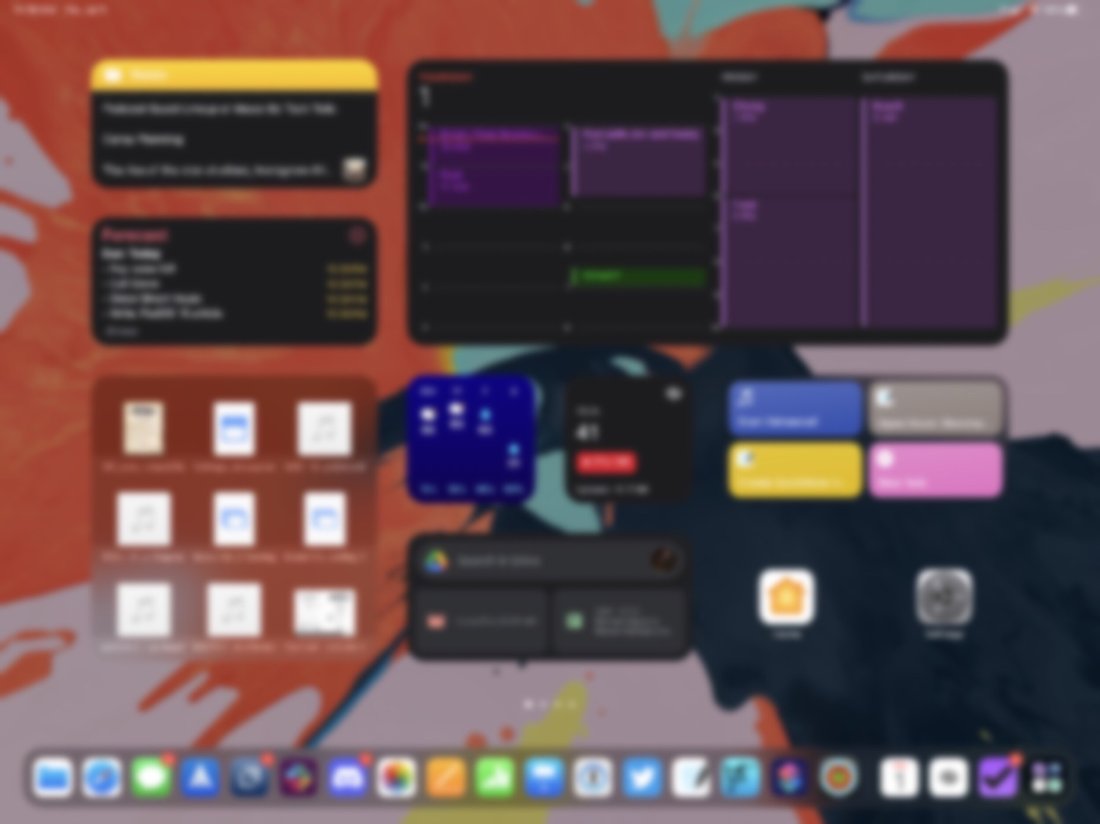
The iPad now allows you to put widgets anywhere on the home screen. I am trying an experiment that strips most of the apps off the main page and instead makes a productivity dashboard. It’s pretty nice!

<div class="
      image-block-outer-wrapper
      layout-caption-below
      design-layout-inline
      combination-animation-none
      individual-animation-none
      individual-text-animation-none
    ">


    <figure class="
          sqs-block-image-figure
          intrinsic
        " style="max-width:2500px">


      <div class="image-block-wrapper">
        <div class="sqs-image-shape-container-element


          has-aspect-ratio
        " style="position: relative;padding-bottom:74.95999908447266%;overflow: hidden">


            <img src="https://images.squarespace-cdn.com/content/v1/5595df9ce4b0ce9ff9ecd1a8/1625151920936-VH8FOKESDN1C33SDNQLC/public.png" alt="" width="2500" height="1874" style="display:block;object-fit: cover;width: 100%;height: 100%;object-position: 50% 50%" loading="lazy">

        </div>
      </div>


    </figure>


</div>

Focus Modes

You can design your own contextual Do Not Disturb modes on iOS 15. Each focus allows you to decide…

  1. Which apps can be used

  2. Which contacts can notify you

  3. What your home screen looks like

  4. And more

I set up the default Personal and Work focus modes that come built into the OS. My thinking for these is that Personal focus will be similar to regular Do Not Disturb but will only allow close family to text me. Work focus I set up to only allow notifications from email and Slack and limited it to only apps I use for doing logistic desk work and advancing projects.

Here is where things get fun. I created a Rehearsal Focus mode that shuts off access to all apps except the ones I use in rehearsal. It only allows members of my music team to reach me. It is designed to help me stay focused while teaching.

I haven’t done much with customizing the home screen in these various modes of focus yet, but I imagine the automation potential to be huge.

<div class="
      image-block-outer-wrapper
      layout-caption-below
      design-layout-inline
      combination-animation-none
      individual-animation-none
      individual-text-animation-none
    ">


    <figure class="
          sqs-block-image-figure
          intrinsic
        " style="max-width:2500px">


      <div class="image-block-wrapper">
        <div class="sqs-image-shape-container-element


          has-aspect-ratio
        " style="position: relative;padding-bottom:74.95999908447266%;overflow: hidden">


            <img src="https://images.squarespace-cdn.com/content/v1/5595df9ce4b0ce9ff9ecd1a8/1625149539972-0GT4O7BPTECVE89J67ED/IMG_3229.png" alt="" width="2500" height="1874" style="display:block;object-fit: cover;width: 100%;height: 100%;object-position: 50% 50%" loading="lazy">

        </div>
      </div>


    </figure>


</div>

New Shortcuts Actions

A TON of new Shortcuts actions are available to all operating systems (and the Mac is getting the Shortcuts app in this update!)

Shortcuts isn’t as powerful in my work life as it is in my personal life because most of my music and education apps have insufficient (or no) Shortcuts support. But that doesn’t mean I can’t trim tons of time eliminating the friction of iPad multitasking.

In most rehearsals, I open the same apps and files on screen. Now, with a one-tap Shortcut, I can have my iPad go into the new Rehearsal Focus mode, open forScore on the left, GoodNotes on the right (with a blank new note I can use as a digital white board), and a Tonal Energy Tuner app in Slide-Over. Now, if only forScore would add Shortcuts support so I can program it to open a specific score!

See it in action below. Then imagine how long it would take you to set up manually while you have 60-100 band kids entering the room and demanding your attention.

<div class="sqs-video-wrapper" data-provider-name="YouTube" data-html="

“>

Here is a link to a copy of this Shortcut that you can tweak to your own liking.