David William Hearn (composer, arranger, producer and creator of StaffPad) joins the show to talk about StaffPad, how teachers can use it, and the thought process behind designing great iPad software.
Patreon supporters get bonus discussion about recent tv, movies, and music we have been engaging with. Thanks to my sponsors this month, Scale Exercise Play-Along Tracks.
Prior to this release, you could open Dorico projects from the file system of the iPad, but then a duplicate copy was saved inside of the Dorico app, which would not save back to the same location without first exporting that duplicate copy back to the same place, resulting in two copies. With version 2.2 your files stored in the Files app (or your iCloud/Dropbox/Google Drive by extension), will open directly from the location you have saved them on another device, and save them back to that location when you close the project. These projects still conveniently appear in the Open Recent page of the Hub when you launch Dorico.
<div class="
      image-block-outer-wrapper
      layout-caption-below
      design-layout-inline
      combination-animation-none
      individual-animation-none
      individual-text-animation-none
    ">


    <figure class="
          sqs-block-image-figure
          intrinsic
        " style="max-width:2973px">


      <div class="image-block-wrapper">
        <div class="sqs-image-shape-container-element


          has-aspect-ratio
        " style="position: relative;padding-bottom:76.95929718017578%;overflow: hidden">


            <img src="https://images.squarespace-cdn.com/content/v1/5595df9ce4b0ce9ff9ecd1a8/5f61606c-1117-4463-a3b6-4c75ca0afe39/iVBORw0KGgoAAAANSUhEUgAAC50AAAjwCAYAAAAKgq9xAAAACXBIWXMAAAsTAAALEwEAmpwYAAAM.png" alt="" width="2973" height="2288" style="display:block;object-fit: cover;width: 100%;height: 100%;object-position: 50% 50%" loading="lazy">

        </div>
      </div>


      <figcaption class="image-caption-wrapper">
        <div class="image-caption"><p class="">Once opened, Dorico files will generate a thumbnail preview of your project contents, visible right from within the Document Picker.</p></div>
      </figcaption>


    </figure>


</div>
Open in Place has increased my use of Dorico on iPad immeasurably. On the Mac, I keep my projects in iCloud Drive by default, so now I simply open them from that same location on iPad, edit, and exit out of the project to save it back to the same location.
Syncing has been reliable throughout my testing. Dorico does not recommend having the same file open on two devices at the same time as you may get unintended duplicate copies. As Daniel mentioned in the episode, further iCloud support is coming that will improve Dorico’s handling of this problem, at least if your files are kept in iCloud Drive.
<div class="
      image-block-outer-wrapper
      layout-caption-below
      design-layout-inline
      combination-animation-none
      individual-animation-none
      individual-text-animation-none
    ">


    <figure class="
          sqs-block-image-figure
          intrinsic
        " style="max-width:2973px">


      <div class="image-block-wrapper">
        <div class="sqs-image-shape-container-element


          has-aspect-ratio
        " style="position: relative;padding-bottom:76.95929718017578%;overflow: hidden">


            <img src="https://images.squarespace-cdn.com/content/v1/5595df9ce4b0ce9ff9ecd1a8/99f0a0d7-95ca-425a-bb46-92bc82dad906/iVBORw0KGgoAAAANSUhEUgAAC50AAAjwCAYAAAAKgq9xAAAACXBIWXMAAAsTAAALEwEAmpwYAAAM.png" alt="" width="2973" height="2288" style="display:block;object-fit: cover;width: 100%;height: 100%;object-position: 50% 50%" loading="lazy">

        </div>
      </div>


      <figcaption class="image-caption-wrapper">
        <div class="image-caption"><p class="">With Split View multitasking, I can now do my favorite workflow on iPad, which is to have forScore opened on one half and Dorico on the other. This allows for me to easily reference my music library when arranging music, recreating parts, or designing practice resources based on the literature.</p></div>
      </figcaption>


    </figure>


</div>
Recent iPad feature updates have also included Split View multitasking and the ability to preview thumbnails of your scores in the Files or Finder app, which can be previewed using Quick Look. Between “Open in Place,” the multitasking, and thumbnails, my top Dorico feature requests have been met, and the iPad version has become a fully integrated part of my cloud-based computing workflow.
<div class="
      image-block-outer-wrapper
      layout-caption-below
      design-layout-inline
      combination-animation-none
      individual-animation-none
      individual-text-animation-none
    ">


    <figure class="
          sqs-block-image-figure
          intrinsic
        " style="max-width:2502px">


      <div class="image-block-wrapper">
        <div class="sqs-image-shape-container-element


          has-aspect-ratio
        " style="position: relative;padding-bottom:77.318115234375%;overflow: hidden">


            <img src="https://images.squarespace-cdn.com/content/v1/5595df9ce4b0ce9ff9ecd1a8/9f97c5a9-5e50-47dc-aeb0-31096f29470e/CleanShot+2022-04-13+at+09.47.25%402x.png" alt="" width="2502" height="1934" style="display:block;object-fit: cover;width: 100%;height: 100%;object-position: 50% 50%" loading="lazy">

        </div>
      </div>


      <figcaption class="image-caption-wrapper">
        <div class="image-caption"><p class="">Project contents now have preview thumbnails. You can initiate Quick Look by pressing the space bar. This will allow you to preview the document more fully without opening the file.</p></div>
      </figcaption>


    </figure>


</div>
You can read more about Dorico 2.2 in their blog post.
This week on Music Ed Tech Talk I am joined by Joe Plazak, Principal Software Engineer and Designer of Sibelius, to talk all about their summer iPad release.
Listen below or in the podcast app of your choice! I look forward to writing more about Sibelius for iPad down the road.
Episode Description: Joe Plazak (Principal Software Engineer and Designer) joins the show to talk about Sibelius for Mobile and their new iPad app.
This episode is sponsored by Blink Session Music: Because Virtual Lessons Are More Than a Video Chat.
Backstage Access Patreon Subscribers can listen to extended discussion including Joe Plazak’s Book of the Week and some of my reflections on writing Digital Organization Tips for Music Teachers.
Musical ideas come when you least expect them and are often gone in a flash. With Cubasis, you always have your mobile DAW with you, because Cubasis is available for all your mobile devices. iPad? Check. iPhone? Of course! Android smartphone and tablet? Sure thing! And now we bring one of the fastest, most intuitive and complete mobile DAWs to the world of Chromebooks, too. Welcome Google (again)! Welcome Chrome OS! Cubasis is ready to capture your ideas whenever and wherever you are.
I am pleased to be a guest on the iPad Pros podcast this week to talk about Dorico and Sibelius for iPad.
Tim Chaten does an awesome job with this show and has a background in composition. If you want to spend quite a bit of time with us and hear my thoughts on these two professional scoring programs for iPad, give it a listen!
And just like that, Sibelius has their own iPad app. This comes after yesterday’s news that Dorico has released a desktop-class iPad app. If you want to learn more about that, click that link. I have some early first impressions, a video, and a podcast interview with Product Marketing Manager Daniel Spreadbury.
I don’t have much to say about Sibelius coming to iPad because I didn’t have any access to it before today, and because it hasn’t been my primary notation editor for years. But from 30 minutes of playing with it, it is pretty powerful and will certainly offer competition in this space, which is good! I want pro iPad apps to get better. The thing that is most impressive about it is how well adapted to the iPad it appears. It has multitasking, Files app integration, and some really intuitive touch/Apple Pencil touch gestures for note input that offer a new kind of ease and accuracy I wasn’t quite expecting.
You can watch a First Look video from Scoring Notes below and read their review here. You can download Sibelius for iPad here.
Dorico for iPad is out today! You can read their announcement here. It’s a desktop-class adaptation, which includes most of the features I need for my everyday work as a music teacher. I am beyond excited that a major professional scoring app has come to the iPad for two reasons:
I depend on iOS for getting much of my work done. There are still apps and workflows that require me to take out my Mac, and I am delighted whenever the release of a professional iPad app lessons these occurrences.
Our niche professional corner of the world is receiving legitimate, pro-featured, software for iPadOS, a market that is still light on “pro” software, even from Apple themselves (like, for real… where is Logic Pro on iPad?). While many “pro” iPad apps are companion experiences to bigger desktop versions, Dorico brings a whole lot of the power from its desktop app to its mobile version, proving that the iPad can be every bit as “pro” as its name suggests.
Dorico for iPad’s free tier is similar to their free desktop offering Dorico SE, and an in-app subscription adds features comparable to their Dorico Elements version. The iPad app has new features, many of which are optimizations for touch, including several new input methods (piano, fretboard, drum pads, and a new Key Editor). Dorico for iPad doesn’t do everything. Serious composers and power users might need the desktop for some things. For me, a middle school band director, it will fill most of my iOS composing needs.
There are some quirks due to Dorico not supporting features that make iPad apps feel like iPad apps: full Apple Pencil support, responsive touch gestures, file system integration, Magic Keyboard/trackpad support, and multitasking are examples of this. While there is room for improvement, it’s bold for the Dorico team to pack a desktop-class experience into the first version. I am thankful for their hard work and wish the Dorico team future success on this project.
Video
Watch Dorico for iPad in action.
Some Musings on Professional iPad Apps
When my long-time favorite iPad app (forScore) came to the Mac earlier this year, I wrote about it.
While forScore was one of the few remaining iPad apps I wanted on Mac, there are, similarly, plenty of Mac apps I would still love to see on iPad.
One could argue that with the latest iPad hardware (featuring M1 chips), there is no excuse for professional apps not to run on the platform. I agree! The iPad has more than enough processing power, all of the necessary input devices (if you have a keyboard and mouse), and even some things that the Mac doesn’t have (like touch support and the Apple Pencil).
The issue of why the iPad lacks pro apps is too broad to cover here, but it has much to do with how Apple has positioned iPadOS and the App Store model over the past 10 years. It is becoming easier than ever to make a cross-platform app, but this doesn’t change the fact that there are still some fundamentally dissimilar aspects of developing for iOS and macOS. The arguably bigger problem is that the App Store (even with fewer sandboxing limitations in recent years) is hostile towards the exact kind of developers who cater to niche professionals like composers and music teachers.
For example, companies who make digital audio workstations and notation editors have traditionally charged prices in the multiple hundreds of dollars, costs which the mobile market has decided is not acceptable. Such developers also offer things like crossgrade/upgrade/educational pricing, group licenses, and more. These are not feasible in the current-day App Store, and I think Apple is oblivious to keep calling the iPad Pro the iPad Pro while not providing more flexible App Store rules. This is not to mention that Apple hasn’t even brought their professional apps (Logic Pro, Final Cut Pro, and Xcode), to the iPad.
I am dependent on my iPad and prefer to work on it whenever possible. Its light form factor and simple operating system make me feel more nimble moving in and out of apps. Dorico has always been one of the reasons I have to take my Mac out of my bag when I am sitting on the couch wrapping up some school work late at night. Even though there are good score apps on iPad, the convenience of leaning back on the couch to get work done has been counterbalanced by needing to import and export XML files back and forth, just to get these apps to talk to Dorico on desktop.
It is within that context that I am pleased to say Dorico is available for iPad today. It’s the first of the major professional desktop scoring apps to be released on a mobile platform, and after just a few weeks of use, I can tell that it will become my primary notation editor on iOS.
I’m a Music Teacher
Because I am a music teacher, my opinions about scoring software are viewed through the lens of someone who does not depend on the entire feature set of Dorico, particularly engraving and playback. This means I usually need to get in and out of the program fast and that I am often performing tasks like writing scale exercises, reconstructing missing bass clarinet parts from my library, or adding percussion instruments to the score of a piece on our next concert. That said, I admire tools that empower me to work efficiently, and for notation, Dorico is that tool.
If you are looking for a professional composing perspective, and a more comprehensive feature overview, I recommend the Scoring Notes review of Dorico for iPad.
Dorico for iPad and Its Features
Dorico for iPad is an ambitious and stellar 1.0 that should make every developer of pro software take note and get to work.
The Dorico team has brought many of the core functions that make Dorico so powerful on Mac and Windows to the iPad version. All of the features I depend on are all there. It has keyboard input, powerful pop-overs, MIDI controller input, and all of the custom Notation and Layout Options that are available on desktop. It even has the same custom keyboard shortcut editor.
Dorico is available for free with a set of features very similar to their desktop offering Dorico SE. If you subscribe to the app through In-App Purchase, features are added which bring in line with the experience of using Dorico Elements.
Dorico for iPad has all of the modes you would expect: Setup, Write, Engrave, and Play. There is no Print mode and I don’t miss it. All of the export options I use regularly are conveniently accessed through a share button in the upper right corner of the application. Play mode supports third-party iOS plugins. This is certainly more limiting than desktop, because iOS doesn’t support traditional VSTs, but this is also not a feature I take advantage of anyway.
Dorico for iPad is so much Dorico that it is hard to write about it without reviewing the existing desktop versions, which is not something I have set out to do here. That said, it is worth noting some of the things that are added for touch, and some of the quirks that result from a desktop app being so faithfully reproduced on a touch-based tablet.
One of the things that makes Dorico on iPad feel so faithful to the desktop version is that computer keyboard input is nearly identical with a Magic Keyboard attached. Once I got acclimated to the small differences in the user interface, I comfortably began recalling all the same shortcuts and workflows I am used to.
Because this version is designed to be used without the keyboard attached, there are some added on-screen buttons for touch control. Extra toolbar buttons for things like delete, repeat, undo, redo, and moving the arrow keys, are all included.
A floating toolbar, which can be moved around on the screen, allows common note adjustments to be made by finger. This toolbar includes things like moving a selected note up/down, shifting a selection of notes right or left by a 16th note, etc…
Holding on the score with one finger and then dragging displays a rectangle on-screen that can select multiple elements of the score at once. And there are also some new methods of touch input:
An on-screen piano, which you can pan across and resize by dragging and pinching.
A fretboard for instruments like guitar.
Drum pads for percussion instruments (much more intuitive for writing drum set parts in my opinion.)
An integrated mixer which you can see right inside of Write mode.
A new Key Editor. I can best describe the Key Editor as a piano roll editing tool for the notes of your score. Users who are familiar with MIDI note editing in a digital audio workstation will love visualizing the notes of the staff as colorful rectangles. They can be dragged vertically to change pitch, horizontally to change the rhythm, and can be resized to adjust the duration. It is an intuitive way to work, particularly for touch.
Native Software
There will always be room for growth. What I want most from future iterations of Dorico on iPad can be best explained in the context of the forScore article I linked at the top of this post. forScore is a beloved app amongst musicians that is iPad-first but has recently been ported to the Mac through Apple’s Catalyst technology. My TL;DR in my forScore Mac review was basically to say that it’s amazing to have such an indispensable music app on Mac, even though it has some quirks relating to the fact that some iPad paradigms don’t translate to the Mac.
My Dorico first impressions are more or less the inverse of that statement. Dorico for iPad is desktop-class. What I’d like to see from it down the road is to become more iPad-native through taking advantage of common features on the platform. Dorico is written using Qt, a development platform that makes it easy to write one code base for Windows and Mac. This same development platform is what made it easier to bring Dorico to the iPad now, but for this same reason, I can understand that the team had their hands full prioritizing the features for the first version.
Now that the iPad Pro has excellent trackpad, keyboard, and mouse support, I don’t feel that different using it than I do my Mac in many instances. While Dorico’s “desktop-ness” is its greatest strength, its fluency makes the missing iPad-isms more apparent. Here are a few:
Dorico doesn’t have Apple Pencil support (with the exception of it imitating a touch in some circumstances).
Dorico does not work with the native File picker, which is to say that you can’t open a Dorico project from your Dropbox or iCloud Drive within the Files app, edit it, and then save it back to the original location. You must instead import it from within the Dorico app, which then makes a copy inside of the app. You can export it back to the original location you pulled it from, but don’t forget to delete the old copy! See an image below of OmniOutliner, a popular outlining app for iPad. When launched, it shows the same interface as the Files app. A document can be selected, edited, and saved back to the same location. I would love to see Dorico add this feature down the road.
Trackpad support isn’t native. Magic Keyboard users will note that two-finger swiping (which moves around the score in the Mac version) does nothing on iPad. Because the Magic Trackpad can simulate a finger, clicking and dragging with one finger will simulate the gesture of dragging the score around.
Dorico does not support multitasking features like Split View. This means that another app cannot share the screen at the same time unless it is in Slide Over mode which means it is a tiny, iPhone-sized, app that floats above Dorico and covers part of the information on the screen. One of my favorite workflows with notation software is to open it on half of the screen while referencing another score in forScore on the other half. The image below depicts forScore on screen at the same time as Dorico in Slide Over.
Elephants, Pencils, and Software Instruments
The obvious elephant in the room is StaffPad. StaffPad is not always included in conversations about major pro notation software (Sibelius, Finale, Dorico), but relative to the power of most iPad software in the App Store, it deserves to be a part of the conversation. I covered StaffPad here.
StaffPad feels very iPad-native and supports a premium design experience and numerous pro-features, like, for example, a store of top-of-the-line audio plugins within the app.
While the comparison to Dorico is fair, I also feel like StaffPad is aiming for a different experience. Sure, they will compete to some extent, but StaffPad is aiming at new innovative methods of input, and high-end audio output that is all intuitively integrated into the same package. For example, StaffPad features Apple Pencil gestures for note input, exclusively, and a forthcoming feature will listen to you play an instrument in the microphone and transcribe you in real-time. StaffPad’s third-party software instruments sound great and require little fuss to set up. It’s all a very iPad-first experience. But it’s an iPad-only experience (unless you are also using it on Windows).
The strength of Dorico on iPad is that you are getting much of the power of the desktop version, on iOS. This means that there are some quirks, but that you are ultimately less inhibited by what you can produce. Dorico’s Engrave mode allows you to get more customizable, better looking, scores and note input in the Write mode is just as easy to do with a computer keyboard or MIDI controller as it is on a desktop.
I do appreciate the novelty of writing scores with the Apple Pencil. It feels nice. In fairness to Dorico, I wanted to see if I am more efficient using this method. I took about 10 excerpts from my music teaching resource library (music I would use a notation editor for in real life) and timed myself recreating these excerpts into both StaffPad and Dorico.
Much like using the self-checkout lane of a grocery store, I “felt” faster in StaffPad, but I was about twice as fast at note entry using Dorico in every instance. I was also 100 percent sure that the note I input would be the note that appeared on the screen.
I appreciate that there is competition in this space, and I think that stylus input has a place in the future of mobile score software. But I have shifted most of my score work on iOS to Dorico, and will probably continue to do so in the future. It sure is great having another professional Mac app on iPad. Here’s to hoping that my other tools like Logic, Final Cut, and Descript are next in line.
Thanks Dorico team for an ambitious and excellent release. I am looking forward to years of updates.
forScore has long been my most essential iPad app, and one of the few apps I consider iPad-first. This is to say that it is an app that takes specific advantage of the iPad’s strengths (form factor, pencil support, paper-like display, direct touch input) and leverages them in a way that makes the iPad feel essential.
For the same reasons it is essential on iPad, it has seemed slightly less essential on the iPhone (small screen size is impractical) and Mac (similarly, the design is not easy for direct manipulation, annotation, portability, or sticking on a music stand).
Still, an app this useful screams to be used cross-platform! The more I moved my sheet music library from PDFs on my hard drive to forScore, the more I found I needed to be able to work with the same library structure on my other devices. An iPhone is small, but there are those moments when it is the only device on you and you want to reference something really quickly. In a moment that my iPad battery once failed, I did conduct a percussion ensemble rehearsal from forScore on the iPhone.
In the same way that the iPhone is sometimes useful for being always the one in your pocket, the Mac is also useful sometimes. For example, file management is way easier on a Mac. No matter how many Mac features the iPad adds (drag and drop, Files app, etc.), it is simply not as easy as the Mac. Yes, the iPad can technically do the same things as the Mac in this regard, but it’s slower and more cumbersome. Furthermore, most users know how to use the Finder on Mac but don’t know how to work with the Files app on iPad, even though it is mostly the same these days.
<div class="
      image-block-outer-wrapper
      layout-caption-below
      design-layout-inline
      combination-animation-none
      individual-animation-none
      individual-text-animation-none
    ">


    <figure class="
          sqs-block-image-figure
          intrinsic
        " style="max-width:800px">


      <div class="image-block-wrapper">
        <div class="sqs-image-shape-container-element


          has-aspect-ratio
        " style="position: relative;padding-bottom:75.125%;overflow: hidden">


            <img src="https://images.squarespace-cdn.com/content/v1/5595df9ce4b0ce9ff9ecd1a8/1625925617918-12I7KK37KZGE9QZ2BWRR/CleanShot+2021-07-10+at+09.28.40.gif" alt="It is actually possible to open forScore and the Files app side by side on the iPad. From there, you can drag and drop multiple files at once from one app to another." width="800" height="601" style="display:block;object-fit: cover;width: 100%;height: 100%;object-position: 50% 50%" loading="lazy">

        </div>
      </div>


      <figcaption class="image-caption-wrapper">
        <div class="image-caption"><p class="">It is actually possible to open forScore and the Files app side by side on the iPad. From there, you can drag and drop multiple files at once from one app to another.</p></div>
      </figcaption>


    </figure>


</div>
I’d like to note that a year of teaching (mostly) online has sent me “back to the Mac,” so to speak. The Mac’s efficiency in multitasking, as well as its ability to run streaming apps like OBS and Loopback, has positioned it as my primary work device. Streaming forScore to my iPad’s screen to my Mac using OBS and AirServer is great, but it’s fiddly, indirect, and kills my iPad battery. It has become so much more direct to have forScore running right on the Mac, in the same place my other work is already happening.
<div class="
      image-block-outer-wrapper
      layout-caption-below
      design-layout-inline
      combination-animation-none
      individual-animation-none
      individual-text-animation-none
    ">


    <figure class="
          sqs-block-image-figure
          intrinsic
        " style="max-width:1112px">


      <div class="image-block-wrapper">
        <div class="sqs-image-shape-container-element


          has-aspect-ratio
        " style="position: relative;padding-bottom:69.51438903808594%;overflow: hidden">


            <img src="https://images.squarespace-cdn.com/content/v1/5595df9ce4b0ce9ff9ecd1a8/1625925592095-E3Y17P6LRN6XUVQBSZWX/CleanShot+2021-07-10+at+09.30.44.png" alt="In video conferencing apps like Zoom, I can now share music on the screen with my students directly, thanks to forScore running on my Mac." width="1112" height="773" style="display:block;object-fit: cover;width: 100%;height: 100%;object-position: 50% 50%" loading="lazy">

        </div>
      </div>


      <figcaption class="image-caption-wrapper">
        <div class="image-caption"><p class="">In video conferencing apps like Zoom, I can now share music on the screen with my students directly, thanks to forScore running on my Mac.</p></div>
      </figcaption>


    </figure>


</div>
The wait is over. Actually, it has been over since the fall. With the launch of macOS 11 Big Sur, forScore has released a universal version of their app on the Mac App Store. This means that it will be a free download for those who have purchased the app on iPad.
Note: I wrote most of this review fairly soon after release. Its scope is therefore more like what I would call “First Impressions.” I have been using it all school year long by the time I am actually posting this and think it is now more accurate to call it a review even though I will not be covering every detail comprehensively in the words below.
The goal of this review is to cover what’s unique about the Mac experience. If you want to learn more about forScore’s features, check out this excellent review by David MacDonald
For more on this subject (and speaking of David MacDonald), listen to my podcast review of forScore for Mac, where he was the guest.
Having forScore on the Mac is a huge deal for me. I have been using it aggressively since the fall. It is on a shared screen during every band class and private percussion lesson I teach. Using it right on the Mac is just as easy as I expected.
All of the buttons, knobs, bells, whistles and user interface elements are exactly where you would expect them to be because it looks and feels like the iPad app. I will get into the implications of that in a moment.
Adding music to my library is now a breeze. Until this point, I have been storing all of my scores in a folder in iCloud Drive and then creating duplicate copies in the iPad version of my forScore library. This means that to share music on my Mac’s screen (without doing the AirPlay method above), I have to open the files in PDF Expert. They don’t have any of my indexes, metadata, or attached recordings. I cannot annotate them as I can in forScore, or use music stamps, and I cannot see them in the context of my organized setlist. It is in some ways like maintaining two separate libraries of the same stuff.
To make matters worse, iCloud Drive periodically decides to put some of my scores back in the cloud when I am low on space. When this happens, and I try to open a score from the Spotlight, even a score I used the day before, I will have to wait an extra-long time for my Mac to download the file before actually opening it.
I am happy to report that forScore on the Mac resolves these frustrations. Not only is it lightning-fast for me to get all of the scores that were not in my forScore database inside of it, but scores can also now sync across devices over iCloud. Using keyboard shortcuts like Command+Clicking, Command+Tabbing, and the precision of the keyboard and mouse, allowed me to easily drag and drop most of my remaining digital sheet music library straight into forScore from the Finder. I never pushed forScore too hard in this regard, but at one point, I dragged about 40 scores into forScore from the Finder at once and it handled them with a breeze. This is something the iPad would occasionally crash while trying to do.
<div class="
      image-block-outer-wrapper
      layout-caption-below
      design-layout-inline
      combination-animation-none
      individual-animation-none
      individual-text-animation-none
    ">


    <figure class="
          sqs-block-image-figure
          intrinsic
        " style="max-width:800px">


      <div class="image-block-wrapper">
        <div class="sqs-image-shape-container-element


          has-aspect-ratio
        " style="position: relative;padding-bottom:62.5%;overflow: hidden">


            <img src="https://images.squarespace-cdn.com/content/v1/5595df9ce4b0ce9ff9ecd1a8/1625925693795-EPHCPH8HKUPPQ5MTUC4M/CleanShot+2021-07-10+at+09.23.47.gif" alt="The file import process I showed on the iPad above is far faster and more precise on macOS." width="800" height="500" style="display:block;object-fit: cover;width: 100%;height: 100%;object-position: 50% 50%" loading="lazy">

        </div>
      </div>


      <figcaption class="image-caption-wrapper">
        <div class="image-caption"><p class="">The file import process I showed on the iPad above is far faster and more precise on macOS.</p></div>
      </figcaption>


    </figure>


</div>
Because of this ease, finding duplicated, and deleting them was also easy. So was adding metadata. The Mac is now my preferred tool for doing this kind of logistic work in bulk.
Catalyst
forScore uses Apple’s Catalyst technology which means that Mac apps can share code with iPad apps. Apple introduced this at WWDC in 2019 and in the year that followed, relatively few apps made this transition. A notably good app using this technology is GoodNotes 5. They ditched their native Mac app in version 5 and decided to bring the iPad version over. GoodNotes is a good comparison to forScore, because its strength is, similarly, that it is a touch-first app that feels best when conceptualized as a digital “piece of paper.”
Catalyst apps can be automatically provided to the Mac by the developer with one press of a button, but they won’t be good experiences. Developers can do more work to have the app feel more like it belongs on the Mac, using things like the Touch Bar, custom Tool Bar elements, keyboard shortcuts, etc. The results have been lackluster. Still, having a Mac version of GoodNotes is better than not having one. And because it is an app I usually use on iPad, the need for the Mac version was more for reference.
<div class="
      image-block-outer-wrapper
      layout-caption-below
      design-layout-inline
      combination-animation-none
      individual-animation-none
      individual-text-animation-none
    ">


    <figure class="
          sqs-block-image-figure
          intrinsic
        " style="max-width:2466px">


      <div class="image-block-wrapper">
        <div class="sqs-image-shape-container-element


          has-aspect-ratio
        " style="position: relative;padding-bottom:70.39740753173828%;overflow: hidden">


            <img src="https://images.squarespace-cdn.com/content/v1/5595df9ce4b0ce9ff9ecd1a8/1625925921736-L6THJ0HVCWSCJ3NVTIU4/CleanShot+2021-07-10+at+09.33.20%402x.png" alt="GoodNotes 5 on the Mac. It looks good. But I am constantly forgetting whether to double or single tap on things because it behaves like an iPad app, but I have the conventions of a Mac hardwired into my brain when I am sitting in front of one." width="2466" height="1736" style="display:block;object-fit: cover;width: 100%;height: 100%;object-position: 50% 50%" loading="lazy">

        </div>
      </div>


      <figcaption class="image-caption-wrapper">
        <div class="image-caption"><p class="">GoodNotes 5 on the Mac. It looks good. But I am constantly forgetting whether to double or single tap on things because it behaves like an iPad app, but I have the conventions of a Mac hardwired into my brain when I am sitting in front of one.</p></div>
      </figcaption>


    </figure>


</div>


<div class="
      image-block-outer-wrapper
      layout-caption-below
      design-layout-inline
      combination-animation-none
      individual-animation-none
      individual-text-animation-none
    ">


    <figure class="
          sqs-block-image-figure
          intrinsic
        " style="max-width:2466px">


      <div class="image-block-wrapper">
        <div class="sqs-image-shape-container-element


          has-aspect-ratio
        " style="position: relative;padding-bottom:70.39740753173828%;overflow: hidden">


            <img src="https://images.squarespace-cdn.com/content/v1/5595df9ce4b0ce9ff9ecd1a8/1625925943296-PZECRR7DN8VCHN5QJDL6/CleanShot+2021-07-10+at+09.33.07%402x.png" alt="This is an even weirder example of an iPad toolbar on Mac, but it brings GoodNotes to my Mac, and for that I am grateful." width="2466" height="1736" style="display:block;object-fit: cover;width: 100%;height: 100%;object-position: 50% 50%" loading="lazy">

        </div>
      </div>


      <figcaption class="image-caption-wrapper">
        <div class="image-caption"><p class="">This is an even weirder example of an iPad toolbar on Mac, but it brings GoodNotes to my Mac, and for that I am grateful.</p></div>
      </figcaption>


    </figure>


</div>
At WWDC in 2020, Apple announced that more developer tools would be coming to Catalyst, so that it is easier to bring even more of the things that make Mac apps feel like Mac apps to your iPad version. They also announced that new Macs would be coming out (they shipped on November 17th) with new processors built by Apple. These new machines would be able to run native iOS apps without developers doing anything at all.
Steven Troughton Smith highlights these three methods on Twitter.
I imagine forScore went with the last of those three options for the Mac. Even though it feels like a mostly native experience, some things get weird.
With everything in macOS 11, it’s getting harder to define what Catalyst is. There are 3 forms:
• Unmodified iOS apps (Apple Silicon-only) • Traditional Catalyst apps (more Mac like, but blurry scaling) • Optimized for Mac/Mac Idiom Catalyst apps (pixel perfect, Mac controls)
There are things about forScore on Mac that “look” like the iPad and things that “behave” like the iPad. The things that look like iPad are more forgivable.
For example, the toolbar of an iPad app looks distinct from that of the Mac. Apple is attempting to blur this distinction by redesigning their stock apps to have buttons that are made of thin-lined graphics, rather than appearing as press-able buttons.
<div class="
      image-block-outer-wrapper
      layout-caption-below
      design-layout-inline
      combination-animation-none
      individual-animation-none
      individual-text-animation-none
    ">


    <figure class="
          sqs-block-image-figure
          intrinsic
        " style="max-width:660px">


      <div class="image-block-wrapper">
        <div class="sqs-image-shape-container-element


          has-aspect-ratio
        " style="position: relative;padding-bottom:6.363636016845703%;overflow: hidden">


            <img src="https://images.squarespace-cdn.com/content/v1/5595df9ce4b0ce9ff9ecd1a8/1625927574019-GM7BSBYVSPMU4JVA8HM1/CleanShot+2021-07-10+at+10.26.59.png" alt="The old macOS toolbar used to look like this." width="660" height="42" style="display:block;object-fit: cover;width: 100%;height: 100%;object-position: 50% 50%" loading="lazy">

        </div>
      </div>


      <figcaption class="image-caption-wrapper">
        <div class="image-caption"><p class="">The old macOS toolbar used to look like this.</p></div>
      </figcaption>


    </figure>


</div>


<div class="
      image-block-outer-wrapper
      layout-caption-below
      design-layout-inline
      combination-animation-none
      individual-animation-none
      individual-text-animation-none
    ">


    <figure class="
          sqs-block-image-figure
          intrinsic
        " style="max-width:2184px">


      <div class="image-block-wrapper">
        <div class="sqs-image-shape-container-element


          has-aspect-ratio
        " style="position: relative;padding-bottom:5.6776556968688965%;overflow: hidden">


            <img src="https://images.squarespace-cdn.com/content/v1/5595df9ce4b0ce9ff9ecd1a8/1625926010644-DXF4VPMDVEBHUUU8GOPP/CleanShot+2021-07-10+at+09.34.25%402x.png" alt="By contrast, iOS apps that are brought to the Mac with Catalyst have a toolbar that looks like this." width="2184" height="124" style="display:block;object-fit: cover;width: 100%;height: 100%;object-position: 50% 50%" loading="lazy">

        </div>
      </div>


      <figcaption class="image-caption-wrapper">
        <div class="image-caption"><p class="">By contrast, iOS apps that are brought to the Mac with Catalyst have a toolbar that looks like this.</p></div>
      </figcaption>


    </figure>


</div>


<div class="
      image-block-outer-wrapper
      layout-caption-below
      design-layout-inline
      combination-animation-none
      individual-animation-none
      individual-text-animation-none
    ">


    <figure class="
          sqs-block-image-figure
          intrinsic
        " style="max-width:2318px">


      <div class="image-block-wrapper">
        <div class="sqs-image-shape-container-element


          has-aspect-ratio
        " style="position: relative;padding-bottom:5.780845642089844%;overflow: hidden">


            <img src="https://images.squarespace-cdn.com/content/v1/5595df9ce4b0ce9ff9ecd1a8/1625926023520-5OPPPFE0T935YJ3UJVHZ/CleanShot+2021-07-10+at+09.35.00%402x.png" alt="The new macOS toolbar seeks to blur this distinction by bringing its own toolbar design closer to that of iPad apps." width="2318" height="134" style="display:block;object-fit: cover;width: 100%;height: 100%;object-position: 50% 50%" loading="lazy">

        </div>
      </div>


      <figcaption class="image-caption-wrapper">
        <div class="image-caption"><p class="">The new macOS toolbar seeks to blur this distinction by bringing its own toolbar design closer to that of iPad apps.</p></div>
      </figcaption>


    </figure>


</div>
iOS apps also have different pop-over style elements that feature a Cancel button in the upper left and a Done button in the upper right. These don’t feel Mac-like but they get the job done. You can, for example, still press Escape to dismiss them like you can on a Mac, though the difference in user interface might suggest otherwise.
<div class="
      image-block-outer-wrapper
      layout-caption-below
      design-layout-inline
      combination-animation-none
      individual-animation-none
      individual-text-animation-none
    ">


    <figure class="
          sqs-block-image-figure
          intrinsic
        " style="max-width:1582px">


      <div class="image-block-wrapper">
        <div class="sqs-image-shape-container-element


          has-aspect-ratio
        " style="position: relative;padding-bottom:128.06573486328125%;overflow: hidden">


            <img src="https://images.squarespace-cdn.com/content/v1/5595df9ce4b0ce9ff9ecd1a8/1625926353940-01RZ0O2TIHUM2W052HPV/CleanShot+2021-07-10+at+10.11.24%402x.png" alt="Alerts and settings screens trip me up with Catalyst apps because they really make me feel like I am using an iPad." width="1582" height="2026" style="display:block;object-fit: cover;width: 100%;height: 100%;object-position: 50% 50%" loading="lazy">

        </div>
      </div>


      <figcaption class="image-caption-wrapper">
        <div class="image-caption"><p class="">Alerts and settings screens trip me up with Catalyst apps because they <em>really</em> make me feel like I am using an iPad.</p></div>
      </figcaption>


    </figure>


</div>


<div class="
      image-block-outer-wrapper
      layout-caption-below
      design-layout-inline
      combination-animation-none
      individual-animation-none
      individual-text-animation-none
    ">


    <figure class="
          sqs-block-image-figure
          intrinsic
        " style="max-width:1674px">


      <div class="image-block-wrapper">
        <div class="sqs-image-shape-container-element


          has-aspect-ratio
        " style="position: relative;padding-bottom:71.68458557128906%;overflow: hidden">


            <img src="https://images.squarespace-cdn.com/content/v1/5595df9ce4b0ce9ff9ecd1a8/1625926372271-7XBJJL36WU5ENAIJ9M5M/CleanShot+2021-07-10+at+10.11.46%402x.png" alt="By contrast, here is the user interface of the OmniFocus settings screen, which follows native Mac app conventions." width="1674" height="1200" style="display:block;object-fit: cover;width: 100%;height: 100%;object-position: 50% 50%" loading="lazy">

        </div>
      </div>


      <figcaption class="image-caption-wrapper">
        <div class="image-caption"><p class="">By contrast, here is the user interface of the OmniFocus settings screen, which follows native Mac app conventions.</p></div>
      </figcaption>


    </figure>


</div>
Here are some other details and quirks that highlight the varying degrees of success that forScore has at being Mac-like…
Window resizing
Windows can be resized on Mac. This is implemented pretty well in forScore. When the window is dragged to certain dimensions, the score will automatically decide if it is better to fit one or two pages of the score on the screen. As with an iPad, you can click the book-looking button to the left of the file’s title to force it to keep two pages on screen, regardless of window size. Tools in the toolbar also automatically disappear at smaller window sizes and reappear at larger ones.
<div class="
      image-block-outer-wrapper
      layout-caption-below
      design-layout-inline
      combination-animation-none
      individual-animation-none
      individual-text-animation-none
    ">


    <figure class="
          sqs-block-image-figure
          intrinsic
        " style="max-width:800px">


      <div class="image-block-wrapper">
        <div class="sqs-image-shape-container-element


          has-aspect-ratio
        " style="position: relative;padding-bottom:72.125%;overflow: hidden">


            <img src="https://images.squarespace-cdn.com/content/v1/5595df9ce4b0ce9ff9ecd1a8/1625926073403-R9CJPA55LPPTLYG3XY50/CleanShot+2021-07-10+at+09.36.12.gif" alt="forScore can do things on Mac it can’t do on iPad, like window resizing!" width="800" height="577" style="display:block;object-fit: cover;width: 100%;height: 100%;object-position: 50% 50%" loading="lazy">

        </div>
      </div>


      <figcaption class="image-caption-wrapper">
        <div class="image-caption"><p class="">forScore can do things on Mac it can’t do on iPad, like window resizing!</p></div>
      </figcaption>


    </figure>


</div>
Menu bar
The Mac has the menu bar which exposes (in well-made software) all of the available actions in the app. This helps with discoverability and customization. Users can always find what they want from the menu bar and can set menu bar items as keyboard shortcuts in the System Preferences app. It is nice to see many of forScore’s options in the menu bar, but I am not certain that all of them are there. Fortunately, forScore for Mac has an area in settings that allows you to customize keyboard shortcuts for many of the app’s features.
<div class="
      image-block-outer-wrapper
      layout-caption-below
      design-layout-inline
      combination-animation-none
      individual-animation-none
      individual-text-animation-none
    ">


    <figure class="
          sqs-block-image-figure
          intrinsic
        " style="max-width:983px">


      <div class="image-block-wrapper">
        <div class="sqs-image-shape-container-element


          has-aspect-ratio
        " style="position: relative;padding-bottom:82.80773162841797%;overflow: hidden">


            <img src="https://images.squarespace-cdn.com/content/v1/5595df9ce4b0ce9ff9ecd1a8/1625925996474-FBX5YWUGJMS2ONEK8SDA/CleanShot+2021-07-09+at+09.39.48.png" alt="You can set up custom keyboard shortcuts in forScore." width="983" height="814" style="display:block;object-fit: cover;width: 100%;height: 100%;object-position: 50% 50%" loading="lazy">

        </div>
      </div>


      <figcaption class="image-caption-wrapper">
        <div class="image-caption"><p class="">You can set up custom keyboard shortcuts in forScore.</p></div>
      </figcaption>


    </figure>


</div>
Page navigation
It’s really weird. Simply put, page navigation conventions that work on iPad do not always translate to the Mac. For example, touching and dragging the screen to turn pages is natural when you use your hand to turn the pages, but less so with a keyboard and mouse. Common Mac conventions like two-finger scrolling to swipe pages are implemented in forScore. But other things are weird. Two-finger scrolling feels more natural in other document-based apps like, for example, Preview. In forScore, you can pinch to zoom, but pages that are zoomed in larger than the window size take extra page-turning gestures to navigate. This if because forScore’s default behavior when you swipe is to show you whatever of the page is not on the display. This makes sense because in a performance you might want to zoom in closer to the music. When doing this, it makes sense that a one-touch gesture reveals the next part of the music (regardless of what page it is on), but in practice, this is not Mac-like. Any other app that deals with PDFs would show me the next page when I do the page turn gesture. This quirk is particularly weird if your score is just a few pixels taller than the window size you have set. Turning the page takes two swipes instead of one. The first swipe awkwardly jolts the screen down just enough to see the few missing pixels at the bottom of the screen, and the next swipe actually turns the page.
<div class="
      image-block-outer-wrapper
      layout-caption-below
      design-layout-inline
      combination-animation-none
      individual-animation-none
      individual-text-animation-none
    ">


    <figure class="
          sqs-block-image-figure
          intrinsic
        " style="max-width:625px">


      <div class="image-block-wrapper">
        <div class="sqs-image-shape-container-element


          has-aspect-ratio
        " style="position: relative;padding-bottom:128%;overflow: hidden">


            <img src="https://images.squarespace-cdn.com/content/v1/5595df9ce4b0ce9ff9ecd1a8/1625926106078-YBOGTZI6YTS3LX4EQURA/CleanShot+2021-07-10+at+09.40.48.gif" alt="When my window is just too short, I have to turn the page twice, to turn it once. These kinds of quirks aren’t terrible, but when you encounter them, it’s easy to perceive the app as broken or untrustworthy." width="625" height="800" style="display:block;object-fit: cover;width: 100%;height: 100%;object-position: 50% 50%" loading="lazy">

        </div>
      </div>


      <figcaption class="image-caption-wrapper">
        <div class="image-caption"><p class="">When my window is just too short, I have to turn the page twice, to turn it once. These kinds of quirks aren’t terrible, but when you encounter them, it’s easy to perceive the app as broken or untrustworthy.</p></div>
      </figcaption>


    </figure>


</div>
Zooming in and out
The above-mentioned quirk is even weirder when you have zoomed in a lot. I do this often to focus my students on a particular excerpt of music. When scrolled in, there is (to my knowledge) no way to keep scrolling from the trackpad. You have to zoom out, turn the page, and then zoom in again. Contrast this with Preview, a native Mac app, which will just let me scroll freely through the document, no matter how far I have zoomed in.
Spotlight!
I am pleased to say that searching for score files in Spotlight (Command+Spacebar) results in all my scores showing up, even chapter titles in an index of a larger score.
Mac apps tend to have sidebars that reveal list views and top-levels of organization hierarchy in an app. These can often be toggled on and off though I usually leave them on so I can get to things more quickly. forScore on the Mac supports the option to keep the sidebar permanently visible, so you can always see your library alongside whatever score is selected. Cool.
<div class="
      image-block-outer-wrapper
      layout-caption-below
      design-layout-inline
      combination-animation-none
      individual-animation-none
      individual-text-animation-none
    ">


    <figure class="
          sqs-block-image-figure
          intrinsic
        " style="max-width:3360px">


      <div class="image-block-wrapper">
        <div class="sqs-image-shape-container-element


          has-aspect-ratio
        " style="position: relative;padding-bottom:62.5%;overflow: hidden">


            <img src="https://images.squarespace-cdn.com/content/v1/5595df9ce4b0ce9ff9ecd1a8/1625928115026-OIGE0M403046LJKCTLEJ/CleanShot+2021-07-10+at+09.19.11%402x.png" alt="I like that the Mac version of forScore supports a permanently-visible left sidebar. I wouldn’t mind this feature on my 12.9 inch iPad Pro." width="3360" height="2100" style="display:block;object-fit: cover;width: 100%;height: 100%;object-position: 50% 50%" loading="lazy">

        </div>
      </div>


      <figcaption class="image-caption-wrapper">
        <div class="image-caption"><p class="">I like that the Mac version of forScore supports a permanently-visible left sidebar. I wouldn’t mind this feature on my 12.9 inch iPad Pro.</p></div>
      </figcaption>


    </figure>


</div>
Conclusion
There are of course more Mac-like things to celebrate and more iPad-like things to question, but the bottom line is this: forScore is an app loved by musicians all over, and it is completely stellar that the developers dedicated time to bringing this application over. It is unknown if it would ever have happened without Apple’s Catalyst technology, but because of it, we get to have a pretty ok Mac app, where we otherwise would not. And having a pretty ok Mac version of an indispensable iPad app is… actually great! So thank you forScore team!
There are certainly more Mac apps that I would love to see on iOS than there are iOS apps I would like to see on the Mac, but the list is getting smaller.



 Buy me a coffee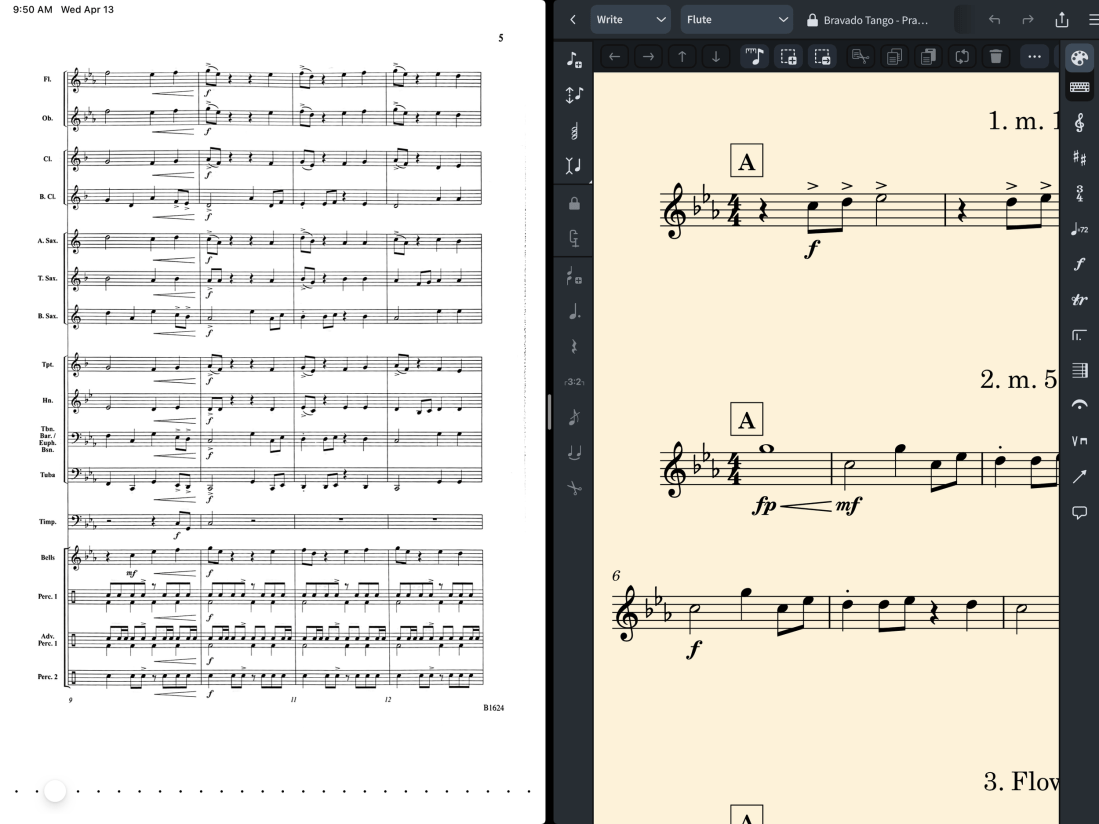









 Music Ed Tech Talk
You must be logged in to post a comment.