Dorico 2.2 Out! – features tighter integration with the iPad file system

When Daniel Spreadbury joined the podcast recently he teased the release of “Open in Place” on the iPad version of Dorico. The feature is now out for public use and available on the App Store.

Prior to this release, you could open Dorico projects from the file system of the iPad, but then a duplicate copy was saved inside of the Dorico app, which would not save back to the same location without first exporting that duplicate copy back to the same place, resulting in two copies. With version 2.2 your files stored in the Files app (or your iCloud/Dropbox/Google Drive by extension), will open directly from the location you have saved them on another device, and save them back to that location when you close the project. These projects still conveniently appear in the Open Recent page of the Hub when you launch Dorico.

<div class="
      image-block-outer-wrapper
      layout-caption-below
      design-layout-inline
      combination-animation-none
      individual-animation-none
      individual-text-animation-none
    ">


    <figure class="
          sqs-block-image-figure
          intrinsic
        " style="max-width:2973px">


      <div class="image-block-wrapper">
        <div class="sqs-image-shape-container-element


          has-aspect-ratio
        " style="position: relative;padding-bottom:76.95929718017578%;overflow: hidden">


            <img src="https://images.squarespace-cdn.com/content/v1/5595df9ce4b0ce9ff9ecd1a8/5f61606c-1117-4463-a3b6-4c75ca0afe39/iVBORw0KGgoAAAANSUhEUgAAC50AAAjwCAYAAAAKgq9xAAAACXBIWXMAAAsTAAALEwEAmpwYAAAM.png" alt="" width="2973" height="2288" style="display:block;object-fit: cover;width: 100%;height: 100%;object-position: 50% 50%" loading="lazy">

        </div>
      </div>


      <figcaption class="image-caption-wrapper">
        <div class="image-caption"><p class="">Once opened, Dorico files will generate a thumbnail preview of your project contents, visible right from within the Document Picker.</p></div>
      </figcaption>


    </figure>


</div>

Open in Place has increased my use of Dorico on iPad immeasurably. On the Mac, I keep my projects in iCloud Drive by default, so now I simply open them from that same location on iPad, edit, and exit out of the project to save it back to the same location.

Syncing has been reliable throughout my testing. Dorico does not recommend having the same file open on two devices at the same time as you may get unintended duplicate copies. As Daniel mentioned in the episode, further iCloud support is coming that will improve Dorico’s handling of this problem, at least if your files are kept in iCloud Drive.

<div class="
      image-block-outer-wrapper
      layout-caption-below
      design-layout-inline
      combination-animation-none
      individual-animation-none
      individual-text-animation-none
    ">


    <figure class="
          sqs-block-image-figure
          intrinsic
        " style="max-width:2973px">


      <div class="image-block-wrapper">
        <div class="sqs-image-shape-container-element


          has-aspect-ratio
        " style="position: relative;padding-bottom:76.95929718017578%;overflow: hidden">


            <img src="https://images.squarespace-cdn.com/content/v1/5595df9ce4b0ce9ff9ecd1a8/99f0a0d7-95ca-425a-bb46-92bc82dad906/iVBORw0KGgoAAAANSUhEUgAAC50AAAjwCAYAAAAKgq9xAAAACXBIWXMAAAsTAAALEwEAmpwYAAAM.png" alt="" width="2973" height="2288" style="display:block;object-fit: cover;width: 100%;height: 100%;object-position: 50% 50%" loading="lazy">

        </div>
      </div>


      <figcaption class="image-caption-wrapper">
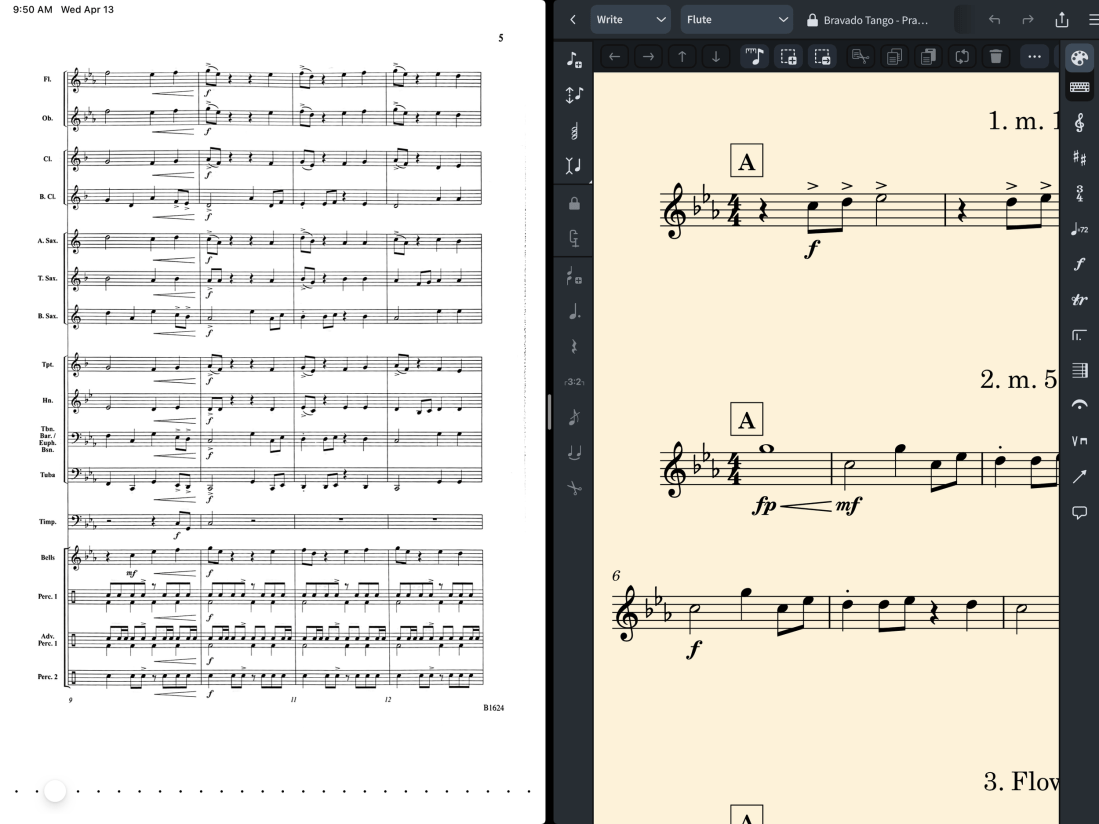
        <div class="image-caption"><p class="">With Split View multitasking, I can now do my favorite workflow on iPad, which is to have forScore opened on one half and Dorico on the other. This allows for me to easily reference my music library when arranging music, recreating parts, or designing practice resources based on the literature.</p></div>
      </figcaption>


    </figure>


</div>

Recent iPad feature updates have also included Split View multitasking and the ability to preview thumbnails of your scores in the Files or Finder app, which can be previewed using Quick Look. Between “Open in Place,” the multitasking, and thumbnails, my top Dorico feature requests have been met, and the iPad version has become a fully integrated part of my cloud-based computing workflow.

<div class="
      image-block-outer-wrapper
      layout-caption-below
      design-layout-inline
      combination-animation-none
      individual-animation-none
      individual-text-animation-none
    ">


    <figure class="
          sqs-block-image-figure
          intrinsic
        " style="max-width:2502px">


      <div class="image-block-wrapper">
        <div class="sqs-image-shape-container-element


          has-aspect-ratio
        " style="position: relative;padding-bottom:77.318115234375%;overflow: hidden">


            <img src="https://images.squarespace-cdn.com/content/v1/5595df9ce4b0ce9ff9ecd1a8/9f97c5a9-5e50-47dc-aeb0-31096f29470e/CleanShot+2022-04-13+at+09.47.25%402x.png" alt="" width="2502" height="1934" style="display:block;object-fit: cover;width: 100%;height: 100%;object-position: 50% 50%" loading="lazy">

        </div>
      </div>


      <figcaption class="image-caption-wrapper">
        <div class="image-caption"><p class="">Project contents now have preview thumbnails. You can initiate Quick Look by pressing the space bar. This will allow you to preview the document more fully without opening the file.</p></div>
      </figcaption>


    </figure>


</div>

You can read more about Dorico 2.2 in their blog post.
Music Ed Tech Talk #52 – Dorico Updates! with Daniel Spreadbury

Daniel returns to the show to discuss the release of Dorico 4 for desktop, Dorico 2 for iPad, Steinberg licensing, and other updates!

Subscribe to the Blog…
RSS | Email Newsletter

Subscribe to the Podcast in…
Apple Podcasts | Overcast | Castro | Spotify | RSS

Support Music Ed Tech Talk

Become a Patron!

.bmc-button img{height: 34px !important;width: 35px !important;margin-bottom: 1px !important;box-shadow: none !important;border: none !important;vertical-align: middle !important;}.bmc-button{padding: 7px 15px 7px 10px !important;line-height: 35px !important;height:51px !important;text-decoration: none !important;display:inline-flex !important;color:#ffffff !important;background-color:#000000 !important;border-radius: 5px !important;border: 1px solid transparent !important;padding: 7px 15px 7px 10px !important;font-size: 20px !important;letter-spacing:0.6px !important;box-shadow: 0px 1px 2px rgba(190, 190, 190, 0.5) !important;-webkit-box-shadow: 0px 1px 2px 2px rgba(190, 190, 190, 0.5) !important;margin: 0 auto !important;font-family:'Arial', cursive !important;-webkit-box-sizing: border-box !important;box-sizing: border-box !important;}.bmc-button:hover, .bmc-button:active, .bmc-button:focus {-webkit-box-shadow: 0px 1px 2px 2px rgba(190, 190, 190, 0.5) !important;text-decoration: none !important;box-shadow: 0px 1px 2px 2px rgba(190, 190, 190, 0.5) !important;opacity: 0.85 !important;color:#ffffff !important;}Buy me a coffeeBuy me a coffee

Show Notes:

Album of the Week:
Robby – Dilla Time Book | Slum Village – Fan-Tas-Tic Vol. 1 | Vol. 2 | Jay Dilla Essentials | J Dilla Influences | Inspired by J Dilla
Daniel – Horizon Forbidden West Soundtrack Volume 1

App of the Week:
Robby – Audible
Daniel – Raycast

Tech Tip of the Week:
Robby – Whispersync
Daniel – Pi-hole

Where to Find Us:
Robby – Twitter | Blog | Book
Daniel – Twitter | Website

Please don’t forget to rate the show and share it with others!

Dorico 2 Released for iPad

Speaking of Dorico, Dorico 2 for iPad is now out on the App Store. It’s free and comes with many improvements, my favorite being Apple Pencil support in Read view.

When I wrote about Dorico 1.0 for iPad, I expressed my enthusiasm for it sharing similar code with the then-upcoming desktop version of Dorico 4. Basing the iPad version on the desktop code has indeed expedited feature releases. I am hopeful for the development speed that both the mobile and desktop versions of Dorico will receive in the future.

While I don’t use the read view in Dorico for iPad a ton, I am excited to see the addition of annotation support with Apple Pencil. Even though it doesn’t do note input, this development shows that the Dorico team is iterating fast and responding to user feedback.

Check out the Dorico release below.

Dorico for iPad 2.0 now available from the App Store:

We are pleased to announce that a new version of the top-rated music notation app for iPad, Dorico for iPad, is now available for free download from the App Store. If you already have Dorico for iPad installed, go to the Updates tab in the App Store app on your iPad to grab the update.

This new version brings many of the new features added to Dorico 4 for macOS and Windows to iPadOS and adds support for freehand annotations in Read view using the Apple Pencil for those users who choose to take advantage of the optional in-app purchase subscription. Read on for more details.

Dorico 4

Dorico 4 is out! I’ve been testing it for the past few months, and I’m not even sure I am scratching the surface of what it can do. It is, in my opinion, the most important and exciting update to Dorico since its release in 2016.

This past summer, Dorico released an iPad app, which has many of the design updates and features seen in Dorico 4. You can read my first impressions about the iPad version of Dorico, and hear my conversation with Product Marketing Manager Daniel Spreadbury, here.

Fortunately, the Scoring Notes blog posted a review, which you can read here.

Here are some quick things that I am excited about in Dorico 4

Licensing

Dorico 4 uses Steinberg’s brand new Steinberg Licensing, replacing the Steinberg e-Licenser. The e-Licensor was one of the two or three most frustrating licensing processes on my Mac. The new Steinberg Licensing is one of the least frustrating processes for licensing software on my Mac.

Once Dorico 4 launched, I was presented with the option to move my existing Dorico 3.5 license over and log into my Steinberg account. Once completed, Dorico can run on up to three machines without connecting to the web. This is a super easy and generous way to handle licensing.

Key Editor

<div class="
      image-block-outer-wrapper
      layout-caption-below
      design-layout-inline
      combination-animation-none
      individual-animation-none
      individual-text-animation-none
    ">


    <figure class="
          sqs-block-image-figure
          intrinsic
        " style="max-width:3024px">


      <div class="image-block-wrapper">
        <div class="sqs-image-shape-container-element


          has-aspect-ratio
        " style="position: relative;padding-bottom:64.94709014892578%;overflow: hidden">


            <img src="https://images.squarespace-cdn.com/content/v1/5595df9ce4b0ce9ff9ecd1a8/f6f3d9e1-d4f9-4805-88c1-3995ea91ae46/CleanShot+2022-01-16+at+21.13.02%402x.png" alt="" width="3024" height="1964" style="display:block;object-fit: cover;width: 100%;height: 100%;object-position: 50% 50%" loading="lazy">

        </div>
      </div>


    </figure>


</div>

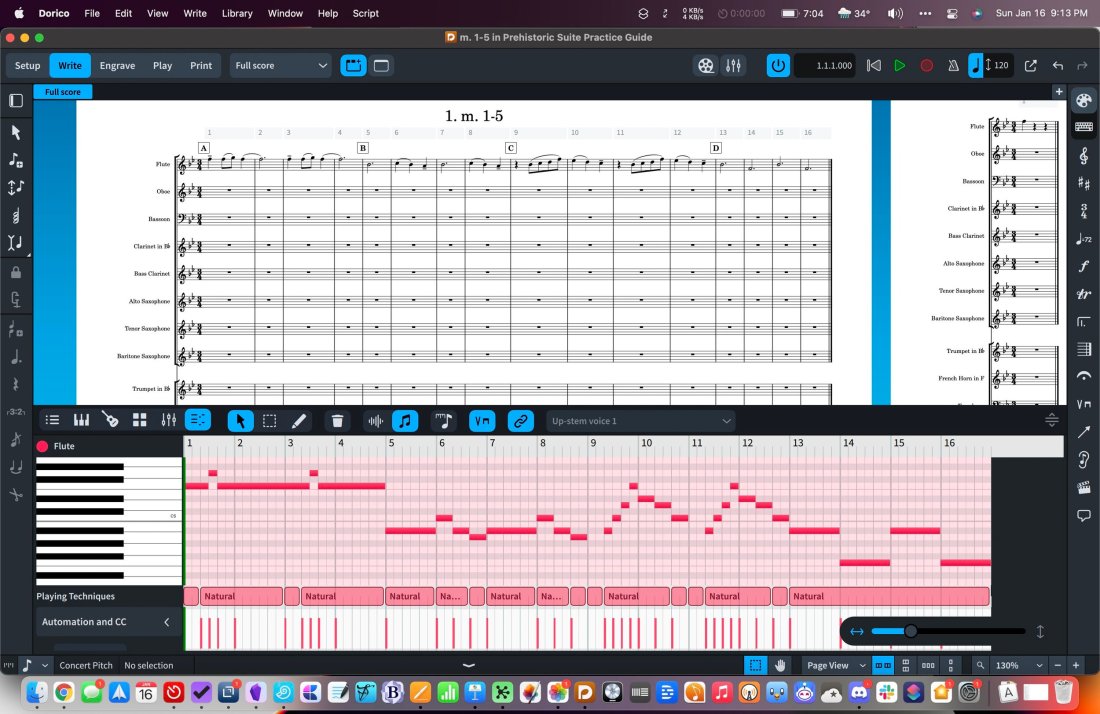
I covered this in my iPad First Impressions post, so I won’t go into too much detail here. The bottom area, which previously only contained project properties, now includes new note input methods like a piano, fretboard, and drum pads. It also integrates a piano roll and mixer right into Write Mode.

I really enjoy writing with notation and a piano roll visible on the screen at once. Perhaps this is because I am comfortable with DAWs. But I think it also speaks to how easily I conceptualize and edit rhythmic duration on a piano roll. Ethan Hein summarizes this well:

https://platform.twitter.com/widgets.js

You can also view a mixer in the bottom area while in Write Mode. Cool.

<div class="
      image-block-outer-wrapper
      layout-caption-below
      design-layout-inline
      combination-animation-none
      individual-animation-none
      individual-text-animation-none
    ">


    <figure class="
          sqs-block-image-figure
          intrinsic
        " style="max-width:3024px">


      <div class="image-block-wrapper">
        <div class="sqs-image-shape-container-element


          has-aspect-ratio
        " style="position: relative;padding-bottom:64.94709014892578%;overflow: hidden">


            <img src="https://musicedtechtalk.com/wp-content/uploads/2022/01/0e8c0-cleanshot2022-01-16at21.13.21402x.jpg" alt="" width="3024" height="1964" style="display:block;object-fit: cover;width: 100%;height: 100%;object-position: 50% 50%" loading="lazy">

        </div>
      </div>


    </figure>


</div>

Jump Bar

“Command pallet,” “command search,” “quick open”… whatever it’s called, this feature is becoming very popular in pro-software. If you have used Sibelius, you might be familiar with their Command Search feature. The feature is also quite popular in productivity software. I love using Command+O in OmniFocus to open projects and perspectives quickly. In my note app Obsidian, Command+O smartly searches my notes, and Command+P acts upon them.

The idea is that you have a keyboard shortcut that brings up a search, you start typing, and then the software smartly displays some options on the screen for places it thinks you want to go or things you want to do.

Dorico has added this feature with their new Jump Bar, and I couldn’t be happier. Just press the letter J, and you can type “m30” to bounce to measure 30 or “dynamics” to bring up the dynamics popover.

Popovers are my favorite part of the Dorico workflow, but I sometimes forget which keyboard shortcuts belong to which menus. In my opinion, having one command that allows for natural-language searching is a workflow win. Even if it is technically more keystrokes to find things, there is way less mental overhead in just typing what you want plainly.

<div class="
      image-block-outer-wrapper
      layout-caption-below
      design-layout-inline
      combination-animation-none
      individual-animation-none
      individual-text-animation-none
    ">


    <figure class="
          sqs-block-image-figure
          intrinsic
        " style="max-width:3024px">


      <div class="image-block-wrapper">
        <div class="sqs-image-shape-container-element


          has-aspect-ratio
        " style="position: relative;padding-bottom:64.94709014892578%;overflow: hidden">


            <img src="https://musicedtechtalk.com/wp-content/uploads/2022/01/2737c-cleanshot2022-01-16at21.13.44402x.jpg" alt="" width="3024" height="1964" style="display:block;object-fit: cover;width: 100%;height: 100%;object-position: 50% 50%" loading="lazy">

        </div>
      </div>


    </figure>


</div>

Improvements to Play Mode and the Interface

Play Mode moves a handful of track options to the left, making it more familiar to users who work inside DAWs. Working with inserts and effects feels less esoteric in this design. I like it.

<div class="
      image-block-outer-wrapper
      layout-caption-below
      design-layout-inline
      combination-animation-none
      individual-animation-none
      individual-text-animation-none
    ">


    <figure class="
          sqs-block-image-figure
          intrinsic
        " style="max-width:3024px">


      <div class="image-block-wrapper">
        <div class="sqs-image-shape-container-element


          has-aspect-ratio
        " style="position: relative;padding-bottom:64.94709014892578%;overflow: hidden">


            <img src="https://musicedtechtalk.com/wp-content/uploads/2022/01/289f2-cleanshot2022-01-16at21.15.37402x.jpg" alt="" width="3024" height="1964" style="display:block;object-fit: cover;width: 100%;height: 100%;object-position: 50% 50%" loading="lazy">

        </div>
      </div>


    </figure>


</div>

Project Templates

You can now turn any project into a template. Templates appear in the File menu, under the New from Project Template selection.

Previously, I used a Siri Shortcut to manage project templates in Dorico. I wrote about that for Scoring Notes here. My shortcuts method handles some of the file management for you and is worth a look if you want to learn more about macOS and iOS automation.

Generally, I think it is a benefit to store templates inside of Dorico, and I will be taking some of my most frequently used templates in the Shortcuts app and moving them inside of Dorico.

Library

Dorico moves most options relating to customizing the app’s behavior into a menu called Library. It drives me nuts when professional creative software stores its settings across numerous custom preference panes throughout the application. This adjustment makes customizing Dorico’s various options more discoverable, regardless of the mode or context they relate to.

The new library features also include many new options for font styles, which I am sure will make David MacDonald very happy.

M1

Dorico 4 works with Apple Silicon. From Scoring Notes:

Dorico 4 is the first Dorico version, and the first of any of the major desktop applications, to support Apple silicon Macs, such as the M1 MacBook Pro, iMac, and Mac mini. If you have an Apple silicon Mac, Dorico will run as a native application by default. However, if you use VST plug-ins, Dorico can only load VST plug-ins that can run natively on Apple silicon as well, and these must be VST 3 (there is no support for VST 2 plug-ins on Apple silicon). It is possible to force Dorico 4 to run under Rosetta 2 on Apple Silicon, which will allow VST 2 and Intel-native plug-ins to be loaded, though at the expense of slower overall performance.

Overall, Dorico 4 is a huge step forward. I imagine a lot of the work on this update was done in preparation for the iPad release. Now that both versions exist, I expect that the shared development platform between desktop and mobile will mean that future updates are released in side-step and continue to be feature-rich.

Always Start from the Beginning: Developing Tone Quality, Intonation, Concert Repertoire, and Classroom Management through Unison Playing in Performing Ensembles

This post first appeared on the NAfME Blog on December 7, 2021. You can read it there by clicking here.


Always Start from the Beginning

Every year I teach band, I start from the beginning. I find that if I rebuild the ensemble, focusing on fundamentals, it is impossible to fail.

This is especially true after many programs have lost over a year of in-person instruction. Even if students’ skills have been sustained or improved, they are likely returning to the classroom with less handle on things that they can only learn in a group: intonation, balance, blend, and even basic rehearsal expectations.

They will have to relearn how to listen outside their comfortable bubble of one.

Image.jpeg

Caption: A mixer at the front of the room allows me to pump my voice, computer, and phone through a stereo and mix them to taste.

I want to describe some of the teaching strategies that have been most helpful this fall (and long since before COVID) while also sharing some technological tips I have taken from virtual learning into this year. I will explain how I am implementing them in my beginning band class to ensure that they develop great ears, strong ensemble sound, musicianship, and all while preparing concert music.

Developing the Ear

All excellent music-making starts with the ear. In Musical Performance: Learning Theory and Pedagogy, Daniel Kohut claims that students need a “superior concept” of the sound they wish to make. I believe this is much easier to achieve while playing in unison. Young musicians often learn this way by nature of beginning method books focusing on familiar, unison melodies, which elementary school teachers teach in instrument-specific sectionals. But when students first join a large ensemble, they can lose their independent sense of tone, intonation, and balance if too many separate voices start happening in their concert literature too soon.

IMG_9265.png

Caption: The Tonal Energy Tuner app is only a few dollars, and it play justly in-tune polyphonic drones and a metronome simultaneously.

My Concert Band class has 50 6th and 7th-grade students. Many of these students are first-year players. This year, most of them had only experienced a half year of in-person band before walking into my classroom.

I decided to keep them playing in unison for as long as I could keep them interested. I wanted to emphasize tone quality, intonation, balance, and bend, while somehow managing the classroom and preparing them for a December concert. And I wanted to keep things fun. Was it possible to do all of this? Yes!

CleanShot 2021-10-30 at 09.50.14.png

Caption: Dorico’s popovers, like this one for dynamics, allow you to enter notation naturally and quickly. Adding solfege with the Lyrics popover was equally easy.

Transforming Concert Literature into Unison Melodies

I started by ensuring that I centered instruction around accessible melodic material from the method book rather than technical exercises and drills. Additionally, I took the pieces I was planning for our winter concert and wrote out every person’s part for every instrument using Dorico. Dorico’s keyboard shortcuts and flow-based composing make it easy to design supplemental resources as quickly as you can think.

Image.jpeg

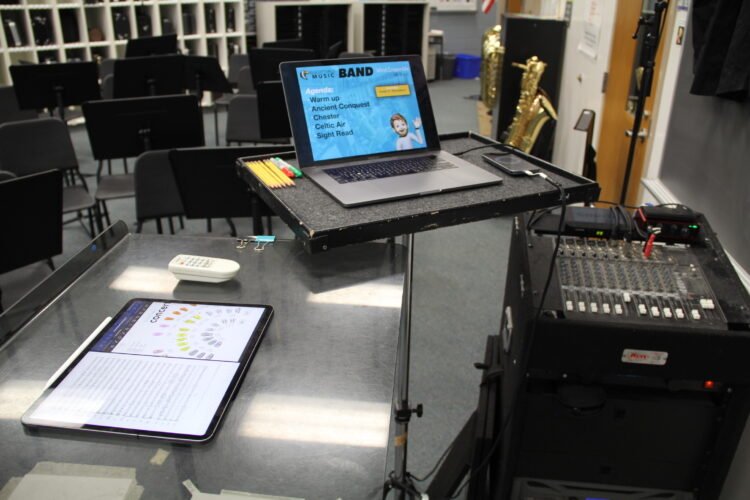
Caption: Last school year, my team purchased some equipment to support hybrid teaching. This year, we have repurposed that gear to integrate audio technology into traditional rehearsals seamlessly.

The guides are organized by rehearsal marking. For example, Part 1 has everyone in the band playing the bass line of measures 1-8. By playing each part of the music sequentially, students get more practice sight-reading while learning who in the band plays which notes. By playing in unison, they leverage their strength in numbers to develop firmer and more stable tone quality while learning to hear what an ensemble blend should sound like for the first time.

CleanShot 2021-10-30 at 09.49.23.png

Caption: This is what an individual part looks like in Dorico once completed. Instead of isolating sections of the band during rehearsal, I can have everyone playing at all times. For example, if I want to work with the tuba part in measure one, I can tell the entire band to play “Part 1. Lower Voice” and keep everyone engaged.

I write solfege into these practice guides and alternate between the students singing and playing. In a year without any COVID concerns, I would also encourage the brass to buzz these melodies on mouthpieces to develop their inner ear and flexibility.

Play-Along Resources Help Model Tone, Intonation, and Tempo

There is always a drone prominently playing through our sound system using the Tonal Energy Tuner app. The polyphonic drones can model justly in-tune intervals. Students can subtly adjust their pitch by making the “beats” that result between two out-of-tune pitches slow down and eventually dissolve.

CleanShot 2021-10-30 at 09.39.39.png

Caption: One of the easiest and most engaging ways to encourage metronome practice is to play along to the Drummer Tracks in GarageBand. There are numerous styles, beats, and editing tools at your disposal. Beats are way more fun to play with and provide more musical feeling than a metronome.

I have created play-along tracks that combine trap beats with tuning drones. I like to pump them through the speakers during warm-ups and throughout rehearsal. You can make these too using the free GarageBand app on iOS.

Sometimes, I will have Tonal Energy coming through my phone and the beats coming through my Mac. This allows me to mix the drone and the metronome independently, as they are plugged into two separate channels of my mixer.

Speaking Calmly, Being Everywhere

A Shure wireless microphone goes into a third channel of the mixer, allowing me to speak in a comfortable room voice and be heard over the sound of loud drones, beats, and a full band of 50-65 students playing.

73b42005bdaf925216f74de6ebf33333.png

Caption: This Shure wireless headset microphone has been a game-changer this year. I don’t ever have to raise my voice to be understood. I can speak comfortably and be heard over the sound of a pumping drone and 60 students playing.

This technique works wonders for classroom management. Flowing from one part of our daily agenda to the next is nearly seamless because of how easy it is to keep everyone playing most of the rehearsal. With these persistent play-alongs underlying most of the rehearsal, my role could be described less like a traditional director and more like a spin instructor.

This might sound ridiculous at first, but it is true. A spin instructor curates music, keeps the beat moving you forward and paces instruction, all while making you sweat. This is precisely how I want my role to feel in the band room. I like to think of myself as a “coach” who directs students towards the goal while they work for it, rather than a “director” who beats the music into them.

Image.jpeg

Caption: My colleague, Ben Denne, teaches from our “command station” at the front of the room.

The wireless mic allows me to step off the podium and be heard from anywhere in the room. While the band is playing, I can be high-fiving students, sizing a student for concert attire, helping percussionists find their place, encouraging good trombone posture, or any other need. I can be everywhere and still keep the flow of rehearsal moving even when I’m off the podium.

CleanShot 2021-10-30 at 12.32.29.png

Caption: Farrago is a useful app for queuing play-along material in a soundboard-style audio launcher. I keep my scale tracks organized and color-coded by key and rhythmic patterns to find them more easily.

Taking the Slow Road Gets Maximum Results

Once it is time to hand out concert music, I’m delighted to hear students say things like, “wait, we know this!.” By this point, they can sing every part, play every part, and can now split into three or four unique voices because they are more confident in their melody from having practiced it with the strength of 60 musicians in unison.

Image.png

Caption: AnyTune is another excellent app that can change the speed and pitch of a play-along track independently.

The results are clear. I have never had a more engaging, fun, and tightly managed beginning band experience. Students are developing fundamentals at a pace consistent, if not better, than a typical year, and we are stronger for it.

#48 – Holiday Special 2021, featuring Will Kuhn, Craig McClellan, David MacDonald, and Jon Tippens

Friends of the show join to answer burning questions about music, education, and technology in 2021 (and beyond).

Patreon subscribers get some extra discussion about Dune and Foundation.

Subscribe to the Blog…

RSS | Email Newsletter

Subscribe to the Podcast in…

Apple Podcasts | Overcast | Castro | Spotify | RSS

Support Music Ed Tech Talk

Become a Patron!

Buy me a coffee

Show Notes:

Album of the Year – Nate Smith: Kinfolk 2 | Stevie Wonder: Talking Book | Magdalena Bay: Murcurial World | John Mayer: Sob Rock | Cory Wong and Dirty Loops: Turbo

App of the Year – Obsidian | Fin Timer | OP-Z App | Pixelmator Photo | Molskine Actions

Tech Tip of the Year – Focus Modes (some discussion about how I am using these on episode 44 of this show) | camelcamelcamel.com | Use OBS for everything | Feedbin | Press and hold the spacebar on iOS to move your cursor around

Please don’t forget to rate the show and share it with others!

#43 – iOS 15 and macOS Monterey, with Paul Shimmons

Paul Shimmons returns to the show to talk about the features in Apple’s new operating system updates, and how we plan to use them.

Patreon subscribers get a bootleg version of the recording, without the ads, and including bonus conversation about notation apps on iPad.

Subscribe to the Blog…

RSS | Email Newsletter

Subscribe to the Podcast in…

Apple Podcasts | Overcast | Castro | Spotify | RSS

Support Music Ed Tech Talk

Become a Patron!

Buy me a coffee

Show Notes:

Tuesday, 26 Oct 2021 14:10:49.jpeg

App of the Week

Paul – Ultimate Drill Book

Robby – Sofa

Music of the Week

Paul – Powerhouse – White Heart

Robby – Cory Henry – Best of Me

Where to Find Us:

Robby – Twitter | Blog | Book

Paul – Twitter | Website

Please don’t forget to rate the show and share it with others!

Sibelius for iPad, with Joe Plazak (Principal Software Engineer and Designer)

This week on Music Ed Tech Talk I am joined by Joe Plazak, Principal Software Engineer and Designer of Sibelius, to talk all about their summer iPad release.

Listen below or in the podcast app of your choice! I look forward to writing more about Sibelius for iPad down the road.

Episode Description: Joe Plazak (Principal Software Engineer and Designer) joins the show to talk about Sibelius for Mobile and their new iPad app.

This episode is sponsored by Blink Session Music: Because Virtual Lessons Are More Than a Video Chat.

Backstage Access Patreon Subscribers can listen to extended discussion including Joe Plazak’s Book of the Week and some of my reflections on writing Digital Organization Tips for Music Teachers.

Subscribe to the Blog…
RSS | Email Newsletter

Subscribe to the Podcast in…
Apple Podcasts | Overcast | Castro | Spotify | RSS

Support Music Ed Tech Talk

Become a Patron!

.bmc-button img{height: 34px !important;width: 35px !important;margin-bottom: 1px !important;box-shadow: none !important;border: none !important;vertical-align: middle !important;}.bmc-button{padding: 7px 15px 7px 10px !important;line-height: 35px !important;height:51px !important;text-decoration: none !important;display:inline-flex !important;color:#ffffff !important;background-color:#000000 !important;border-radius: 5px !important;border: 1px solid transparent !important;padding: 7px 15px 7px 10px !important;font-size: 20px !important;letter-spacing:0.6px !important;box-shadow: 0px 1px 2px rgba(190, 190, 190, 0.5) !important;-webkit-box-shadow: 0px 1px 2px 2px rgba(190, 190, 190, 0.5) !important;margin: 0 auto !important;font-family:'Arial', cursive !important;-webkit-box-sizing: border-box !important;box-sizing: border-box !important;}.bmc-button:hover, .bmc-button:active, .bmc-button:focus {-webkit-box-shadow: 0px 1px 2px 2px rgba(190, 190, 190, 0.5) !important;text-decoration: none !important;box-shadow: 0px 1px 2px 2px rgba(190, 190, 190, 0.5) !important;opacity: 0.85 !important;color:#ffffff !important;}

Buy me a coffeeBuy me a coffee

Thanks to my sponsors this month, Blink Session Music.

Show Notes:

App of the Week:
Robby – CleanShot
Joe – Tips

Album of the Week:
Robby – Jack & Owane – Part One: Shredemption
Joe – Pomplamoose – Impossible à prononcer

Tech Tip of the Week:
Robby – Make your own custom keyboard shortcuts
Joe – Hold the spacebar on iPhone to get a cursor

Please don’t forget to rate the show and share it with others!


Yesterday’s iPhone Event

I’ve already been getting texts from colleagues asking about yesterday’s iPhone event so I thought I would put some thoughts down here.

I get why this event has everyone’s curiosity levels at 100 every year. Everyone needs a phone. And they want to know which one will be their next. The truth is, iPhones are at a point where they are going to continue to slowly iterate year over year. Major changes are rare.

Every year Apple makes better iPhones than the previous year. In the case of this year, the most notable improvements are to the camera. If you have been holding on to your phone for 2-3 years, this will be a worthy upgrade.

There are four options: iPhone 13, iPhone 13 mini, iPhone 13 Pro, iPhone Pro Max.

Respectively, those could be explained as New Phone (Medium), New Phone (Small), Better New Phone (Medium), Better New Phone (Big).

I can’t tell you which phone to buy but chances are the New Phone is probably good enough for your needs, and what it will really come down to is size and how ready you are to upgrade. The camera is always better on the Pro models, and I have a toddler, so I am getting that model. While some years there is a better camera in the largest sized model, this is not the case this year, so iPhone Pro 13 (non-Max) it is for me. My wife will be getting a mini, which is a really lovely phone if you can stomach the low battery life.

The most attractive thing announced yesterday was probably the new iPad mini that has the new design of the iPad Pros (with flat edges and support for the second-generation Apple Pencil). If you have room for an iPad mini in your life, there is no question, you should get it. This device looks really slick. I am still riding out my iPad Pro 12.9 inch from 2018 and plan to do so for a while, though I am curious about going to the 11-inch pro model sometime down the road. I realize I might miss the larger size for sheet music reading, but I was doing it before there was ever a 12.9-inch size, and I really miss the feeling of holding the smaller size for things like reading and watching video content on the couch. The 12.9 has very much a laptop feeling in my experience. Owning a 12.9 and a mini is tempting but it seems cumbersome to charge and keep up with two iPadOS devices.

There is also a new Apple Watch and it looks like the most boring update ever unless you have a 2+-year-old Apple Watch in which case it will be a really strong update.

I also may consider the new MagSafe wallet attachment that has Find My app integration considering I just lost my wallet at school over as recently as this past weekend.

Cubasis comes to Android and receives a discount

Cubasis is, in my opinion, the app to use if you are looking to produce music in a professional DAW using your iPad.

Good news! Version 3 is currently deeply discounted and they just released an Android version!

What’s New in Cubasis 3.2 | Steinberg–>

Musical ideas come when you least expect them and are often gone in a flash. With Cubasis, you always have your mobile DAW with you, because Cubasis is available for all your mobile devices. iPad? Check. iPhone? Of course! Android smartphone and tablet? Sure thing! And now we bring one of the fastest, most intuitive and complete mobile DAWs to the world of Chromebooks, too. Welcome Google (again)! Welcome Chrome OS! Cubasis is ready to capture your ideas whenever and wherever you are.