Forscore 14 Automation Links

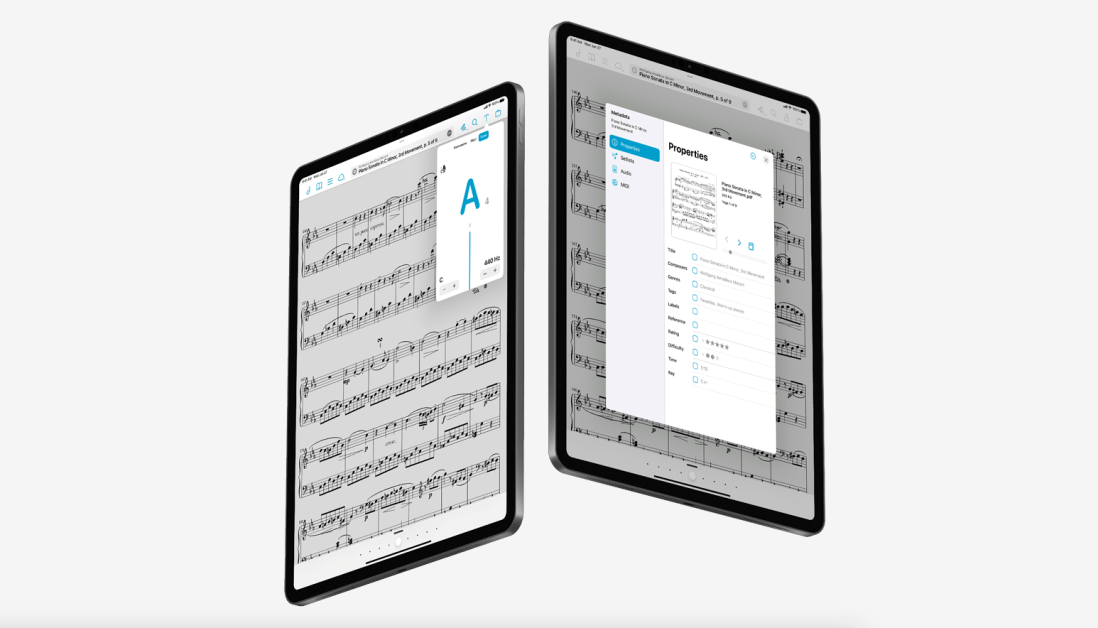
forScore 14 came out last month. It is an awesome release which includes updates to the metadata panel, tuner, Apple Pencil support, and other redesigned user interface elements. You can read about all the details here.

My favorite feture in this update is called Automation Links. The feature allows you to copy a link to a score (or a page within a score) to your clipboard and paste it somewhere else. This kind of deep linking has become a core part of my productivity workflow over the years. Most of my productivity tools offer a shortcut like this, and it is so awesome to see the feature added to one of my more musically specific apps.

Watch the video below to see the feature in action along with two demos of how I use the feature to teach music more efficiently.

Note: Automation Links are a paid forScore Pro feature.

9to5 Mac: Notability for iPad adds new ‘Pencil’ feature for a ‘lifelike handwriting experience’

9to5 Mac reports on an update to Notability. For a few years, I have been solidly in the GoodNotes camp when it comes to handwritten notes on iPad. It is great to see that there is still competition in this space.

Notability for iPad adds new ‘Pencil’ feature for a ‘lifelike handwriting experience’:

Notability, the popular note-taking app for iPhone and iPad, has been updated today with a new “Pencil” feature. According to the company, this feature brings “the most paper-like sketching experience to digital notetakers,” including support for the Apple Pencil as well.

MacStories -> The Practicality of Art in Software

This blog post from Federico Viticci over at MacStories is worth a read.

This part jumped out at me:

In bringing this back to software, it’s evident that – again, historically – Apple doesn’t believe in art as a veneer to make something “look good”. Art – whereby “art” we refer to the human care behind the design of software – is intrinsically tied to the technology that powers the computer. It’s the intersection of technology and liberal arts: skew toward one side more than the other, and you risk of losing the balance many of us like about Apple. Art in Apple’s software isn’t some secret ingredient that can just be added at the end of the process, like a spice: great design _is_ the process itself. Case in point: the Dynamic Island.

Federico argues that the iPad is not striking a balance between beautiful and useful. I agree with this point. After trying to use it like an equal counterpart to macOS in 2016-2019, I have been back to the Mac (so to speak) ever since.

The iPad makes a great digital piece of paper. And I think I am leveraging its strengths best when I use it exactly like that.

macOS Ventura, music notation software compatibility, iPad news

Robby does hot takes on macOS Ventura, iOS and iPadOS 16.1, and new iPads.

Subscribe to the Blog…
RSS | Email Newsletter

Subscribe to the Podcast in…
Apple Podcasts | Overcast | Castro | Spotify | RSS

Support Music Ed Tech Talk

Become a Patron!

.bmc-button img{height: 34px !important;width: 35px !important;margin-bottom: 1px !important;box-shadow: none !important;border: none !important;vertical-align: middle !important;}.bmc-button{padding: 7px 15px 7px 10px !important;line-height: 35px !important;height:51px !important;text-decoration: none !important;display:inline-flex !important;color:#ffffff !important;background-color:#000000 !important;border-radius: 5px !important;border: 1px solid transparent !important;padding: 7px 15px 7px 10px !important;font-size: 20px !important;letter-spacing:0.6px !important;box-shadow: 0px 1px 2px rgba(190, 190, 190, 0.5) !important;-webkit-box-shadow: 0px 1px 2px 2px rgba(190, 190, 190, 0.5) !important;margin: 0 auto !important;font-family:'Arial', cursive !important;-webkit-box-sizing: border-box !important;box-sizing: border-box !important;}.bmc-button:hover, .bmc-button:active, .bmc-button:focus {-webkit-box-shadow: 0px 1px 2px 2px rgba(190, 190, 190, 0.5) !important;text-decoration: none !important;box-shadow: 0px 1px 2px 2px rgba(190, 190, 190, 0.5) !important;opacity: 0.85 !important;color:#ffffff !important;}Buy me a coffeeBuy me a coffee

Thanks to my sponsors this month, Scale Exercise Play-Along Tracks.

Show Notes:

Steinberg Summer Sale

Summer Deals:

Save up to 50% on Groove Agent 5 and expansions, Iconica, Dorico, Cubasis and much more. Only from July 7 to July 28, 2022.

Steinberg is running a summer sale right now and some of the cuts are deep. A lifetime purchase of Dorico is 30% off and Cubasis (which is, in my opinion, the most fully-featured DAW available for iPad) is 50% off.

Check it out!

Talking StaffPad, with David William Hearn

David William Hearn (composer, arranger, producer and creator of StaffPad) joins the show to talk about StaffPad, how teachers can use it, and the thought process behind designing great iPad software.

Patreon supporters get bonus discussion about recent tv, movies, and music we have been engaging with. Thanks to my sponsors this month, Scale Exercise Play-Along Tracks.

Subscribe to the Blog…
RSS | Email Newsletter

Subscribe to the Podcast in…
Apple Podcasts | Overcast | Castro | Spotify | RSS

Support Music Ed Tech Talk

Become a Patron!

.bmc-button img{height: 34px !important;width: 35px !important;margin-bottom: 1px !important;box-shadow: none !important;border: none !important;vertical-align: middle !important;}.bmc-button{padding: 7px 15px 7px 10px !important;line-height: 35px !important;height:51px !important;text-decoration: none !important;display:inline-flex !important;color:#ffffff !important;background-color:#000000 !important;border-radius: 5px !important;border: 1px solid transparent !important;padding: 7px 15px 7px 10px !important;font-size: 20px !important;letter-spacing:0.6px !important;box-shadow: 0px 1px 2px rgba(190, 190, 190, 0.5) !important;-webkit-box-shadow: 0px 1px 2px 2px rgba(190, 190, 190, 0.5) !important;margin: 0 auto !important;font-family:'Arial', cursive !important;-webkit-box-sizing: border-box !important;box-sizing: border-box !important;}.bmc-button:hover, .bmc-button:active, .bmc-button:focus {-webkit-box-shadow: 0px 1px 2px 2px rgba(190, 190, 190, 0.5) !important;text-decoration: none !important;box-shadow: 0px 1px 2px 2px rgba(190, 190, 190, 0.5) !important;opacity: 0.85 !important;color:#ffffff !important;}Buy me a coffeeBuy me a coffee

Show Notes:

App of the Week:

Robby – Default Folder X

DWH – Soulver

Music of the Week:
Robby – Button MasherOrigin Story

DWH – Prince

Tech Tip of the Week:
Robby – Universal Clipboard

DWH – Automate stuff

Where to Find Us:
Robby – Twitter | Blog | Book
David William Hearn – Twitter | Website

Please don’t forget to rate the show and share it with others!

New Software Coming from Apple

Tim Chaten, host of the iPad Pros podcast, joins the show to talk about Apple’s announcements at their WWDC Keynote this month.

Subscribe to the Blog…
RSS | Email Newsletter

Subscribe to the Podcast in…
Apple Podcasts | Overcast | Castro | Spotify | RSS

Support Music Ed Tech Talk

Become a Patron!

.bmc-button img{height: 34px !important;width: 35px !important;margin-bottom: 1px !important;box-shadow: none !important;border: none !important;vertical-align: middle !important;}.bmc-button{padding: 7px 15px 7px 10px !important;line-height: 35px !important;height:51px !important;text-decoration: none !important;display:inline-flex !important;color:#ffffff !important;background-color:#000000 !important;border-radius: 5px !important;border: 1px solid transparent !important;padding: 7px 15px 7px 10px !important;font-size: 20px !important;letter-spacing:0.6px !important;box-shadow: 0px 1px 2px rgba(190, 190, 190, 0.5) !important;-webkit-box-shadow: 0px 1px 2px 2px rgba(190, 190, 190, 0.5) !important;margin: 0 auto !important;font-family:'Arial', cursive !important;-webkit-box-sizing: border-box !important;box-sizing: border-box !important;}.bmc-button:hover, .bmc-button:active, .bmc-button:focus {-webkit-box-shadow: 0px 1px 2px 2px rgba(190, 190, 190, 0.5) !important;text-decoration: none !important;box-shadow: 0px 1px 2px 2px rgba(190, 190, 190, 0.5) !important;opacity: 0.85 !important;color:#ffffff !important;}Buy me a coffeeBuy me a coffee

Thanks to my sponsors this month, Scale Exercise Play-Along Tracks.

Show Notes:

Where to Find Us:
Robby – Twitter | Blog | Book
Tim Chaten – Twitter | Website

Please don’t forget to rate the show and share it with others!

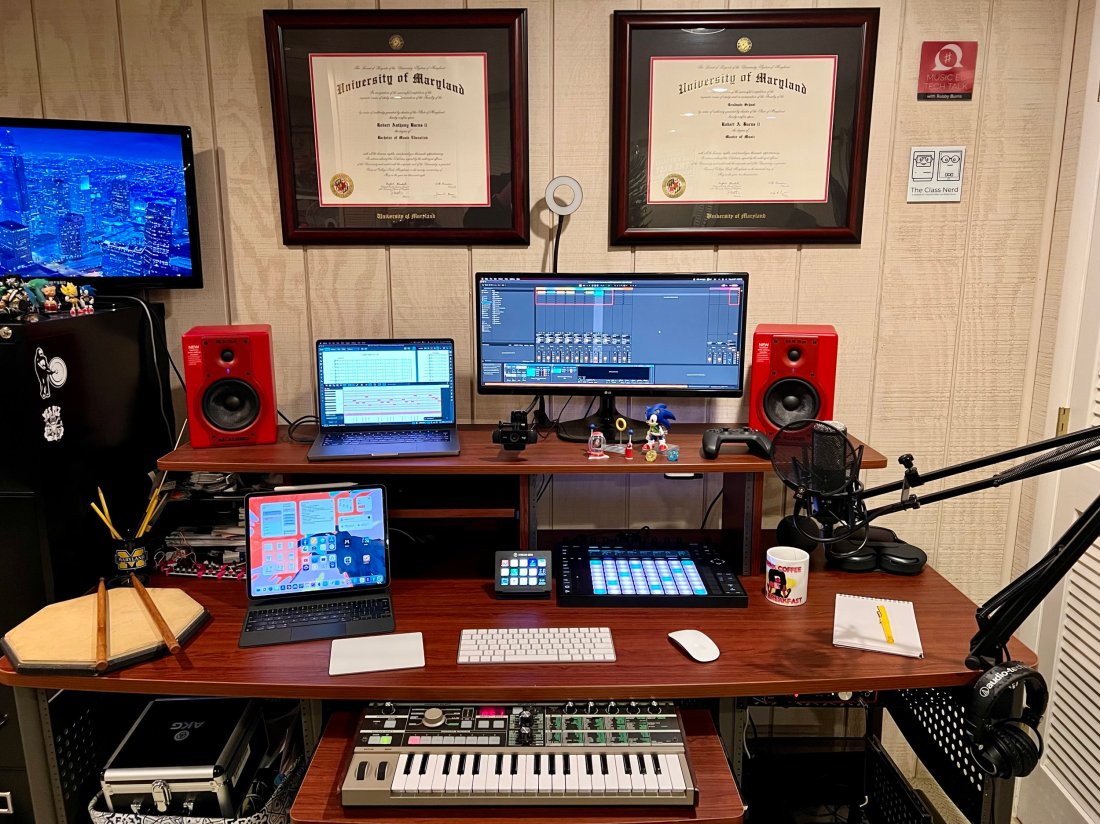
What’s on my desk?

This post now features a complimentary podcast episode. Listen and subscribe!

Earlier this year, I wrote a guest post for the Club MacStories newsletter showing off all the technology on my desk. With permission from the editors, I am cross-posting that below.

Image.jpeg

This desk is in my home music studio in Maryland. I run a private percussion teaching studio out of this space and produce my blog/podcast Music Ed Tech Talk.

Image.jpeg

My 14″ MacBook Pro is the core of my computing life. It goes with me everywhere, from this desk to my day job as a middle school band director. I teach out of four different classrooms. USB-C hubs at all of my desks allow me to have distinctive hardware setups specific to each room while maintaining continuity through the consistency of my macOS settings and apps.

My secondary monitor is an LG Ultra Wide. I don’t love it. I originally got it as a cheap way to interact with my Mac mini (dominantly used to serve up Plex content and run a Homebridge server.) I have phased out the Mac mini and hope to one day replace this monitor with something nicer now that it is used with the MacBook.

Image.jpeg

When my school district moved to virtual learning last year, I wanted to upgrade my webcam. The Logitech C920 was one of the most popular options I was coming across, and it hasn’t let me down yet. I have a snake arm from Amazon (link) that allows me to easily adjust the angle of the camera and the ring light behind it. The arm can bend the camera down to face the surface of my desk and show what my hands are doing during virtual classes, presentations, and live streams.

Image.jpeg

These M-Audio BX5a monitors were on sale ten years ago, presumably because red is a less popular color than black. I actually kind of like having an accent color. They sound balanced enough to reference the diverse musical projects I edit. They produce enough output for my students to jam along to recordings on drum set.

Because the studio monitors are my primary sound output, the HomePod mini is used mainly for controlling Siri. I often ask it to turn on the baseboard heaters (with the Mysa HomeKit thermostat), the lights, and a red light outside the door to let my family know if I’m recording.

Image.jpeg

The Focusrite Scarlet 6i6 is my current audio interface. It has just enough ins and outs to plug my MIDI and audio input devices into my computer while outputting sound to the studio monitors. I don’t currently do any fancy recording down here beyond my podcast and student audition tapes (which only require stereo recording).

Image.jpeg

The AKG P420 is my favorite mic for generalized recording in its price range. It’s a resonant and balanced condenser microphone. I honestly think it compares to some microphones up to double the price. I use it primarily for virtual class, presentations, podcasting, and in a pair to record student audition tapes in stereo.

My Audio Technica headphones are pretty old and junky (I couldn’t even find a link to this model online), but their long life speaks to the quality of AT’s gear. I sometimes plug my AirPods Max into the Scarlet if I am already wearing them.

Image.jpeg

My Lamy Safari Fountain Pen and Rhodia notebook are my entry point into the world of better-than-average writing tools, and I am open to learning more!

Image.jpeg

I love the feel and simplicity of Apple’s Magic Keyboard, Trackpad, and Mouse. It took some time to learn to use the trackpad on the left. Still, it gives me a powerful workflow where I can quickly make refined edits in audio software by zooming in and out of the project with my left hand while precisely manipulating content with the mouse.

iVBORw0KGgoAAAANSUhEUgAAC50AAAjwCAYAAAAKgq9xAAAACXBIWXMAAAsTAAALEwEAmpwYAAAM 2.png

I love my 12.9″ iPad Pro! Sometimes I use it as a laptop at home and work. In my studio, I usually rip off the tablet and read full-sized sheet music on it using the forScore app. I also depend on the Tonal Energy Tuner, which is the most powerful app of its kind on the App Store and does not currently have a Mac version.

Image.jpeg

My Ableton Push 2 works primarily as a control surface for Ableton Live. It is a new addition, and I am overwhelmed by its potential. Ableton Live is a very advanced application, and the Push allows you to control almost all of its features with tactile, performable knobs and buttons. It makes the software feel like an instrument. You can use it to record note input, manage the tempo, trigger loops, edit samples, and more!

CleanShot 2022-01-27 at 17.32.32.png

I play with music production for fun, but I also use the Push as a supercharged metronome when teaching private students. It allows me to get my eyes off the computer screen and focus more on the teaching because all the buttons can manipulate the app even when it isn’t in the foreground.

Image.jpeg

I use a Stream Deck for all the same reasons MacStories readers might find it useful- live streaming, Shortcuts, and other automation. I also use it to navigate the deep menus and feature sets of Dorico, a music notation application.

CleanShot 2022-01-27 at 17.51.41.png

Notation Central has pre-built Stream Deck profiles for major music notation apps available on their website (link).

Image.jpeg

The MicroKorg is a fun little synth that can be highly programmed to produce absolutely otherworldly audio. I also use it for MIDI note entry in digital audio workstations and music notation apps.

Image.jpeg

My electronic reference piano is a Korg Concert C-150, which I also use for MIDI note input. It’s an electric upright piano from the 80s with the legs chopped off. A high school was going to throw it away in the early 2000s before I asked if I could have it instead. I like it because it has a flat surface for putting stuff on (like other keyboards).

On top of the Korg is a Roland Octopad SPD-30. This is a great electronic drum sampler. It has an excellent library of its sounds and can trigger note input in music software using my most comfortable input method (drum sticks).

Next to the Octopad is my Yamaha Harmony Director. It’s a keyboard that plays sustained tuning drones and can easily switch between different tuning systems. The drones can be played through speakers, or in my case, be used to create play-along practice material for students (link).

Apple TV. I wish I could say I use this for something other than playing Sonic the Hedgehog while my kid naps.

Instruments! The desk is a fun command station, but it’s really only the hub of my digital productivity and creativity. The real bread and butter of my professional life are the instruments I play and teach. Depicted here are my vibraphone, marimba, timpani, drum sets, snare drum, wind instruments, and other fun!

Image.jpeg

Image.jpeg

Image.jpeg

Image.jpeg

Image.jpeg

Image.jpeg

PlayScore, with Anthony Wilkes

Anthony Wilkes joins the show to talk about PlayScore 2, a sheet music scanning app. Anthony is the CEO of PlayScore, and in the conversation we talked all about what it can do, the challenges of developing music scanning software, and practical uses for teachers and students.

Patreon supporters receive bonus conversation about machine learning, the future of score scanning software, and automation.

Subscribe to the Blog…
RSS | Email Newsletter

Subscribe to the Podcast in…
Apple Podcasts | Overcast | Castro | Spotify | RSS

Support Music Ed Tech Talk

Become a Patron!

.bmc-button img{height: 34px !important;width: 35px !important;margin-bottom: 1px !important;box-shadow: none !important;border: none !important;vertical-align: middle !important;}.bmc-button{padding: 7px 15px 7px 10px !important;line-height: 35px !important;height:51px !important;text-decoration: none !important;display:inline-flex !important;color:#ffffff !important;background-color:#000000 !important;border-radius: 5px !important;border: 1px solid transparent !important;padding: 7px 15px 7px 10px !important;font-size: 20px !important;letter-spacing:0.6px !important;box-shadow: 0px 1px 2px rgba(190, 190, 190, 0.5) !important;-webkit-box-shadow: 0px 1px 2px 2px rgba(190, 190, 190, 0.5) !important;margin: 0 auto !important;font-family:'Arial', cursive !important;-webkit-box-sizing: border-box !important;box-sizing: border-box !important;}.bmc-button:hover, .bmc-button:active, .bmc-button:focus {-webkit-box-shadow: 0px 1px 2px 2px rgba(190, 190, 190, 0.5) !important;text-decoration: none !important;box-shadow: 0px 1px 2px 2px rgba(190, 190, 190, 0.5) !important;opacity: 0.85 !important;color:#ffffff !important;}Buy me a coffeeBuy me a coffee

Thanks to my sponsors this month, Scale Exercise Play Alongs.

Show Notes:

App of the Week:
Robby – Audio Hijack 4
Anthony – Dorico

Music of the Week:
Robby – Listen to This – Audio Guide
Anthony – On BBC’s first ever live broadcast of Beatrice Harrison, featuring cellist Clare Deniz

Tech Tip of the Week:
Robby – Universal Control
Anthony – iPad multitasking

Where to Find Us:
Robby – Twitter | Blog | Book
Anthony – Twitter | Website

Please don’t forget to rate the show and share it with others!