Google is adding Markdown support to Google Docs on the web, letting you format your document using text shortcuts rather than keyboard ones. In a blog post announcing the feature, Google says it’s doing this through its autocorrect feature, so it will automatically format the text for you after you type it in Markdown format. For example, if you type “# Google Docs is getting more Markdown support” it’ll automatically get converted to a level one heading.
Google says that Docs already supported a few Markdown autocorrections for bulleted and numbered lists, and checkboxes. It’s adding much wider support, though — you can now use Markdown to add headings, bold and italicize text (or do both), strikethrough (though it’s done using a – on either side of your content, rather than the traditional ~), and links. That’s a far from complete implementation of Markdown, but at least it covers most of what I personally use the language for.
Markdown is extremely useful and easy to learn because of its natural syntax that doesn’t look like code.
I wrote a little bit about why I use Markdown, and how it can be used to better organize and compose content in Learning Management Software. Read that here.
While Markdown is typically used to compose text documents and web content, it will only make your experience easier if you spend most of your time inside of Google Docs.
I found some of Google’s support documentation on Markdown here.
Students and Teachers out there, how about Craft Pro for Free? 🤯 Our Back to School offer 🎒 just started and will be available until the end of September! 💥 As of the latest release: Customisation Options + Widget + Shortcuts Update = ❤️ https://t.co/Ps4p7S905W
Craft Download here is an app that has been getting a lot of attention in the Apple community lately for the way it makes the process of organizing and sharing information very elegant.
They are currently offering the pro version for FREE to teachers and students. Make sure you check out the tweet above for more details.
In their own words, Craft is a “tool for creating beautiful documents and notes and sharing your thoughts. Everything you create in Craft can be shared with one tap. Craft supports inline markdown, backlinks, code snippets, images, videos, attaching PDF files, and rich link previews.”
Craft is on iOS and macOS and is worth checking out.
It’s hard to pin down exactly how it might serve you because it is extremely versatile. If you like organizing and sharing your ideas, particularly if you are a lukewarm Google Docs user, this is worth a look.
Check out the update to MusGlyphs, a font for typing music symbols into a word processor. Scoring Notes has the details. Click to read their writeup below.
MusGlyphs has been updated to version 2.1. MusGlyphs is the font by Dan Kreider that makes it easier to type a wide variety of musical symbols directly into a word processor, combined with text fonts, without needing to adjust baselines or point sizes.
Among the notable improvements in this version is the addition of MusGlyphs Text, a version of MusGlyphs with regular and bold variants that allows the user to type ordinary text and musical symbols without needing to switch between two different fonts.
This isn’t something I have used a ton but I am excited to check this version out in more detail. It could be really useful for making music worksheets in a word processor like Pages or Word. Unfortunately, Google Docs (to my knowledge) still has terrible support for third party fonts.
I have been meaning to write about “what I have been doing for online learning” since the fall.
This has proven difficult for many reasons, mostly that there is a lot I have been doing and it is all interconnected.
Generally, my planning and technology use has fallen into two categories.
Tech that supports synchronous classes (via Zoom/Google Meet/etc.)
Tech that supports the asynchronous work (via LMS, cloud-based and student-facing software, etc.)
Fortunately, I was invited to present at two music conferences this year, MMEA and TMEA, and each of my accepted sessions has serendipitously aligned with each of those areas.
This presentation in the video above is an overview of the asynchronous part. In other words, how I am keeping my virtual instruction focused on playing instruments solo, through student-facing tools like Noteflight, Soundtrap, Flipgrid, and a handful of iOS utility apps.
These strategies were developed while I was teaching virtually but they can just as easily be used in a hybrid or in-person teaching model. I would argue that they are just as valuable in either of those environments.
This presentation was first given at TMEA on Saturday, February 14th, 2021.
Google’s editing applications can open and edit Microsoft files, with that capability recently coming to Android. When opening Office files from the Drive web client, Google will now directly open them in editing mode.
I would guess this is one more small nail in the coffin for my school district never using anything other than Google Drive again. Most of my colleagues have moved their docs, tables, and presentations to Google’s suite of apps. For the few hold-outs who still email Word docs instead of Google Doc links, it looks like this will allow them to continue editing comfortably in Microsoft Office, while enjoying the benefits of organizing their work in Google Drive and sharing it with others.
I have been outspoken about enjoying native apps over web apps but online teaching has forced me to depend on my Mac and Google Chrome much more. The more I get used to doing my work in a web browser, the less I mind it.
I still do most of my work in Apple’s iWork suite because it is nicer, easier, prettier, faster, and better integrated with Apple platforms. Something tells me iWork isn’t getting the option to edit from the Google Drive interface any day soon.
In the age of online learning, the teaching world is embracing Google Docs even more than ever. Google Slides are all the rage, especially in combination with the great ecosystem of Chrome Extensions like Flat for Docs and Peardeck.
I love the extensibility of web-based software, but I feel more at home using native apps like Microsoft Office and Apple’s iWork. These apps feel like they belong on the operating system, they function reliably offline, have great keyboard shortcuts, more professional features, and great designs.
I am spending less time creating documents for my classes this year as things have moved to online Canvas content, Noteflight scores, and Soundtrap templates. There is a lesser need for my usual rosters, seating charts, posters, and other data that I create in native software. Presenting information online is still as relevant as ever though, and for that, I am finding that Apple’s Keynote is still the tool for the job.
No, I can’t add a Peardeck to my Keynote presentations, but I can access them from a web browser and share them with my colleagues, where we can both be editing the same presentation at the same time, just like a Google Slides presentation.
I am using Google Slides for some things (notably, the extensions above), but Keynote is still my go-to app. It gives me more speed, more control, better templates, and fine integration across Apple’s ecosystem. If I edit a slide on my Mac, for example, that presentation even becomes quickly launchable from the Files widget on my iPadOS home screen for further editing.
<div class="
      image-block-outer-wrapper
      layout-caption-below
      design-layout-inline
      combination-animation-none
      individual-animation-none
      individual-text-animation-none
    ">


    <figure class="
          sqs-block-image-figure
          intrinsic
        " style="max-width:2500px">


      <div class="image-block-wrapper">
        <div class="sqs-image-shape-container-element


          has-aspect-ratio
        " style="position: relative;padding-bottom:74.95999908447266%;overflow: hidden">


            <img src="https://images.squarespace-cdn.com/content/v1/5595df9ce4b0ce9ff9ecd1a8/1602699875079-USKAC3WQHVAD3OEXL0N9/IMG_145B157A0F04-1.jpeg" alt="Widgets on the left side of my iPad homescreen allow me to see recent data across all my apps including timers, calendars, tasks, recent notes, and recently opened documents across all my devices! It’s fair for me to mention that while this works mo…" width="2500" height="1874" style="display:block;object-fit: cover;width: 100%;height: 100%;object-position: 50% 50%" loading="lazy">

        </div>
      </div>


      <figcaption class="image-caption-wrapper">
        <div class="image-caption"><p class="">Widgets on the left side of my iPad homescreen allow me to see recent data across all my apps including timers, calendars, tasks, recent notes, and recently opened documents across all my devices! It’s fair for me to mention that while this works more reliably with documents stored in iCloud, I have been noticing my Google Docs starting to show up in this Files widget. Horray!</p></div>
      </figcaption>


    </figure>


</div>
Keynote recently received two updates that make it even better for teaching online.
Running a Presentation in a Two Monitor Setup Without Overtaking Both Screens
I run two monitors for my online classes. The one on the left is used in combination with Open Broadcasting Software to quickly share my screen without fiddling with options inside of Google Meet or Zoom. Until recently, running a Keynote presentation would overtake both monitors, rendering it useless for my secondary screen, where I watch over the Google Meet, and interact with other software.
Now through using an option in the Menubar called Play Slideshow in Window, Keynote can run in a standalone window, which can be put into full-screen mode and only take up one monitor. You can also right-click the Toolbar and permanently add an option to present this way. See these options in the gifs below.
Now, I can run this on the monitor I share with students and have them enter my class to a rotation of slides, while I do unrelated tasks on my other display.
One of the last standing reasons I loved using Google Slides was because you could embed videos from websites like YouTube and Vimeo right into the slides and have them play with an internet connection. If you show a lot of YouTube to your class, this is way faster than downloading YouTube videos to your hard drive and then embedding those into Keynote or Powerpoint (although, the Downie app makes this process very easy).
Now that Keynote can embed YouTube videos right into a slide, I can save a lot of time, and space! I have the entire Breathing Gym video series in one of my slide shows, and the storage really adds up!
I play a “Friday Video Feature” for my students every Friday, usually pertaining to some kind of educational goal, but sometimes just a short, fun, video. I used to save these on my hard drive, and at one point, I archived them in Evernote, but now I think I am just going to leave a year’s worth of my favorites embedded YouTube videos right into the same presentation I run for the class each day so that I can pull them up on command.
Overall I am pleased with the results I get in Keynote, particularly how good the final presentations look. Some of these recent updates, particularly the YouTube support, seem related to Apple’s understanding that their education users are probably depending on the web more. If that’s the case, I am curious to see what else they have in the pipeline for iWork.
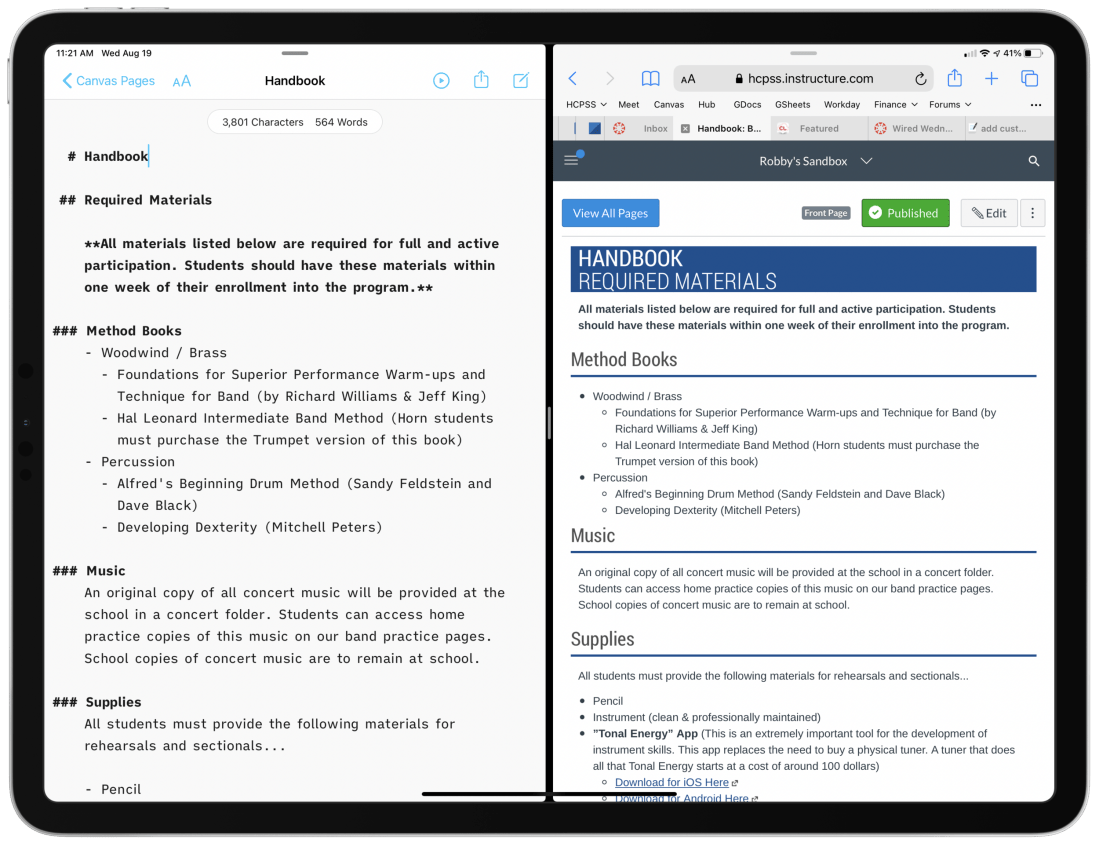
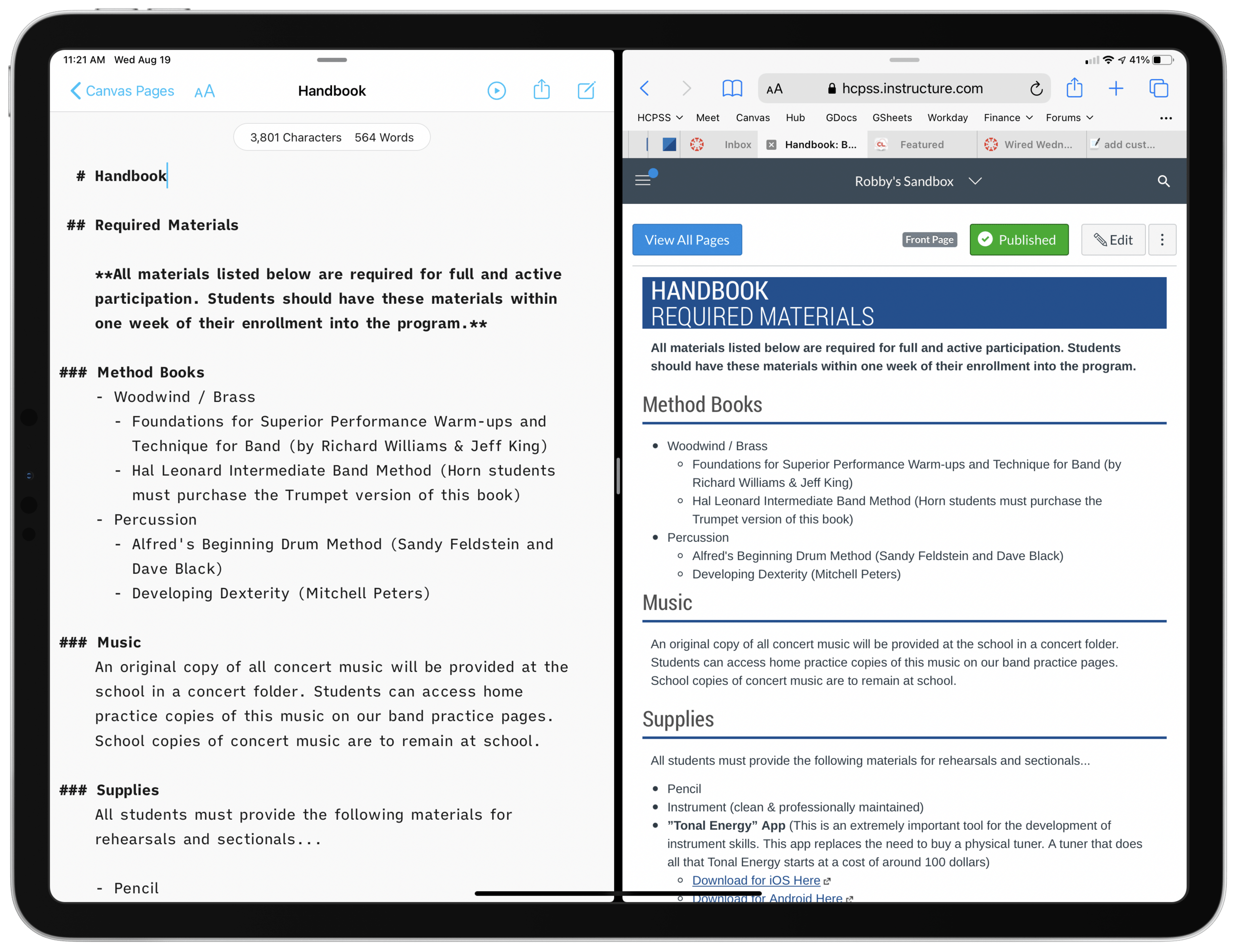
Left:A draft of a Canvas page, written in a text file on my computer. I used the Markdown syntax for headings, lists, and links. Right: What the Canvas page looks like once the text on the left is imported into the course page as HTML.
My district’s LMS of choice is Canvas, which is pretty stressful to work with. From most accounts I hear about other LMS software, Canvas is far from the worst. “You go to war with the LMS you have” I once heard.
Lately, I am writing my Canvas content in Markdown and storing it as text files on my computer.
Why?
Canvas is littered with user-hostile behaviors. Each class is a separate container. All files, pages, and assignments are quarantined, requiring multi-step procedures for sharing between courses. On top of this, the organizing tools are a mess. I am never 100 percent sure where to go. Even when I do, I have to wait for the internet to load each new thing I click on.
<div class="
      image-block-outer-wrapper
      layout-caption-below
      design-layout-inline
      combination-animation-none
      individual-animation-none
      individual-text-animation-none
    ">


    <figure class="
          sqs-block-image-figure
          intrinsic
        " style="max-width:2500px">


      <div class="image-block-wrapper">
        <div class="sqs-image-shape-container-element


          has-aspect-ratio
        " style="position: relative;padding-bottom:61.119998931884766%;overflow: hidden">


            <img src="https://images.squarespace-cdn.com/content/v1/5595df9ce4b0ce9ff9ecd1a8/1597866028922-HBRQ0FDXB4AE8F1L2EUI/CleanShot+2020-08-19+at+15.38.50%402x.png" alt="Instead of one file repository that all courses pull from, each class has its own separate Files area." width="2500" height="1528" style="display:block;object-fit: cover;width: 100%;height: 100%;object-position: 50% 50%" loading="lazy">

        </div>
      </div>


      <figcaption class="image-caption-wrapper">
        <div class="image-caption"><p class="">Instead of one file repository that all courses pull from, each class has its own separate Files area.</p></div>
      </figcaption>


    </figure>


</div>
Canvas is equally difficult for students. All of the course pages and content are just sort of floating in space. It’s up to the teacher to link the material together meaningful, but the tools to do so are inelegant and unintuitive. My music program has resorted to a website for communicating most general information since it exposes the hierarchy of its structure to our viewers. In other words, we control where every page lives, and our students can get to any part of our site from the navigation bar at the top of the page.
The WYSIWYG web editors you see within most Canvas pages, assignments, and announcements are equally frustrating. They are clunky, the text field is tiny, the buttons for all the tools are ambiguous, and I lose my data if the page refreshes itself or I lose connection. Additionally, it’s hard to anticipate what my formatting will look like before actually clicking the save button.
Lately, I am writing my Canvas content in Markdown and storing it as text files on my computer. By editing in Markdown, I can create content in third-party apps, work with data offline, control where files are organized, search them from the Spotlight, and quickly export as HTML for input into the Canvas HTML editor when I am ready to publish.
Using Mac and iOS Native Apps
I like native applications because the good ones feel designed to look like the computing platform. For example, the forScore app on iOS uses similar navigation buttons and fonts to Apple’s own Mail, Keynote, Pages, and Notes. This way, I don’t feel like I am learning new software.
Native apps that deal with documents store files on my hard drive. I can easily organize them into my own folder system, work on them without an internet connection, open the same file in different applications, and search them from the Spotlight. Document-based apps update your file as you edit your data. Websites often lose your data when they run into issues.
I don’t write anything longer than a sentence or two into the text field of a website. Instead, I draft them inDrafts and move my work to iAWriter for longer projects. Both of these apps can preview Markdown.
What is Markdown?
Markdown is a shorthand syntax for HTML. It empowers me to draft web content without actually writing code. Skim this Markdown syntax guide to see what I mean. You can learn the basics in five minutes.
Drafts and iA Writer have one-button shortcuts to convert Markdown to formatted text or HTML. Here is an example of Markdown, and what it would look like once converted to rich text or HTML.
# Blog Post Title
Here are *three things* I want to do today.
1. Work out
2. Sit in the hot tub
3. Grill some chicken

Let me tell you more about them.

## Work out
Today I will work out on my bike. My wife once said, and I quote:
> The earlier in the day you aim to do it, the more likely it is to happen.

## Sit in the hot tub
This will be relaxing. Maybe I will listen to a podcast there. Here are some recent favorites...
- Sound Expertise
- Sticky Notes
- Upgrade

My favorite podcast player is [Overcast](https://overcast.fm).
Once an app like Drafts or iA Writer converts the Markdown to rich text, it would look like this:
<div class="
      image-block-outer-wrapper
      layout-caption-below
      design-layout-inline
      combination-animation-none
      individual-animation-none
      individual-text-animation-none
    ">


    <figure class="
          sqs-block-image-figure
          intrinsic
        " style="max-width:1536px">


      <div class="image-block-wrapper">
        <div class="sqs-image-shape-container-element


          has-aspect-ratio
        " style="position: relative;padding-bottom:119.140625%;overflow: hidden">


            <img src="https://images.squarespace-cdn.com/content/v1/5595df9ce4b0ce9ff9ecd1a8/1597864448247-LZ511PWF8U5IKLA96WGX/CleanShot+2020-08-19+at+14.44.57%402x.png" alt="A good Markdown app like iA Writer will convert the syntax to rich text for you and copy it so that you can paste it into an application like Google Docs, Microsoft Word, or your website." width="1536" height="1830" style="display:block;object-fit: cover;width: 100%;height: 100%;object-position: 50% 50%" loading="lazy">

        </div>
      </div>


      <figcaption class="image-caption-wrapper">
        <div class="image-caption"><p class="">A good Markdown app like iA Writer will convert the syntax to rich text for you and copy it so that you can paste it into an application like Google Docs, Microsoft Word, or your website.</p></div>
      </figcaption>


    </figure>


</div>
I could have just as easily exported the resulting rich text to a Word document or Google Doc and all of the formatting would have been properly executed.
iAWriter can also export my Markdown as HTML like this:
<h1>Blog Post Title</h1>

<p>Here are <em>three things</em> I want to do today.</p>

<ol>
<li>Work out</li>
<li>Sit in the hot tub</li>
<li>Grill some chicken</li>
</ol>

<p>Let me tell you more about them.</p>

<h2>Work out</h2>

<p>Today I will workout on my bike. My wife once said, and I quote:</p>

<blockquote>
<p>The earlier in the day you aim to do it, the more likely it is to happen.</p>
</blockquote>

<h2>Sit in the hot tub</h2>

<p>This will be relaxing. Maybe I will listen to a podcast there. Here are some recent favorites...</p>

<ul>
<li>Sound Expertise</li>
<li>Sticky Notes</li>
<li>Upgrade</li>
</ul>

<p>My favorite podcast player is <a href="https://overcast.fm">Overcast</a>.</p>
Because Markdown can be converted to HTML automatically, I have found it less stressful to actually write my Canvas pages, announcements, and messages to parents in Markdown and then pasting the resulting HTML into the HTML editor of Canvas. I store my Markdown files in a folder of text files, with subfolders for each course. I have favorited these folders so that they are always accessible in the iA Writer sidebar. These folders are easily accessible. Because I am writing in plaintext, the result feels much more like writing in a simple note app than it does a word processor.
<div class="
      image-block-outer-wrapper
      layout-caption-below
      design-layout-inline
      combination-animation-none
      individual-animation-none
      individual-text-animation-none
    ">


    <figure class="
          sqs-block-image-figure
          intrinsic
        " style="max-width:2372px">


      <div class="image-block-wrapper">
        <div class="sqs-image-shape-container-element


          has-aspect-ratio
        " style="position: relative;padding-bottom:78.33052062988281%;overflow: hidden">


            <img src="https://images.squarespace-cdn.com/content/v1/5595df9ce4b0ce9ff9ecd1a8/1597864486248-5J9W1DWCB7H44XERKZW5/CleanShot+2020-08-19+at+14.45.57%402x.png" alt="iA Writer links to folders of text files on your hard drive. But it looks like a simple note app." width="2372" height="1858" style="display:block;object-fit: cover;width: 100%;height: 100%;object-position: 50% 50%" loading="lazy">

        </div>
      </div>


      <figcaption class="image-caption-wrapper">
        <div class="image-caption"><p class="">iA Writer links to folders of text files on your hard drive. But it looks like a simple note app.</p></div>
      </figcaption>


    </figure>


</div>
Here is an example of a Canvas announcement intended to be shared with one of my band classes early this fall. It contains an embedded Google Form families sign as an agreement to our policies. Markdown and HTML can be written in the same document and iA Writer treats it all as HTML when you export it.
I got the HTML embed straight from the Share menu of the Google Form setup. I didn’t need to know any code to make this message!
<div class="
      image-block-outer-wrapper
      layout-caption-below
      design-layout-inline
      combination-animation-none
      individual-animation-none
      individual-text-animation-none
    ">


    <figure class="
          sqs-block-image-figure
          intrinsic
        " style="max-width:2500px">


      <div class="image-block-wrapper">
        <div class="sqs-image-shape-container-element


          has-aspect-ratio
        " style="position: relative;padding-bottom:62.519996643066406%;overflow: hidden">


            <img src="https://images.squarespace-cdn.com/content/v1/5595df9ce4b0ce9ff9ecd1a8/1597866399217-9I7XOHMYA9C68EXRFUBS/CleanShot+2020-08-19+at+15.46.06%402x.png" alt="On the left: a Markdown document that contains HTML code for a Google Form embed. On the right: pasting that as HTML into the HTML editor in Canvas." width="2500" height="1563" style="display:block;object-fit: cover;width: 100%;height: 100%;object-position: 50% 50%" loading="lazy">

        </div>
      </div>


      <figcaption class="image-caption-wrapper">
        <div class="image-caption"><p class="">On the left: a Markdown document that contains HTML code for a Google Form embed. On the right: pasting that as HTML into the HTML editor in Canvas.</p></div>
      </figcaption>


    </figure>


</div>


<div class="
      image-block-outer-wrapper
      layout-caption-below
      design-layout-inline
      combination-animation-none
      individual-animation-none
      individual-text-animation-none
    ">


    <figure class="
          sqs-block-image-figure
          intrinsic
        " style="max-width:2500px">


      <div class="image-block-wrapper">
        <div class="sqs-image-shape-container-element


          has-aspect-ratio
        " style="position: relative;padding-bottom:76.95999908447266%;overflow: hidden">


            <img src="https://images.squarespace-cdn.com/content/v1/5595df9ce4b0ce9ff9ecd1a8/1597864190944-J0QAE339L9AL7Q519LPF/iVBORw0KGgoAAAANSUhEUgAAC50AAAjwCAYAAAAKgq9xAAAACXBIWXMAAAsTAAALEwEAmpwYAAAM+3.png" alt="How the resulting announcement appears to students." width="2500" height="1924" style="display:block;object-fit: cover;width: 100%;height: 100%;object-position: 50% 50%" loading="lazy">

        </div>
      </div>


      <figcaption class="image-caption-wrapper">
        <div class="image-caption"><p class="">How the resulting announcement appears to students.</p></div>
      </figcaption>


    </figure>


</div>
EDIT: When I wrote this post, I fogtot to add one benefit to having all of these files on your computer… even though Canvas messages don’t support formatting like headings and bold, I draft those in iAWriter too. It is SO much easier to find and re-use old emails I have sent to parents when they are searchable from my computer. Have you ever tried to search your Canvas ‘Sent’ folder? It’s terrible! Local computer copies for the win!
Cool new document creation shortcuts from WordPress and Adobe, in collaboration with Google. If you are a Google Docs user and didn’t already know about document creation shortcuts, they will save you some time. Click to read the entire article below.
Back in 2018, Google introduced web links to quickly open blank Docs, Forms, and Sheets. Over the years, it expanded to most other G Suite services, with Adobe Acrobat and Spark now supporting several .new shortcuts.
Adobe “collaborated” with Google in hopes of providing a “streamlined way to get things done.” It specifically doesn’t want users to be “stuck scouring the web just to get things done.”
I wish I had more of a need for these. I love the idea of typing “new.sheets” into my browser to set up a new spreadsheet, but I am logged into two different Google accounts and the chance that it creates the document in the correct account is 50/50. Kind of defeats the point of the shortcut.
Microsoft is creating a new kind of Office document. Instead of Word, Excel, or PowerPoint, the company has created Lego blocks of Office content that live on the web. The tables, graphs, and lists that you typically find in Office documents are transforming into living, collaborative modules that exist outside of traditional documents.
Microsoft calls its Lego blocks Fluid components, and they can be edited in real time by anyone in any app. The idea is that you could create things like a table without having to switch to multiple apps to get it done, and the table will persist on the web like a Lego block, free for anyone to use and edit.
This is obviously very cool, but it’s the next part that gets me excited.
Fluid is designed to make those tables, charts, and lists always feel alive and editable, no matter where you create them and regardless of how you share and copy them into other apps. Instead of getting a static and dull chart you copied from Excel, you’ll get a chart that can be edited anywhere you paste it, and you’ll see everyone making edits as they happen. That might be in the middle of an email chain, in a chat app like Microsoft Teams, or even third-party apps eventually.
So certain parts of Office documents can be shared between multiple spaces, or with multiple users, across multiple apps. If I am understanding this correctly, I can instantly think of 25 ways this could make my job easier. Here are a few…
Copy tasks from a Microsoft To Do project called Field Trip into an email to my music team and have everyone check off tasks in the email as they do them. Status of those completed tasks syncs back to my project in To Do.
Say I am logging a spreadsheet of student concert attire orders and I need some data for a few choir kids. I can copy and paste just those cells, email them to the choir teacher, he can fill out the data right in the email, and I watch as it syncs back to my spreadsheet.
Similar to that last one. My school district sends me an updated list of recommended private teachers. I email just the flute teachers to my flute students and it stays up to date when the data is edited by those who maintain the list.
No more putting the same student names in multiple different documents. I can have one Word document that acts as a primary roster. All concert programs, student lists, sectional roster documents, etc. are just snippets of text from my primary roster document, that automatically update when I update the primary roster. No more misspelled names, inconsistency, or duplicated work.
Various data from documents can be clipped into media rich notes in OneNote where I can access them alongside one another without thinking about document management. For example, a short list of Concert Attire tasks could coexist in the same note as a portion of a payment spreadsheet, and both could update in real time when I edit their respective documents in To Do and Excel.
For the reccord, I don’t use any of Microsoft’s apps as my default tools, but I can certainly see myself using them more often if I can leverage this kind of power out of them.
Some questions I have:
Will this be web only or will it eventually roll out to Microsoft apps on all platforms?
Will Microsoft stand alone apps like Excel continue to exist or will they be replaced with one app (like the iPhone which now has an “Office” app that combines features of the whole suite)
Will this actually catch on with people who are used to saving files to places on their hard drive? It seems ahead of its time.
Will it compete with Google Docs? Someone needs to. Google Docs gets a only a few things right, but they get them really right, and that’s why I think it has been so pervasive. Personally, I would far prefer that my work and personal circles relied on great native apps like Office.
Will third party apps be able to embed the modular Microsoft elements inside of them, create modular elements to be able to insert in Microsoft docs, or both?
Would Apple ever consider participating in this framework with their iWorks apps? Would they recreate their own version?





 Music Ed Tech Talk
You must be logged in to post a comment.