What’s on Kate’s Desk?

Kate Bateman is one of my colleagues in the Howard County Public School System. We recently did one of my favorite things, which is to eat hot pot and geek out over stationary. Afterwards, Kate showed me an image of her amazing desk setup. I was inspired. I thought, wouldn’t it be cool to share more of people’s workflows and setups on this blog?

Kate agreed to be a part of my experiment in a new series on here, “What’s On Your Desk?”

I prepped some questions for Kate, she answered and provided pictures.

Kate, take it away. What’s on your desk?


My name is Kate Bateman. I am a former professional orchestral flutist, but gave that up to spend time with The Youths at Mount View Middle School, where I teach band and general music. This is my 8th year as a teacher.

I also have a stupid amount of hobbies- I speak Korean conversationally, I love painting, I dabble in photography, I read a lot, I love cooking (when I have the time to enjoy the process of it), and if I have the money, I will travel any chance I get.

What are a few of the things on your desk that make you the most productive?

One is my planner (a Hobonichi weeks), which keeps me organized when I have a million things going on. I got the version with extra blank pages in the back, so I also use it to keep track of to-dos both in and out of work. It’s old school, but it works for me.

The other is a simple analog timer. Whenever I need to sit down and get something done but am feeling particularly unmotivated, I stick the timer on for 15 minutes at a time, take a break for 5 minutes, then rinse and repeat until I can’t concentrate anymore.

What computing devices do you always have on your desk? How do they fit into your workflow?

Just my old iMac and my iPad. I use Google for most of my work, along with a few other apps to help with organization (Craft and Goodnotes being the main two). These can all be accessed easily from any desktop or my iPad, so I leave my school-provided chromebook at work. It’s clunky anyway.

What other tools do you keep close by?

Everything else is SUPER low tech! I almost feel like I’m betraying you, Robby.

I have all five of my fountain pens close by. My favorite, and most beloved, is my Pilot Vanishing Point, which was worth every (exhorbitant) penny because I use it all day, every day. All my pens feel different to use and they all have different color Pilot Iroshizuku inks in them. I use my Vanishing Point the most, but I also reach for others depending on my mood.

I also have all of my journals within easy reach to the side on this Ikea cutting-board-turned-bookshelf. I have my daily 5-year journal, my Commonplace journal (where I write down things I’ve read, quotes, lyrics, notes from therapy, anything thought-provoking that I want to come back to later), my sketchbook, my journal for my National Board Certification classes, and my notebook where I take all of my notes in my Korean lessons.

I “built” this desk specifically out of an Ikea butcher block countertop, a set of Ikea Alex drawers, and a little cube with shelves specifically to store my art supplies and stationery, while still giving me a lot of room to spread out. All of my stationery and art supplies are within easy reach, they’re just hidden in the drawers (except for my oil and gouache paintbrushes).

Are there any workflows that are effective for your productivity these days?

Specifically here, at this desk? Nah.

At school though, I start every morning by writing down what we actually got done the day before in each class, and then quickly making a new plan for each class for that day. It gives me a chance to see how much I still have to plan, if I need to make copies of materials, or prepare the classroom in any way, etc.

Usually once I get through period 1, I start my to-do list. It’s mostly a brain dump- what do I still need to get through the day? What do I need to get through the rest of the week? Who do I need to contact about which concerns or questions?

I teach five completely different classes every day, and each day I see around 150 students, so having the brain dump time lets me see everything all at once, and enables me to prioritize. As someone wise (Ben Denne, a wonderful HCPSS colleague) once said, working quickly isn’t really working quickly, it’s just about putting out the biggest fire first.
How does your work change when you are mobile, or away from this setup?

The type of work I do is definitely different. When I am at my desk at school, I often am shuffling a lot of papers, and several binders with my band, sectional and general music lesson plans, attendance sheets, and resources. Work at school is a lot of admin- putting grades in, emails, grading, updating Canvas etc. This is also the work that is a lot easier to do when I’ve been in front of kids for several hours straight and don’t necessarily have a lot of gas left in the tank, mentally.

I feel like I do a lot more of my “big picture” planning when I’m at my home desk. If I need to sit down and plan an entire unit, rethink part of a unit, write playing exercises, or re-write a part, it’s much easier to do it here, farther removed from the day-to-day chaos of school.

What’s something on your desk that is unique to you? Why do you have it?

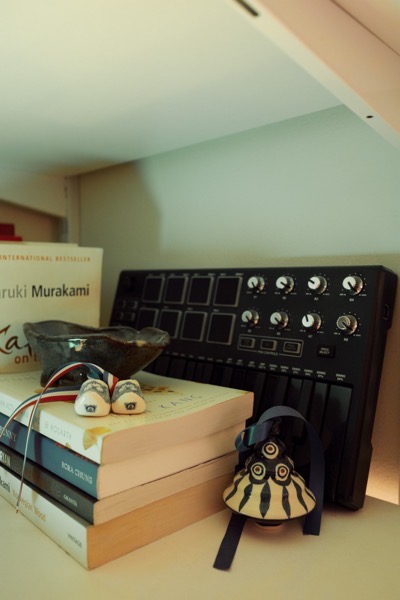
I love my Ikea pegboard behind my computer. It has a bunch of little trinkets and things I’ve picked up from various travels. The majority are from Korea- a photobooth strip from Seoul with my friends Seungwon and Seungmin; a cloth from one of the lovely host I stayed with in Itaewon; a bookmark from the Dae-O bookstore in Seoul (a pilgrimage for fans of BTS’s leader RM); several keychains and postcards. I also have a postcard from Bangkok, where I went with my coworkers/family members Matt and Jon and Randy and a tile from the Palais des Papes in Avignon, France, where I went this summer with my wonderful friends Justine and Lewis.

The little jar which holds my gel and ball point pens is also special; it’s the jar from the dip that my friends Caitlin and Danny brought to a New Year’s party we hosted a couple years ago. I have a figurine from a different trip to Korea that brings back memories of Seoul and Busan with my friends Nick and Nicole. I also love my three-legged pig (which symbolizes goodwill and luck) from my friends Charlie and Carey, who I met through DnD.

I have a lot more trinkets from different trips and times of my life everywhere in my home. Every time I see these things, I’m reminded of how lucky I am to have had made such fantastic memories, and to have made them with wonderful people.

What’s on my desk?

This post now features a complimentary podcast episode. Listen and subscribe!

Earlier this year, I wrote a guest post for the Club MacStories newsletter showing off all the technology on my desk. With permission from the editors, I am cross-posting that below.

Image.jpeg

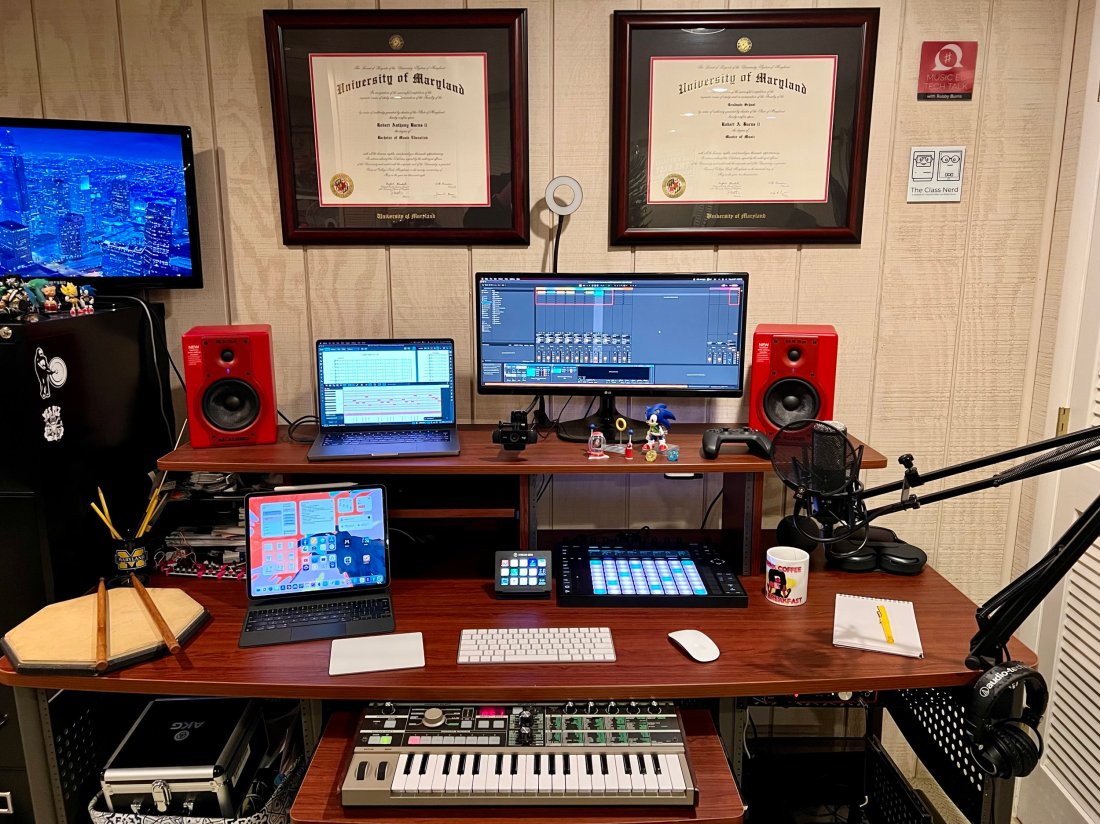
This desk is in my home music studio in Maryland. I run a private percussion teaching studio out of this space and produce my blog/podcast Music Ed Tech Talk.

Image.jpeg

My 14″ MacBook Pro is the core of my computing life. It goes with me everywhere, from this desk to my day job as a middle school band director. I teach out of four different classrooms. USB-C hubs at all of my desks allow me to have distinctive hardware setups specific to each room while maintaining continuity through the consistency of my macOS settings and apps.

My secondary monitor is an LG Ultra Wide. I don’t love it. I originally got it as a cheap way to interact with my Mac mini (dominantly used to serve up Plex content and run a Homebridge server.) I have phased out the Mac mini and hope to one day replace this monitor with something nicer now that it is used with the MacBook.

Image.jpeg

When my school district moved to virtual learning last year, I wanted to upgrade my webcam. The Logitech C920 was one of the most popular options I was coming across, and it hasn’t let me down yet. I have a snake arm from Amazon (link) that allows me to easily adjust the angle of the camera and the ring light behind it. The arm can bend the camera down to face the surface of my desk and show what my hands are doing during virtual classes, presentations, and live streams.

Image.jpeg

These M-Audio BX5a monitors were on sale ten years ago, presumably because red is a less popular color than black. I actually kind of like having an accent color. They sound balanced enough to reference the diverse musical projects I edit. They produce enough output for my students to jam along to recordings on drum set.

Because the studio monitors are my primary sound output, the HomePod mini is used mainly for controlling Siri. I often ask it to turn on the baseboard heaters (with the Mysa HomeKit thermostat), the lights, and a red light outside the door to let my family know if I’m recording.

Image.jpeg

The Focusrite Scarlet 6i6 is my current audio interface. It has just enough ins and outs to plug my MIDI and audio input devices into my computer while outputting sound to the studio monitors. I don’t currently do any fancy recording down here beyond my podcast and student audition tapes (which only require stereo recording).

Image.jpeg

The AKG P420 is my favorite mic for generalized recording in its price range. It’s a resonant and balanced condenser microphone. I honestly think it compares to some microphones up to double the price. I use it primarily for virtual class, presentations, podcasting, and in a pair to record student audition tapes in stereo.

My Audio Technica headphones are pretty old and junky (I couldn’t even find a link to this model online), but their long life speaks to the quality of AT’s gear. I sometimes plug my AirPods Max into the Scarlet if I am already wearing them.

Image.jpeg

My Lamy Safari Fountain Pen and Rhodia notebook are my entry point into the world of better-than-average writing tools, and I am open to learning more!

Image.jpeg

I love the feel and simplicity of Apple’s Magic Keyboard, Trackpad, and Mouse. It took some time to learn to use the trackpad on the left. Still, it gives me a powerful workflow where I can quickly make refined edits in audio software by zooming in and out of the project with my left hand while precisely manipulating content with the mouse.

iVBORw0KGgoAAAANSUhEUgAAC50AAAjwCAYAAAAKgq9xAAAACXBIWXMAAAsTAAALEwEAmpwYAAAM 2.png

I love my 12.9″ iPad Pro! Sometimes I use it as a laptop at home and work. In my studio, I usually rip off the tablet and read full-sized sheet music on it using the forScore app. I also depend on the Tonal Energy Tuner, which is the most powerful app of its kind on the App Store and does not currently have a Mac version.

Image.jpeg

My Ableton Push 2 works primarily as a control surface for Ableton Live. It is a new addition, and I am overwhelmed by its potential. Ableton Live is a very advanced application, and the Push allows you to control almost all of its features with tactile, performable knobs and buttons. It makes the software feel like an instrument. You can use it to record note input, manage the tempo, trigger loops, edit samples, and more!

CleanShot 2022-01-27 at 17.32.32.png

I play with music production for fun, but I also use the Push as a supercharged metronome when teaching private students. It allows me to get my eyes off the computer screen and focus more on the teaching because all the buttons can manipulate the app even when it isn’t in the foreground.

Image.jpeg

I use a Stream Deck for all the same reasons MacStories readers might find it useful- live streaming, Shortcuts, and other automation. I also use it to navigate the deep menus and feature sets of Dorico, a music notation application.

CleanShot 2022-01-27 at 17.51.41.png

Notation Central has pre-built Stream Deck profiles for major music notation apps available on their website (link).

Image.jpeg

The MicroKorg is a fun little synth that can be highly programmed to produce absolutely otherworldly audio. I also use it for MIDI note entry in digital audio workstations and music notation apps.

Image.jpeg

My electronic reference piano is a Korg Concert C-150, which I also use for MIDI note input. It’s an electric upright piano from the 80s with the legs chopped off. A high school was going to throw it away in the early 2000s before I asked if I could have it instead. I like it because it has a flat surface for putting stuff on (like other keyboards).

On top of the Korg is a Roland Octopad SPD-30. This is a great electronic drum sampler. It has an excellent library of its sounds and can trigger note input in music software using my most comfortable input method (drum sticks).

Next to the Octopad is my Yamaha Harmony Director. It’s a keyboard that plays sustained tuning drones and can easily switch between different tuning systems. The drones can be played through speakers, or in my case, be used to create play-along practice material for students (link).

Apple TV. I wish I could say I use this for something other than playing Sonic the Hedgehog while my kid naps.

Instruments! The desk is a fun command station, but it’s really only the hub of my digital productivity and creativity. The real bread and butter of my professional life are the instruments I play and teach. Depicted here are my vibraphone, marimba, timpani, drum sets, snare drum, wind instruments, and other fun!

Image.jpeg

Image.jpeg

Image.jpeg

Image.jpeg

Image.jpeg

Image.jpeg