The Prime Directive, featuring Will Kuhn and Ethan Hein (Music Ed Tech Talk Podcast #32)

Listen on Apple PodcastsListen on SpotifyRSS Feed

Description

Ethan and Will join the show to talk about their book Electronic Music School, the Prime Directive, writing apps, and the future of the iPad.

Thanks to this week’s sponsor, the DMV Percussion Academy. Leran more and registere here.

Chapters:

  • 00:00:00 – Intro
  • 00:01:25 – Sponsor: DMV Percussion Academy
  • 00:02:03 – Star Trek
  • 00:04:18 – Electronic Music School
  • 00:10:09 – Teaching Underlying Musical Concepts of Electronic Music Styles
  • 00:18:33 – Perceived Threat by Traditional Performing Arts Teachers
  • 00:24:28 – Teaching Songwriting
  • 00:27:23 – Scaffolding
  • 00:37:15 – Fighting Racism with Music Education
  • 00:48:37 – The Prime Directive
  • 00:52:34 – Staying Relevant?
  • 01:07:15 – We Live on Twitter
  • 01:07:15 – Writing Apps
  • 01:13:21 – Bedtime
  • 01:16:07 – The M1 iPad Pro
  • 01:35:51 – Tech Tip of the Week
  • 01:38:14 – Album of the Week
  • 01:41:07 – App of the Week
  • 01:43:24 – Closing

Show Notes:

App of the Week:
Robby – Tot
Will – In Haler Radio
Ethan – Figure

Album of the Week:
Robby – Tauk – Shapeshifter II: Outbreak
Will – Suburban Lawns – Janitor (Original Video)
Ethan – Clipping – The Deep

Where to Find Us:
Robby – Twitter | Blog | Book
Will – Twitter | Website
Ethan – Twitter | Website

Please don’t forget to rate the show and share it with others!

Subscribe to Music Ed Tech Talk:

Subscribe to the Blog

Subscribe to the Podcast in…
Apple Podcasts | Overcast | Castro | Spotify | RSS

🎙 forScore for the Mac, featuring David MacDonald (Music Ed Tech Talk #31)

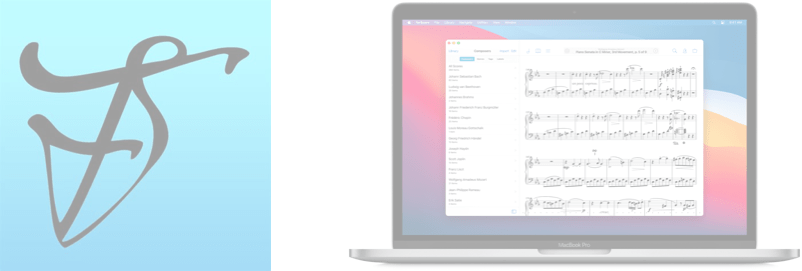
Robby and David talk about forScore for the Mac and its new syncing feature. But also, lots of music theory.

Also included:

  • Loop-based music theory

  • GoodNotes for the Mac

  • Transcribe Apps

  • Lots of music apps and utility apps

  • Tech podcasts we like

  • Music YouTubers we like

  • Our favorite music, tech tips, and albums of the week

Show Notes:

App of the Week: 

Robby – Soro for Sonos
David MacDonald – Diagrams

Album of the Week:

Robby – Lettuce – Elevate
David MacDonald – Darcy James Argue’s Secret Society – Brooklyn Babylon 

Where to Find Us:

Robby – Twitter | Blog | Book
David MacDonald – Twitter | Website

Please don’t forget to rate the show and share it with others!

Subscribe to Music Ed Tech Talk:

Subscribe to the Blog

Subscribe to the Podcast in… Apple Podcasts | Overcast | Castro | Spotify | RSS

🎙Apps for Research and Remembering, with David MacDonald

Composer and teacher, David MacDonald, returns for a discussion about the apps we use for notes, research, writing, and clipping data to find later.

Other topics:

  • What kinds of work goes in which kinds of apps
  • Digital research tools
  • Kindle Paperwhite
  • Streaming / virtual teaching tools
  • Music theory YouTubers
  • Zooming in to your Mac screen
  • Quickly taking a screenshot with the Apple Pencil
  • Our favorite music and apps of the week

Show Notes:

App of the Week:
Robby – Stream Deck Mobile App
David MacDonald – Reincubate Camo & FiLMiC Pro

Album of the Week:
Robby – Owane | Yolo EP Vol. 1
David MacDonald – Scary Pockets YouTube channel

Where to Find Us:
Robby – Twitter | Blog | Book
David MacDonald – Twitter | Website

Please don’t forget to rate the show and share it with others!

Subscribe to Music Ed Tech Talk:

Subscribe to the Blog

Subscribe to the Podcast in…

Apple Podcasts | Overcast | Castro | Spotify | RSS

🎙 METT Episode #28 – Rehearse Your Ensembles Remotely

Robby explains the software, hardware, and teaching strategies he uses to run engaging and effective music rehearsals in a remote or hybrid environment.

This information was presented earlier this month at the Maryland Music Educators Association conference. The notes and links below are from the session notes of that presentation.

Learn More From Me About Technology

Website – robbyburns.com

Blog – Music Ed Tech Talk (musicedtechtalk.com)

Subscribe to the Music Ed Tech Talk podcast Apple Podcasts | Spotify | RSS

Subscribe to my email newsletter here

Buy my book, Digital Organization Tips for Music Teachers, here

Buy my Scale Play Along Tracks here

Abstract

Learn the strategies and technologies to run engaging synchronous rehearsals. Engage students visually and speed up your flow using Open Broadcasting Software. Pump the sound video/music/play-along tracks directly through Zoom or Google Meet for a lag-free experience. Explore play along with resources, student reflection with Google Docs, effective camera/mic practices, and have students working collaboratively in synchronous chamber ensembles with Soundtrap! Software discussed includes: Keynote, Google Slides, Loopback, Soundsource, Farrago, AnyTune, Soundtrap, Smartmusic!

Broadcasting Software

Audio Routing

Making Play Along Tracks

Visual Presentation

Subscribe to Music Ed Tech Talk:

Subscribe to the Blog

Subscribe to the Podcast in…
Apple Podcasts | Overcast | Castro | Spotify | RSS

🎬 Technology Tips for Musicians and Teachers, Facebook Live with David MacDonald

Speaking of live video, here is the video from my Facebook Live with David MacDonald last Sunday. In the video, we discuss apps and gadgets we are using to teach virtually. Watch on Facebook here or in the embedded video below.

Tech Tips for Musicians and Teachers, with David MacDonald – (Facebook Live, February 21 at 5 pm EST)

I will be going on Facebook Live with composer David MacDonald on Sunday at 5 pm EST. We are going to be discussing tech that we have recently been using in our respective music teaching jobs.

Follow me on Facebook and tune in here.

<div class="
      image-block-outer-wrapper
      layout-caption-below
      design-layout-inline
      combination-animation-none
      individual-animation-none
      individual-text-animation-none
    ">


    <figure class="
          sqs-block-image-figure
          intrinsic
        " style="max-width:672px">


      <div class="image-block-wrapper">
        <div class="sqs-image-shape-container-element


          has-aspect-ratio
        " style="position: relative;padding-bottom:33.48214340209961%;overflow: hidden">


            <img src="https://images.squarespace-cdn.com/content/v1/5595df9ce4b0ce9ff9ecd1a8/1613417972064-LH6Z8V20L3HZRLX55FQR/David+MacDonald+Facebook+Live+Promo.png" alt="David MacDonald Facebook Live Promo.png" width="672" height="225" style="display:block;object-fit: cover;width: 100%;height: 100%;object-position: 50% 50%" loading="lazy">

        </div>
      </div>


    </figure>


</div>

METT Episode #18 – Productivity Boot Camp (Part I): Notes and Tasks, with Dr. Frank Buck

Thanks to my sponsors this month, Flat for Education.

Dr. Frank Buck returns to the show for the kick-off of my mini-series, Productivity Boot Camp! Dr. Frank Buck is a productivity master with a background in band directing and administration. I share my knowledge of Apple products and native third-party apps, and he shares his experience with web-based, cross-platform apps. We bounce back and forth about good digital task and note management and share our favorite apps!

Show Notes:

App of the Week:
Robby – Sticky Widgets
Frank Buck – Feedly

Album of the Week:
Robby – The Lost Art of Longing | BT
Frank Buck – Handel Flute Sonata V – Recording of Dr. Frank Buck Performing

Where to Find Us:
Robby – Twitter | Blog | Book
Frank Buck – Twitter | Website

Please don’t forget to rate the show and share it with others!

Subscribe to Music Ed Tech Talk:

Subscribe to the Blog

Subscribe to the Podcast in…
Apple Podcasts | Overcast | Castro | Spotify | RSS

Thanks to this week’s sponsor, Flat for Education:

Flat for Education offers music educators and their students the most affordable cloud-based music notation software on the market. Empowering teachers to create playful and engaging music activities, creations, assessments on any device at any time.

The platform integrates with every well-known learning management system available: Google Classroom, Microsoft 365, Canvas, Schoology, and MusicFirst to name a few. Everything will be synchronized with your existing setup to avoid any time loss.

Flat for Education offers an advanced system of assignments allowing you to create playful and stunning music activities with your students.

Create a template for all your students to start working from, or simplify the toolbar to have them only working with eighth and quarter notes. The only limit is your imagination.

Save a lot of time by generating worksheets and quizzes in just a few clicks for your students to practice music theory.

Finally, Bands directors and choirs conductors can have their students directly recording their performance from home for review.

Whether you are teaching remotely or in-person, Flat for Education will support you in creating playful and engaging music activities in no time. Try it free for 90 days on flat.io/edu

METT Podcast #16 – Master Your Virtual Teaching Tech, with David MacDonald

Thanks to my sponsor this month, MusicFirst

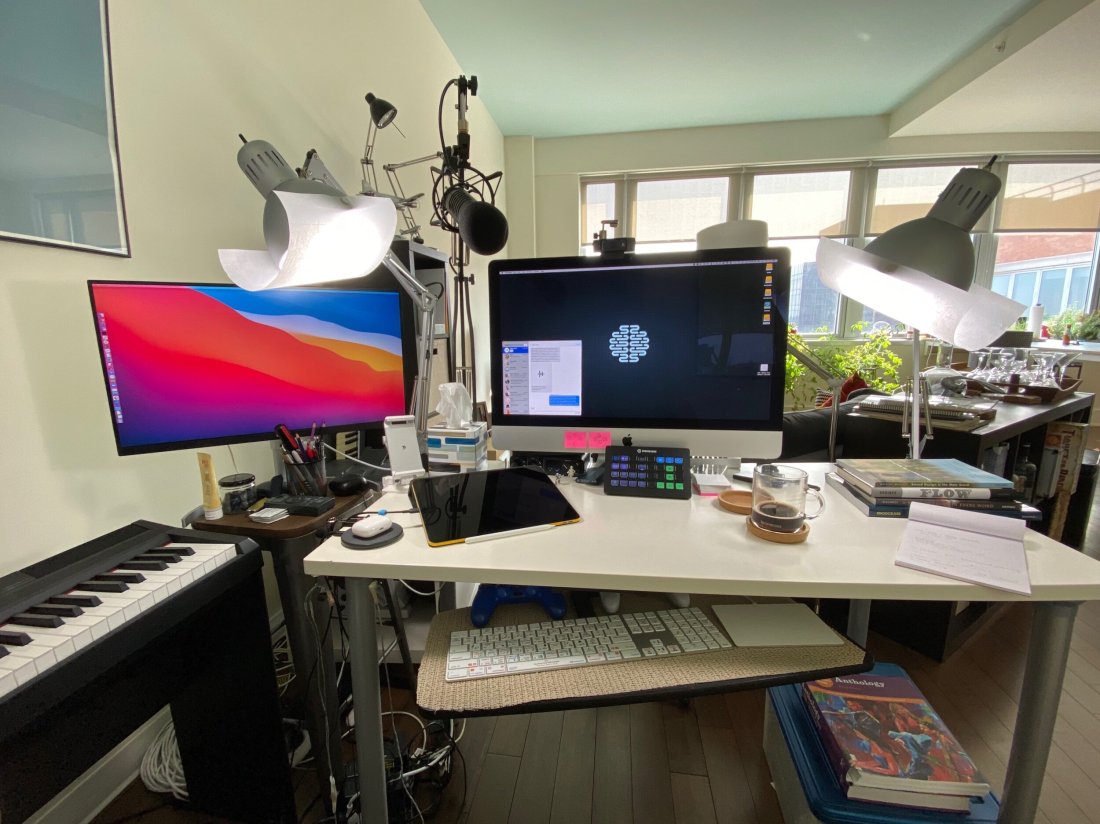
David MacDonald returns to the show to talk about the hardware and software in our virtual teaching setups. Then we speculate about touchscreen Macs and consider how Apple’s recent App Store policies might impact the future of creative professional software on iOS.

Topics include:

  • New Zoom features for musicians and teachers
  • David and Philip Rothman‘s new podcast, Scoring Notes
  • Using Open Broadcaster Software to level up your virtual teaching
  • Routing audio from your apps into Zoom and Google Meet calls
  • Teaching with Auralia
  • LMS integration with third-party music education apps
  • Using MainStage and Logic for performing instruments into virtual classrooms
  • Touchscreen Macs
  • Apple’s App Store Policy

Show Notes:

Where to Find Us:
Robby – Twitter | Blog | Book
David MacDonald – Twitter | Website | Blog

Please don’t forget to rate the show and share it with others!

Subscribe to Music Ed Tech Talk:

Subscribe to the Blog

Subscribe to the Podcast in…
Apple Podcasts | Overcast | Castro | Spotify | RSS

Today’s episode is sponsored by MusicFirst:

MusicFirst offers music educators and their students easy-to-use, affordable, cloud-based software that enables music learning, creation, assessment, sharing, and exploration on any device, anywhere, at any time.

MusicFirst Classroom is the only learning management system designed specifically for K-12 music education. It combines the flexibility of an LMS with engaging content and powerful software integrations to help manage your students’ progress, make lesson plans, and create assignments.

And for younger students, MusicFirst Junior is the perfect online system for teaching elementary general music. It includes a comprehensive K-5 curriculum, hundreds of lessons & songs, and kid-friendly graphics to making learning and creating music fun!

Whether you’re teaching remotely, in-person, or in a blended learning environment, MusicFirst will work with you to find a solution that fits your program’s unique needs. Try it free for 30 days at musicfirst.com.

<div class="
      image-block-outer-wrapper
      layout-caption-below
      design-layout-inline
      combination-animation-none
      individual-animation-none
      individual-text-animation-none
    ">


    <figure class="
          sqs-block-image-figure
          intrinsic
        " style="max-width:2500px">


      <div class="image-block-wrapper">
        <div class="sqs-image-shape-container-element


          has-aspect-ratio
        " style="position: relative;padding-bottom:74.95999908447266%;overflow: hidden">


            <img src="https://images.squarespace-cdn.com/content/v1/5595df9ce4b0ce9ff9ecd1a8/1600038818677-9KFU4NAEUS7MPSAS5S61/IMG_3003.jpeg" alt="David’s teaching setup." width="2500" height="1874" style="display:block;object-fit: cover;width: 100%;height: 100%;object-position: 50% 50%" loading="lazy">

        </div>
      </div>


      <figcaption class="image-caption-wrapper">
        <div class="image-caption"><p class="">David’s teaching setup.</p></div>
      </figcaption>


    </figure>


</div>


<div class="
      image-block-outer-wrapper
      layout-caption-below
      design-layout-inline
      combination-animation-none
      individual-animation-none
      individual-text-animation-none
    ">


    <figure class="
          sqs-block-image-figure
          intrinsic
        " style="max-width:2500px">


      <div class="image-block-wrapper">
        <div class="sqs-image-shape-container-element


          has-aspect-ratio
        " style="position: relative;padding-bottom:75%;overflow: hidden">


            <img src="https://images.squarespace-cdn.com/content/v1/5595df9ce4b0ce9ff9ecd1a8/1600038852982-OD6Y5XFUFRAL1TR2PPJD/A7067C72-D117-473F-A9FA-D3938A9C1A5E.jpeg" alt="My teaching setup." width="2500" height="1875" style="display:block;object-fit: cover;width: 100%;height: 100%;object-position: 50% 50%" loading="lazy">

        </div>
      </div>


      <figcaption class="image-caption-wrapper">
        <div class="image-caption"><p class="">My teaching setup.</p></div>
      </figcaption>


    </figure>


</div>


<div class="
      image-block-outer-wrapper
      layout-caption-below
      design-layout-inline
      combination-animation-none
      individual-animation-none
      individual-text-animation-none
    ">


    <figure class="
          sqs-block-image-figure
          intrinsic
        " style="max-width:2500px">


      <div class="image-block-wrapper">
        <div class="sqs-image-shape-container-element


          has-aspect-ratio
        " style="position: relative;padding-bottom:75%;overflow: hidden">


            <img src="https://images.squarespace-cdn.com/content/v1/5595df9ce4b0ce9ff9ecd1a8/1600038981679-Y8MXKP63LULXCLM4Y5I3/IMG_2823.jpeg" alt="…From far away." width="2500" height="1875" style="display:block;object-fit: cover;width: 100%;height: 100%;object-position: 50% 50%" loading="lazy">

        </div>
      </div>


      <figcaption class="image-caption-wrapper">
        <div class="image-caption"><p class="">…From far away. </p></div>
      </figcaption>


    </figure>


</div>