Seamlessly Sync Readwise and Craft

Seamlessly Sync Readwise and Craft:

Highlight text in articles or books and instantly sync it to Craft and across all your devices.
Keep reading here…

Craft is now integrated with the Readwise service, which I love for saving my highlights and notes from Kindle books and web articles.

If you ask me, Readwise integration is the essential component of a note-taking workflow built on PKM apps. Even though I am using Apple Notes for my general note-taking these days, and Craft more specifically for information I share on the web, it is really exciting to see them integrate this.

Linked in the article are instructions for a discount on Craft and a free trial of Reader.

Making a Wiki for Your Music Program in Craft

I have been singing the praises of Craft lately, a Personal Knowledge Management app made easy.

You can learn about Craft in the video or podcast episodes below.

Craft has replaced software I was previously using for notes, websites, writing, collaboration, and word processing. Making a note sharable with anyone who has the link is only two clicks.

Because Craft is so much easier to use than a learning management platform or a website builder, I have moved a lot of the information and resources I share with my music students to it. I can edit everything in Craft, students can see it all on the web.

At my recent TMEA presentation Digital Organization Tips for Music Teachers, I spoke about this and showed off my “Band Wiki.” A few people who attended the session asked to see how I have these pages set up in Craft. Here are some screenshots of how I set up the Band Wiki.

<div class="
      image-block-outer-wrapper
      layout-caption-below
      design-layout-inline
      combination-animation-none
      individual-animation-none
      individual-text-animation-none
    ">


    <figure class="
          sqs-block-image-figure
          intrinsic
        " style="max-width:2690px">


      <div class="image-block-wrapper">
        <div class="sqs-image-shape-container-element


          has-aspect-ratio
        " style="position: relative;padding-bottom:70.3345718383789%;overflow: hidden">


            <img src="https://images.squarespace-cdn.com/content/v1/5595df9ce4b0ce9ff9ecd1a8/28df68ad-6722-4b0e-90c8-8663ef0c2b22/CleanShot+2023-02-16+at+13.51.17%402x.png" alt="" width="2690" height="1892" style="display:block;object-fit: cover;width: 100%;height: 100%;object-position: 50% 50%" loading="lazy">

        </div>
      </div>


    </figure>


</div>


<div class="
      image-block-outer-wrapper
      layout-caption-below
      design-layout-inline
      combination-animation-none
      individual-animation-none
      individual-text-animation-none
    ">


    <figure class="
          sqs-block-image-figure
          intrinsic
        " style="max-width:2690px">


      <div class="image-block-wrapper">
        <div class="sqs-image-shape-container-element


          has-aspect-ratio
        " style="position: relative;padding-bottom:70.3345718383789%;overflow: hidden">


            <img src="https://images.squarespace-cdn.com/content/v1/5595df9ce4b0ce9ff9ecd1a8/2b322e8f-0eab-42b6-986b-2f9825a0cad5/CleanShot+2023-02-16+at+13.47.45%402x.png" alt="" width="2690" height="1892" style="display:block;object-fit: cover;width: 100%;height: 100%;object-position: 50% 50%" loading="lazy">

        </div>
      </div>


    </figure>


</div>


<div class="
      image-block-outer-wrapper
      layout-caption-below
      design-layout-inline
      combination-animation-none
      individual-animation-none
      individual-text-animation-none
    ">


    <figure class="
          sqs-block-image-figure
          intrinsic
        " style="max-width:2690px">


      <div class="image-block-wrapper">
        <div class="sqs-image-shape-container-element


          has-aspect-ratio
        " style="position: relative;padding-bottom:70.3345718383789%;overflow: hidden">


            <img src="https://images.squarespace-cdn.com/content/v1/5595df9ce4b0ce9ff9ecd1a8/63080aa7-2dd8-4110-9b52-8630e641f62d/CleanShot+2023-02-16+at+13.47.54%402x.png" alt="" width="2690" height="1892" style="display:block;object-fit: cover;width: 100%;height: 100%;object-position: 50% 50%" loading="lazy">

        </div>
      </div>


    </figure>


</div>


<div class="
      image-block-outer-wrapper
      layout-caption-below
      design-layout-inline
      combination-animation-none
      individual-animation-none
      individual-text-animation-none
    ">


    <figure class="
          sqs-block-image-figure
          intrinsic
        " style="max-width:2690px">


      <div class="image-block-wrapper">
        <div class="sqs-image-shape-container-element


          has-aspect-ratio
        " style="position: relative;padding-bottom:70.3345718383789%;overflow: hidden">


            <img src="https://images.squarespace-cdn.com/content/v1/5595df9ce4b0ce9ff9ecd1a8/e54a484f-0f47-450f-b6fb-cca874fb404b/CleanShot+2023-02-16+at+13.48.03%402x.png" alt="" width="2690" height="1892" style="display:block;object-fit: cover;width: 100%;height: 100%;object-position: 50% 50%" loading="lazy">

        </div>
      </div>


    </figure>


</div>


<div class="
      image-block-outer-wrapper
      layout-caption-below
      design-layout-inline
      combination-animation-none
      individual-animation-none
      individual-text-animation-none
    ">


    <figure class="
          sqs-block-image-figure
          intrinsic
        " style="max-width:2690px">


      <div class="image-block-wrapper">
        <div class="sqs-image-shape-container-element


          has-aspect-ratio
        " style="position: relative;padding-bottom:70.3345718383789%;overflow: hidden">


            <img src="https://images.squarespace-cdn.com/content/v1/5595df9ce4b0ce9ff9ecd1a8/bbfcd8e8-5954-4762-852f-7030a86b5be7/CleanShot+2023-02-16+at+13.48.26%402x.png" alt="" width="2690" height="1892" style="display:block;object-fit: cover;width: 100%;height: 100%;object-position: 50% 50%" loading="lazy">

        </div>
      </div>


    </figure>


</div>


<div class="
      image-block-outer-wrapper
      layout-caption-below
      design-layout-inline
      combination-animation-none
      individual-animation-none
      individual-text-animation-none
    ">


    <figure class="
          sqs-block-image-figure
          intrinsic
        " style="max-width:2690px">


      <div class="image-block-wrapper">
        <div class="sqs-image-shape-container-element


          has-aspect-ratio
        " style="position: relative;padding-bottom:70.3345718383789%;overflow: hidden">


            <img src="https://images.squarespace-cdn.com/content/v1/5595df9ce4b0ce9ff9ecd1a8/97cc91b2-4e92-4df9-81d1-20399f48fe53/CleanShot+2023-02-16+at+13.48.41%402x.png" alt="" width="2690" height="1892" style="display:block;object-fit: cover;width: 100%;height: 100%;object-position: 50% 50%" loading="lazy">

        </div>
      </div>


    </figure>


</div>


<div class="
      image-block-outer-wrapper
      layout-caption-below
      design-layout-inline
      combination-animation-none
      individual-animation-none
      individual-text-animation-none
    ">


    <figure class="
          sqs-block-image-figure
          intrinsic
        " style="max-width:2690px">


      <div class="image-block-wrapper">
        <div class="sqs-image-shape-container-element


          has-aspect-ratio
        " style="position: relative;padding-bottom:70.3345718383789%;overflow: hidden">


            <img src="https://images.squarespace-cdn.com/content/v1/5595df9ce4b0ce9ff9ecd1a8/d3388144-361a-49f4-bd06-f12dc26ebefd/CleanShot+2023-02-16+at+13.49.17%402x.png" alt="" width="2690" height="1892" style="display:block;object-fit: cover;width: 100%;height: 100%;object-position: 50% 50%" loading="lazy">

        </div>
      </div>


    </figure>


</div>

Building a Second (Music Teacher) Brain, with Dr. Cory Meals

Dr. Cory Meals joins the show to talk about building a second brain, personal knowledge management apps, and how to keep it all together!

Subscribe to the Blog…
RSS | Email Newsletter

Subscribe to the Podcast in…
Apple Podcasts | Overcast | Castro | Spotify | RSS

Support Music Ed Tech Talk

Become a Patron!

.bmc-button img{height: 34px !important;width: 35px !important;margin-bottom: 1px !important;box-shadow: none !important;border: none !important;vertical-align: middle !important;}.bmc-button{padding: 7px 15px 7px 10px !important;line-height: 35px !important;height:51px !important;text-decoration: none !important;display:inline-flex !important;color:#ffffff !important;background-color:#000000 !important;border-radius: 5px !important;border: 1px solid transparent !important;padding: 7px 15px 7px 10px !important;font-size: 20px !important;letter-spacing:0.6px !important;box-shadow: 0px 1px 2px rgba(190, 190, 190, 0.5) !important;-webkit-box-shadow: 0px 1px 2px 2px rgba(190, 190, 190, 0.5) !important;margin: 0 auto !important;font-family:'Arial', cursive !important;-webkit-box-sizing: border-box !important;box-sizing: border-box !important;}.bmc-button:hover, .bmc-button:active, .bmc-button:focus {-webkit-box-shadow: 0px 1px 2px 2px rgba(190, 190, 190, 0.5) !important;text-decoration: none !important;box-shadow: 0px 1px 2px 2px rgba(190, 190, 190, 0.5) !important;opacity: 0.85 !important;color:#ffffff !important;}Buy me a coffeeBuy me a coffee

Thanks to my sponsors this month, Scale Exercise Play-Along Tracks.

Show Notes:

Other Recommendations from Cory, not mentioned in the episode:

App of the Week:

Music of the Week:

Where to Find Us:

Please don’t forget to rate the show and share it with others!

Communicating Student Learning Objective data to administrators with fancy Numbers charts

I would like to give a shoutout to Numbers, which remains an essential tool on all my Apple products.

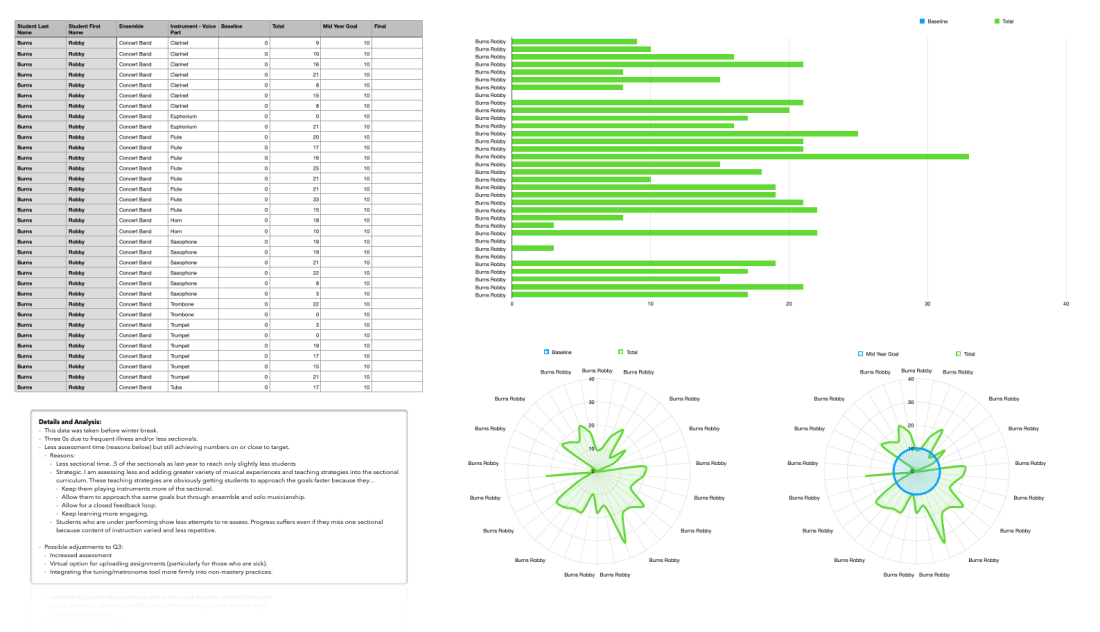
It took minimal clicks to get some really fancy, legible, and engaging charts into my SLO data tracking project for the school year.

Listeners of my podcast will remember Ben Denne and I talking all about our Music Mastery Sequence, and the tool he built to track it. In his more recent podcast appearance, we followed up on this subject, explaining how we have moved away from FileMaker and towards other tools.

My current method for tracking student progress is a giant Numbers spreadsheet with clickable star icons for how many “stars” they earn on each performance. I am using Craft to give students more transparent, informal, and qualitative feedback about what they should be working on.

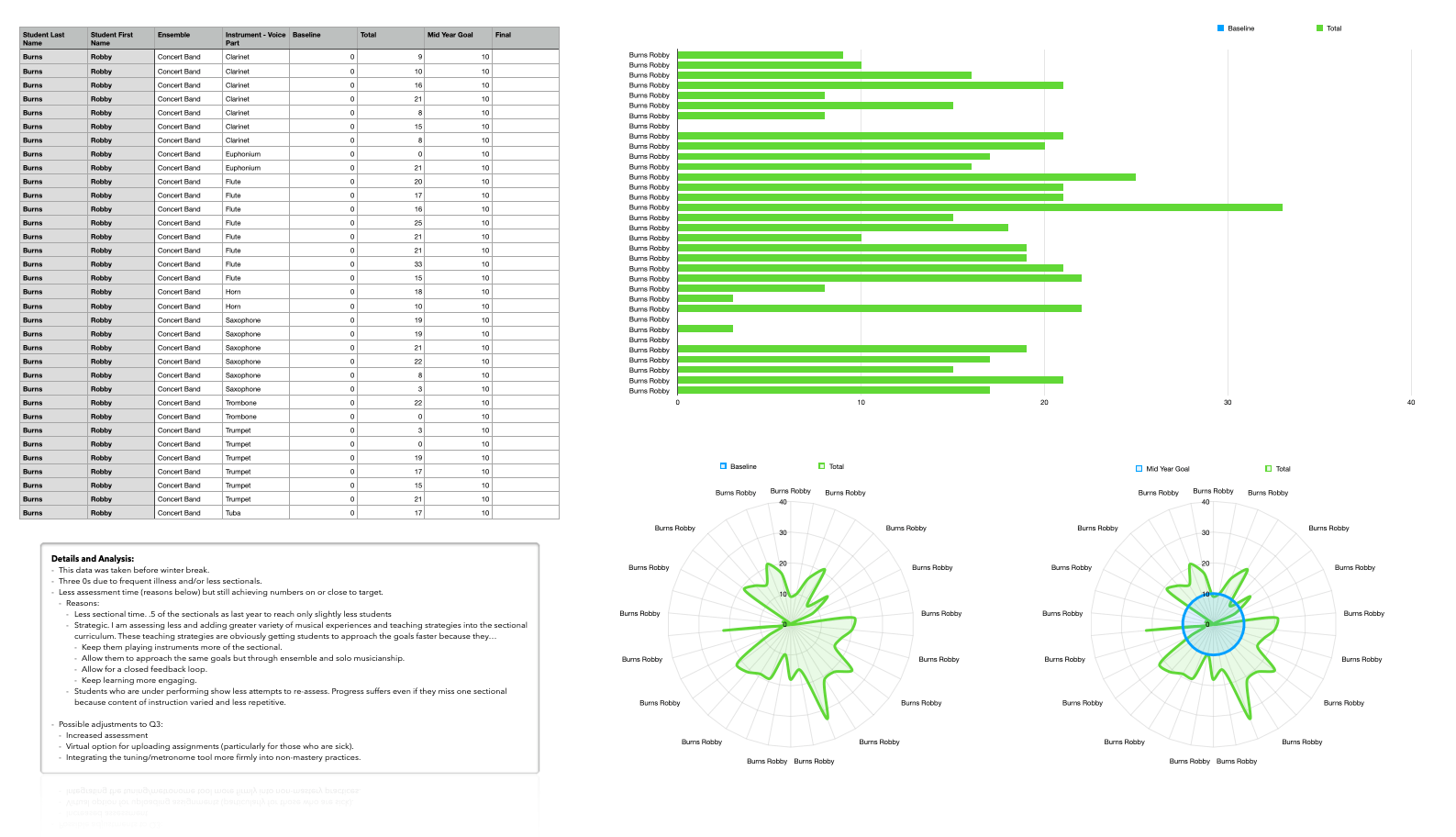
This same Numbers spreadsheet was able to pump out the above table, graph, and charts. Their graphical nature and intuitive ease allowed me to better understand my own shortcomings in this process and what resources, changes, and school supports I needed to make improvement. This helped me to construct a meaningful narrative in a recent SLO meeting.

I hope to cover Numbers and Craft in greater detail later on down the road, as well as my successes in teaching instrumental music performance at an individualized level. If you want more on this, I certainly recommend the hyperlinked podcast episodes above.

#47 – Craft for Music Educators, with Dr. David MacDonald

David rejoins the show to talk about how we use Craft, an extremely versatile, elegant, and powerful app for the web, iOS, and macOS devices.

Subscribe to the Blog…

RSS | Email Newsletter

Subscribe to the Podcast in…

Apple Podcasts | Overcast | Castro | Spotify | RSS

Support Music Ed Tech Talk

Become a Patron!

Buy me a coffee

Show Notes:

App of the Week

Robby – Documents

David – GoodReader

Music of the Week

Robby – NPR Top 50 of 2021

David – Silk Sonic

Tech Tip of the Week

Better Touch Tool

Where to Find Us:

Robby – Twitter | Blog | Book

David – Twitter | Website | Blog

Please don’t forget to rate the show and share it with others!

The Music Ed Tech Talk Holiday Gift Guide, featuring Dr. David MacDonald

David MacDonald joins Robby to share their favorite books, hardware, apps, services, and musical gift ideas.

Subscribe to the Blog…

RSS | Email Newsletter

Subscribe to the Podcast in…

Apple Podcasts | Overcast | Castro | Spotify | RSS

Support Music Ed Tech Talk

Become a Patron!

Buy me a coffee

Show Notes:

Books

Hardware

More Hardware

Software

Services

Misc

Music of the Week

Robby – Sarah Jarosz

David – Sister Rosetta Tharpe

Tech Tip of the Week

Robby – Focus Modes

David – CopyChar.cc

Where to Find Us:

Robby – Twitter | Blog | Book

David – Twitter | Website | Blog

Please don’t forget to rate the show and share it with others!

METT Episode 44 – Rehearsal Tech

Check out the latest episode of Music Ed Tech Talk!

Dr. Peter Perry joins the show to talk about the software and hardware we use in rehearsals, his book Technology Tips for Ensemble Directors, and our recent favorite music, apps, and tech tips.

Subscribe to the Blog…

RSS | Email Newsletter

Subscribe to the Podcast in…

Apple Podcasts | Overcast | Castro | Spotify | RSS

Support Music Ed Tech Talk

Become a Patron!

Buy me a coffee

Show Notes:

Music of the Week

Robby – Astor Piazzolla and Gary Burton – The New Tango

Peter – Tony Benett and Lady Gaga – Love for Sale)

App of the Week:

Robby – Craft

Peter – Izotope RX9

Where to Find Us:

Robby – Twitter | Blog | Book

Peter – Twitter | Website

Please don’t forget to rate the show and share it with others!

METT Episode #42 – Pass the Baton, with Theresa Hoover

There’s a new episode of Music Ed Tech Talk out!

Theresa Hoover returns to talk about career changing, COVID practices worth bringing into this school year, productivity apps, and empowering student creativity!

Subscribe to the Blog…
RSS | Email Newsletter

Subscribe to the Podcast in…
Apple Podcasts | Overcast | Castro | Spotify | RSS

Support Music Ed Tech Talk

Become a Patron!

.bmc-button img{height: 34px !important;width: 35px !important;margin-bottom: 1px !important;box-shadow: none !important;border: none !important;vertical-align: middle !important;}.bmc-button{padding: 7px 15px 7px 10px !important;line-height: 35px !important;height:51px !important;text-decoration: none !important;display:inline-flex !important;color:#ffffff !important;background-color:#000000 !important;border-radius: 5px !important;border: 1px solid transparent !important;padding: 7px 15px 7px 10px !important;font-size: 20px !important;letter-spacing:0.6px !important;box-shadow: 0px 1px 2px rgba(190, 190, 190, 0.5) !important;-webkit-box-shadow: 0px 1px 2px 2px rgba(190, 190, 190, 0.5) !important;margin: 0 auto !important;font-family:'Arial', cursive !important;-webkit-box-sizing: border-box !important;box-sizing: border-box !important;}.bmc-button:hover, .bmc-button:active, .bmc-button:focus {-webkit-box-shadow: 0px 1px 2px 2px rgba(190, 190, 190, 0.5) !important;text-decoration: none !important;box-shadow: 0px 1px 2px 2px rgba(190, 190, 190, 0.5) !important;opacity: 0.85 !important;color:#ffffff !important;}Buy me a coffeeBuy me a coffee

Thanks to my sponsors this month, Blink Session Music.

Show Notes:

App of the Week:
Robby – Instapaper / Readwise
Theresa – Kumospace

Album of the Week:
Robby – Turbo
Theresa – Cory Wong

Tech Tip of the Week:
Robby – Safari Tab Groups, Sync Safari and Chrome bookmarks with a Windows PC
Theresa – Chrome Reading List / Favicons Favorite Bar

Where to Find Us:
Robby – Twitter | Blog | Book
Theresa – Twitter | Website

Please don’t forget to rate the show and share it with others!

Craft Pro currently free for teachers and students

https://platform.twitter.com/widgets.js

Craft Download here is an app that has been getting a lot of attention in the Apple community lately for the way it makes the process of organizing and sharing information very elegant.

They are currently offering the pro version for FREE to teachers and students. Make sure you check out the tweet above for more details.

In their own words, Craft is a “tool for creating beautiful documents and notes and sharing your thoughts. Everything you create in Craft can be shared with one tap. Craft supports inline markdown, backlinks, code snippets, images, videos, attaching PDF files, and rich link previews.”

Craft is on iOS and macOS and is worth checking out.

It’s hard to pin down exactly how it might serve you because it is extremely versatile. If you like organizing and sharing your ideas, particularly if you are a lukewarm Google Docs user, this is worth a look.