harmony-cloud-app — Stefon Harris

Edit: I have been informed that this page is very old and that the iOS version of this app has been out since 2015 and has not received updates since. Hard to recommend a 10 dollar app with that in mind.

A colleague turned me on to Harmony Cloud earlier in the month. It’s a new ear training tool from vibraphonist Stefon Harris, and it seems really neat.

I attended a masterclass featuring Stefon Harris back in the early 2000s, and something I distinctly remember about his teaching was how well he could communicate complex harmonic ideas in jazz through much more musical and emotive language. For example, he described the sound of a dominant chord with a b9 and 13 in it was like “a warm hug” or “rocking a baby to sleep.” He perfectly bridged the complexity of improv with concepts any listener can relate to. I’m really curious to see how his musicianship and teaching skill translate into this app.

harmony-cloud-app — Stefon Harris:

Harmony Cloud™ helps you hear, practice, and create music in ways you never thought possible. Harmony Cloud™ is a revolutionary step forward in the world of ear training, created by world-renowned jazz musician and educator Stefon Harris. The app is designed to help serious musicians at all levels expand their understanding of harmony, feel music on a deeper level, and fearlessly explore the world of improvisation. Its underlying (patent-pending) algorithm stitches together chords you select into an unending source of unpredictable, yet musical, chord progressions. Try our Beta Version today! Be on the lookout for an official iOS release coming soon!
Keep reading here…

Logic Pro amplifies beat making on Mac and iPad with advanced new capabilities – Apple

Logic Pro has some new updates. Some of them are novel and cool, but a new feature that captures performance data before the user presses record is exactly the kind of iterative workflow improvement that I love to see.

Logic Pro amplifies beat making on Mac and iPad with advanced new capabilities – Apple:

Flashback Capture allows artists to recover unforgettable performances, even if they forgot to hit record.2 Users can quickly restore MIDI and audio performances using a key command or a custom control bar button. By enabling Cycle mode, musicians can improvise multiple takes, and Flashback Capture will automatically organize each pass into a take folder.
Keep reading here…

DaVinci Resolve 20 for iPad: Features & AI Enhancements

On the recent episode of Music Ed Tech Talk, Will and I were discussing how rare it is that iPad apps function similarly to their desktop counterparts. DaVinci Resolve is an exception to this standard, and it only seems to get more powerful with every new release.

DaVinci Resolve 20 for iPad: Features & AI Enhancements:

Alongside the release of DaVinci Resolve 20 for Windows and macOS, version 20 of DaVinci Resolve has now been released for iPadOS as well. Similar to the desktop release, this update adds a number of new AI features across the application.
Keep reading here…

Digital Organization Tips for Music Teachers, Revisited

I will be presenting a session at the NJMEA Conference this week titled Digital Organization Tips for Music Teachers. In preparation for this presentation, I have revisited this topic on my podcast with similar content to make it quickly accessible in the feed for attendees of the session.

Subscribe to the Blog…
RSS | Email Newsletter

Subscribe to the Podcast in…
Apple Podcasts | Overcast | Castro | Spotify | RSS

Support Music Ed Tech Talk

Become a Patron!

.bmc-button img{height: 34px !important;width: 35px !important;margin-bottom: 1px !important;box-shadow: none !important;border: none !important;vertical-align: middle !important;}.bmc-button{padding: 7px 15px 7px 10px !important;line-height: 35px !important;height:51px !important;text-decoration: none !important;display:inline-flex !important;color:#ffffff !important;background-color:#000000 !important;border-radius: 5px !important;border: 1px solid transparent !important;padding: 7px 15px 7px 10px !important;font-size: 20px !important;letter-spacing:0.6px !important;box-shadow: 0px 1px 2px rgba(190, 190, 190, 0.5) !important;-webkit-box-shadow: 0px 1px 2px 2px rgba(190, 190, 190, 0.5) !important;margin: 0 auto !important;font-family:'Arial', cursive !important;-webkit-box-sizing: border-box !important;box-sizing: border-box !important;}.bmc-button:hover, .bmc-button:active, .bmc-button:focus {-webkit-box-shadow: 0px 1px 2px 2px rgba(190, 190, 190, 0.5) !important;text-decoration: none !important;box-shadow: 0px 1px 2px 2px rgba(190, 190, 190, 0.5) !important;opacity: 0.85 !important;color:#ffffff !important;}Buy me a coffeeBuy me a coffee

Thanks to my sponsors this month, Scale Exercise Play Along Tracks.

Show Notes:

Please don’t forget to rate the show and share it with others!

Building a Second (Music Teacher) Brain, with Dr. Cory Meals

Dr. Cory Meals joins the show to talk about building a second brain, personal knowledge management apps, and how to keep it all together!

Subscribe to the Blog…
RSS | Email Newsletter

Subscribe to the Podcast in…
Apple Podcasts | Overcast | Castro | Spotify | RSS

Support Music Ed Tech Talk

Become a Patron!

.bmc-button img{height: 34px !important;width: 35px !important;margin-bottom: 1px !important;box-shadow: none !important;border: none !important;vertical-align: middle !important;}.bmc-button{padding: 7px 15px 7px 10px !important;line-height: 35px !important;height:51px !important;text-decoration: none !important;display:inline-flex !important;color:#ffffff !important;background-color:#000000 !important;border-radius: 5px !important;border: 1px solid transparent !important;padding: 7px 15px 7px 10px !important;font-size: 20px !important;letter-spacing:0.6px !important;box-shadow: 0px 1px 2px rgba(190, 190, 190, 0.5) !important;-webkit-box-shadow: 0px 1px 2px 2px rgba(190, 190, 190, 0.5) !important;margin: 0 auto !important;font-family:'Arial', cursive !important;-webkit-box-sizing: border-box !important;box-sizing: border-box !important;}.bmc-button:hover, .bmc-button:active, .bmc-button:focus {-webkit-box-shadow: 0px 1px 2px 2px rgba(190, 190, 190, 0.5) !important;text-decoration: none !important;box-shadow: 0px 1px 2px 2px rgba(190, 190, 190, 0.5) !important;opacity: 0.85 !important;color:#ffffff !important;}Buy me a coffeeBuy me a coffee

Thanks to my sponsors this month, Scale Exercise Play-Along Tracks.

Show Notes:

Other Recommendations from Cory, not mentioned in the episode:

App of the Week:

Music of the Week:

Where to Find Us:

Please don’t forget to rate the show and share it with others!

Always Start from the Beginning: Developing Tone Quality, Intonation, Concert Repertoire, and Classroom Management through Unison Playing in Performing Ensembles

This post first appeared on the NAfME Blog on December 7, 2021. You can read it there by clicking here.


Always Start from the Beginning

Every year I teach band, I start from the beginning. I find that if I rebuild the ensemble, focusing on fundamentals, it is impossible to fail.

This is especially true after many programs have lost over a year of in-person instruction. Even if students’ skills have been sustained or improved, they are likely returning to the classroom with less handle on things that they can only learn in a group: intonation, balance, blend, and even basic rehearsal expectations.

They will have to relearn how to listen outside their comfortable bubble of one.

Image.jpeg

Caption: A mixer at the front of the room allows me to pump my voice, computer, and phone through a stereo and mix them to taste.

I want to describe some of the teaching strategies that have been most helpful this fall (and long since before COVID) while also sharing some technological tips I have taken from virtual learning into this year. I will explain how I am implementing them in my beginning band class to ensure that they develop great ears, strong ensemble sound, musicianship, and all while preparing concert music.

Developing the Ear

All excellent music-making starts with the ear. In Musical Performance: Learning Theory and Pedagogy, Daniel Kohut claims that students need a “superior concept” of the sound they wish to make. I believe this is much easier to achieve while playing in unison. Young musicians often learn this way by nature of beginning method books focusing on familiar, unison melodies, which elementary school teachers teach in instrument-specific sectionals. But when students first join a large ensemble, they can lose their independent sense of tone, intonation, and balance if too many separate voices start happening in their concert literature too soon.

IMG_9265.png

Caption: The Tonal Energy Tuner app is only a few dollars, and it play justly in-tune polyphonic drones and a metronome simultaneously.

My Concert Band class has 50 6th and 7th-grade students. Many of these students are first-year players. This year, most of them had only experienced a half year of in-person band before walking into my classroom.

I decided to keep them playing in unison for as long as I could keep them interested. I wanted to emphasize tone quality, intonation, balance, and bend, while somehow managing the classroom and preparing them for a December concert. And I wanted to keep things fun. Was it possible to do all of this? Yes!

CleanShot 2021-10-30 at 09.50.14.png

Caption: Dorico’s popovers, like this one for dynamics, allow you to enter notation naturally and quickly. Adding solfege with the Lyrics popover was equally easy.

Transforming Concert Literature into Unison Melodies

I started by ensuring that I centered instruction around accessible melodic material from the method book rather than technical exercises and drills. Additionally, I took the pieces I was planning for our winter concert and wrote out every person’s part for every instrument using Dorico. Dorico’s keyboard shortcuts and flow-based composing make it easy to design supplemental resources as quickly as you can think.

Image.jpeg

Caption: Last school year, my team purchased some equipment to support hybrid teaching. This year, we have repurposed that gear to integrate audio technology into traditional rehearsals seamlessly.

The guides are organized by rehearsal marking. For example, Part 1 has everyone in the band playing the bass line of measures 1-8. By playing each part of the music sequentially, students get more practice sight-reading while learning who in the band plays which notes. By playing in unison, they leverage their strength in numbers to develop firmer and more stable tone quality while learning to hear what an ensemble blend should sound like for the first time.

CleanShot 2021-10-30 at 09.49.23.png

Caption: This is what an individual part looks like in Dorico once completed. Instead of isolating sections of the band during rehearsal, I can have everyone playing at all times. For example, if I want to work with the tuba part in measure one, I can tell the entire band to play “Part 1. Lower Voice” and keep everyone engaged.

I write solfege into these practice guides and alternate between the students singing and playing. In a year without any COVID concerns, I would also encourage the brass to buzz these melodies on mouthpieces to develop their inner ear and flexibility.

Play-Along Resources Help Model Tone, Intonation, and Tempo

There is always a drone prominently playing through our sound system using the Tonal Energy Tuner app. The polyphonic drones can model justly in-tune intervals. Students can subtly adjust their pitch by making the “beats” that result between two out-of-tune pitches slow down and eventually dissolve.

CleanShot 2021-10-30 at 09.39.39.png

Caption: One of the easiest and most engaging ways to encourage metronome practice is to play along to the Drummer Tracks in GarageBand. There are numerous styles, beats, and editing tools at your disposal. Beats are way more fun to play with and provide more musical feeling than a metronome.

I have created play-along tracks that combine trap beats with tuning drones. I like to pump them through the speakers during warm-ups and throughout rehearsal. You can make these too using the free GarageBand app on iOS.

Sometimes, I will have Tonal Energy coming through my phone and the beats coming through my Mac. This allows me to mix the drone and the metronome independently, as they are plugged into two separate channels of my mixer.

Speaking Calmly, Being Everywhere

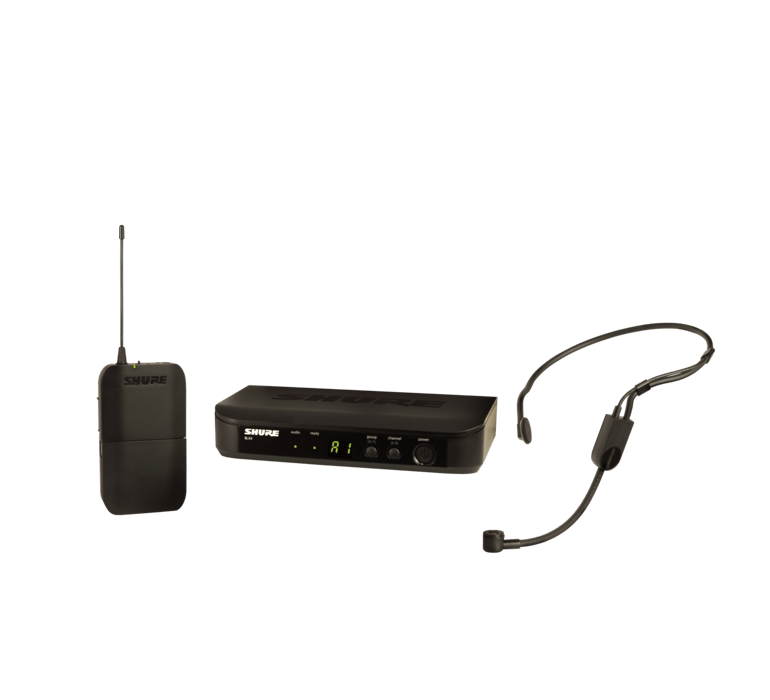
A Shure wireless microphone goes into a third channel of the mixer, allowing me to speak in a comfortable room voice and be heard over the sound of loud drones, beats, and a full band of 50-65 students playing.
73b42005bdaf925216f74de6ebf33333.png

Caption: This Shure wireless headset microphone has been a game-changer this year. I don’t ever have to raise my voice to be understood. I can speak comfortably and be heard over the sound of a pumping drone and 60 students playing.

This technique works wonders for classroom management. Flowing from one part of our daily agenda to the next is nearly seamless because of how easy it is to keep everyone playing most of the rehearsal. With these persistent play-alongs underlying most of the rehearsal, my role could be described less like a traditional director and more like a spin instructor.

This might sound ridiculous at first, but it is true. A spin instructor curates music, keeps the beat moving you forward and paces instruction, all while making you sweat. This is precisely how I want my role to feel in the band room. I like to think of myself as a “coach” who directs students towards the goal while they work for it, rather than a “director” who beats the music into them.

Image.jpeg

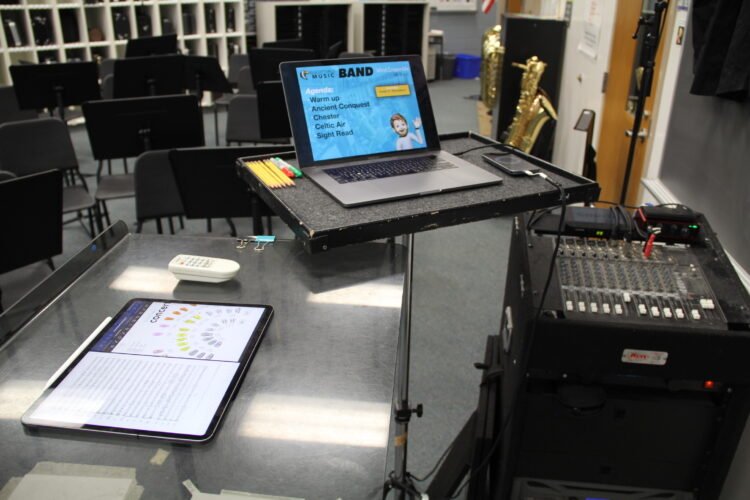
Caption: My colleague, Ben Denne, teaches from our “command station” at the front of the room.

The wireless mic allows me to step off the podium and be heard from anywhere in the room. While the band is playing, I can be high-fiving students, sizing a student for concert attire, helping percussionists find their place, encouraging good trombone posture, or any other need. I can be everywhere and still keep the flow of rehearsal moving even when I’m off the podium.

CleanShot 2021-10-30 at 12.32.29.png

Caption: Farrago is a useful app for queuing play-along material in a soundboard-style audio launcher. I keep my scale tracks organized and color-coded by key and rhythmic patterns to find them more easily.

Taking the Slow Road Gets Maximum Results

Once it is time to hand out concert music, I’m delighted to hear students say things like, “wait, we know this!.” By this point, they can sing every part, play every part, and can now split into three or four unique voices because they are more confident in their melody from having practiced it with the strength of 60 musicians in unison.

Image.png

Caption: AnyTune is another excellent app that can change the speed and pitch of a play-along track independently.

The results are clear. I have never had a more engaging, fun, and tightly managed beginning band experience. Students are developing fundamentals at a pace consistent, if not better, than a typical year, and we are stronger for it.

Overviewer – an app that turns an iPhone into a document camera for Zoom and virtual learning

I tweeted about this app when it came out but never posted it here…

Definitely check out Overviewer, a new app that turns an iPhone into a document camera for Zoom and virtual learning. It is made by the same developer as Dark Noise, a white noise app that has no business being as thoroughly considered as it is.

From the developer:

My wife is a Kindergarten teacher and when COVID hit she had to figure out how to teach a bunch of 5 and 6 year olds how to draw letters over Zoom. Initially she made her own document camera using her iPhone and the default camera app. Zoom has a wonderful feature where you can share your iPhone’s screen by plugging into your laptop with a lightning cable or even wirelessly over AirPlay but when you open the camera app there are two issues.

  1. There’s a bunch of buttons and chrome around camera view so it looks clunky
  1. The camera app doesn’t actually rotate when you turn it sideways (just some of the labels) so you can only share your phone in portrait mode which means huge black bars on each side of the zoom call and a tiny video stream of what you want to share.

3 New Apps I Am Using

Tweetbot 6

I spend a bit of time on Twitter. It is a great place to curate an information feed from people who I am interested in. Unfortunately, the Twitter app uses its algorithm to feed me things like ads and promoted Tweets which shows me unwanted clutter and news that I often don’t come to Twitter for.

Tweetbot is a Twitter client with a superior design and shows me the Tweets of the people I follow, in the order that they tweet them. I have used it off and on for years.

Until recently, Twitter had revoked some of the technology that made third-party Twitter apps good. Recent changes in the company have started to reverse this decision and Tweetbot 6 reflects these changes. 75 percent of the issues I had using the old version of Tweetbot are resolved now that I can see consistent image and tweet thumbnails, view polls, and receive push notifications for DMs.

Now Twitter feels like a news feed that I have curated rather than one curated by someone else or a machine.

Tweetbot now costs a subscription price of 6 dollars a year. Some people won’t like that. For me, I use it numerous times a day and that is worth it.

Carrot Weather 5

Carrot has for long been my favorite weather app on iOS (also on Android). It is simply the best designed and most feature-filled weather app I have found. I particularly like the amount of customization it gives me over the Apple Watch version of the app.

Carrot Weather 5 updates the design (it’s pretty!) and allows the user to customize every element of how the data is displayed, down to the pixel. It is a really nice update and has made me want to use the app even more than usual.

ReadKit on iOS

ReadKit is an RSS client that has existed on the Mac for a while. I like it because it aggregates my RSS feeds from services like Feedbin alongside my read it later services like Pinboard and Instapaper.

I am really glad to see an iOS version finally come to the iPhone and iPad. Unfortunately, my favorite feature (Smart Folders) is planned but did not ship with this version. For now, I will probably keep using Reeder for subscribing to blogs.

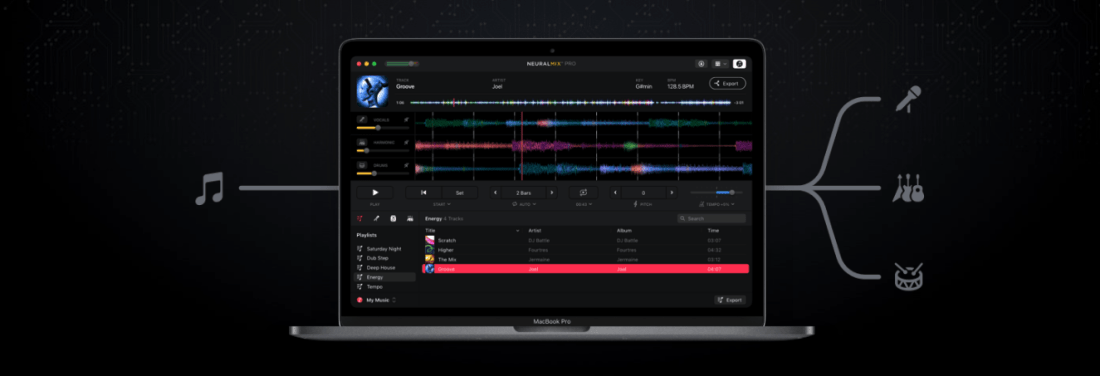
App of the Week: Neural Mix Pro

I have been testing out a Mac App called Neural Mix Pro, made by the people who make the popular DJay App for macOS and iOS.

It promises to take songs in your music library and hard drive and independently isolate vocals, drums, and other accompaniment so that they can be separated and mixed independently.

It works. I haven’t played with it enough to know the breadth of its capability, but I tested the following songs, and they worked enough that I think I would use this tool for future music projects and teaching resources.

  • Blues for Time: a fusion song in a drum set method book I assign often. I already had a drum-less version of the track, but the one I could make in Neural Mix Pro was satisfactory. There are some artifacts when you filter out instruments, but that was to be expected. No vocals on this track, but drums and other accompaniment separated correctly.
  • Material Girl, Madonna: The vocals and electronic drums are so heavy in this track that isolating just the accompaniment instruments resulted in the correct instruments but not with an EQ that I would use for anything professionally. The vocals and drums sounded ok when separated.
  • Jesus Walks, Kanye West: very satisfactory separation of drums, accompaniment, vocals. The backup vocals in the intro are tied to the vocal track, however. No way to separate that. With Neural Mix, you can export just one of the three tracks and apply a target key or tempo to change to it. I exported this tune to an even 80 bpm (it was around 78.x bpm, to begin with) into Logic Pro and has some fun toying around with adding my own improvisations using software instruments. I can see how this could be a useful tool for DJs, music producers, and music educators alike.

Here is a video of my quick demo. I made this on a computer with limited access to my music library and no real goal in mind other than to play around. Let me know if there is something you think I should test in the app.

<div class="sqs-video-wrapper" data-provider-name="YouTube" data-html="
“>

I can see this app being useful in the music classroom for a few reasons. In my general music class, where we use Soundtrap to produce music, I could giving students a vocal track for a pop song and having them remix it. The results in Neural Mix are, by far, good enough for student use, and I imagine my students having a blast with this.

I could also use this in private lessons by taking songs my students drum along to and making "Minus One" recordings out of them that don't any longer have the drums. Alternatively, I could make them a drum-only version of a song to study the details more closely.

This would be more useful you could separate other instruments than just drums. Taking an instrumentalist out of a jazz record to create a track to improvise over is one of a handful of possibilities that immediately popped into my head. Perhaps these features are in store for a future update. Or maybe this app will remain geared towards pop music, DJs, and music producers. Either way, I can see myself using it on my never-ending quest to make fun play-along tracks for the band to play along to.