New Software Coming from Apple (And What You Can Do With It)

Its been a busy few weeks as I have been wrapping up the end of a tough school year. While I am late to getting this week’s podcast episode out, I have been working on this site and have a bunch of content to share in the coming week.

I managed to sneak in enough time during the last week of school to watch Apple’s WWDC Keynote and to talk about it on Music Ed Tech Talk with Craig McClellan (cohost of my other podcast, The Class Nerd).

It was an opportunity to take a nice break from the challenging end-of-year procedures, and to think about how Apple’s fall software updates will impact how I get work done in the classroom. Listen below.

Support Music Ed Tech Talk

Become a Patron!

.bmc-button img{height: 34px !important;width: 35px !important;margin-bottom: 1px !important;box-shadow: none !important;border: none !important;vertical-align: middle !important;}.bmc-button{padding: 7px 15px 7px 10px !important;line-height: 35px !important;height:51px !important;text-decoration: none !important;display:inline-flex !important;color:#ffffff !important;background-color:#000000 !important;border-radius: 5px !important;border: 1px solid transparent !important;padding: 7px 15px 7px 10px !important;font-size: 20px !important;letter-spacing:0.6px !important;box-shadow: 0px 1px 2px rgba(190, 190, 190, 0.5) !important;-webkit-box-shadow: 0px 1px 2px 2px rgba(190, 190, 190, 0.5) !important;margin: 0 auto !important;font-family:'Arial', cursive !important;-webkit-box-sizing: border-box !important;box-sizing: border-box !important;}.bmc-button:hover, .bmc-button:active, .bmc-button:focus {-webkit-box-shadow: 0px 1px 2px 2px rgba(190, 190, 190, 0.5) !important;text-decoration: none !important;box-shadow: 0px 1px 2px 2px rgba(190, 190, 190, 0.5) !important;opacity: 0.85 !important;color:#ffffff !important;}Buy me a coffeeBuy me a coffee

Subscribe to the Blog…
RSS | Email Newsletter

Subscribe to the Podcast in…
Apple Podcasts | Overcast | Castro | Spotify | RSS

Robby and Craig break down the announcements from Apple’s Word Wide Developer Conference and discuss how teachers might use the upcoming features to their latest software updates.

Show Notes:

Album of the Week:
Robby – Bones by Michael Mayo
Craig McClellan – Sour by Olivia Rodrigo

App of the Week:
Robby – Timery for the Mac
Craig McClellan – Music Harbor

Tech Tip of the Week:
Robby – Transpose Chrome Extension
Craig McClellan – Feedbin

Where to Find Us:
Robby – Twitter | Blog | Book
Craig McClellan – Twitter

Please don’t forget to rate the show and share it with others!

The Prime Directive, featuring Will Kuhn and Ethan Hein (Music Ed Tech Talk Podcast #32)

Listen on Apple PodcastsListen on SpotifyRSS Feed

Description

Ethan and Will join the show to talk about their book Electronic Music School, the Prime Directive, writing apps, and the future of the iPad.

Thanks to this week’s sponsor, the DMV Percussion Academy. Leran more and registere here.

Chapters:

  • 00:00:00 – Intro
  • 00:01:25 – Sponsor: DMV Percussion Academy
  • 00:02:03 – Star Trek
  • 00:04:18 – Electronic Music School
  • 00:10:09 – Teaching Underlying Musical Concepts of Electronic Music Styles
  • 00:18:33 – Perceived Threat by Traditional Performing Arts Teachers
  • 00:24:28 – Teaching Songwriting
  • 00:27:23 – Scaffolding
  • 00:37:15 – Fighting Racism with Music Education
  • 00:48:37 – The Prime Directive
  • 00:52:34 – Staying Relevant?
  • 01:07:15 – We Live on Twitter
  • 01:07:15 – Writing Apps
  • 01:13:21 – Bedtime
  • 01:16:07 – The M1 iPad Pro
  • 01:35:51 – Tech Tip of the Week
  • 01:38:14 – Album of the Week
  • 01:41:07 – App of the Week
  • 01:43:24 – Closing

Show Notes:

App of the Week:
Robby – Tot
Will – In Haler Radio
Ethan – Figure

Album of the Week:
Robby – Tauk – Shapeshifter II: Outbreak
Will – Suburban Lawns – Janitor (Original Video)
Ethan – Clipping – The Deep

Where to Find Us:
Robby – Twitter | Blog | Book
Will – Twitter | Website
Ethan – Twitter | Website

Please don’t forget to rate the show and share it with others!

Subscribe to Music Ed Tech Talk:

Subscribe to the Blog

Subscribe to the Podcast in…
Apple Podcasts | Overcast | Castro | Spotify | RSS

🎙 forScore for the Mac, featuring David MacDonald (Music Ed Tech Talk #31)

Robby and David talk about forScore for the Mac and its new syncing feature. But also, lots of music theory.

Also included:

  • Loop-based music theory

  • GoodNotes for the Mac

  • Transcribe Apps

  • Lots of music apps and utility apps

  • Tech podcasts we like

  • Music YouTubers we like

  • Our favorite music, tech tips, and albums of the week

Show Notes:

App of the Week: 

Robby – Soro for Sonos
David MacDonald – Diagrams

Album of the Week:

Robby – Lettuce – Elevate
David MacDonald – Darcy James Argue’s Secret Society – Brooklyn Babylon 

Where to Find Us:

Robby – Twitter | Blog | Book
David MacDonald – Twitter | Website

Please don’t forget to rate the show and share it with others!

Subscribe to Music Ed Tech Talk:

Subscribe to the Blog

Subscribe to the Podcast in… Apple Podcasts | Overcast | Castro | Spotify | RSS

#20 – Electronic Music School, with Will Kuhn

Will Kuhn joins the show to talk about Apple’s new Macs, teaching electronic music, home automation, and his forthcoming book, Electronic Music School.

Show Notes:

We recorded this episode right after last weeks Apple event! People have now used and reviewed these machines! I recommend this one, this one, and this one.

Other topics include:

  • Apple in education
  • M1 chip implications for audio software
  • Other Apple Fall announcements and products
  • Ableton Live 11

Do you have a product or service you would like to promote to music educators? Sponsor Music Ed Tech Talk!

Stuff mentioned:

App of the Week:
Robby – Neural Mix Pro
Will – Ableton Live 11

Album of the Week:
Robby – Vulfpeck | The Joy of Music The Job of Real Estate
Will – Machinedrum – A View of U | beabadoobee

Where to Find Us:
Robby – Twitter | Blog | Book
Will – Twitter | Website

Please don’t forget to rate the show and share it with others!

Subscribe to Music Ed Tech Talk:

Subscribe to the Blog

Subscribe to the Podcast in…
Apple Podcasts | Overcast | Castro | Spotify | RSS

Sponsor Music Ed Tech Talk!

METT Podcast #16 – Master Your Virtual Teaching Tech, with David MacDonald

Thanks to my sponsor this month, MusicFirst

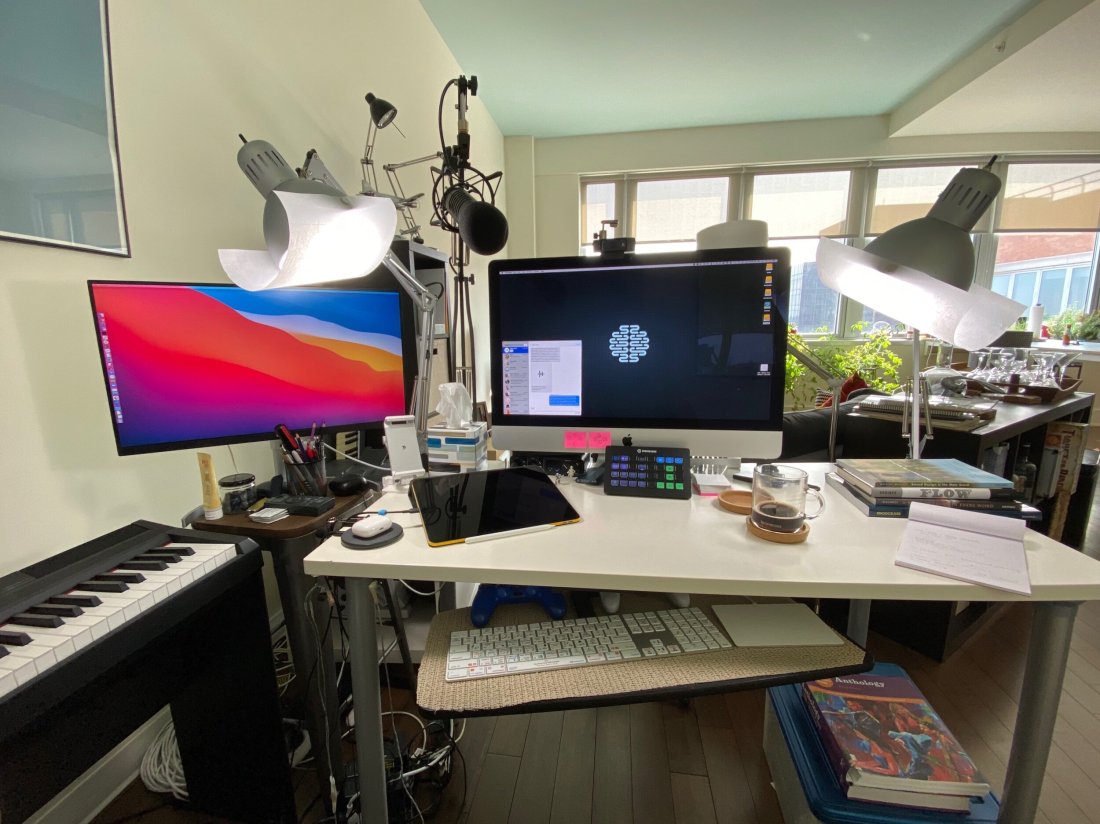
David MacDonald returns to the show to talk about the hardware and software in our virtual teaching setups. Then we speculate about touchscreen Macs and consider how Apple’s recent App Store policies might impact the future of creative professional software on iOS.

Topics include:

  • New Zoom features for musicians and teachers
  • David and Philip Rothman‘s new podcast, Scoring Notes
  • Using Open Broadcaster Software to level up your virtual teaching
  • Routing audio from your apps into Zoom and Google Meet calls
  • Teaching with Auralia
  • LMS integration with third-party music education apps
  • Using MainStage and Logic for performing instruments into virtual classrooms
  • Touchscreen Macs
  • Apple’s App Store Policy

Show Notes:

Where to Find Us:
Robby – Twitter | Blog | Book
David MacDonald – Twitter | Website | Blog

Please don’t forget to rate the show and share it with others!

Subscribe to Music Ed Tech Talk:

Subscribe to the Blog

Subscribe to the Podcast in…
Apple Podcasts | Overcast | Castro | Spotify | RSS

Today’s episode is sponsored by MusicFirst:

MusicFirst offers music educators and their students easy-to-use, affordable, cloud-based software that enables music learning, creation, assessment, sharing, and exploration on any device, anywhere, at any time.

MusicFirst Classroom is the only learning management system designed specifically for K-12 music education. It combines the flexibility of an LMS with engaging content and powerful software integrations to help manage your students’ progress, make lesson plans, and create assignments.

And for younger students, MusicFirst Junior is the perfect online system for teaching elementary general music. It includes a comprehensive K-5 curriculum, hundreds of lessons & songs, and kid-friendly graphics to making learning and creating music fun!

Whether you’re teaching remotely, in-person, or in a blended learning environment, MusicFirst will work with you to find a solution that fits your program’s unique needs. Try it free for 30 days at musicfirst.com.

<div class="
      image-block-outer-wrapper
      layout-caption-below
      design-layout-inline
      combination-animation-none
      individual-animation-none
      individual-text-animation-none
    ">


    <figure class="
          sqs-block-image-figure
          intrinsic
        " style="max-width:2500px">


      <div class="image-block-wrapper">
        <div class="sqs-image-shape-container-element


          has-aspect-ratio
        " style="position: relative;padding-bottom:74.95999908447266%;overflow: hidden">


            <img src="https://images.squarespace-cdn.com/content/v1/5595df9ce4b0ce9ff9ecd1a8/1600038818677-9KFU4NAEUS7MPSAS5S61/IMG_3003.jpeg" alt="David’s teaching setup." width="2500" height="1874" style="display:block;object-fit: cover;width: 100%;height: 100%;object-position: 50% 50%" loading="lazy">

        </div>
      </div>


      <figcaption class="image-caption-wrapper">
        <div class="image-caption"><p class="">David’s teaching setup.</p></div>
      </figcaption>


    </figure>


</div>


<div class="
      image-block-outer-wrapper
      layout-caption-below
      design-layout-inline
      combination-animation-none
      individual-animation-none
      individual-text-animation-none
    ">


    <figure class="
          sqs-block-image-figure
          intrinsic
        " style="max-width:2500px">


      <div class="image-block-wrapper">
        <div class="sqs-image-shape-container-element


          has-aspect-ratio
        " style="position: relative;padding-bottom:75%;overflow: hidden">


            <img src="https://images.squarespace-cdn.com/content/v1/5595df9ce4b0ce9ff9ecd1a8/1600038852982-OD6Y5XFUFRAL1TR2PPJD/A7067C72-D117-473F-A9FA-D3938A9C1A5E.jpeg" alt="My teaching setup." width="2500" height="1875" style="display:block;object-fit: cover;width: 100%;height: 100%;object-position: 50% 50%" loading="lazy">

        </div>
      </div>


      <figcaption class="image-caption-wrapper">
        <div class="image-caption"><p class="">My teaching setup.</p></div>
      </figcaption>


    </figure>


</div>


<div class="
      image-block-outer-wrapper
      layout-caption-below
      design-layout-inline
      combination-animation-none
      individual-animation-none
      individual-text-animation-none
    ">


    <figure class="
          sqs-block-image-figure
          intrinsic
        " style="max-width:2500px">


      <div class="image-block-wrapper">
        <div class="sqs-image-shape-container-element


          has-aspect-ratio
        " style="position: relative;padding-bottom:75%;overflow: hidden">


            <img src="https://images.squarespace-cdn.com/content/v1/5595df9ce4b0ce9ff9ecd1a8/1600038981679-Y8MXKP63LULXCLM4Y5I3/IMG_2823.jpeg" alt="…From far away." width="2500" height="1875" style="display:block;object-fit: cover;width: 100%;height: 100%;object-position: 50% 50%" loading="lazy">

        </div>
      </div>


      <figcaption class="image-caption-wrapper">
        <div class="image-caption"><p class="">…From far away. </p></div>
      </figcaption>


    </figure>


</div>

🎙 Introducing Music Ed Tech Talk, My New(ish) Podcast!

Today I am excited to announce that my podcast, Robby Burns + Friends, is getting a long overdue re-brand. I am renaming the show Music Ed Tech Talk. It will continue to follow the candid guest/host conversation style and will focus on music, education, technology, and other mutual interests.

Given my investment in the fields of music and education, and my intense interest in technology, most episodes of Robby Burns + Friends were already centered on these topics. I felt it was time to rebrand the show to better indicate to new listeners what they should expect when they press play.

That being said, I see this show, in combination with my blog, to be my digital megaphone, so don’t be surprised to hear me venture into the unknown. This is not a show about music technology education. It is a show about music, education, and technology. Three separate interests, sometimes discussed in isolation, sometimes in combination, and sometimes not at all. What I am saying is — don’t be surprised to hear occasional digressions on Star Wars and pickling. 

I am hosting this show in the same place so you should expect to keep getting episodes in your feed if you were subscribed to Robby Burns + Friends. If not, please let me know. I am keeping the first three seasons of RB+F in the Apple Podcasts Directory under the new title because I feel that they are, spiritually speaking, the same show. I will be tightening up the format a little bit, and am planning to speak with new and exciting guests.

That about sums it up. Ushering in this new season of Music Ed Tech Talk is my very first guest ever, Jon Tippens. You can listen to the new episode and read the show notes here or click play right below.

Show Notes:

@ryebot on Twitter, designer of my new artwork

Drawing on the Right Side of the Brain, Betty Edwards

The Natural Rider, Mary Wanless

The Inner Game of Tennis, Timothy Galloway

Lynda.com – Online software tutorials

Teaching Musical Performance, Daniel Kohut

OmniFocus – Accomplish More Every Day

Things by Cultured Code

Reid Stefan – Audio tutorials with puppets

Be Focused Pro – Pomodoro App for Mac and iOS

App of the Week: 

Robby – Safari on iPad OS

Jon – Time by bluecocoa

Album of the Week:

Robby – Snarky Puppy Live in Stockholm, 2015

Jon – Dawn of MIDI – Dysnominia

Where to Find Us:

Jon Tippens: Twitter 

Robby Burns: Twitter | Blog

Subscribe to Music Ed Tech Talk:

Apple Podcasts | Overcast | Castro | Spotify | RSS

The Break Up of iTunes, a musician’s perspective

Piggybacking off of yesterday’s post, there was a rumor earlier in the month that the next wave of iOS apps to come to the Mac are Apple’s very own media apps.

9to5mac.com – Next major macOS version will include standalone Music, Podcasts, and TV apps, Books app gets major redesign | Guilherme Rambo:

Fellow developer Steve Troughton-Smith recently expressed confidence about some evidence found indicating that Apple is working on new Music, Podcasts, and perhaps Books apps for macOS, to join the new TV app.

I’ve been able to independently confirm that this is true. On top of that, I’ve been able to confirm with sources familiar with the development of the next major version of macOS – likely 10.15 – that the system will include standalone Music, Podcasts, and TV apps, but it will also include a major redesign of the Books app. We also got an exclusive look at the icons for the new Podcasts and TV apps on macOS.

I have been arguing that iTunes should be broken up into separate apps on the Mac for years. As a musician and teacher who is an absolute iTunes power user, and who depends on music library management tools, I thought it was worth digging into the implications of this a little bit.

If you are a podcast listener, and have room in your diet for some shows that discuss Apple technology, there was an astoundingly good conversation about this topic on last week’s episodes of Upgrade and ATP. Both shows discuss not only the implications for the future of iTunes, but for the very nature of the Mac itself.

I am so excited for the TV app and the Podcast app to get their own attention. They have been much needed for a long time. I imagine Podcasts will be solid out of the gate. I will kind of miss the current TV app icon on iOS and the Apple TV but I understand that Apple needs to brand it with their logo since it is going to be coming to third party TVs and Amazon Fire products this fall with the launch of their new TV service. I don’t know how a Books app based on the iOS version would work with my imported PDF book library, but it is already wildly inconsistent between iOS and macOS so I cannot imagine it could get any worse.

iTunes is a place that I have traditionally relied heavily upon to organize my music library, recordings of my ensemble, and video performances of my concerts. I detail my entire music and video workflows in my book, Digital Organization Tips for Music Teachers.

iTunes is the only app that allows me to store my personal library alongside a streaming music library, and sync it across multiple devices. This is what has set it apart from Spotify for me over the past few years. iTunes also has some great video organization tools. For years now, I have organized all video of my school ensemble’s live performance (amongst numerous other musical performances and home video) into the video section of iTunes, and then pointed a Plex server towards the folder of files so that I can stream them from my Apple TV and iOS devices on the go.

If the new Music and TV apps are just like their iOS counterparts, there are a whole lot of features I depend on that could potentially get ditched. Here are a few of them…

Importing my own music. The iOS version of music can’t even import a song. That’s right! If I buy an album on Bandcamp, or take an audio file of a professional band performing a tune my ensemble is working on, I can drag them right into iTunes on my Mac, and they will sync to my mobile devices over Apple Music Library. I would imagine Apple has to have at least figured this one out for iOS if they are going to ship this app on the Mac in the fall.

Metadata control. It would be a sad day if I could not press the info button on a song, add my own comments, rating, and adjustments to the title, album name, etc.

Smart Playlists. Jazz and classical recordings are notoriously difficult to manage in iTunes because of how complex their metadata is. In addition to editing artist and album information in these recordings, I have spent some time adding extra info to the comments section of my songs and then creating smart playlists to filter them. If Miles Davis is tagged in every recording he sat in on, you can make playlists like ‘Songs Miles Soloed On Between 1961-75.’

Adding video. QuickTime (much like Preview) is an app that exists only on the Mac, because it is natively built into iOS whenever you tap a media file (or PDF in the case of Preview). Apple never had a dedicated app for managing video (although there is the awkward iMovie Library feature which has an arbitrary file limit). That said, iTunes is a pretty great utility for this purpose. I would hate to loose its video management features, even though they were never on iOS to begin with. The TV app is looking more and more like it is built to fulfill Apple’s TV strategy, which is to aggregate as much TV and Movie content from as many providers as possible, into a unified entertainment service. Don’t get my wrong, I am excited, I just don’t see myself using it to organize recordings of my band concerts.

Presumably iTunes isn’t going anywhere any time soon. For these legacy features, and including the need to sync older iOS devices to a Mac, I imagine it will still come on the Mac, buried in the Utilities folder, for years to come. Hopefully, users will still be able to do actions like I listed above in iTunes, and enjoy the benefit of them in the new Music app.

In conclusion, I remain highly cynical about this transition because Apple does not seem interested in making good apps in recent years. Conversely, I am enthusiastic about the long term benefit. If Apple developers are writing code for just one version of their apps instead of two, it is more likely that iOS versions of software will get elevated. That is exciting, even if it means that the Mac apps cannot do all of the same stuff they could always do at first. Coupled with rumors that Apple is going to release an ARM based Mac in the near future, I would like to believe that years down the road, we will be getting closer to a shared app platform between all Apple devices, with feature parity, and less distinction between input devices and which hardware its running on.

🎙 The Class Nerd – Episode 4: Drafts

This week on The Class Nerd, Craig and I pick apart our favorite iOS productivity app, Drafts.

I always explain Drafts as the app that most diminishes the cognitive load of my music teaching job and beyond. Gone are the days of writing down notes, todos, and other reminders on whatever scrap piece of paper is nearest to me only to forget everything when its most important. Drafts is the fastest way I know to take down an idea. I don’t even have to think about what kind of idea it is because Drafts offers a rich list of actions that can send the text to other apps.

This episode might be out most technical yet, but don’t let that scare you off. Drafts is one of those apps that is as complicated as you want it to be. You can get a ton of productivity out of it with very little learning curve.

Listen to the episode here.