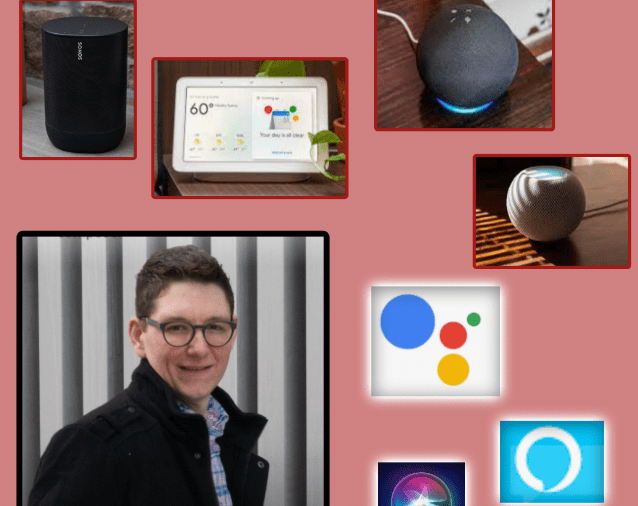
My smart speaker setup

I aspire to write more about my smart home setup here but doing so requires a style of writing that doesn’t always come easily for me. So I decided to podcast about it. Scroll below to hear my recent conversation with David MacDonald about how I set up my smart speakers. Click here to learn about my favorite smart home devices.

Episode Description:

Robby and David (music composition, theory, and technology teacher at the Wichita State University) compare smart speakers, their assistants, and their smart home ecosystems. This episode covers the HomePod, Google Nest, Amazon Echo, Siri, Alexa, Google Assistant, Sonos speakers, and the various quirks that result from trying to use them in combination.

Backstage Access Patreon supporters get extended conversation about Apple Notes, DEVONthink, Standard Music Font Layout compatibility, FileMaker databases, student motivation, grading (and ungrading), and sticker charts.

Subscribe to the Blog…
RSS | Email Newsletter

Subscribe to the Podcast in…
Apple Podcasts | Overcast | Castro | Spotify | RSS

Support Music Ed Tech Talk

Become a Patron!

.bmc-button img{height: 34px !important;width: 35px !important;margin-bottom: 1px !important;box-shadow: none !important;border: none !important;vertical-align: middle !important;}.bmc-button{padding: 7px 15px 7px 10px !important;line-height: 35px !important;height:51px !important;text-decoration: none !important;display:inline-flex !important;color:#ffffff !important;background-color:#000000 !important;border-radius: 5px !important;border: 1px solid transparent !important;padding: 7px 15px 7px 10px !important;font-size: 20px !important;letter-spacing:0.6px !important;box-shadow: 0px 1px 2px rgba(190, 190, 190, 0.5) !important;-webkit-box-shadow: 0px 1px 2px 2px rgba(190, 190, 190, 0.5) !important;margin: 0 auto !important;font-family:'Arial', cursive !important;-webkit-box-sizing: border-box !important;box-sizing: border-box !important;}.bmc-button:hover, .bmc-button:active, .bmc-button:focus {-webkit-box-shadow: 0px 1px 2px 2px rgba(190, 190, 190, 0.5) !important;text-decoration: none !important;box-shadow: 0px 1px 2px 2px rgba(190, 190, 190, 0.5) !important;opacity: 0.85 !important;color:#ffffff !important;}Buy me a coffeeBuy me a coffee

Show Notes:

App of the Week:
Robby – HomeRun 2
David MacDonald – Letterpress

Album of the Week:
Robby – Hiatus Kaiyote – Mood Valiant
David MacDonald – Frederic Rzewski: The People United Will Never Be Defeated – Ursula Oppens | The People United Will Never Be Defeated – Kaj Schumacher | Winnsboro Cotton Mill Blues

Tech Tip of the Week:
Robby – Use a clipboard manager
David MacDonald – New stream deck store!

Where to Find Us:
Robby – Twitter | Blog | Book
David MacDonald – Twitter | Website

Please don’t forget to rate the show and share it with others!

Brief experiment with Apple Music on the Amazon Echo

Read Apple Music is Now Available on the Amazon Echo for the (week old) scoop.

I have played around with this a little and there are still some major hang ups with using Apple Music on Amazon Echos.

In my limited testing, Echo did not always play requested music from my Apple Music account, even though Apple Music was set as the defaul music service to stream through when not otherwise specified.

Problem two: Amazon Echos can not stream to a group of Sonos speakers. This is pretty much a deal breaker as I can ask my HomePod to play music and have it send the output to a group of Sonos speakers via AirPlay 2. Echos can only stream from themselves.

Even the HomePod is early days enough that there are tons of hang ups with grouping speakers. It often forgets which speakers I like to AirPlay to and I have to readjust my groups in the AirPlay settings. This is a pain, but at least I have the option to do it.

I would love to see an update to the Home app and or Shortcuts app that allows me to create an automation that triggers music from pre-specified speaker groups at a specific time or based on my location. This is something that the Echo can do. Fingers crossed.

🔗 Sonos gets AirPlay 2 Support and Affinity Designer Comes to iPad

It’s an exciting day for users of Apple products today. Two announcements that caught my attention are highlighted below…

Affinity Designer Debuts on iPad as a Full-Featured Graphic Design Tool – MacStories:

Nearly one year ago, Serif released Affinity Photo for the iPad as a full-featured photo editing powerhouse. Unlike what companies such as Adobe do, where a Mac app like Photoshop is broken down into less powerful versions on iOS, Affinity Photo was brought to the iPad with no compromises whatsoever. Today, that same philosophy is bringing us Serif’s second major iPad app: Affinity Designer.

Where Affinity Photo focuses on photo editing, Affinity Designer is a vector-based illustration tool. And with full support for the Apple Pencil, iOS 11’s drag and drop, and system technologies like Metal, the app looks like the ultimate portable design studio.

For a limited time, Affinity Designer is available at a launch price of $13.99, 30% off the regular price of $19.99.

I have long been looking for something like Adobe Illustrator on the iPad. I have been very happy with OmniGraffle for designing seating charts, posters, flyers, and other graphics on iOS, especially because it syncs flawlessly to its Mac counterpart. For $13.99 I am going to be very tempted to give Affinity Designer a spin. Download it here.

<div class="
      image-block-outer-wrapper
      layout-caption-below
      design-layout-inline
      combination-animation-none
      individual-animation-none
      individual-text-animation-none
    ">


    <figure class="
          sqs-block-image-figure
          intrinsic
        " style="max-width:220px">


      <div class="image-block-wrapper">
        <div class="sqs-image-shape-container-element


          has-aspect-ratio
        " style="position: relative;padding-bottom:100.44117736816406%;overflow: hidden">


            <img src="https://images.squarespace-cdn.com/content/v1/5595df9ce4b0ce9ff9ecd1a8/1531347878229-ASIZ2JHEVIF1K2QJ4QLJ/IMG_1671.JPEG" alt="IMG_1671.JPEG" width="220" height="221" style="display:block;object-fit: cover;width: 100%;height: 100%;object-position: 50% 50%" loading="lazy">

        </div>
      </div>


    </figure>


</div>

Next up, Sonos!

Sonos Adds AirPlay 2 Support to Certain Speaker Models – MacStories

Sonos announced today that it has added AirPlay 2 support to compatible speaker systems. The update allows users to stream audio to the company’s Sonos One, Beam, Playbase, and the second generation Play:5 speakers from iOS apps that support AirPlay 2 of and from iTunes on a Mac.

I recently purchased a HomePod and have been looking forward to pairing its audio with my existing Sonos Playbar in the living room and Sonos Play:1 in the bedroom. Jason Snell wrote a great post for Macworld that gets into the all the details about how all of these different smart speakers play together.

Sonos update adds AirPlay 2 support | Macworld:

Perhaps most impressively, all AirPlay 2 speakers can play music in perfect synchronization. If you’ve got a HomePod or two and a compatible Sonos device, you can now select all those devices and play music through them, entirely in sync. Even better, if you’ve got incompatible Sonos devices and place them in the same group as an AirPlay 2-compatible Sonos device via the Sonos app, those speakers will also play synchronously. I was able to get music to play in sync throughout my house this morning, via a paired set of HomePods, a Play:5, and the (incompatible) Play:1 in my bathroom.

My two Sonos speakers are incompatible. So I can’t get too excited unless I buy a new Sonos One or Play:5. I do need one of these for the basement but it is a steep price to pay. Furthermore, it is a bummer that the old speakers cannot be controlled individually through the Apple home app, only as a group with a compatible Sonos.

I can bypass this problem in the living room, where my TV (with Apple TV attached) is running its audio through a Sonos Playbar. AirPlay allows a phone to send audio to an Apple TV on the same network, so if I want to control the Playbar individually, I just send audio to the living room Apple TV its attached to. The bedroom will be a different story, through I cannot imagine that many scenarios where I will need separate music or volume control in the bedroom and basement.


<div class="
      image-block-outer-wrapper
      layout-caption-below
      design-layout-inline
      combination-animation-none
      individual-animation-none
      individual-text-animation-none
    ">


    <figure class="
          sqs-block-image-figure
          intrinsic
        " style="max-width:1136px">


      <div class="image-block-wrapper">
        <div class="sqs-image-shape-container-element


          has-aspect-ratio
        " style="position: relative;padding-bottom:106.38629150390625%;overflow: hidden">


            <img src="https://images.squarespace-cdn.com/content/v1/5595df9ce4b0ce9ff9ecd1a8/1531347912824-E7ZY7GFA4PW2UW1SMJCB/FullSizeRender.jpg" alt="FullSizeRender.jpg" width="1136" height="1209" style="display:block;object-fit: cover;width: 100%;height: 100%;object-position: 50% 50%" loading="lazy">

        </div>
      </div>


    </figure>


</div>