Logic Pro amplifies beat making on Mac and iPad with advanced new capabilities – Apple

Logic Pro has some new updates. Some of them are novel and cool, but a new feature that captures performance data before the user presses record is exactly the kind of iterative workflow improvement that I love to see.

Logic Pro amplifies beat making on Mac and iPad with advanced new capabilities – Apple:

Flashback Capture allows artists to recover unforgettable performances, even if they forgot to hit record.2 Users can quickly restore MIDI and audio performances using a key command or a custom control bar button. By enabling Cycle mode, musicians can improvise multiple takes, and Flashback Capture will automatically organize each pass into a take folder.
Keep reading here…

Sam and Jony and skepticism – Six Colors

If you haven’t heard, OpenAI is merging with Jony Ive’s company io, and they have announced that they are working on a hardware product. They are very jazzed about it. Probably a past version of myself would be too, but given my mixed feelings about where AI sits in our culture right now, I couldn’t help but throw up in my mouth several times while watching the announcement video.

Still, I admit I am very curious what they are cooking up.

I think Jason Snell over at Six Colors has the take on this news that I most closely identify with.

Sam and Jony and skepticism – Six Colors:

But right now, all we have are words and an awkward video of Sam and Jony drinking espresso. The words are all vague. I’ll believe whatever they’re going to release when I see it. Until then, like so much in the AI world in particular and the tech world in general, it’s meaningless hype, signifying nothing.
Keep reading here…

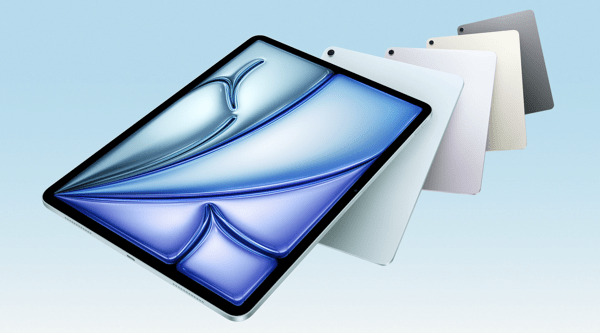
Apple introduces iPad Air with powerful M3 chip and new Magic Keyboard – Apple

CleanShot 2025-03-25 at 13.01.18@2x.

I’m a little late in blogging about this, but I wanted to share in case any musicians or educators are planning an iPad upgrade soon. If you use your iPad primarily for reading music with forScore, now is a fantastic time to consider the new, larger iPad Air.

I’m still using my 12.9-inch iPad Pro from 2018, and it’s definitely starting to show its age. I’ll probably wait for the next round of Pro updates—mainly because I’m curious to try the new Apple Pencil, and the updated screen I saw in the Apple Store looks fantastic.

That said, for most people—just like with the MacBook Air—the iPad Air is the right choice.

Apple introduces iPad Air with powerful M3 chip and new Magic Keyboard – Apple:

Apple today introduced the faster, more powerful iPad Air with the M3 chip and built for Apple Intelligence. iPad Air with M3 brings Apple’s advanced graphics architecture to iPad Air for the first time — taking its incredible combination of power-efficient performance and portability to a new level. iPad Air with M3 is nearly 2x faster compared to iPad Air with M1,1 and up to 3.5x faster than iPad Air with A14 Bionic.2
Keep reading here…

About migrating Apple Account purchases between accounts – Apple Support

Now THIS is a true “finally.”

For years, I’ve thought that if Apple were ever going to allow the merging of a media-only Apple ID with a primary one, it would have happened a decade ago. I had long since given up hope that they would ever dedicate resources to this.

Recently, I’ve been dealing with an awful macOS bug where the App Store won’t stay logged into my secondary “media” Apple ID. When I called Apple Support, several specialists were surprised that it’s even possible to use two different Apple IDs. That’s how far back this issue dates. The last time Apple even allowed the creation of an Apple ID dissociated from an @mac, @me, or @iCloud address was so long ago that most of their support team is too young to know it was ever possible. Wild.

I’m overjoyed that I can finally end my 15+ year nightmare of managing media purchases under a separate account. Maybe you’re in the same boat.

If so, be sure to read all of the fine print. There are several conditions, and I’ve seen multiple reports on Reddit about common bugs. I haven’t done the migration yet because you can’t if you’ve purchased anything with one of the IDs in the past 15 days, and I just bought an app a few days ago.

I’ll report back once I go through with it. This might be one of those things where it’s worth waiting a month or so to let the rest of the internet (and Apple) work out the bugs.

About migrating Apple Account purchases between accounts – Apple Support:

You can choose to migrate apps, music, and other content you’ve purchased from Apple on a secondary Apple Account to a primary Apple Account. The secondary Apple Account might be an account that’s used only for purchases. You’ll need access to the primary email address or phone number and password for both accounts, and neither account should be shared with anyone else. Learn more about how to migrate purchases.
Keep reading here…

Will Kuhn and I talk changes to the podcast, automation, apps of the year, tech we’re thankful for, and some of our recent favorite music

Check out the latest episode of Music Ed Tech Talk!


Will is here! We discuss forthcoming changes to the show, automation, apps of the year, tech we’re thankful for, and some of our favorite media we’ve been engaging with.

This episode was recorded in late December 2024.


Subscribe to the Blog… RSS | Email Newsletter

Subscribe to the Podcast in… Apple Podcasts | Overcast | Castro | Spotify | RSS

Support Music Ed Tech Talk

Become a Patron!

Buy me a coffee

Chapters

00:00:00 Here he goes taking about Dark Souls again

00:08:15 MCU (Muppet Cinematic Universe)

00:15:14 Introducing…Will Kuhn, now a METT Regular! And Jaye, podcast editor!

00:20:23 2025 Mike Kovins TI:ME Teacher of the Year Robby Burns – acknowledgments and thank yous.

00:27:04 Thank you Patreon Supporter Susan!

00:27:46 MacStories’ App of the Year: Delta Emulator

00:40:31 Siri Shortcuts App

00:43:32 Current AI uses – productivity, creativity, philosophy

00:51:31 Robby’s National Board Certification Application and NotebookLM

00:57:51 What are we really trying to do [with AI and our students]?

01:02:58 Three Holiday Topic Blitz – Tech We’re Thankful For; Tech We’re Thankful For In the Workplace; Gifts and Gift Cards

01:16:54 How about music?!

Show Notes and Links

Where to Find Us

Please don’t forget to rate the show and share it with others!

  1. 79 – Teaching Music Tech, with Gillian Desmarais – Music Ed Tech Talk ↩︎
  2. 61 – Music Technology 101, with Heath Jones – Music Ed Tech Talk ↩︎
  3. 61 – Music Technology 101, with Heath Jones – Music Ed Tech Talk ↩︎
  4. 69 – I Don’t Want a Valuable Life Lesson, I Just Want An Ice Cream – Music Ed Tech Talk ↩︎
  5. 52 – Dorico Updates! with Daniel Spreadbury – Music Ed Tech Talk ↩︎

Introducing Apple Invites, a new app that brings people together – Apple

New app from Apple. I like the fun design, but I wish it leaned more toward the streamlined scheduling approach of Calendly rather than the invitation-style feel of Evite.

Introducing Apple Invites, a new app that brings people together – Apple:

Apple today introduced Apple Invites, a new app for iPhone that helps users create custom invitations to gather friends and family for any occasion. With Apple Invites, users can create and easily share invitations, RSVP, contribute to Shared Albums, and engage with Apple Music playlists. Starting today, users can download Apple Invites from the App Store, or access it on the web through icloud.com/invites. iCloud+ subscribers can create invitations, and anyone can RSVP, regardless of whether they have an Apple Account or Apple device.

Keep reading here…CleanShot 2025-02-04 at 14.52.16@2x.

Apple in 2024: The Six Colors report card

CleanShot 2025-02-04 at 14.48.06@2x.

As someone who uses and thinks about Apple computers quite a lot, this read from Six Colors is always interesting.

Apple in 2024: The Six Colors report card – Six Colors:

It’s time for our annual look back on Apple’s performance during the past year, as seen through the eyes of writers, editors, developers, podcasters, and other people who spend an awful lot of time thinking about Apple. The whole idea here is to get a broad sense of sentiment—the “vibe in the room”—regarding the past year. (And by looking at previous survey results, we can even see how that sentiment has drifted over the course of an entire decade.)

This is the tenth year that I’ve presented this survey to my hand-selected group. They were prompted with 14 different Apple-related subjects, and asked to rate them on a scale from 1 (worst) to 5 (best) and optionally provide text commentary per category.
Keep reading here…

If you ask me, here’s how I’d rate Apple right now:

  • Mac: B – Mac hardware is better than ever, but macOS is cluttered with intrusive privacy popups. I’ve never found the operating system more distracting or off-putting.

  • iPhone: B – Battery life on my iPhone 16 Pro Max isn’t as good as my last phone, but I’m loving the new camera button for quick shots of my kid.

  • iPad: C – The latest iPads are great refinements of the 2018 iPad Pro design, but the software remains ok at lots of things, and not a great computer. Just put macOS on it.

  • Wearables: C – AirPods 4 and the new health features in AirPods Pro 2 are highlights, but the Vision Pro is a miss. It’s the first new Apple product category I haven’t felt tempted to buy… ever?

  • Watch: C – I love the Apple Watch, but OS updates and widgets feel half-considered. I never know whether I’ll see my watch face or the widget screen when I glance at my wrist. The Siri watch face and developer API seem abandoned, and Apple needs to figure out how to bring back the blood oxygen sensor in the U.S. before I consider upgrading.

  • Home: E – No meaningful updates. The Apple Home ecosystem remains unreliable, and the smart home industry still feels as chaotic as it did in 2019.

  • Apple TV: D – It’s odd to rate this so low because it’s still the best streaming box by very far, but Apple rarely updates the OS or expands its potential. There’s so much more I’d love them to do.

  • Services: C – Apple TV+ is decent, the news and game subscriptions are forgettable, and iCloud is passable but still not rock-solid.

  • Hardware Reliability: A – If there’s one thing Apple still nails, it’s hardware reliability.

  • Developer Relationship: E – Watching Apple handle EU regulations this past year has made it clear: their business practices hurt developers and users alike. It appears that any real improvement will require regulation.

  • World Impact: E – Given how much Apple prioritizes profit over progress in personal computing, it’s hard not to see them as more of a force for harm than good these days.

Podcast Episode #80 – New Apple Software Updates, with Craig McClellan

Subscribe to the Blog…
RSS | Email Newsletter

Subscribe to the Podcast in…
Apple Podcasts | Overcast | Castro | Spotify | RSS

Support Music Ed Tech Talk

Become a Patron!
.bmc-button img{height: 34px !important;width: 35px !important;margin-bottom: 1px !important;box-shadow: none !important;border: none !important;vertical-align: middle !important;}.bmc-button{padding: 7px 15px 7px 10px !important;line-height: 35px !important;height:51px !important;text-decoration: none !important;display:inline-flex !important;color:#ffffff !important;background-color:#000000 !important;border-radius: 5px !important;border: 1px solid transparent !important;padding: 7px 15px 7px 10px !important;font-size: 20px !important;letter-spacing:0.6px !important;box-shadow: 0px 1px 2px rgba(190, 190, 190, 0.5) !important;-webkit-box-shadow: 0px 1px 2px 2px rgba(190, 190, 190, 0.5) !important;margin: 0 auto !important;font-family:’Arial’, cursive !important;-webkit-box-sizing: border-box !important;box-sizing: border-box !important;}.bmc-button:hover, .bmc-button:active, .bmc-button:focus {-webkit-box-shadow: 0px 1px 2px 2px rgba(190, 190, 190, 0.5) !important;text-decoration: none !important;box-shadow: 0px 1px 2px 2px rgba(190, 190, 190, 0.5) !important;opacity: 0.85 !important;color:#ffffff !important;}Buy me a coffeeBuy me a coffee

Show Notes:

Please don’t forget to rate the show and share it with others!

Holiday Gift Guide 2023, with David MacDonald

Robby and David discuss their current computing devices, favorite gift ideas, and lament the use of Microsoft Teams.  

Subscribe to the Blog…

RSS | Email Newsletter

Subscribe to the Podcast in…

Apple Podcasts | Overcast | Castro | Spotify | RSS

Support Music Ed Tech Talk

Become a Patron!

Buy me a coffee

Thanks to my sponsors this month, Scale Exercise Play-Along Tracks.

Show Notes:

Books

Grading for Growth

Critique is Creative

unGrading

On Music Theory

Software/Services

Audio Hijack

1Password

Things

Farrago

Affinity Apps – Designer / Photo / Publisher

Musio

Chat GPT Plus

Gadgets

Anker 3-in-1 Cube with MagSafe

Anker PowerCore MagGo

Material Dock

AirTags

Hidrate smart water bottle and Ember smart mugs

Games

Hori Split Pad Pro

Super Mario Bros Wonder

Elden Ring

Baldur’s Gate 3

Dave the Diver

Steam Deck

Pens, Notebooks, Misc.

Mark One

Mark Two

Mark Three

SideKick Notepad

Studio Neat Pen Tray

LightDims

App of the Week:

Robby – Narwal 2

David – Sports Alerts / Fotmob

Music of the Week:

Robby – Braxton Cook: Somewhere In Between

David – Darcy James Argue: Dynamic Maximum Tension

Tech Tip of the Week:

Robby – Use things as they are designed to be used

David – LightDims  

Where to Find Us:

Robby – Blog | Book

David – Website

Please don’t forget to rate the show and share it with others!

Automating the Action Button of an iPhone 15 Pro

My iPhone 15 Pro Max shipped last week. A couple of quick observations (and more on an upcoming episode of the podcast).

  • I moved up from a smaller pro phone to the Max this year for the camera improvements. I was nervous it would be far too heavy but I am surprised to say that the new titanium material makes me perceive it as lighter than my previous pro model.

  • I have missed the larger screen size.

  • The camera is very good. If you are up for an upgrade, the Pro Max is definitely the one to get this year.

  • It is a a dream to have an entirely dedicated hardware button on the side that I can customize.

The Action Button replaces the old mute switch, and while it can be used to toggle mute on and off, Apple also lets you customize it to do something else, like open the camera, turn on a flashlight, take a voice memo, or run a Shortcut.

Naturally I wanted to get the most out of this button, so I programmed it to run a Shortcut. The Shortcut I programmed it to run changes the behavior of the button based on which Focus Mode my phone is in.

Click here to download the shortcut.

The Shortcut first looks to see if my phone is upside down (which it often is in my pocket). If so, the button toggles mute off and on, like the button traditionally has done. This way, I can quickly mute it if an unwanted call comes through, by feeling the button through my pocket (though my phone us usually on silent mode).

If the phone is in any other orientation, it does the following action, based on Focus Mode:

  • Personal Focus: Opens a new note in the Drafts app

  • Work Focus: Opens a Google Doc with the school schedule

  • Private Lesson Focus: Unlocks the side door to my studio so my next student can enter

  • Sleep Focus: Toggles flashlight

  • Concert Focus: Opens camera

  • Driving Focus: Opens my garage door

And this is only the beginning! I am looking forward to all the cool automating I can do with this button.