Getting Young Performers to Compose, Putting the E in Ensemble (and Much more), with Alex Shapiro

IMG_7357.JPG

A few weeks back, I wrote and podcasted about getting my general music classes to compose, make beats, write, and remix songs this past school year. Read and listen to that here.

I am thrilled to report that I also got my band students to compose for the first time this past year, with very good results. I used composer Alex Shapiro’s Putting the E in Ensemble curriculum (linked below). I am so inspired by her music, approach to composition, and general awesomeness that I invited her on my podcast. The conversation was an inspiration and a delight.

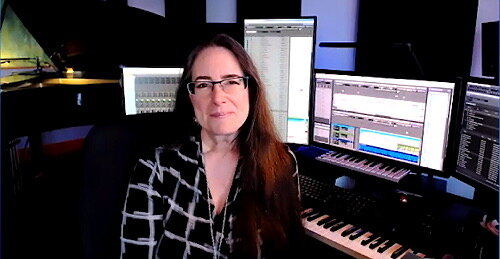
Listen to the episode and follow my podcast below. Keep scrolling through this post to see photos of Alex’s amazing recording space and to listen to some examples of my student’s compositions that resulted from using this curriculum.

Support Music Ed Tech Talk

Become a Patron!

.bmc-button img{height: 34px !important;width: 35px !important;margin-bottom: 1px !important;box-shadow: none !important;border: none !important;vertical-align: middle !important;}.bmc-button{padding: 7px 15px 7px 10px !important;line-height: 35px !important;height:51px !important;text-decoration: none !important;display:inline-flex !important;color:#ffffff !important;background-color:#000000 !important;border-radius: 5px !important;border: 1px solid transparent !important;padding: 7px 15px 7px 10px !important;font-size: 20px !important;letter-spacing:0.6px !important;box-shadow: 0px 1px 2px rgba(190, 190, 190, 0.5) !important;-webkit-box-shadow: 0px 1px 2px 2px rgba(190, 190, 190, 0.5) !important;margin: 0 auto !important;font-family:'Arial', cursive !important;-webkit-box-sizing: border-box !important;box-sizing: border-box !important;}.bmc-button:hover, .bmc-button:active, .bmc-button:focus {-webkit-box-shadow: 0px 1px 2px 2px rgba(190, 190, 190, 0.5) !important;text-decoration: none !important;box-shadow: 0px 1px 2px 2px rgba(190, 190, 190, 0.5) !important;opacity: 0.85 !important;color:#ffffff !important;}Buy me a coffeeBuy me a coffee

Subscribe to the Blog…
RSS | Email Newsletter

Subscribe to the Podcast in…
Apple Podcasts | Overcast | Castro | Spotify | RSS

Episode Description: Composer Alex Shapiro joins the show to talk about getting young students to compose, the importance of composing repertoire for young musicians, writing electro-acoustic music, Putting the E in Ensemble, future tech, and her amazing studio space. Join Patreon for extended conversation about technology and overcoming blocks in the creative process.

Curriculum:https://www.alexshapiro.org/Shapiro-E-ensemble_Syllabus.html

Wind Band music:https://www.alexshapiro.org/ASWindBand.html

Show Notes:

The Great Hack – Netflix

The Social Dilemma

Christopher Cicconi appearance on Music Ed Tech Talk

Off the Edge – Alex Shapiro

Tight Squeeze – Alex Shapiro

Rock Music – Alex Shapiro

Count to Ten – Alex Shapiro

Toothpaste privacy Tweet thread

Apple WWDC 2021

My Scale Play-Along Tracks

App of the Week:
Robby – Magnet
Alex – Two Dots / SpellTower

Album of the Week:
Robby – Sarah Jarosz – Blue Heron Suite
Alex – O Seguinte é Esse / Howling, featuring RY X and Frank Wiedemann: Sacred Ground

Tech Tip of the Week:
Robby – Try widgets!
Alex – Back up your stuff! / Don’t get the latest version only to have paid to get the latest bugs!

Where to Find Us:
Robby – Twitter | Blog | Book
Alex Shapiro – Twitter | Website

Please don’t forget to rate the show and share it with others!

Examples of student work

Alex’s studio space

<div class="
      image-block-outer-wrapper
      layout-caption-below
      design-layout-inline
      combination-animation-none
      individual-animation-none
      individual-text-animation-none
    ">


    <figure class="
          sqs-block-image-figure
          intrinsic
        " style="max-width:2976px">


      <div class="image-block-wrapper">
        <div class="sqs-image-shape-container-element


          has-aspect-ratio
        " style="position: relative;padding-bottom:95.0268783569336%;overflow: hidden">


            <img src="https://images.squarespace-cdn.com/content/v1/5595df9ce4b0ce9ff9ecd1a8/1624662652319-QV23ZT7Z668G0AYI7JHK/IMG_7359.JPG" alt="IMG_7359.JPG" width="2976" height="2828" style="display:block;object-fit: cover;width: 100%;height: 100%;object-position: 50% 50%" loading="lazy">

        </div>
      </div>


    </figure>


</div>







<div class="
      image-block-outer-wrapper
      layout-caption-below
      design-layout-inline
      combination-animation-none
      individual-animation-none
      individual-text-animation-none
    ">


    <figure class="
          sqs-block-image-figure
          intrinsic
        " style="max-width:1000px">


      <div class="image-block-wrapper">
        <div class="sqs-image-shape-container-element


          has-aspect-ratio
        " style="position: relative;padding-bottom:58.89999771118164%;overflow: hidden">


            <img src="https://images.squarespace-cdn.com/content/v1/5595df9ce4b0ce9ff9ecd1a8/1624662676530-WZS3XHN3JDW11W3N739R/IMG_7361.JPG" alt="IMG_7361.JPG" width="1000" height="589" style="display:block;object-fit: cover;width: 100%;height: 100%;object-position: 50% 50%" loading="lazy">

        </div>
      </div>


    </figure>


</div>


<div class="
      image-block-outer-wrapper
      layout-caption-below
      design-layout-inline
      combination-animation-none
      individual-animation-none
      individual-text-animation-none
    ">


    <figure class="
          sqs-block-image-figure
          intrinsic
        " style="max-width:1201px">


      <div class="image-block-wrapper">
        <div class="sqs-image-shape-container-element


          has-aspect-ratio
        " style="position: relative;padding-bottom:51.79017639160156%;overflow: hidden">


            <img src="https://images.squarespace-cdn.com/content/v1/5595df9ce4b0ce9ff9ecd1a8/1624662698868-T3ZRAHF7JW7NCMW8QQF5/IMG_7358.JPG" alt="IMG_7358.JPG" width="1201" height="622" style="display:block;object-fit: cover;width: 100%;height: 100%;object-position: 50% 50%" loading="lazy">

        </div>
      </div>


    </figure>


</div>


<div class="
      image-block-outer-wrapper
      layout-caption-below
      design-layout-inline
      combination-animation-none
      individual-animation-none
      individual-text-animation-none
    ">


    <figure class="
          sqs-block-image-figure
          intrinsic
        " style="max-width:12306px">


      <div class="image-block-wrapper">
        <div class="sqs-image-shape-container-element


          has-aspect-ratio
        " style="position: relative;padding-bottom:29.449838638305664%;overflow: hidden">


            <img src="https://images.squarespace-cdn.com/content/v1/5595df9ce4b0ce9ff9ecd1a8/1624662743115-WCROYV9U02YWH515D7IH/IMG_7362.JPG" alt="IMG_7362.JPG" width="12306" height="3628" style="display:block;object-fit: cover;width: 100%;height: 100%;object-position: 50% 50%" loading="lazy">

        </div>
      </div>


    </figure>


</div>


<div class="
      image-block-outer-wrapper
      layout-caption-below
      design-layout-inline
      combination-animation-none
      individual-animation-none
      individual-text-animation-none
    ">


    <figure class="
          sqs-block-image-figure
          intrinsic
        " style="max-width:2500px">


      <div class="image-block-wrapper">
        <div class="sqs-image-shape-container-element


          has-aspect-ratio
        " style="position: relative;padding-bottom:54.599998474121094%;overflow: hidden">


            <img src="https://images.squarespace-cdn.com/content/v1/5595df9ce4b0ce9ff9ecd1a8/1624662780409-57UAQERMLEXI7UL7IW85/IMG_7360.JPG" alt="IMG_7360.JPG" width="2500" height="1365" style="display:block;object-fit: cover;width: 100%;height: 100%;object-position: 50% 50%" loading="lazy">

        </div>
      </div>


    </figure>


</div>

New Software Coming from Apple (And What You Can Do With It)

Its been a busy few weeks as I have been wrapping up the end of a tough school year. While I am late to getting this week’s podcast episode out, I have been working on this site and have a bunch of content to share in the coming week.

I managed to sneak in enough time during the last week of school to watch Apple’s WWDC Keynote and to talk about it on Music Ed Tech Talk with Craig McClellan (cohost of my other podcast, The Class Nerd).

It was an opportunity to take a nice break from the challenging end-of-year procedures, and to think about how Apple’s fall software updates will impact how I get work done in the classroom. Listen below.

Support Music Ed Tech Talk

Become a Patron!

.bmc-button img{height: 34px !important;width: 35px !important;margin-bottom: 1px !important;box-shadow: none !important;border: none !important;vertical-align: middle !important;}.bmc-button{padding: 7px 15px 7px 10px !important;line-height: 35px !important;height:51px !important;text-decoration: none !important;display:inline-flex !important;color:#ffffff !important;background-color:#000000 !important;border-radius: 5px !important;border: 1px solid transparent !important;padding: 7px 15px 7px 10px !important;font-size: 20px !important;letter-spacing:0.6px !important;box-shadow: 0px 1px 2px rgba(190, 190, 190, 0.5) !important;-webkit-box-shadow: 0px 1px 2px 2px rgba(190, 190, 190, 0.5) !important;margin: 0 auto !important;font-family:'Arial', cursive !important;-webkit-box-sizing: border-box !important;box-sizing: border-box !important;}.bmc-button:hover, .bmc-button:active, .bmc-button:focus {-webkit-box-shadow: 0px 1px 2px 2px rgba(190, 190, 190, 0.5) !important;text-decoration: none !important;box-shadow: 0px 1px 2px 2px rgba(190, 190, 190, 0.5) !important;opacity: 0.85 !important;color:#ffffff !important;}Buy me a coffeeBuy me a coffee

Subscribe to the Blog…
RSS | Email Newsletter

Subscribe to the Podcast in…
Apple Podcasts | Overcast | Castro | Spotify | RSS

Robby and Craig break down the announcements from Apple’s Word Wide Developer Conference and discuss how teachers might use the upcoming features to their latest software updates.

Show Notes:

Album of the Week:
Robby – Bones by Michael Mayo
Craig McClellan – Sour by Olivia Rodrigo

App of the Week:
Robby – Timery for the Mac
Craig McClellan – Music Harbor

Tech Tip of the Week:
Robby – Transpose Chrome Extension
Craig McClellan – Feedbin

Where to Find Us:
Robby – Twitter | Blog | Book
Craig McClellan – Twitter

Please don’t forget to rate the show and share it with others!

3 Soundtrap Projects Your Students Will Love

Listen to the podcast episode and subscribe below!

Subscribe to the Podcast in… Apple Podcasts | Overcast | Castro | Spotify | RSS

This is the first year that I have had consistent access to a cloud-based DAW and notation editor with all of my students. The result of this experience has been dozens of new Soundtrap project ideas. I plan to do an episode and post about how I am using these tools for composition projects in the band classroom later this year.

In the episode above, and in this post, I give an overview of three of my most successful Soundtrap projects this year. These projects can be done in any digital audio workstation, including Bandlab, GarageBand, Logic, Ableton Live, etc.

Listen to the episode for a more thorough explanation of each idea.

C Melody and Loop Audition

<div class="
      image-block-outer-wrapper
      layout-caption-below
      design-layout-inline
      combination-animation-none
      individual-animation-none
      individual-text-animation-none
    ">


    <figure class="
          sqs-block-image-figure
          intrinsic
        " style="max-width:544px">


      <div class="image-block-wrapper">
        <div class="sqs-image-shape-container-element


          has-aspect-ratio
        " style="position: relative;padding-bottom:110.7784423828125%;overflow: hidden">


            <img src="https://images.squarespace-cdn.com/content/v1/5595df9ce4b0ce9ff9ecd1a8/1622399213019-7WQQF3CV9DF9WDNEE1YH/Melody+Loop+222.png" alt="Melody writing in Noteflight and producing in Soundtrap go hand in hand. Because of Noteflight’s many export options, you have many ways to get your melody out of Noteflight and into your Soundtrap project." width="544" height="708" style="display:block;object-fit: cover;width: 100%;height: 100%;object-position: 50% 50%" loading="lazy">

        </div>
      </div>


      <figcaption class="image-caption-wrapper">
        <div class="image-caption"><p class="">Melody writing in Noteflight and producing in Soundtrap go hand in hand. Because of Noteflight’s many export options, you have many ways to get your melody out of Noteflight and into your Soundtrap project.</p></div>
      </figcaption>


    </figure>


</div>

After giving students some time to experience the user interface of Soundtrap, I have them write a short, 8 measure long, melody in the key of C using Noteflight.

Next, I have them export this melody as a MIDI file and then import it into a track in Soundtrap. Next, I have them add three more tracks and create an accompaniment for their melody using at least one of the three loop types.

  1. Bass

  2. Percussion

  3. Harmonic (guitar, synth, piano, etc.)

Here is a recent submission of this project one of my students made. This assignment was submitted later in the semester when we had expanded the project into composing two alternating melodies which became the basis of a song-form in Soundtrap. By alternating between both melodies (and varying the loop accompaniment) the student made a song that follows the form: Verse—Chorus—Verse—Chorus—Bridge—Chorus. This particular student chose to improvise the blues scale over the bridge.

Row Your Boat Multi-Track

This idea was taken from the amazing Middle School Music Technology class content in MusicFirst. I recommend checking out their subscription options if you like this idea. MusicFirst combines the activity with curated YouTube and Spotify playlists that give students an idea about early recording studio practices for multi-track recording before music was produced digitally.

I am giving an overview of this project with permission from MusicFirst. Full Disclosure: MusicFirst is a past sponsor of the Music Ed Tech Talk blog and podcast.

To start, the student performs the song Row Row Row Your Boat into a software instrument track in Soundtrap. After it is recorded, they quantize it to the nearest 1/8th or 1/16th note so that it is rhythmically accurate.

Next, they duplicate this track two times. Using the piano roll to edit the MIDI content of each loop, students select all notes and drag them higher to create harmony. I have them move the second track a third higher and the next track a fifth higher so that they get a nice three-part voicing.

<div class="
      image-block-outer-wrapper
      layout-caption-below
      design-layout-inline
      combination-animation-none
      individual-animation-none
      individual-text-animation-none
    ">


    <figure class="
          sqs-block-image-figure
          intrinsic
        " style="max-width:700px">


      <div class="image-block-wrapper">
        <div class="sqs-image-shape-container-element


          has-aspect-ratio
        " style="position: relative;padding-bottom:66.14286041259766%;overflow: hidden">


            <img src="https://images.squarespace-cdn.com/content/v1/5595df9ce4b0ce9ff9ecd1a8/1622399067329-O1K4RMOQZ392YR5BO5H5/RowRow222.png" alt="After multi-tracking the melody of Row Row Row Your Boat, this student moved the starting point of each region to create a round." width="700" height="510" style="display:block;object-fit: cover;width: 100%;height: 100%;object-position: 50% 50%" loading="lazy">

        </div>
      </div>


      <figcaption class="image-caption-wrapper">
        <div class="image-caption"><p class="">After multi-tracking the melody of Row Row Row Your Boat, this student moved the starting point of each region to create a round.</p></div>
      </figcaption>


    </figure>


</div>

Next, I have them move any notes that land on black keys as a result down to the nearest white key so that every note of each voice is in the key of C.

Next, I have them duplicate these three tracks and transpose them up an octave. Next, I have them take the lowest voice and transpose it down three octaves to add some bass. You can have students make the final result as dense as you like.

Optionally, students can experiment with using different instrument sounds and adding groove-based loop accompaniment.

Here are three recent examples of my student’s submissions:

All-Star Remix

In this assignment, I take a popular song that students choose and separate the voice from the instrumental accompaniment. Then I add it to an audio track in a Soundtrap template and match the tempo and key of the Soundtrap project to the vocal track.

This way, students can drag and drop loops and have them match the pitch and tempo content of the vocals.

I have a post with more details about this project here.

You can watch a video of how to do it below.

<div class="sqs-video-wrapper" data-provider-name="YouTube" data-html="

“>

Here are two examples of my own student’s recent work:

For a Soundtrap project idea for teaching band/choir/orchestra students to compose, check out the podcast episode and blog post below:

Episode Info

See below for all notes associated with the podcast episode…

Description

Robby overviews his three most successful Soundtrap projects in 2021.

Chapters:

  • 00:00:00 – Intro

  • 00:00:14 – Sponsor: DMV Percussion Academy

  • 00:01:24 – About this Episode

  • 00:03:51 – YAY SUMMER

  • 00:05:11 – 1: Melody Composition / Loop Accompaniment

  • 00:14:35 – 1: Student Examples

  • 00:16:15 – 2: Row Your Boat Multi-Track

  • 00:22:19 – 2: Student Examples

  • 00:24:27 – 3: All-Star Remix

  • 00:34:38 – 3: Student Examples

  • 00:36:00 – Grading for Mastery Not Creativity

  • 00:37:47 – Tech Tip of the Week

  • 00:39:20 – App of the Week

  • 00:40:00 – Album of the Week

  • 00:42:44 – Conclusion

Show Notes:

App of the Week: 
Reeder 5

Album of the Week:
Alison Balsom – Paris

Thanks to this week’s sponsor, the DMV Percussion Academy. Learn more and register here.

Please don’t forget to rate the show and share it with others!

Subscribe to Music Ed Tech Talk:

Subscribe to the Blog

Subscribe to the Podcast in… Apple Podcasts | Overcast | Castro | Spotify | RSS