25+ Ways to Use Canva to Create Teaching Resources – Midnight Music

I’ve been experimenting with Canva more this school year, and I have to say, it’s really finding a place in my workflow. There are plenty of times when I need to design something that serves a simple, temporary purpose but doesn’t need to look particularly polished or bespoke. In these moments, the Canva Mac app has helped me get the job done quickly.

Katie Miller has shared some fantastic ideas for using Canva in the music classroom. An edu account is free for teachers and packed with powerful features. Give it a shot, and read Katie’s post.

25+ Ways to Use Canva to Create Teaching Resources:

Being a teacher encompasses so many different skills. Some skills are taught and practiced in our pre-service work while others we have to figure out once we are deep in the trenches of student learning. 

One of the skills that didn’t get much attention, at least in my pre-service program, was the practice of design in helping students gain, organize and use information.  I understood the importance of design to prepare, present and practice standards that students needed to master but I didn’t have a way to easily do it. 

I can remember copying transparencies to project onto paper so I could trace images to make my classroom materials more appealing. I also remember searching through clipart collections to find the perfect addition to digital items I created. And I will never forget making copy after copy to enlarge, reposition or get things to fit just right. Designing materials in my classroom  involved lots of magic tape!

Thank goodness that things change! I have learned new skills and new tools, like Canva, have been created to make design as easy as drag and drop!
Connected #535: Proper Governance – Relay

It’s always great to hear your own feedback on a podcast you love. The hosts of Connected asked who buys the large iPad Air, and I wrote in.

Check out the beginning of Connected #535 to hear it. I learn a lot about technology from this show, it’s worth a follow.

Connected #535: Proper Governance – Relay:

Federico, Myke, and Stephen consider turning their podcast over to a non-profit for all decision-making. Other points of business include Unifi networking, Focus modes, daily notes, and other items.

Micro.blog

Speaking of federated social services…

With all the upheaval in social media over the past few years, I think it is so important for people to own their own spaces on the internet where they share and post what is meaningful to them.

With Micro.blog, you can get just that, for a reasonable price, and with the same ease you get posting to Bluesky, Threads, or Mastodon (it even integrates with them).

Micro.blog:

Another term for cross-posting is POSSE: Publish on your Own Site, Syndicate Elsewhere. Micro.blog embraces this and many other IndieWeb principles.
Keep reading here…

I love the idea.

Emad Zolfaghari: 10 Years of Viola Progress

I recently came across a violist named Emad Zolfaghari, and I had to share. Emad won the Primrose International Viola Competition and created a video showing his progress over 10 years, from when he started playing at age 10 to now, at 20.

The video is an example of what dedication and consistent practice can achieve. It’s a perfect reminder for any music student that progress takes time but pays off.

Share this with your students for a dose of inspiration!

Instagram alternative Pixelfed now has apps – The Verge

In an effort to keep preaching that we all move to federated social media services, allow me to suggest you give Pixelfed a try. It is pretty much the utility of Instagram, but with none of the nonsense.

Instagram alternative Pixelfed now has apps – The Verge]:

Pixelfed, a decentralized and ad-free Instagram alternative, now has apps on iOS and Android, as reported by TechCrunch. The iOS app launched today, while the Android app launched on January 10th.

The platform is seeing a surge in popularity following Meta’s announcement last week that it would be drastically changing its content moderation policies; over the weekend, Pixelfed said that it’s seeing “unprecedented levels of traffic” to the pixelfed.social server and was working to increase resources.
Keep reading here…

OpenAI’s ChatGPT adds scheduled tasks feature in beta – The Verge

OpenAI’s ChatGPT adds scheduled tasks feature in beta – The Verge:

OpenAI is launching a new beta feature in ChatGPT called Tasks that lets users schedule future actions and reminders.

The feature, which is rolling out to Plus, Team, and Pro subscribers starting today, is an attempt to make the chatbot into something closer to a traditional digital assistant — think Google Assistant or Siri but with ChatGPT’s more advanced language capabilities.
Keep reading here…

Now this is a compelling use for ChatGPT. That said, I would far prefer them integrate directly with platform apps like Apple Calendar and Reminders, which are far more developed. This seems inevitable given how ChatGPT has taken the time to make a native app for many major computing platforms.

A ChatGPT that can integrate more deeply with the productivity software on my Apple products would get me excited. Siri is still really bad at the language interpretation and conversational piece, but it does integrate with my devices. If the ChatGPT app could be the place to trigger those automations in natural language, and then offload the action to third-party apps, I would be on board.

Robby Burns named 2025 Mike Kovins TI:ME Teacher of the Year

I am very excited to share that I have been named the 2025 Mike Kovins TI:ME Teacher of the Year.

From the TI:ME website… (click to read their entire blog post)

Robby Burns named 2025 Mike Kovins TI:ME Teacher of the Year.:

Robby’s use of technology within the band room and the studio is breathtakingly brilliant. He infuses all of his work with excellent choices of apps and utilities that help students learn music, both in class and during their private practice. He is generous with his skills and his learning, constantly helping other instrumental teachers throughout the school district, and running many professional development sessions on the integration of technology into the ensemble classroom.

You can see the list of all past TI:ME TOTYs here.

It is an incredible roster that I am honored to be in any way associated with. And hey, many of them have been past guests on the Music Ed Tech Talk Podcast. Go check them out in the backlog.

🔗 The End of Finale | the finale blog

MakeMusic announced the end of Finale today. They encouraged their users to move to Dorico. Dorico is offering their highest tier (Dorico Pro) to users of Finale or PrintMusic for just $149.

Dorico is amazing, and I couldn’t agree more that it is the future of music notation.

The end of Finale | the finale blog:

Today, Finale is no longer the future of the notation industry—a reality after 35 years, and I want to be candid about this. Instead of releasing new versions of Finale that would offer only marginal value to our users, we’ve made the decision to end its development.

Effective immediately, we are announcing these changes:

  • There will be no further updates to Finale, or any of its associated tools (PrintMusic, Notepad, Songwriter)
  • It is no longer possible to purchase or upgrade Finale in the MakeMusic eStore
  • Finale will continue to work on devices where it is currently installed (barring OS changes)

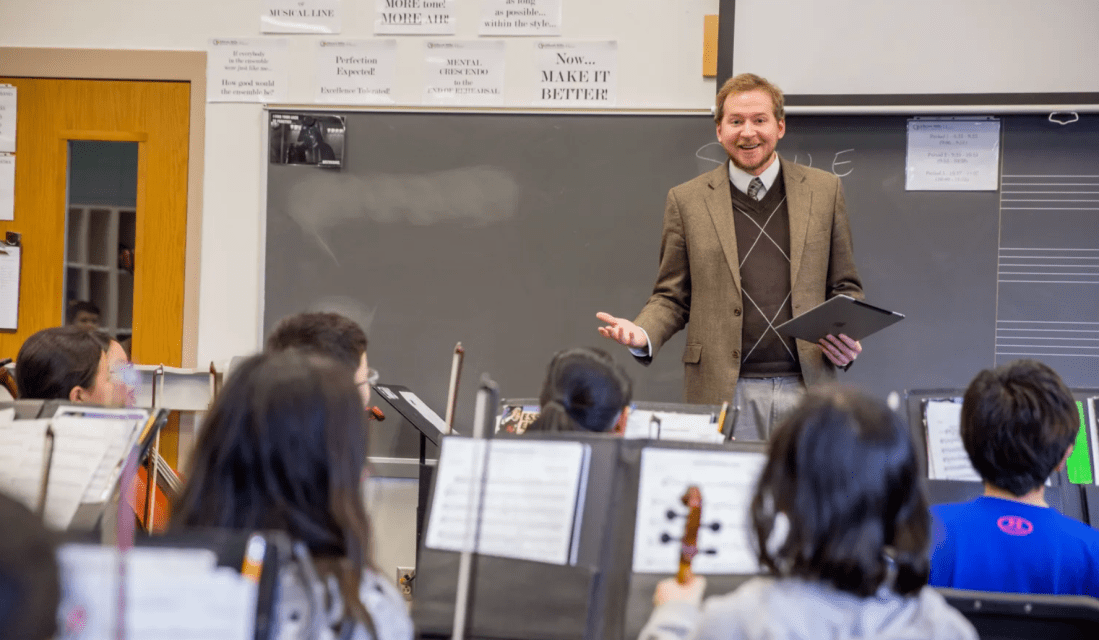
Robby Burns Transforms Band with Technology | TI-ME.org

The Technology Institute for Music Education (TI:ME) has a brand new website design. I am happy to be featured on their blog as a teacher using technology in the classroom. Click the link below for the entire feature.

Robby Burns Transforms Band with Technology:

What is a particular success story from using technology in your music classes?

A few years back, I transformed how I teach my beginning Concert Band class. When concert literature was giving us trouble, I wrote out everyone’s part for every instrument transposition and created play-along materials for all of it. The idea was to have fun in class while doing the necessary repetitions to perform successfully. My music team added a headset microphone to the front of the room, and I loaded all the play-along material into the Farrago soundboard app on the Mac. I became like a spin instructor: running tracks, encouraging repetitive effort, walking around the room, giving high-fives, correcting posture, and keeping kids engaged who might otherwise feel disconnected from the process. This approach changed how I do the job, and wouldn’t have been possible without the hardware and software I have come to depend on.

Guest Appearance: iPad Pros Podcast –

I’m glad to have joined the iPad Pros podcast again to talk about how I use the iPad in my gigging life, both as a performer and conductor.

Anyone looking to level up their iPad skill should listen to the episode below and subscribe to Tim Chaten’s show. He even has a new podcast all about the Apple Vision Pro.