Dorico 6 is now available

Dorico 6 is out today and it is full of really great stuff.

Dorico 6 is now available: Perfect scores, faster – Dorico:

We’re delighted to announce the immediate availability of Dorico 6, the brand new generation of our family of music notation and composition software for macOS, Windows, and iPadOS. This version is absolutely packed with new features, with a particular focus on engraving and workflow, though there are improvements throughout the application, and we hope that every Dorico user will find several things to be excited about.

If you’re an existing Dorico user, you can update or upgrade to Dorico 6 right now, or if you want to try before you buy, a completely free 60-day trial version is also available from today.

Before we begin, check out the introductory video beautifully produced by my colleague Anthony, with music of his own composition, performed by cellist Cristina Munoz Caamano, who also appears in the video and on our web site. We hope it’ll put you in the mood to find out more about what we’ve been working on, and why.
Keep reading here…

As usual, the Scoring Notes blog has a really detailed post reviewing all of the new features, which I encourage you to check out.

Dorico 6 review: Proof positive – Scoring Notes:

Every major Dorico update affects all areas of the application, but if the Dorico 5 cycle could be characterized as full of audio goodies, Dorico 6 is brimming with delights in the areas of engraving and workflow. Cutaway scores and proofreading are two of the headline features, but there are robust advancements in chord symbols, text, playing techniques, and more — they’re all either new or more robust than ever.
Keep reading here…

There’s never been a better time to try Dorico, especially if you’re still considering alternatives to Finale. With a bit of time spent learning the popovers and jump bar, Dorico can deliver better-looking scores with more power and ease than any alternative.

Seamlessly Sync Readwise and Craft

Seamlessly Sync Readwise and Craft:

Highlight text in articles or books and instantly sync it to Craft and across all your devices.
Keep reading here…

Craft is now integrated with the Readwise service, which I love for saving my highlights and notes from Kindle books and web articles.

If you ask me, Readwise integration is the essential component of a note-taking workflow built on PKM apps. Even though I am using Apple Notes for my general note-taking these days, and Craft more specifically for information I share on the web, it is really exciting to see them integrate this.

Linked in the article are instructions for a discount on Craft and a free trial of Reader.

Mastodon Exit Interview – Rob Shearer

I am still hopelessly in favor of a federated social internet, but Rob Shearer shares some very valid concerns about the state of Mastodon, in particular, in this blog post…

Mastodon Exit Interview:

I am currently winding down the Mastodon bots I used to post sunrise and sunset times. The precipitating event is that the admin of the instance hosting the associated accounts demanded they be made nigh-undiscoverable, but the underlying cause is that it’s become increasing clear that Mastodon isn’t, and won’t ever be, a good platform for “asynchronous ephemeral notifications of any kind”. I’d also argue (more controversially) that it’s simply not good infrastructure for social networking of any kind. There are lots of interesting people using Mastodon, and I’m sure it will live on as a good-enough space for certain niche groups. But there is no question that it will never offer the fun of early Twitter, let alone the vibrancy of Twitter during its growth phase. I’ve long since dropped Mastodon from my home screen, and have switched to Bluesky for text-centric social media.

Apple Updates iWork Apps With New iOS 18.4 and macOS 15.4 Features – MacRumors

These are solid updates. I am happy to see iWork apps continuing to get regular meaningful updates outside of the cycle of annual operating system updates.

Apple Updates iWork Apps With New iOS 18.4 and macOS 15.4 Features – MacRumors:

Each app also received a few other enhancements that are not tied to the latest software updates.
Keep reading here…

Exploring Tech in the Bandroom (Podcast appearance on Get Organized! by Dr. Frank Buck

I met Dr. Frank Buck at TMEA several years ago, and since then, I’ve had the pleasure of hosting him on Music Ed Tech Talk several times to discuss how technology can support productivity and organization.

This time, I had the chance to join him on his show! It was a real pleasure to share some of the core elements of my digital workflow, especially as they relate to teaching middle school band.

Watch below, or check out the complimentary blog post here.

Pixar Creative Chief Pete Docter Says AI Could Be A ‘Game Changer’

Yup.

Pixar Creative Chief Pete Docter Says AI Could Be A ‘Game Changer’:

My experience so far in a lot of different ways, AI takes something and sands the edges down, so it makes the blob average. And that could be very useful in a lot of ways. But if you really want to do something brand new and really insightful and speak from a personal angle, that’s not going to come from AI fully.
Keep reading here…

Raycast AI Extensions

This kind of feature is exactly why I’m so glad I started using Raycast a few years ago.

I do wish it supported natural language input without needing extra syntax, but even as it stands, it’s helped me cut down on the mental overhead of remembering the right keywords—something that’s often necessary with launcher apps, especially when you’ve integrated them with a lot of other tools.

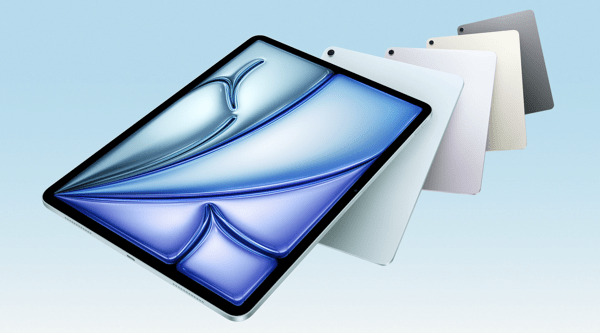
Apple introduces iPad Air with powerful M3 chip and new Magic Keyboard – Apple

CleanShot 2025-03-25 at 13.01.18@2x.

I’m a little late in blogging about this, but I wanted to share in case any musicians or educators are planning an iPad upgrade soon. If you use your iPad primarily for reading music with forScore, now is a fantastic time to consider the new, larger iPad Air.

I’m still using my 12.9-inch iPad Pro from 2018, and it’s definitely starting to show its age. I’ll probably wait for the next round of Pro updates—mainly because I’m curious to try the new Apple Pencil, and the updated screen I saw in the Apple Store looks fantastic.

That said, for most people—just like with the MacBook Air—the iPad Air is the right choice.

Apple introduces iPad Air with powerful M3 chip and new Magic Keyboard – Apple:

Apple today introduced the faster, more powerful iPad Air with the M3 chip and built for Apple Intelligence. iPad Air with M3 brings Apple’s advanced graphics architecture to iPad Air for the first time — taking its incredible combination of power-efficient performance and portability to a new level. iPad Air with M3 is nearly 2x faster compared to iPad Air with M1,1 and up to 3.5x faster than iPad Air with A14 Bionic.2
Keep reading here…

forScore 14.4

Check out the list of features in forScore 14.4. As usual, I am exited about the automation.

Automation is becoming increasingly popular, and forScore lets you do a lot using the Shortcuts app. With forScore 14.4, we’ve added dozens of new actions for working with metadata, setlist entries, duplicating items and setlists, cropping, and more.

Between this and family sharing, forScore 14.4 is looking to be a great update.