What We’re Fighting For – Edward Zitron

This is a long but worthwhile read that touches on many key points about the declining quality of technology everywhere–and, as a result, my diminishing joy in using it. It also speaks to my hope that I can continue finding computers both fun and useful in the future.

What We’re Fighting For:

We do not “use” the computer — we negotiate with it to try and make it do the things we want it to do, because the incentives behind modern software development no longer align with the user.
Keep reading here…

Will Kuhn and I talk changes to the podcast, automation, apps of the year, tech we’re thankful for, and some of our recent favorite music

Check out the latest episode of Music Ed Tech Talk!


Will is here! We discuss forthcoming changes to the show, automation, apps of the year, tech we’re thankful for, and some of our favorite media we’ve been engaging with.

This episode was recorded in late December 2024.


Subscribe to the Blog… RSS | Email Newsletter

Subscribe to the Podcast in… Apple Podcasts | Overcast | Castro | Spotify | RSS

Support Music Ed Tech Talk

Become a Patron!

Buy me a coffee

Chapters

00:00:00 Here he goes taking about Dark Souls again

00:08:15 MCU (Muppet Cinematic Universe)

00:15:14 Introducing…Will Kuhn, now a METT Regular! And Jaye, podcast editor!

00:20:23 2025 Mike Kovins TI:ME Teacher of the Year Robby Burns – acknowledgments and thank yous.

00:27:04 Thank you Patreon Supporter Susan!

00:27:46 MacStories’ App of the Year: Delta Emulator

00:40:31 Siri Shortcuts App

00:43:32 Current AI uses – productivity, creativity, philosophy

00:51:31 Robby’s National Board Certification Application and NotebookLM

00:57:51 What are we really trying to do [with AI and our students]?

01:02:58 Three Holiday Topic Blitz – Tech We’re Thankful For; Tech We’re Thankful For In the Workplace; Gifts and Gift Cards

01:16:54 How about music?!

Show Notes and Links

Where to Find Us

Please don’t forget to rate the show and share it with others!

  1. 79 – Teaching Music Tech, with Gillian Desmarais – Music Ed Tech Talk ↩︎
  2. 61 – Music Technology 101, with Heath Jones – Music Ed Tech Talk ↩︎
  3. 61 – Music Technology 101, with Heath Jones – Music Ed Tech Talk ↩︎
  4. 69 – I Don’t Want a Valuable Life Lesson, I Just Want An Ice Cream – Music Ed Tech Talk ↩︎
  5. 52 – Dorico Updates! with Daniel Spreadbury – Music Ed Tech Talk ↩︎

Netflix confirms it didn’t mean to support that Apple TV feature everyone has wanted for years – 9to5Mac

Nooooooooooooo!

Netflix confirms it didn’t mean to support that Apple TV feature everyone has wanted for years – 9to5Mac:

Within a few hours of popping up in the United States, however, the feature started to vanish. Mark Gurman at Bloomberg shared that he believed the integration was a bug, although actual support could come in the future. Meanwhile, The Verge reports that Netflix has confirmed that support for Apple’s TV app was a mistake and not intended to occur.
Netflix has notoriously not played nice with Apple’s TV app because it prefers to be the one-true-channel for streaming movies and TV shows.
Now back to your regularly scheduled Netflix price increases.
Keep reading here…

Amazon revamps Prime Video’s Apple TV app | The Verge

Wow, another finally for the Apple TV.

My son watches a lot of kids’ content on Amazon Prime and frequently asks to rewatch the same episode (or 10-second clip) over and over again.

The fact that Amazon has been using its own janky playback controls instead of Apple’s far superior ones has made me want to rip my hair out on occasion. This will be a welcome improvement.

Amazon revamps Prime Video’s Apple TV app | The Verge:

Amazon’s Prime Video app just got a big update on Apple TV. The app is now better optimized for tvOS, allowing you to swipe on the Siri Remote to scroll through Prime Video’s shows and movies as well as use touchpad gestures for fast-forwarding, rewinding, and scrubbing through content.
Keep reading here…

Netflix finally has integration with the Apple TV app – FlatpanelsHD

Wow, finally! I thought this would never happen. I use the Apple TV’s Up Next feature so often that I almost never see Netflix content. It was almost certainly a contributor to my decision to cancel Netflix a few years back.

This integration seems like it isn’t as complete as the integration of other apps like Amazon Prime and Disney+, but it’s a whole lot better than nothing.

Netflix finally has integration with the Apple TV app – FlatpanelsHD:

It seems that Apple has finally struck a deal to integrate Netflix into the Apple TV app, with Netflix content now appearing in Continue Watching, Search, and the Watchlist
Keep reading here…

Readwise Reader now syncs highlights to Apple Notes

I’ve been using Readwise Reader for the past few years as both an RSS client and a read-it-later service.

I subscribe to all my favorite blogs and news sources within the app. My workflow typically involves swiping through the day’s articles, saving some to my read-later list, and catching up on them when I have time.

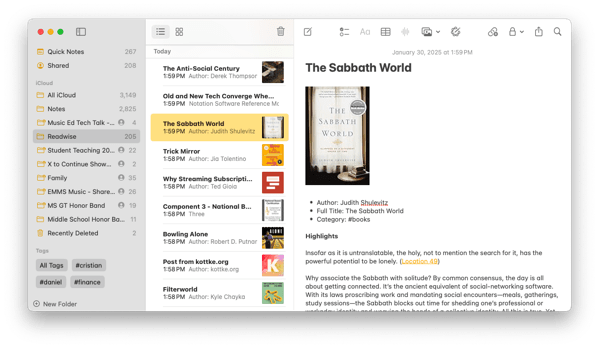
One of Readwise’s standout features is its ability to capture highlights from both web articles and Kindle books, automatically syncing them to your preferred notes app. It now integrates with Apple Notes!

Here’s what my Apple Notes app looks like after an export: The sync pulls in book cover art, metadata, and the full text of each quote, along with direct links to those highlights in Readwise Reader and the Kindle app. It’s an invaluable tool for research and deep thinking.

CleanShot 2025-01-30 at 16.51.47.

After a bruising year, Sonos readies its next big thing: a streaming box | The Verge

We have a lot of Sonos speakers in our house. $200-$400 dollars for a tv box seems crazy high in cost. Unless they really nail the interface for it and provide far more HDMI outputs than my TV, I don’t see how this competes with the abundance of affordable streaming devices on the market–let alone the premium (yet still less expensive) Apple TV.

After a bruising year, Sonos readies its next big thing: a streaming box | The Verge:

After the most tumultuous nine months in Sonos’ history, the brand is trying to find its footing again. Even as work continues to rehabilitate the company’s beleaguered mobile app, Sonos is planning to take a big swing in a new product category: it’s getting into video for the first time. In the coming months, Sonos will release a streaming player that sources tell me could cost between $200 and $400 — a truly staggering price for its category.
Keep reading here…

Teaching Intonation with Tonal Energy – OMEA 2025

CleanShot 2025-02-06 at 10.43.27@2x.

I am thrilled to be presenting four sessions at the Ohio Music Educators Association Professional Development Conference this weekend! My fourth session focuses on teaching intonation in the music classroom with support of technology.

If you’d like to attend, the session is on February 8 at 11 AM. If you’re already here or have attended, thank you for coming!

This post serves as a resource for session notes, including links to the primary tools I mention, and a complimentary podcast episode.

Complimentary Podcast Episode:

Where to Find Me

Subscribe to the Blog…RSS**** | Email Newsletter

Subscribe to the Podcast in…Apple Podcasts**** | Overcast | Castro | Spotify | RSS

Support My Work

Become a Patron!

Session Outline and Links to Resources Mentioned in the Session

Teaching Intonation

Philosophy

  • Prioritize these…
    • Tone
    • Intonation
    • Balance/Blend
    • Melodic Accuracy
    • Rhythmic Accuracy
    • Expression/Phrasing
    • Technique/Articulation
  • Sound Over Sight
    • If we are asking students to use their ears, then why are we having them use their eyes?
    • Natural Learning – think about how children learn to speak. Through modeling from parental figures, constant repetition, and encountering these repetitions in various contexts.
    • Electronic tuners can only tune intervals of unisons and octaves accurately.
    • We are used to hearing the piano in its slightly “out-of-tune” tempered state.
  • Interval Adjustment
    • Pure intervals have varying degrees of adjustment from tempered intonation to make them in tune.
    • Scale Degree | Adjustment
      • 1 | 0
      • 2 | +3.9
      • 3 | -13.7
      • 4 | -2.0
      • 5 | +2.0
      • 6 | -15.6
      • 7 | -11.7
      • 8 | 0
  • We must teach our students to HEAR when something is out of tune by listening for beats. But how?
    • Resonant intonation is the result of two other important features: superior tone and balance.
    • Good tone comes first.
    • Learning balance is difficult in a room by yourself.
    • Use of an electric drone helps.
    • Turn the drone up to a level that equals the student.
    • Song based learning that utilizes lots of simple melodies in standard keys teaches students to understand basic consonance and dissonance.
    • Lots of repetition!!!
    • Patients!
    • Reinforce that one success does not mean that everything will be in tune from here on out.
    • Don’t strive for a perfect intonation system. Resist teaching students the theory of intervals and focus on them hearing consonance and dissonance through listening to the relationships of intervals.
    • Once you know what a 5th sounds like, you can tune it anywhere.
    • Avoid technical talk unless something is absolutely in a students way.
  • Daniel Kohut – Musical Performance: Learning Theory and Pedagogy
    • Superior Concept
    • Relaxed Concentration
    • Focused Awareness
  • Reasons teachers give up on teaching intonation this way…
    • Fear of other areas of musical performance failing – wrong notes, rhythm, poor technique, inability to execute musically. The solution to this – pick easier music!!!
    • Abstract nature of these skills make them less concrete to student minds and harder to teach.
    • This is a long road. It takes time. But! – the end reward is ultimately better because students own their critical listening skills and now make musical adjustments themselves, even to features in the music that are not tone and intonation related. Each year will have an upswing towards the end. Independent musicianship is the result.

Features of Tonal Energy

  • Overview of each feature and setting – Live Demo
    • Strategies
  • Everything with drone
    • All music taught around tonal centers
    • Students tune down to the tonic most immediately beneath where the majority of their part sits
    • Students write tonal centers in their method books and concert music
  • Analyze mode – Students practice scale patterns and songs in this sequence…
    1. Visual and aural feedback
    2. Aural feedback only
    3. No drone at all
  • Practice Guide

CleanShot 2022-01-09 at 12.45.41.png

  • You can balance to the drone

    Tell students to match the volume of the drone at various levels.

  • Play along melodies with students on a keyboard or on the display

CleanShot 2022-02-03 at 18.21.25@2x.png

A midi keyboard like the Xkey can play certain key areas in tune perfectly and can automatically tune chords to just intonation. Combined with an iPad, this is like owning a Yamaha Harmony Director.

CleanShot 2022-02-03 at 18.21.47@2x.png

Lightly Row with Tuning Drones

Recording Tonal Energy into GarageBand with Inter-App Audio

Embellishing the Drone Track with Drums

Embellishing Lightly Row

Scale Exercise Play-Along Tracks with Trap Beats – Promotional Video

Image.png

Image.png

CleanShot 2022-02-03 at 18.23.30@2x.png

  • More Resources

Extra Show Notes from the Podcast Episode:

App of the Week

Album of the Week

Tech Tip of the Week

Communication and Collaboration Apps For Music Teams – OMEA 2025

CleanShot 2025-02-07 at 11.52.20@2x.

I am thrilled to be presenting four sessions at the Ohio Music Educators Association Professional Development Conference this weekend! My third session focuses on communication and collaboration apps for music teams.

If you’d like to attend, the session is on February 8 at 9:30 AM. If you’re already here or have attended, thank you for coming!

This post serves as a resource for session notes, including links to the primary tools I mention, and a complimentary podcast episode.

Complimentary Podcast Episode:

Where to Find Me

Subscribe to the Blog…RSS**** | Email Newsletter

Subscribe to the Podcast in…Apple Podcasts**** | Overcast | Castro | Spotify | RSS

Support My Work

Become a Patron!

Buy me a coffee

Links to Things Mentioned in the Session

Image.png

Image.png

Image.png

Image.png

Image.png

Image.png

Image.png

Image.png

Image.png

Image.png

Working with Digital Scores – OMEA 2025

CleanShot 2025-02-06 at 10.33.12@2x.

I am thrilled to be presenting four sessions at the Ohio Music Educators Association Professional Development Conference this weekend! My second session focuses on working with digital scores.

If you’d like to attend, the session is on February 7 at 5 PM. If you’re already here or have attended, thank you for coming!

This post serves as a resource for session notes, including links to the primary tools I mention in the session.

Apps for Scanning:
Simple Scan
Scanner Pro
– Apple Notes/Files

Apps for Scanning Notation
– Scoring Notes Article: Scanning the Current OMR Landscape
Sheet Music Scanner
Newzik
Soundslice
PlayScore 2
SmartScore 64
ScanScore 3

Apps for Managing Files
– Files App
Dropbox
Google Drive
Documents
Evernote

Apps for Working with Scores:
forScore
unReal Book
Newzik

Notes on forScore:
forScore Mac App Review
Creating indexes with forScore
The fastest way to get music into forScore
forScore Automation Links

My Book:

Digital Organization Tips for Music Teachers

Buy on Amazon | Buy on Oxford University Press

View the video trailer