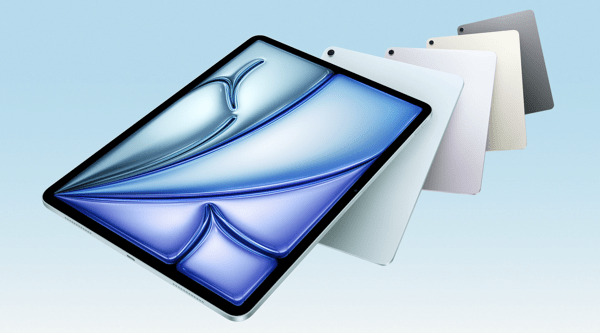
Apple introduces iPad Air with powerful M3 chip and new Magic Keyboard – Apple

CleanShot 2025-03-25 at 13.01.18@2x.

I’m a little late in blogging about this, but I wanted to share in case any musicians or educators are planning an iPad upgrade soon. If you use your iPad primarily for reading music with forScore, now is a fantastic time to consider the new, larger iPad Air.

I’m still using my 12.9-inch iPad Pro from 2018, and it’s definitely starting to show its age. I’ll probably wait for the next round of Pro updates—mainly because I’m curious to try the new Apple Pencil, and the updated screen I saw in the Apple Store looks fantastic.

That said, for most people—just like with the MacBook Air—the iPad Air is the right choice.

Apple introduces iPad Air with powerful M3 chip and new Magic Keyboard – Apple:

Apple today introduced the faster, more powerful iPad Air with the M3 chip and built for Apple Intelligence. iPad Air with M3 brings Apple’s advanced graphics architecture to iPad Air for the first time — taking its incredible combination of power-efficient performance and portability to a new level. iPad Air with M3 is nearly 2x faster compared to iPad Air with M1,1 and up to 3.5x faster than iPad Air with A14 Bionic.2
Keep reading here…

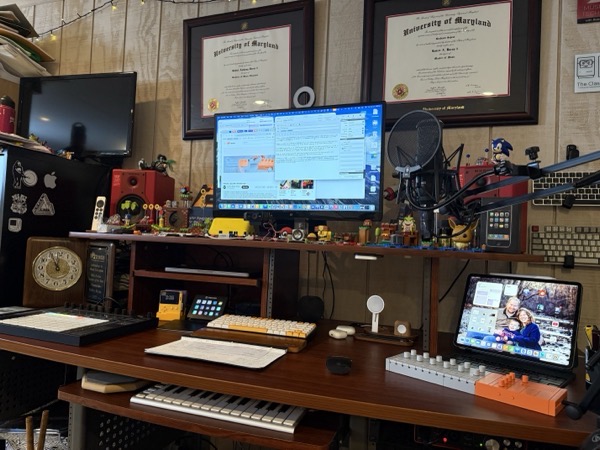
Music Ed Tech Talk Episode 85 – Roast My Homescreen, with Jaye Mateyko

https://play.libsyn.com/embed/episode/id/35828740/height/192/theme/modern/size/large/thumbnail/yes/custom-color/bc5454/time-start/00:00:00/playlist-height/200/direction/backward/download/yes/font-color/FFFFFF

Jaye joins the show to discuss how our homescreens reflect our tech setups and most-used apps.

Subscribe to the Blog…

RSS | Email Newsletter

Subscribe to the Podcast in…

Apple Podcasts | Overcast | Castro | Spotify | RSS

Support Music Ed Tech Talk

👉 Become a Patron!

Buy me a coffee

Chapters

  • 00:00:00 – Welcome to the show, Jaye, and the new Music Ed Tech Team
  • 00:02:25 – Thank you, Molly!
  • 00:03:41 – I…moved…my blog…to WordPress
  • 00:07:11 – Tradeshow Talk
  • 00:12:50 – What a shock, we’re back on stationary
  • 00:20:00 – Desks, The Series
  • 00:22:50 – The Very First “Roast My Home Screen”
  • 00:28:25 – Quick Pivot back to Tradeshows, but really it’s a rant about Contacts
  • 00:37:07 – Focus Settings and “Roast My Home Screen”
  • 01:06:16 – Health Apps
  • 01:17:30 – The Pump, by Arnold
  • 01:23:30 – Music and Media Recommendations

Show Notes


Please don’t forget to rate the show and share it with others!

forScore 14.4

Check out the list of features in forScore 14.4. As usual, I am exited about the automation.

Automation is becoming increasingly popular, and forScore lets you do a lot using the Shortcuts app. With forScore 14.4, we’ve added dozens of new actions for working with metadata, setlist entries, duplicating items and setlists, cropping, and more.

Between this and family sharing, forScore 14.4 is looking to be a great update.

Practice Pro: An Elegant, All-in-One Practice Tool with a Custom Widget Interface

Practice Pro is a new practice tool from Modular Tools for Musicians.

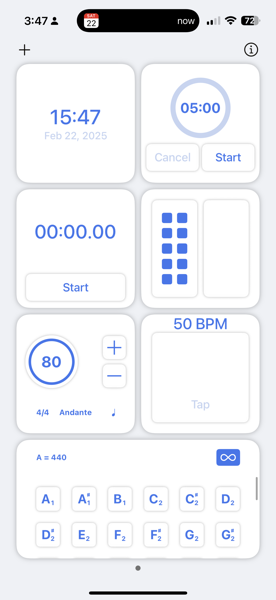
The app’s design takes inspiration from iOS’s home screen widget system, making it feel instantly familiar and intuitive. Each widget serves a specific function, and while they are simple in design, they provide just enough features for most musicians.

In my setup (as shown in the screenshot below), I use the small metronome widget, tap tempo widget, timer, stopwatch, clock, and tuning drones. I also make use of a tally widget, which helps my students track repetitions—an essential tool for reinforcing consistent practice. Typically, I’d have to jump between four or more apps to access all these features, but with Practice Pro, everything is in one place.

Here’s how I might use this in a lesson. I might start the stopwatch and timer widgets, then tell a student:
“Practice measures 1-2 until you’ve played them successfully 10 times in a row or for two minutes straight—whichever comes last.”
Next, I tap in the desired tempo, activate the metronome, and they’re off. Having everything within one interface makes the process seamless. Plus, the widgets are fully customizable, with more options available than what I just described.

My students have responded enthusiastically to Practice Pro’s design, often asking how to install it themselves when they see it in action.

Right now, it’s available at a launch sale price of just $5—a great deal for such a useful and well designed tool. I highly recommend checking it out!
60 Minutes – U.S. Marine Band forced to cancel concert with students of color after Trump DEI order

I am incredibly proud of my former student, Rishab Jain, for his outstanding accomplishments in music. I’m especially proud of his involvement in this recent 60 Minutes story.

I highly encourage you to watch the full video—his remarks at the 2:30 mark particularly stood out to me.

If we’re a society that’s surpassing art, we’re a society that is afraid of what it might reveal about itself. If we’re suppressing music, we’re suppressing emotions, we’re suppressing expression, we’re suppressing vulnerability, we’re suppressing the very essence of what makes us human. We are devaluing our own humanity; we are degrading our own humanity.

You can watch the entire concert here.

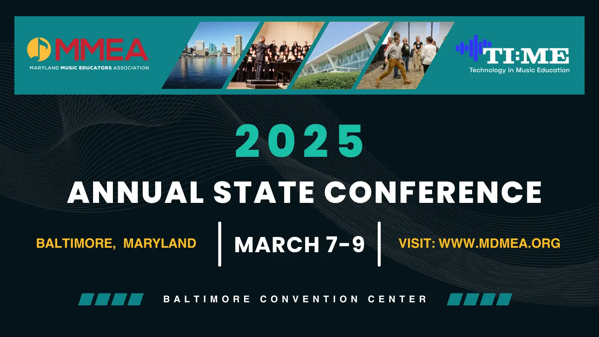
I am presenting at the Maryland Music Educators Association Conference this weekend!

2025 Annual State Conference Graphic (1).

I am thrilled to be presenting at the Maryland Music Educators Association Conference this weekend! My session focuses on teaching intonation in the music classroom with support of technology.

If you’d like to attend, the session is on Saturday, March 8 at 10:45 AM. If you’re already here or have attended, thank you for coming!

This post serves as a resource for session notes, including links to the primary tools I mention, and a complimentary podcast episode.

Complimentary Podcast Episode: https://www.youtube.com/watch?v=nEKe44aNCuE

Where to Find Me

Subscribe to the Blog…RSS**** | Email Newsletter

Subscribe to the Podcast in…Apple Podcasts**** | Overcast | Castro | Spotify | RSS

Support My Work

Become a Patron!

Session Outline and Links to Resources Mentioned in the Session

Teaching Intonation

Philosophy

  • Prioritize these…
  • Tone
  • Intonation
  • Balance/Blend
  • Melodic Accuracy
  • Rhythmic Accuracy
  • Expression/Phrasing
  • Technique/Articulation
  • Sound Over Sight
  • If we are asking students to use their ears, then why are we having them use their eyes?
  • Natural Learning – think about how children learn to speak. Through modeling from parental figures, constant repetition, and encountering these repetitions in various contexts.
  • Electronic tuners can only tune intervals of unisons and octaves accurately.
  • We are used to hearing the piano in its slightly “out-of-tune” tempered state.
  • Interval Adjustment
  • Pure intervals have varying degrees of adjustment from tempered intonation to make them in tune.
  • Scale Degree | Adjustment
  • 1 | 0
  • 2 | +3.9
  • 3 | -13.7
  • 4 | -2.0
  • 5 | +2.0
  • 6 | -15.6
  • 7 | -11.7
  • 8 | 0
  • We must teach our students to HEAR when something is out of tune by listening for beats. But how?
  • Resonant intonation is the result of two other important features: superior tone and balance.
  • Good tone comes first.
  • Learning balance is difficult in a room by yourself.
  • Use of an electric drone helps.
  • Turn the drone up to a level that equals the student.
  • Song based learning that utilizes lots of simple melodies in standard keys teaches students to understand basic consonance and dissonance.
  • Lots of repetition!!!
  • Patients!
  • Reinforce that one success does not mean that everything will be in tune from here on out.
  • Don’t strive for a perfect intonation system. Resist teaching students the theory of intervals and focus on them hearing consonance and dissonance through listening to the relationships of intervals.
  • Once you know what a 5th sounds like, you can tune it anywhere.
  • Avoid technical talk unless something is absolutely in a students way.
  • Daniel Kohut – Musical Performance: Learning Theory and Pedagogy
  • Superior Concept
  • Relaxed Concentration
  • Focused Awareness
  • Reasons teachers give up on teaching intonation this way…
  • Fear of other areas of musical performance failing – wrong notes, rhythm, poor technique, inability to execute musically. The solution to this – pick easier music!!!
  • Abstract nature of these skills make them less concrete to student minds and harder to teach.
  • This is a long road. It takes time. But! – the end reward is ultimately better because students own their critical listening skills and now make musical adjustments themselves, even to features in the music that are not tone and intonation related. Each year will have an upswing towards the end. Independent musicianship is the result.

Features of Tonal Energy

  • Overview of each feature and setting – Live Demo
  • Strategies
  • Everything with drone
  • All music taught around tonal centers
  • Students tune down to the tonic most immediately beneath where the majority of their part sits
  • Students write tonal centers in their method books and concert music
  • Analyze mode – Students practice scale patterns and songs in this sequence…
  1. Visual and aural feedback
  2. Aural feedback only
  3. No drone at all

– Practice Guide

CleanShot 2022-01-09 at 12.45.41.png

  • You can balance to the drone

Tell students to match the volume of the drone at various levels.

  • Play along melodies with students on a keyboard or on the display

CleanShot 2022-02-03 at 18.21.25@2x.png

A midi keyboard like the Xkey can play certain key areas in tune perfectly and can automatically tune chords to just intonation. Combined with an iPad, this is like owning a Yamaha Harmony Director.

CleanShot 2022-02-03 at 18.21.47@2x.png

GarageBand for iOS allows easy creation of engaging play along tracks by using TE Tuner as a plugin and combining its sounds with other instruments.

Lightly Row with Tuning Drones

Recording Tonal Energy into GarageBand with Inter-App Audio

Embellishing the Drone Track with Drums

Embellishing Lightly Row

Scale Exercise Play-Along Tracks with Trap Beats – Promotional Video

Image.png

Image.png

CleanShot 2022-02-03 at 18.23.30@2x.png

  • More Resources
  • Hal Leonard Intermediate Band Method
  • Beat Elimination as a Means of Teaching Intonation to Beginning Wind Instrumentalists, The Journal of Research in Music Education, Winer 1972
  • The Problem of Tonality in Seventheenth Century Music, Delbert M. Beswick, Music, Ph.D. Dissertation, University of North Carolina, 1950
  • Musical Performance: Learning Theory and Pedagogy – Daniel Kohut
  • Automating Band Warmups, Teaching Auditory Skill, and Managing My Classroom… With Solfege Bingo

Extra Show Notes from the Podcast Episode:

App of the Week

Album of the Week

Tech Tip of the Week

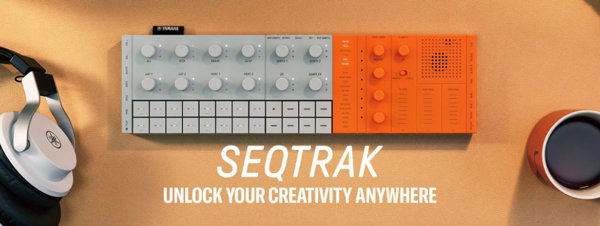
Yamaha SEQTRAK

CleanShot 2025-02-22 at 15.26.30.

I’ve been playing with a Yamaha SEQTRAK a bit for the past week.

This device is incredibly cool. It’s a mobile idea station designed for both power and portability. It features a multitrack sequencer, a wide variety of synths, effects, and a sampler. With about four hours of battery life, it’s fun to carry around the house or on the go. The build quality is solid, and its design is stylish. The touch strips are highly responsive.

A complimentary app lets you control the entire device through a graphic user interface. The app also includes eye-catching visualizers that sync with your music. I have a feeling some of my general music students will enjoy it—the focused form factor could serve as a great introduction to sequencing.

If this sounds interesting, there are plenty of demos and tutorials available online, one of which I embedded below. I just wanted to share that I think this wave of portable beat machines is a great trend—and the SEQTRAK gets my thumbs-up!

About migrating Apple Account purchases between accounts – Apple Support

Now THIS is a true “finally.”

For years, I’ve thought that if Apple were ever going to allow the merging of a media-only Apple ID with a primary one, it would have happened a decade ago. I had long since given up hope that they would ever dedicate resources to this.

Recently, I’ve been dealing with an awful macOS bug where the App Store won’t stay logged into my secondary “media” Apple ID. When I called Apple Support, several specialists were surprised that it’s even possible to use two different Apple IDs. That’s how far back this issue dates. The last time Apple even allowed the creation of an Apple ID dissociated from an @mac, @me, or @iCloud address was so long ago that most of their support team is too young to know it was ever possible. Wild.

I’m overjoyed that I can finally end my 15+ year nightmare of managing media purchases under a separate account. Maybe you’re in the same boat.

If so, be sure to read all of the fine print. There are several conditions, and I’ve seen multiple reports on Reddit about common bugs. I haven’t done the migration yet because you can’t if you’ve purchased anything with one of the IDs in the past 15 days, and I just bought an app a few days ago.

I’ll report back once I go through with it. This might be one of those things where it’s worth waiting a month or so to let the rest of the internet (and Apple) work out the bugs.

About migrating Apple Account purchases between accounts – Apple Support:

You can choose to migrate apps, music, and other content you’ve purchased from Apple on a secondary Apple Account to a primary Apple Account. The secondary Apple Account might be an account that’s used only for purchases. You’ll need access to the primary email address or phone number and password for both accounts, and neither account should be shared with anyone else. Learn more about how to migrate purchases.
Keep reading here…

Twenty Years on this Journey – Technology in Music Education

Chris Russel wrote some reflections on blogging for 20 years about music, education, and technology.

This part caught my attention…

Twenty Years on this Journey – Technology in Music Education:

What has also surprised me is how technology in our field, music education, has been in a holding pattern, even before COVID. The deep dive into the use of devices during COVID has resulted in a push against the use of technology by parents and teachers alike, but the technological slowdown started before that.
Keep reading here…

My gut reaction to reading this was to remember my own excitement for tech in 2005. So much hardware and software was on the verge of a breakthrough in democratizing the creative process–making things that used to be expensive, difficult, and professional more affordable, consumer-friendly, and personal. I was primarily excited by how easily I could make and share music.

When I think about what we’re being told are the breakthroughs of 2025, it’s all AI. The positioning of AI as some sort of “next big thing” still feels like an answer in search of a question. AI, and the developments of the early 2000’s, can both make things easier, but so much of what’s emerging today feels pro-capital and anti-curious.

Definitely follow Chris Russel’s awesome work. He has helped me level up my ukulele teaching chops in recent years, and this conversation might be a good starting point for some of that if you are interested.