Apple Updates iWork Apps With New iOS 18.4 and macOS 15.4 Features – MacRumors

These are solid updates. I am happy to see iWork apps continuing to get regular meaningful updates outside of the cycle of annual operating system updates.

Apple Updates iWork Apps With New iOS 18.4 and macOS 15.4 Features – MacRumors:

Each app also received a few other enhancements that are not tied to the latest software updates.
Keep reading here…

Exploring Tech in the Bandroom (Podcast appearance on Get Organized! by Dr. Frank Buck

I met Dr. Frank Buck at TMEA several years ago, and since then, I’ve had the pleasure of hosting him on Music Ed Tech Talk several times to discuss how technology can support productivity and organization.

This time, I had the chance to join him on his show! It was a real pleasure to share some of the core elements of my digital workflow, especially as they relate to teaching middle school band.

Watch below, or check out the complimentary blog post here.

Pixar Creative Chief Pete Docter Says AI Could Be A ‘Game Changer’

Yup.

Pixar Creative Chief Pete Docter Says AI Could Be A ‘Game Changer’:

My experience so far in a lot of different ways, AI takes something and sands the edges down, so it makes the blob average. And that could be very useful in a lot of ways. But if you really want to do something brand new and really insightful and speak from a personal angle, that’s not going to come from AI fully.
Keep reading here…

What’s on Kate’s Desk?

Kate Bateman is one of my colleagues in the Howard County Public School System. We recently did one of my favorite things, which is to eat hot pot and geek out over stationary. Afterwards, Kate showed me an image of her amazing desk setup. I was inspired. I thought, wouldn’t it be cool to share more of people’s workflows and setups on this blog?

Kate agreed to be a part of my experiment in a new series on here, “What’s On Your Desk?”

I prepped some questions for Kate, she answered and provided pictures.

Kate, take it away. What’s on your desk?


My name is Kate Bateman. I am a former professional orchestral flutist, but gave that up to spend time with The Youths at Mount View Middle School, where I teach band and general music. This is my 8th year as a teacher.

I also have a stupid amount of hobbies- I speak Korean conversationally, I love painting, I dabble in photography, I read a lot, I love cooking (when I have the time to enjoy the process of it), and if I have the money, I will travel any chance I get.

What are a few of the things on your desk that make you the most productive?

One is my planner (a Hobonichi weeks), which keeps me organized when I have a million things going on. I got the version with extra blank pages in the back, so I also use it to keep track of to-dos both in and out of work. It’s old school, but it works for me.

The other is a simple analog timer. Whenever I need to sit down and get something done but am feeling particularly unmotivated, I stick the timer on for 15 minutes at a time, take a break for 5 minutes, then rinse and repeat until I can’t concentrate anymore.

What computing devices do you always have on your desk? How do they fit into your workflow?

Just my old iMac and my iPad. I use Google for most of my work, along with a few other apps to help with organization (Craft and Goodnotes being the main two). These can all be accessed easily from any desktop or my iPad, so I leave my school-provided chromebook at work. It’s clunky anyway.

What other tools do you keep close by?

Everything else is SUPER low tech! I almost feel like I’m betraying you, Robby.

I have all five of my fountain pens close by. My favorite, and most beloved, is my Pilot Vanishing Point, which was worth every (exhorbitant) penny because I use it all day, every day. All my pens feel different to use and they all have different color Pilot Iroshizuku inks in them. I use my Vanishing Point the most, but I also reach for others depending on my mood.

I also have all of my journals within easy reach to the side on this Ikea cutting-board-turned-bookshelf. I have my daily 5-year journal, my Commonplace journal (where I write down things I’ve read, quotes, lyrics, notes from therapy, anything thought-provoking that I want to come back to later), my sketchbook, my journal for my National Board Certification classes, and my notebook where I take all of my notes in my Korean lessons.

I “built” this desk specifically out of an Ikea butcher block countertop, a set of Ikea Alex drawers, and a little cube with shelves specifically to store my art supplies and stationery, while still giving me a lot of room to spread out. All of my stationery and art supplies are within easy reach, they’re just hidden in the drawers (except for my oil and gouache paintbrushes).

Are there any workflows that are effective for your productivity these days?

Specifically here, at this desk? Nah.

At school though, I start every morning by writing down what we actually got done the day before in each class, and then quickly making a new plan for each class for that day. It gives me a chance to see how much I still have to plan, if I need to make copies of materials, or prepare the classroom in any way, etc.

Usually once I get through period 1, I start my to-do list. It’s mostly a brain dump- what do I still need to get through the day? What do I need to get through the rest of the week? Who do I need to contact about which concerns or questions?

I teach five completely different classes every day, and each day I see around 150 students, so having the brain dump time lets me see everything all at once, and enables me to prioritize. As someone wise (Ben Denne, a wonderful HCPSS colleague) once said, working quickly isn’t really working quickly, it’s just about putting out the biggest fire first.
How does your work change when you are mobile, or away from this setup?

The type of work I do is definitely different. When I am at my desk at school, I often am shuffling a lot of papers, and several binders with my band, sectional and general music lesson plans, attendance sheets, and resources. Work at school is a lot of admin- putting grades in, emails, grading, updating Canvas etc. This is also the work that is a lot easier to do when I’ve been in front of kids for several hours straight and don’t necessarily have a lot of gas left in the tank, mentally.

I feel like I do a lot more of my “big picture” planning when I’m at my home desk. If I need to sit down and plan an entire unit, rethink part of a unit, write playing exercises, or re-write a part, it’s much easier to do it here, farther removed from the day-to-day chaos of school.

What’s something on your desk that is unique to you? Why do you have it?

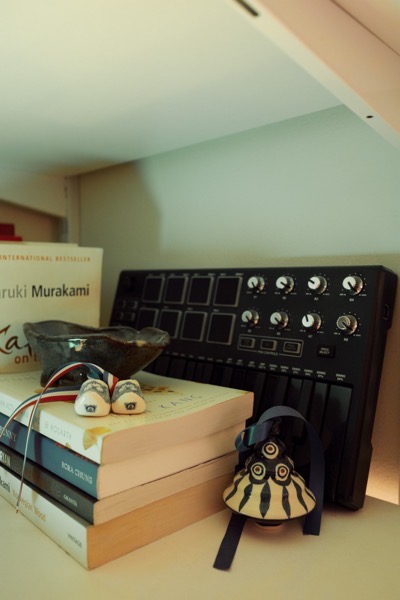
I love my Ikea pegboard behind my computer. It has a bunch of little trinkets and things I’ve picked up from various travels. The majority are from Korea- a photobooth strip from Seoul with my friends Seungwon and Seungmin; a cloth from one of the lovely host I stayed with in Itaewon; a bookmark from the Dae-O bookstore in Seoul (a pilgrimage for fans of BTS’s leader RM); several keychains and postcards. I also have a postcard from Bangkok, where I went with my coworkers/family members Matt and Jon and Randy and a tile from the Palais des Papes in Avignon, France, where I went this summer with my wonderful friends Justine and Lewis.

The little jar which holds my gel and ball point pens is also special; it’s the jar from the dip that my friends Caitlin and Danny brought to a New Year’s party we hosted a couple years ago. I have a figurine from a different trip to Korea that brings back memories of Seoul and Busan with my friends Nick and Nicole. I also love my three-legged pig (which symbolizes goodwill and luck) from my friends Charlie and Carey, who I met through DnD.

I have a lot more trinkets from different trips and times of my life everywhere in my home. Every time I see these things, I’m reminded of how lucky I am to have had made such fantastic memories, and to have made them with wonderful people.

Raycast AI Extensions

This kind of feature is exactly why I’m so glad I started using Raycast a few years ago.

I do wish it supported natural language input without needing extra syntax, but even as it stands, it’s helped me cut down on the mental overhead of remembering the right keywords—something that’s often necessary with launcher apps, especially when you’ve integrated them with a lot of other tools.

Apple introduces iPad Air with powerful M3 chip and new Magic Keyboard – Apple

CleanShot 2025-03-25 at 13.01.18@2x.

I’m a little late in blogging about this, but I wanted to share in case any musicians or educators are planning an iPad upgrade soon. If you use your iPad primarily for reading music with forScore, now is a fantastic time to consider the new, larger iPad Air.

I’m still using my 12.9-inch iPad Pro from 2018, and it’s definitely starting to show its age. I’ll probably wait for the next round of Pro updates—mainly because I’m curious to try the new Apple Pencil, and the updated screen I saw in the Apple Store looks fantastic.

That said, for most people—just like with the MacBook Air—the iPad Air is the right choice.

Apple introduces iPad Air with powerful M3 chip and new Magic Keyboard – Apple:

Apple today introduced the faster, more powerful iPad Air with the M3 chip and built for Apple Intelligence. iPad Air with M3 brings Apple’s advanced graphics architecture to iPad Air for the first time — taking its incredible combination of power-efficient performance and portability to a new level. iPad Air with M3 is nearly 2x faster compared to iPad Air with M1,1 and up to 3.5x faster than iPad Air with A14 Bionic.2
Keep reading here…

Music Ed Tech Talk Episode 85 – Roast My Homescreen, with Jaye Mateyko

https://play.libsyn.com/embed/episode/id/35828740/height/192/theme/modern/size/large/thumbnail/yes/custom-color/bc5454/time-start/00:00:00/playlist-height/200/direction/backward/download/yes/font-color/FFFFFF

Jaye joins the show to discuss how our homescreens reflect our tech setups and most-used apps.

Subscribe to the Blog…

RSS | Email Newsletter

Subscribe to the Podcast in…

Apple Podcasts | Overcast | Castro | Spotify | RSS

Support Music Ed Tech Talk

👉 Become a Patron!

Buy me a coffee

Chapters

  • 00:00:00 – Welcome to the show, Jaye, and the new Music Ed Tech Team
  • 00:02:25 – Thank you, Molly!
  • 00:03:41 – I…moved…my blog…to WordPress
  • 00:07:11 – Tradeshow Talk
  • 00:12:50 – What a shock, we’re back on stationary
  • 00:20:00 – Desks, The Series
  • 00:22:50 – The Very First “Roast My Home Screen”
  • 00:28:25 – Quick Pivot back to Tradeshows, but really it’s a rant about Contacts
  • 00:37:07 – Focus Settings and “Roast My Home Screen”
  • 01:06:16 – Health Apps
  • 01:17:30 – The Pump, by Arnold
  • 01:23:30 – Music and Media Recommendations

Show Notes


Please don’t forget to rate the show and share it with others!

forScore 14.4

Check out the list of features in forScore 14.4. As usual, I am exited about the automation.

Automation is becoming increasingly popular, and forScore lets you do a lot using the Shortcuts app. With forScore 14.4, we’ve added dozens of new actions for working with metadata, setlist entries, duplicating items and setlists, cropping, and more.

Between this and family sharing, forScore 14.4 is looking to be a great update.

Practice Pro: An Elegant, All-in-One Practice Tool with a Custom Widget Interface

Practice Pro is a new practice tool from Modular Tools for Musicians.

The app’s design takes inspiration from iOS’s home screen widget system, making it feel instantly familiar and intuitive. Each widget serves a specific function, and while they are simple in design, they provide just enough features for most musicians.

In my setup (as shown in the screenshot below), I use the small metronome widget, tap tempo widget, timer, stopwatch, clock, and tuning drones. I also make use of a tally widget, which helps my students track repetitions—an essential tool for reinforcing consistent practice. Typically, I’d have to jump between four or more apps to access all these features, but with Practice Pro, everything is in one place.

Here’s how I might use this in a lesson. I might start the stopwatch and timer widgets, then tell a student:
“Practice measures 1-2 until you’ve played them successfully 10 times in a row or for two minutes straight—whichever comes last.”
Next, I tap in the desired tempo, activate the metronome, and they’re off. Having everything within one interface makes the process seamless. Plus, the widgets are fully customizable, with more options available than what I just described.

My students have responded enthusiastically to Practice Pro’s design, often asking how to install it themselves when they see it in action.

Right now, it’s available at a launch sale price of just $5—a great deal for such a useful and well designed tool. I highly recommend checking it out!

60 Minutes – U.S. Marine Band forced to cancel concert with students of color after Trump DEI order

I am incredibly proud of my former student, Rishab Jain, for his outstanding accomplishments in music. I’m especially proud of his involvement in this recent 60 Minutes story.

I highly encourage you to watch the full video—his remarks at the 2:30 mark particularly stood out to me.

If we’re a society that’s surpassing art, we’re a society that is afraid of what it might reveal about itself. If we’re suppressing music, we’re suppressing emotions, we’re suppressing expression, we’re suppressing vulnerability, we’re suppressing the very essence of what makes us human. We are devaluing our own humanity; we are degrading our own humanity.

You can watch the entire concert here.